
1. Giriş
Thank you for choosing the BOTHSTAR Keypad Door Knob. This electronic door knob provides a secure and convenient keyless entry solution for your home, office, hotel, bedroom, garage, or apartment. It features multiple access methods, including user codes and traditional keys, along with smart functionalities designed for enhanced security and ease of use. Please read this manual carefully before installation and operation to ensure proper function and longevity of your product.

Image 1.1: The BOTHSTAR Keypad Door Knob in Satin Nickel with included keys.
2. Güvenlik Bilgileri
- Kilidi kendiniz sökmeye veya tamir etmeye çalışmayın. Servis için yetkili personele başvurun.
- Use only the specified battery type (4 AA batteries, not included). Do not mix old and new batteries or different types of batteries.
- Keep keys in a safe place, separate from the lock, and ensure they are not accessible to unauthorized individuals.
- Avoid exposing the lock to extreme temperatures or direct sunlight for prolonged periods, although it is designed for IP65 weather resistance.
- Arızaları önlemek için montaj sırasında tüm bileşenlerin güvenli bir şekilde sabitlendiğinden emin olun.
- Regularly check battery levels and replace them when the low battery alarm indicates.
3. Paket İçeriği
Lütfen paketinizde aşağıdaki bileşenlerin tamamının bulunduğunu doğrulayın:
- Exterior Keypad Knob Assembly
- İç Düğme Takımı
- Latch Mechanism (Adjustable 2-3/8" or 2-3/4")
- Grev plakası
- Montaj Vidaları
- 2 x Mekanik Anahtarlar
- Kurulum Şablonu
- Kullanıcı Kılavuzu
4. Kurulum Kılavuzu
4.1 Kapı Hazırlığı
The BOTHSTAR Keypad Door Knob is designed to fit standard doors with a thickness of 1-3/8" to 2-1/2" (35mm to 65mm). The latch is adjustable for backsets of 2-3/8" (60mm) or 2-3/4" (70mm).

Image 4.1: Diagram illustrating door thickness and adjustable latch dimensions.
4.2 Adım Adım Kurulum
A screwdriver is the only tool required for installation. Follow these steps carefully:
- Mandalı yükleyin: Insert the latch into the door edge. Ensure the latch bolt is facing the correct direction (slanted side towards the door frame). Secure with screws.

Image 4.2: Installing the latch mechanism into the door.
- Dış Montajı Yerleştirin: Carefully insert the exterior keypad knob assembly into the door, ensuring the spindle passes through the latch mechanism.
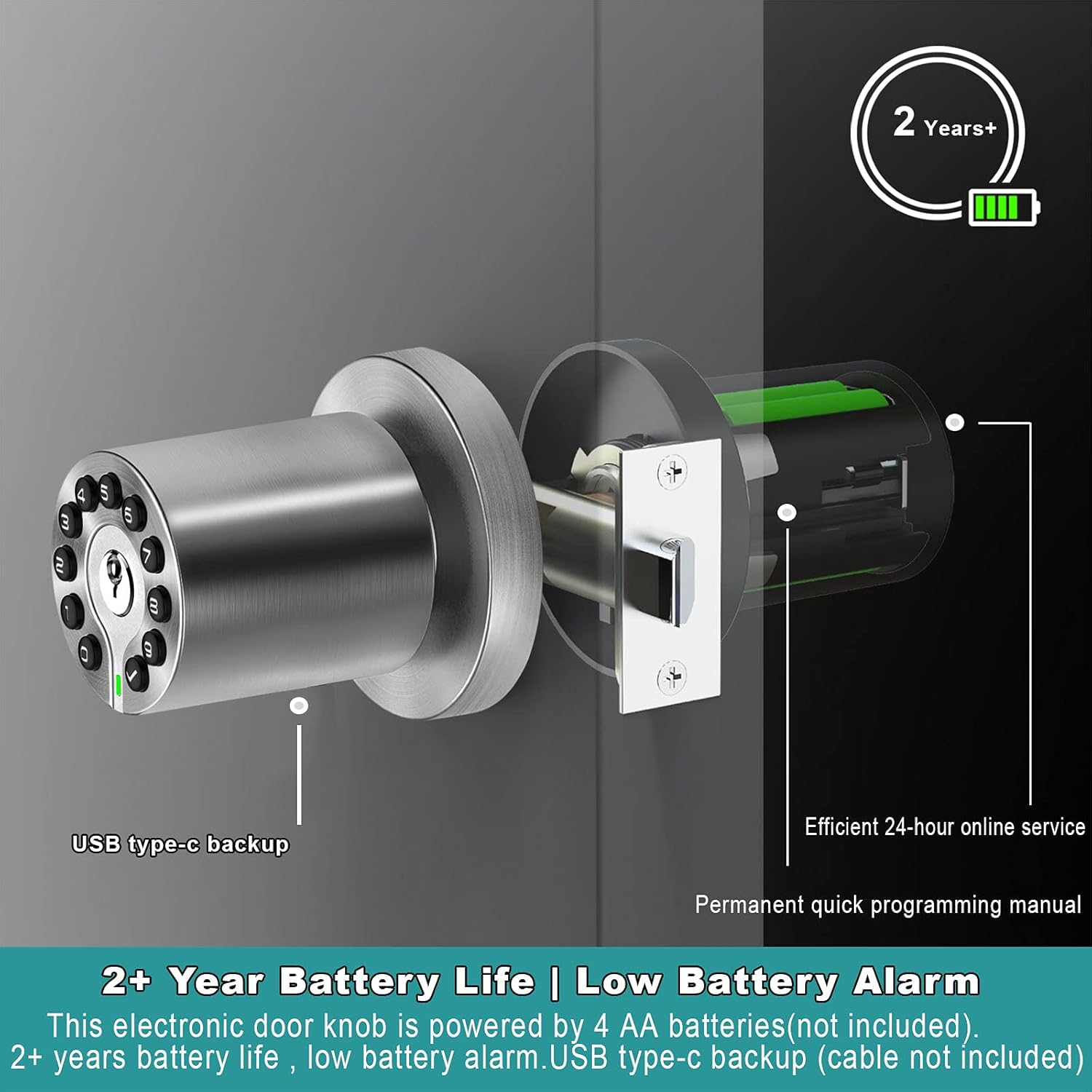
Image 4.3: Inserting the exterior keypad assembly.
- Insert Interior Assembly: Connect the cable from the exterior assembly to the interior assembly. Align the interior assembly with the spindle and mounting posts, then push it onto the door.

Image 4.4: Connecting cables and inserting the interior knob assembly.
- Vidaları Sıkıştırın: Secure the interior assembly to the exterior assembly using the provided screws.

Image 4.5: Tightening the mounting screws to secure the lock.
- Connect and Install Batteries: Connect the battery pack cable to the interior assembly. Insert 4 AA batteries (not included) into the battery compartment.

Image 4.6: Connecting the battery pack and inserting AA batteries.
- Install Interior Cover: Place the interior cover over the battery compartment and secure it.

Image 4.7: Installing the final interior cover.
4.3 Önemli Kurulum Notları
Ensure the square tube is inserted into the latch at the correct angle. Incorrect insertion can lead to the knob opening without a code or not opening at all. Make sure the key is not in the handle during assembly, and hold the rosette while inserting the panel into the latch. Do not turn the knob when inserting the panel.

Image 4.8: Visual guide for correct square tube insertion during installation.
5. Programming and Operation
The BOTHSTAR Keypad Door Knob supports 1 master code and up to 50 user codes, each 4-15 digits in length.
5.1 Initial Setup: Setting the Master Code
Upon first use, the lock will have a default master code (refer to the quick programming manual for the default code). It is highly recommended to change this immediately for security purposes. Follow the instructions in the quick programming manual to set your new master code.
5.2 Adding User Codes
The master code is used to add or delete user codes. You can program up to 50 unique user codes for family members, guests, or staff. Refer to the quick programming manual for detailed steps on adding user codes.
5.3 Passcode Disguise (Anti-Peeping Function)
To prevent others from guessing your code, you can enter random digits before and/or after your actual passcode. The lock will recognize the correct sequence within the longer string of numbers. For example, if your code is 1234, you can enter 567812349012 and the lock will still open.

Image 5.1: Illustration of the Anti-Peeping PIN Code feature.
5.4 Auto-Lock and Manual Lock Modes
- Otomatik kilit: The lock automatically engages after 4 seconds of being unlocked. This duration can typically be adjusted from 2 seconds to 12 hours via programming.
- Manuel Kilit: If you prefer to manually control when the door locks, you can disable the auto-lock feature. This allows the knob to function as a standard passage knob until you manually engage the lock.

Image 5.2: Explanation of Auto-Lock and Manual Lock functionalities.
5.5 Sessiz Mod
The lock features a silent mode that disables keypad beeps for quiet operation. This is useful in environments where noise disturbance is a concern.
5.6 Visitor Mode
Activate visitor mode when you have multiple guests. This mode allows temporary access without requiring individual codes for each visitor. Consult the quick programming manual for activation and deactivation steps.
6. Bakım
6.1 Pil Değişimi
The lock is powered by 4 AA batteries (not included) and offers over 2 years of battery life under normal usage. A low battery alarm will sound to indicate when batteries need replacement. To replace, remove the interior cover, disconnect the old battery pack, insert new AA batteries, and reconnect. A USB Type-C backup port is available for emergency power if batteries run out completely (USB cable not included).

Image 6.1: Battery compartment and USB Type-C backup port for emergency power.
6.2 Temizlik
Kilidi yumuşak bir bezle temizleyin.amp Bez. Cilaya veya elektronik bileşenlere zarar verebilecek aşındırıcı temizleyiciler veya çözücüler kullanmaktan kaçının.
7. Sorun Giderme
| Sorun | Olası Neden | Çözüm |
|---|---|---|
| Kilit, tuş takımı girişine yanıt vermiyor. | Dead batteries; Incorrect code entered; Keypad malfunction. | Replace batteries; Re-enter code carefully; Use mechanical key; Contact support. |
| Knob turns but door does not unlock. | Spindle not correctly engaged with latch; Latch mechanism jammed. | Check installation of interior/exterior assemblies; Inspect latch for obstructions. |
| Pil seviyesi düşük uyarısı sık sık çalıyor. | Batteries are low; Poor quality batteries. | Replace with new, high-quality AA alkaline batteries. |
| Kilit otomatik olarak kilitlenmiyor. | Auto-lock feature is disabled; Incorrect programming. | Enable auto-lock through programming; Verify auto-lock settings. |
| Keypad is difficult to see in darkness. | Backlight not activating. | Press any key to activate the backlight. If it still doesn't light up, check batteries. |
8. Ürün Özellikleri
| Özellik | Şartname |
|---|---|
| Model Adı | YJ20 |
| Marka | İKİ YILDIZ |
| Kilit Tipi | Tuş takımı |
| Malzeme | Metal (Satin Nickel finish) |
| Boyutlar (U x G x Y) | 8.07 x 4.53 x 4.53 inç |
| Ürün Ağırlığı | 2.53 pound |
| Güç Kaynağı | 4 adet AA pil (dahil değildir) |
| Pil Ömrü | Yaklaşık 2+ yıl |
| Kullanıcı Kodları | 1 Ana Kod, 50 Kullanıcı Kodu |
| Kod Uzunluğu | 4-15 haneli |
| Kapı Kalınlığı Uyumluluğu | 1-3/8" ila 2-1/2" (35 mm ila 65 mm) |
| Arka Mesafe Uyumluluğu | Adjustable 2-3/8" (60mm) or 2-3/4" (70mm) |
| Hava Direnci | IP65 (Outside knob can be used outdoors, can work when it rains) |
| Özel Özellikler | Keyless Entry, Backlit Keypad, Passcode Disguise, Auto-lock (4 sec default), Visitor Mode, Silent Mode, USB Type-C Backup |
| Dahil Bileşenler | Kilit ve anahtar |

Image 8.1: The lock's IP65 weather resistance against rain, frost, and low light.
9. Garanti ve Destek
9.1 Garanti Bilgileri
The BOTHSTAR Keypad Door Knob comes with a long-term warranty, ensuring reliable performance and peace of mind. For specific warranty terms and conditions, please refer to the warranty card included in your package or contact BOTHSTAR customer service.
9.2 Müşteri Desteği
For any questions, technical assistance, or warranty claims, please contact BOTHSTAR customer support. Our team is dedicated to providing efficient service and support for your product.
You may find contact information on the product packaging, the official BOTHSTAR websitenizden veya satın alma noktanızdan.