
giriiş
Thank you for choosing the Mahli Smart Robotic 3-in-1 Vacuum Cleaner. This manual provides important information on the safe use, operation, and maintenance of your device. Please read it thoroughly before first use and keep it for future reference.

Figure 1: Mahli Smart Robotic 3-in-1 Vacuum Cleaner and Remote Control
This image displays the Mahli Smart Robotic 3-in-1 Vacuum Cleaner in white, accompanied by its remote control. The vacuum cleaner is round with a power button on top, and the remote control is rectangular with navigation and function buttons.
Güvenlik Talimatları
- Cihazı kullanmadan önce tüm talimatları okuyun.
- Do not operate the vacuum cleaner in wet environments or near water.
- Saçınızı, bol giysilerinizi, parmaklarınızı ve vücudunuzun tüm kısımlarını açıklıklardan ve hareketli parçalardan uzak tutun.
- Sadece bu kılavuzda açıklandığı şekilde kullanın. Sadece üreticinin önerdiği aparatları kullanın.
- Hasarlı kablo veya fişle kullanmayın. Cihaz düzgün çalışmıyorsa, düşürüldüyse, hasar gördüyse, dışarıda bırakıldıysa veya suya düştüyse, bir servis merkezine iade edin.
- Kordonu çekmeyin veya taşımayın, kordonu sap olarak kullanmayın, kordonun üzerine kapı kapatmayın veya kordonu keskin kenarlar veya köşelerin etrafından çekmeyin. Cihazı kordonun üzerinden geçirmeyin. Kordonu ısıtılmış yüzeylerden uzak tutun.
- Fişi kablodan çekerek çıkarmayın. Fişi çıkarmak için kabloyu değil fişi tutun.
- Islak elle fişe veya cihaza dokunmayın.
- Açıklıklara herhangi bir nesne koymayın. Herhangi bir açıklığı tıkalı haldeyken kullanmayın; toz, tiftik, saç ve hava akışını azaltabilecek her şeyden uzak tutun.
- Fişi çekmeden önce tüm kontrolleri kapatın.
- Merdiven temizliğinde ekstra özen gösterin.
- Benzin gibi yanıcı veya parlayıcı sıvıları almak için veya bunların bulunabileceği alanlarda kullanmayın.
- Sigara, kibrit, sıcak kül gibi yanan veya dumanı tüten hiçbir şeyi toplamayın.
- Toz torbası ve/veya filtreler takılı olmadan kullanmayınız.
- İstem dışı çalıştırmayı önleyin. Pil paketine bağlamadan, cihazı kaldırmadan veya taşımadan önce anahtarın kapalı konumda olduğundan emin olun.
- Sadece üreticinin belirttiği şarj cihazıyla şarj edin.
- Cihazı veya pil takımını değiştirmeyin veya onarmaya çalışmayın.
Ürün Bileşenleri
The Mahli Smart Robotic 3-in-1 Vacuum Cleaner comes with the following components:
- Main Robotic Vacuum Unit
- Uzaktan kumanda
- USB Şarj Kablosu
- Yan Fırçalar (2 adet)
- Paspas Bezi (1x)
- Temizlik Fırçası (1 adet)
Şekil 2: Dahil Edilen Bileşenler
This image shows the Mahli Smart Robotic 3-in-1 Vacuum Cleaner along with its accessories: two side brushes, a mop cloth, a USB charging cable, and a small cleaning brush.
Kurmak
1. Elektrikli Süpürgeyi Şarj Etme
- Connect the USB charging cable to the charging port on the vacuum cleaner.
- USB kablosunun diğer ucunu uyumlu bir USB güç adaptörüne (dahil değildir) veya bilgisayarın USB portuna takın.
- Şarj gösterge ışığı yanacaktır. Tam şarj yaklaşık 3 saat sürer.
- Once fully charged, the indicator light may change or turn off. Disconnect the vacuum cleaner from the power source.
2. Attaching Side Brushes
Gently press the side brushes onto the designated posts on the underside of the vacuum cleaner until they click into place.
3. Attaching the Mop Cloth (Optional)
If using the mopping function, attach the mop cloth to the designated area on the bottom of the vacuum cleaner. Ensure it is securely fastened.
Kullanım Talimatları
1. Açma/Kapama
- To power on, press the power switch on the side or bottom of the vacuum cleaner. Alternatively, for some models, simply touch the power button on the top surface after ensuring the main power switch is on.
- To power off, press the power switch again or hold the power button on the top surface.
2. Temizleme Modları
The vacuum cleaner features intelligent omni-directional and auto-route technology for efficient cleaning.
- Otomatik Temizleme: Once powered on, the vacuum cleaner will automatically begin cleaning, navigating around obstacles and covering the floor area.
- Uzaktan Kumanda Kullanımı: Use the provided remote control for manual direction changes or to start/stop cleaning.
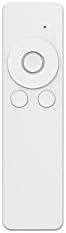
Şekil 3: Uzaktan Kumanda
This image shows the white remote control for the Mahli Smart Robotic 3-in-1 Vacuum Cleaner. It features a circular directional pad at the top, with two smaller circular buttons below it.
3. Paspaslama Fonksiyonu
If the mop cloth is attached, the vacuum cleaner will perform mopping simultaneously with sweeping and vacuuming. Ensure the mop cloth is clean and slightly damp En iyi sonuçlar için.
Bakım
1. Çöp Kutusunu Boşaltma
Regularly empty the dustbin to maintain optimal cleaning performance. Locate the dustbin compartment, open it, and dispose of collected debris. Clean the dustbin with the provided cleaning brush or a soft cloth.
2. Yan Fırçaların Temizlenmesi
Check the side brushes for tangled hair or debris. Remove any obstructions carefully. If brushes are worn, they may need replacement.
3. Cleaning the Mop Cloth
After each use, remove the mop cloth and wash it thoroughly. Allow it to air dry completely before reattaching.
4. Sensörlerin Temizlenmesi
Wipe the anti-fall sensors and other optical sensors on the bottom and front of the vacuum cleaner with a clean, dry cloth to ensure proper navigation.
Sorun giderme
| Sorun | Olası Neden | Çözüm |
|---|---|---|
| Elektrikli süpürge açılmıyor. | Battery is low or depleted. Main power switch is off. | Charge the vacuum cleaner. Ensure the main power switch is in the ON position. |
| Elektrikli süpürge beklenmedik bir şekilde durdu. | Dustbin is full. Obstruction detected. Battery is low. | Empty the dustbin. Remove any obstructions. Recharge the vacuum cleaner. |
| Zayıf temizleme performansı. | Dustbin is full. Side brushes are tangled or worn. Sensors are dirty. | Empty the dustbin. Clean or replace side brushes. Clean all sensors. |
| Vacuum cleaner gets stuck frequently. | Too many obstacles in the cleaning area. Sensors are dirty. | Clear the cleaning area of excessive clutter. Clean all sensors. |
Özellikler
| Özellik | Detay |
|---|---|
| Örnek | MBOT3002 |
| İşlev | Sweeping, Vacuuming, Mopping (3-in-1) |
| Pil Kapasitesi | 2000mAh |
| Şarj Süresi | Yaklaşık 3 saat |
| Çalışma Zamanı | Yaklaşık 2 saat |
| Anma Hacmitage | 3.7V |
| Çalışma Gürültüsü | 55dB |
| Boyutlar | Çap: 12.5 inç, Yükseklik: 1.8 inç |
| Suitable Floor Types | Wood, Tile, Linoleum |
| Özel Özellikler | Intelligent Omni-Directional, Auto Route Technology, Smart Navigation, 360 Motion, Advanced Sensors, Anti-Fall Sensors |
| Dahil Bileşenler | Sweeper, 2x Brush, 1x Mop, 1x USB Charging Cable, 1x Cleaning Brush, Remote Control |
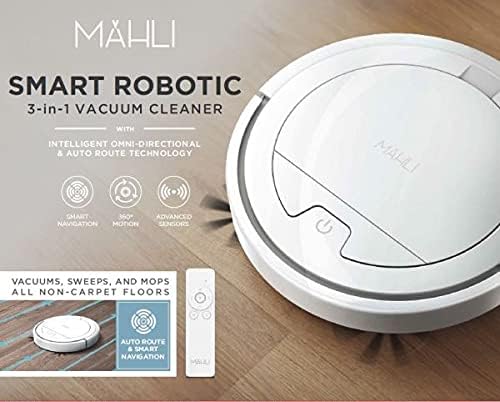
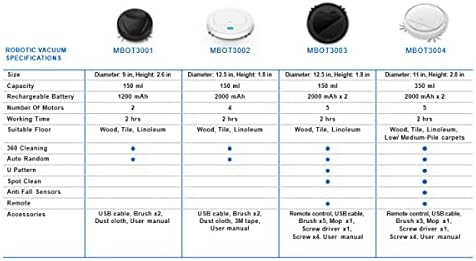
Figure 4: Robotic Vacuum Specifications Overview
This image displays a table comparing specifications for various Mahli robotic vacuum models (MBOT3001, MBOT3002, MBOT3003, MBOT3004). Key specifications include size, capacity, battery, motors, working time, suitable floor, cleaning patterns, sensors, remote, and accessories.
Garanti ve Destek
For warranty information and customer support, please refer to the contact details provided on the product packaging or the official Mahli webSite. Satın alma belgeniz olarak satın alma fişinizi saklayın.
For technical assistance or troubleshooting beyond this manual, please contact Mahli customer service.


