
1. Giriş
This manual provides essential information for the installation, operation, and maintenance of the Cisco Catalyst 9500-16X-A 16-Port 10Gig Switch. Please read this manual thoroughly before attempting to install or operate the device to ensure proper functionality and safety.
The Cisco Catalyst 9500 Series is an enterprise-class core and aggregation layer switch, designed for security, IoT, mobility, and cloud. The C9500-16X-A model offers high-density 10 Gigabit Ethernet connectivity.
2. Ürün Bittiview
The Cisco Catalyst 9500-16X-A is a high-performance network switch engineered for demanding enterprise environments. Key features include:
- Enterprise-Class 10G Switch: Features 16 x 10G SFP+ ports for high-speed data transfer, ideal for core and aggregation layers in campus or data center networks.
- High Performance & Throughput: Delivers up to 480 Gbps switching capacity and advanced Layer 2/3 services for maximum network efficiency and performance.
- Redundant Dual Power Supplies: Includes two hot-swappable power supply units for increased uptime, reliability, and uninterrupted network operations.
- Advanced Security & Automation: Supports Cisco SD-Access, MACsec encryption, TrustSec, and programmable automation via Cisco IOS XE software.
- Modular Design with Hot-Swappable Fans: Built-in redundant fans ensure efficient cooling and easy maintenance, enhancing device longevity and operational stability.
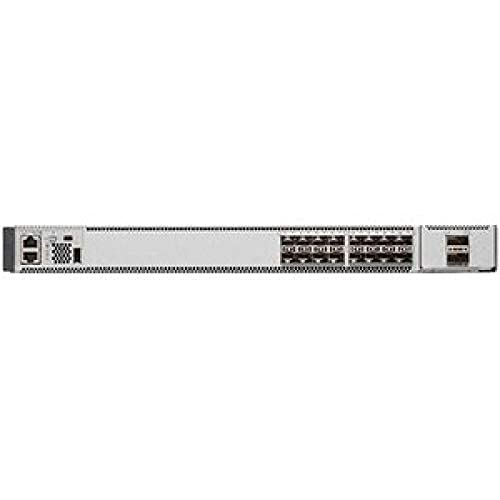
Şekil 2.1: Ön view of the Cisco Catalyst 9500-16X-A Switch, showing 16 SFP+ ports and status indicators.
3. Kurulum
3.1 Paketin Açılması ve Muayene
Carefully unpack the switch and all accessories. Inspect the device for any signs of physical damage. If any damage is found, contact your supplier immediately.
3.2 Raf Montajı
The Cisco Catalyst 9500-16X-A is designed for standard 19-inch rack mounting. Use the provided rack-mount kit and follow the instructions included with the kit to securely install the switch in a rack. Ensure adequate space for airflow around the unit.
3.3 Gücün Bağlanması
- Ensure the power source is compatible with the switch's power requirements.
- Connect the power cords to the dual power supply units at the rear of the switch.
- Connect the other end of the power cords to grounded AC power outlets. The switch supports redundant power supplies for continuous operation.
3.4 Ağ Kablolarını Bağlama
- Insert appropriate SFP+ transceivers into the 10 Gigabit Ethernet ports as needed.
- Connect fiber optic or copper cables (depending on transceiver type) from your network devices to the SFP+ ports on the switch.
- For initial management access, connect a console cable (RJ-45 to DB-9) from your management workstation to the console port on the switch.
4. Kullanım Talimatları
4.1 Açma ve İlk Önyükleme
Once power is connected, the switch will automatically power on. Observe the system LED indicators for boot status. The system LED should turn green once the boot process is complete and the operating system (Cisco IOS XE) has loaded.
4.2 Temel Yapılandırma
Access the switch CLI via the console port or a configured management interface (e.g., Telnet/SSH over a management VLAN). Refer to the Cisco IOS XE documentation for detailed configuration commands. Essential initial configurations include:
- Setting hostname and domain name.
- Yönetim arayüzleri için IP adreslerinin yapılandırılması.
- Kullanıcı hesapları ve şifrelerinin oluşturulması.
- Enabling SSH for secure remote access.
4.3 Ağ Yapılandırması
The Catalyst 9500-16X-A supports a wide range of Layer 2 and Layer 3 features. Common configurations include:
- VLAN creation and assignment to ports.
- Trunk port configuration for inter-switch links.
- Routing protocols (e.g., OSPF, EIGRP, BGP).
- Quality of Service (QoS) settings.
- Security features like MACsec, TrustSec, and Access Control Lists (ACLs).
5. Bakım
5.1 Çevresel Hususlar
Ensure the operating environment adheres to the specified temperature and humidity ranges. Maintain proper airflow around the switch to prevent overheating. The upper temperature rating for this device is 40 °C.
5.2 Fan Modülü Değişimi
The switch features hot-swappable fan modules. If a fan module fails, replace it promptly to maintain adequate cooling. Refer to the Cisco documentation for specific replacement procedures.
5.3 Güç Kaynağı Değişimi
The dual power supplies are hot-swappable, allowing for replacement without interrupting switch operation. If a power supply fails, replace it with a compatible unit to maintain redundancy.
5.4 Yazılım Güncellemeleri
Regularly check for and apply software updates (Cisco IOS XE) to ensure optimal performance, security, and access to new features. Follow Cisco's recommended procedures for software upgrades.
6. Sorun Giderme
This section provides basic troubleshooting steps for common issues. For more complex problems, consult the Cisco documentation or contact technical support.
6.1 Güç Sorunları
- Güç Yok: Verify power cords are securely connected to both the switch and the power outlets. Check power source and circuit breakers.
- Power Supply LED Off: If one power supply LED is off, it may indicate a failure. Check the power connection to that specific PSU or consider replacing it.
6.2 Ağ Bağlantı Sorunları
- Port bağlantısı kesildi: Check the cable connection between the switch port and the connected device. Verify the SFP+ transceiver is correctly seated and compatible. Check the status of the connected device.
- Ağ erişimi yok: Verify IP configuration, VLAN assignments, and routing tables. Check firewall rules if applicable.
6.3 Sistem Performans Sorunları
- Yavaş Performans: Check CPU and memory utilization using CLI commands. Inspect logs for error messages or unusual activity. Ensure adequate cooling.
7. Özellikler
| Özellik | Tanım |
|---|---|
| Marka | Cisco |
| Model Numarası | C9500-16X-A |
| Port Sayısı | 16 |
| Arayüz | SFP+ |
| Veri Aktarım Hızı | 160 gigabits_per_second (Switching Capacity up to 480 Gbps) |
| Anahtar Türü | Sabit |
| Katman Sayısı | 1 (Supports Layer 2/3 services) |
| Dahil Bileşenler | 16-GB internal memory and 16-GB DDR4 memory |
| Uyumlu Cihazlar | Masaüstü, Dizüstü, Sunucu |
| Üst Sıcaklık Derecesi | 40 °C |
| Kasa Malzeme Türü | Metal |
| Üretici | CISCO SİSTEMLERİ - KURUMSAL |
| UPC | 649661945093 |
8. Garanti ve Destek
8.1 Garanti Bilgileri
Bu ürün bir 90 günlük sınırlı garantiLütfen garanti talepleriniz için satın alma belgenizi saklayın. Garanti, normal kullanım koşullarında malzeme ve işçilik kusurlarını kapsar.
8.2 Teknik Destek
For technical assistance, documentation, or further troubleshooting, please visit the official Cisco support website or contact your authorized Cisco reseller. Ensure you have your product model number (C9500-16X-A) and any relevant serial numbers available when seeking support.
Official Cisco Support: https://www.cisco.com/c/en/us/support/index.html