
1. Giriş
This manual provides detailed instructions for the installation, configuration, and operation of your TONTON Wireless 3MP Outdoor Security Camera, model C2019AN3M-W. Please read this manual thoroughly before using the product to ensure proper functionality and safety.
2. Ürün Özellikleri
- 2K (3MP) Resolution: Net ve ayrıntılı video çekertage.
- 2.4GHz WiFi Bağlantısı: Operates independently on 2.4GHz WiFi networks.
- Renkli Gece Görüşü: Features three IR lights and three spotlights for enhanced night vision, including full-color mode.
- PIR & Motion Dual Detection: Reduces false alarms with combined Passive Infrared and motion detection.
- Spotlight ve Siren: Activates a smart floodlight and siren upon detecting suspicious activity.
- İki Yönlü Ses: Gerçek zamanlı iletişim için dahili mikrofon ve hoparlör.
- Dayanıklı Tasarım: IP66 weatherproof metal casing dış mekan kullanımı için.
- Esnek Kurulum: 360-degree adjustable bracket and 110-degree viewaçı.
- Yerel ve Bulut Depolama: Supports C10 Micro SD card (8-128GB, FAT32) and secured cloud storage.
- Uyumluluk: Works as a standalone camera or integrates with Tonton Wireless NVR Systems.
- Akıllı Ev Entegrasyonu: Amazon Alexa ile uyumludur.
3. Paket İçeriği
Lütfen paketi teslim aldığınızda içeriğini kontrol edin. Herhangi bir ürün eksik veya hasarlıysa, müşteri desteğiyle iletişime geçin.
- TONTON Wireless 3MP Outdoor Security Camera (Model C2019AN3M-W)
- Güç Adaptörü (12V 1A)
- Montaj Vidaları ve Ankrajları
- Kullanım Kılavuzu (bu belge)
4. Kurulum Kılavuzu
4.1 Fiziksel Kurulum
The camera features a 360-degree adjustable bracket for flexible positioning. Ensure the camera is mounted in a location that provides optimal viewing coverage and a stable Wi-Fi signal.
- Choose a suitable mounting location, either indoors or outdoors, ensuring it is within range of your 2.4GHz Wi-Fi router.
- Use the provided mounting screws and anchors to securely attach the camera bracket to the desired surface (wall or ceiling).
- Adjust the camera's angle using the 360-degree rotatable bracket to achieve the desired viewing area. The camera offers a 110-degree viewaçı.
- Connect the camera to the power adapter (12V 1A) and plug it into a power outlet.

Figure 1: Camera Components and Features. This image illustrates the various parts of the camera, including its antenna, weatherproof rating, lighting, lens, sensors, audio components, storage slot, network port, reset button, and power input.
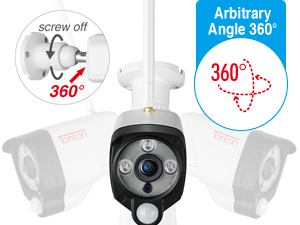

Figure 2: Adjustable Bracket and Wide Viewing Angle. The camera's bracket allows for 360-degree rotation, and it captures a 110-degree field of view.
4.2 Uygulama Yükleme ve Kamera Eşleştirme
The camera operates with the EseeCloud app, available for smartphones and tablets.
- Download the "EseeCloud" app from the App Store (iOS) or Google Play Store (Android).
- Hesap oluşturun ve giriş yapın.
- Follow the in-app instructions to add your camera. Ensure your smartphone is connected to a 2.4GHz Wi-Fi network during the pairing process.
- The camera can be used standalone with a Micro SD card or integrated with a Tonton Wireless NVR System.

Figure 3: Easy Setup Guide. This image illustrates the three main steps for setting up the camera: connecting to power and Wi-Fi, downloading the EseeCloud app, and viewcanlı yayını izlemek.

Figure 4: Wi-Fi Connection. The camera connects wirelessly to your 2.4GHz Wi-Fi network.
5. Kullanım Talimatları
5.1 Canlı View ve İki Yönlü Ses
- Open the EseeCloud app to access the live video feed from your camera.
- Use the microphone icon in the app to enable two-way audio. You can speak through your phone, and the sound will be projected from the camera's speaker. Similarly, you can hear audio from the camera's built-in microphone.

Figure 5: Real-Time Two-Way Audio. This image demonstrates using the EseeCloud app for live viewing and communicating through the camera.
5.2 Gece Görüş Modları
Kamera, birden fazla gece görüş seçeneği sunuyor:
- Kızılötesi (IR) Gece Görüşü: Provides clear black and white video up to 30 meters (100 feet) using three IR lights.
- Tam Renkli Mod: Activates three spotlights to provide full-color video footaggece e.
- Akıllı mod: The camera automatically switches to color night vision when motion is detected, otherwise it uses IR night vision.

Figure 6: Enhanced Color Night Vision. This image highlights the camera's ability to provide clear, colorful video even in low-light conditions using its spotlights and IR LEDs.

Figure 7: Smart Night Vision. This image demonstrates the camera's smart night vision capabilities, providing clear visibility in dark environments.
5.3 Hareket Algılama ve Uyarılar
The camera utilizes both PIR (Passive Infrared) and motion detection to minimize false alarms. When suspicious activity is detected:
- The smart floodlight will illuminate the area.
- A siren can be activated to deter intruders.
- You will receive push notifications via the EseeCloud app.
- Email warnings with snapshots can be sent to your registered email address.

Figure 8: AI Human Intelligent Detection. This image illustrates how the camera detects human motion and sends an alert to your phone.

Figure 9: Effective Warning System. The camera's spotlight and siren can be activated to deter unwanted visitors.

Figure 10: AI Human Motion Detection. The camera intelligently detects human shapes to reduce false alarms.
5.4 Video Kaydı ve Depolama
The camera supports continuous recording or motion-activated recording. Video footage iki şekilde saklanabilir:
- Mikro SD kart: Insert a C10 Micro SD card (8-128GB, FAT32 format) into the camera's built-in slot for local storage.
- Bulut Depolama: Secure cloud storage options are available through the EseeCloud app (subscription may be required).

Figure 11: Local Storage and Multi-Device Viewing. The camera supports up to 128GB Micro SD card for continuous recording and can be viewed on multiple devices.

Figure 12: H.265+ Video Compression. This image highlights the efficiency of H.265+ compression, which optimizes storage and bandwidth.
5.5 Akıllı Ev Entegrasyonu
The camera is compatible with Amazon Alexa. You can use voice commands to view Kameranızın görüntüsünü, Alexa özellikli uyumlu cihazlarda izleyebilirsiniz.

Figure 13: Alexa Integration. The camera can be controlled and viewed through Amazon Alexa devices.
6. Bakım
- Temizlik: Fotoğraf makinesinin objektifini ve gövdesini yumuşak bir bezle nazikçe silin.amp bez. Sert kimyasallar veya aşındırıcı temizleyiciler kullanmaktan kaçının.
- Donanım Yazılımı Güncellemeleri: Regularly check the EseeCloud app for available firmware updates to ensure optimal performance and security.
- Güç Kaynağı: Ensure the camera is connected to the specified 12V 1A power adapter.
- SD Kart Yönetimi: Mikro SD kart kullanıyorsanız, periyodik olarak yeniden yükleyin.view ve önemli foo'yu yedekletage. Format the card as needed to maintain performance.
7. Sorun Giderme
| Sorun | Olası Çözüm |
|---|---|
| Kamera Wi-Fi'ye bağlanmıyor |
|
| Sık yanlış alarmlar |
|
| No video recording to SD card |
|
| Zayıf gece görüş kalitesi |
|
8. Özellikler
| Özellik | Detay |
|---|---|
| Model Numarası | C2019AN3M-W |
| Çözünürlük | 3 MP (2K) |
| Bağlantı | 2.4 GHz Wi-Fi (IEEE 802.11b/g/n) |
| Gece Görüş Aralığı | 30 metreye (100 feet) kadar |
| Gece Görüş Tipi | IR, Full Color, Smart Mode |
| Hareket Algılama | PIR & Motion Dual Detection |
| Ses | Çift Yönlü Ses (Dahili Mikrofon ve Hoparlör) |
| Depolama Seçenekleri | Micro SD Card (8-128GB, FAT32, Class 10), Cloud Storage |
| Hava koşullarına dayanıklılık | IP66 |
| ViewAçı | 110 Derece |
| Güç Kaynağı | Corded Electric 12V 1A Power Adapter |
| Çalışma Sıcaklığı | -20°C ila 60°C (-4°F ila 140°F) |
| Boyutlar | 22.2x11.99x9.88 cm |
| Ağırlık | 730 gr |
| Video Sıkıştırma | H.265 + |
| Uyumlu Cihazlar | Smartphone, Tablet, NVR Recorder |
| Denetleyici Türü | APP/ NVR Recorder |

Figure 14: All-Weather Durability. The camera's IP66 rating ensures reliable operation in diverse weather conditions.
9. Garanti ve Destek
Garanti: The product comes with a 1-year manufacturer's warranty. This warranty typically covers defects in materials and workmanship under normal use. Please refer to the warranty card included with your product for full terms and conditions.
Müşteri Desteği: For technical assistance, troubleshooting, or warranty claims, please contact TONTON customer support. You can find contact information on the official TONTON website or through the EseeCloud app.
Ayrıca ziyaret edebilirsiniz TONTON Store on Amazon Daha fazla bilgi ve destek kaynakları için.

Şekil 15: Garanti ve Destekview. This image summarizes key support benefits including warranty, online support, and money-back guarantee.

Figure 16: Scan for Support. A QR code is provided for quick access to support resources.
