
1. Giriş
The Avidsen HomeCam Battery is a 100% wireless outdoor surveillance camera designed for easy installation and robust home protection. Featuring 1080P Full HD resolution, a solar panel for continuous power, night vision, and two-way audio, this camera allows you to monitor your property remotely via a smartphone application without any subscription fees. This manual provides detailed instructions for setting up, operating, and maintaining your camera.
2. Kutuda Neler Var?
Lütfen paketin içinde tüm bileşenlerin mevcut olup olmadığını kontrol edin:
- 1 x Avidsen HomeCam Battery IP WiFi Camera
- 1 x Solar Panel (PV module)
- 2 x 18650 Piller
- 1 x Camera Sealing Gasket
- Montaj Vidaları ve Duvar Dübelleri

Image: The Avidsen HomeCam Battery camera and its accompanying solar panel, unmounted, showing the main components included in the box.
3. Kurulum Kılavuzu
3.1. Pil Kurulumu
- Kameradaki pil bölmesini bulun.
- Insert the two 18650 batteries, ensuring correct polarity (+/-).
- Pil bölmesini sıkıca kapatın.
3.2. Kamera ve Güneş Panelinin Montajı
The camera and solar panel are designed for outdoor use and can be mounted separately or together. Choose a location that provides optimal sunlight exposure for the solar panel and a clear view kamera için.
- Kamera montajı: The camera features an innovative magnetic mount for precise orientation. Secure the base of the mount to a wall using the provided screws and wall plugs. Attach the camera to the magnetic base and adjust its angle.
- Güneş Paneli Montajı: Mount the solar panel in a location that receives direct sunlight for several hours a day. Connect the solar panel cable to the camera's charging port.
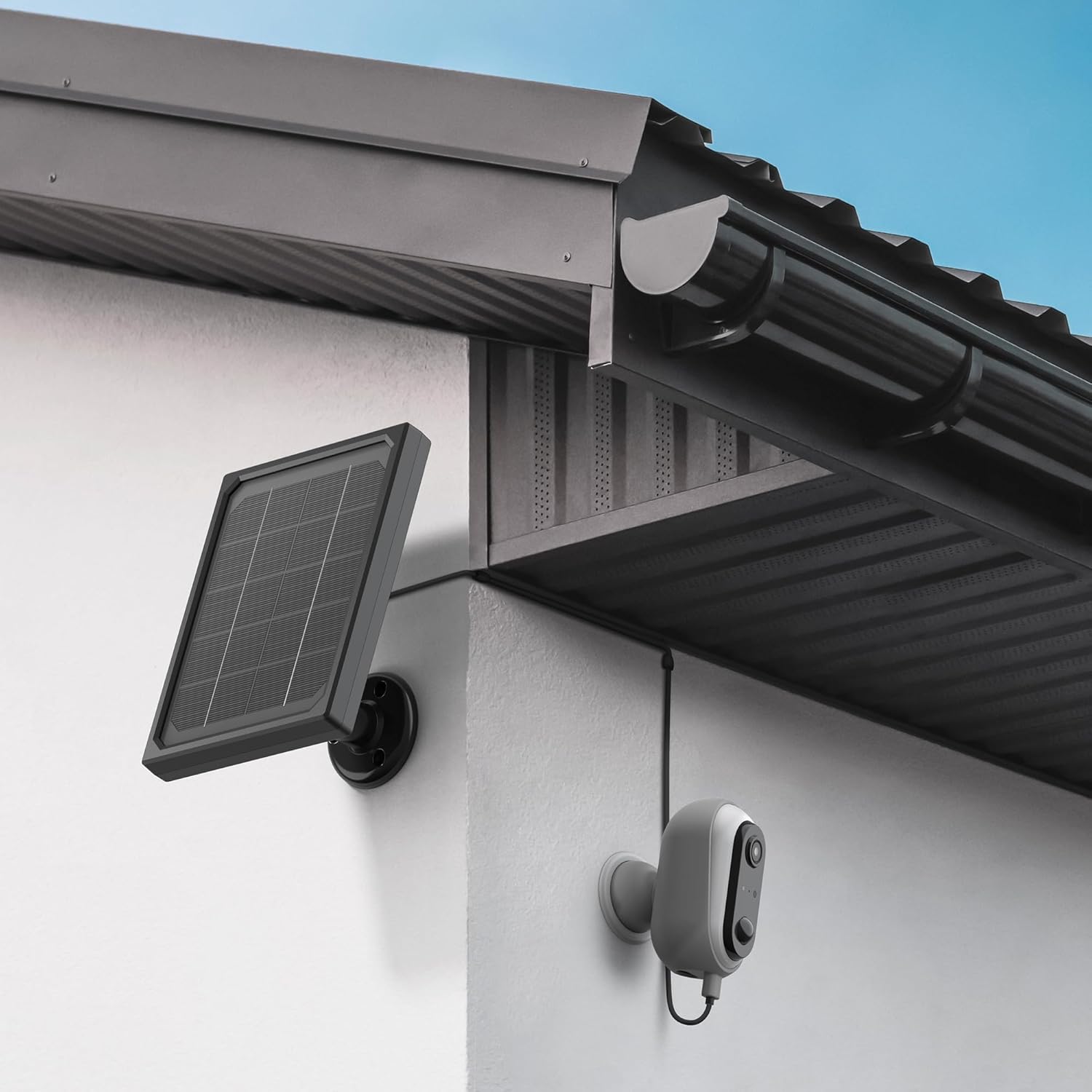
Image: The Avidsen HomeCam Battery camera and its solar panel are shown securely mounted on an exterior wall, positioned to capture sunlight and monitor the area.

Resim: Yakın çekim view of the Avidsen HomeCam Battery camera, highlighting its adjustable magnetic mount which allows for flexible positioning and angle adjustments.
3.3. App Download and Initial Pairing
- Download the "Avidsen Home" application from your smartphone's app store (available on Google Play and Apple App Store).
- Uygulamayı açın ve bir hesap oluşturun veya zaten bir hesabınız varsa giriş yapın.
- Follow the in-app instructions to add a new device. This typically involves scanning a QR code on the camera or manually selecting the device type.
- Eşleştirme işlemi sırasında akıllı telefonunuzun 2.4 GHz Wi-Fi ağına bağlı olduğundan emin olun.
3.4. Wi-Fi Bağlantısı
During the app pairing process, you will be prompted to connect the camera to your home Wi-Fi network.
- Enter your Wi-Fi network name (SSID) and password when requested by the app.
- The camera supports 2.4GHz Wi-Fi networks only. Ensure your router is configured accordingly.
- Bağlantı kurulduktan sonra, kameranın gösterge ışığı değişecek ve uygulama başarılı eşleştirmeyi onaylayacaktır.
4. Kameranın Çalıştırılması
4.1. Canlı View ve Kontroller
Once connected, open the Avidsen Home app to access the live feed from your camera.
- Canlı Video: Uygulamadaki kameraya dokunun. view gerçek zamanlı video akışı.
- İki Yönlü Ses: Use the microphone icon in the app to speak through the camera's speaker and the speaker icon to listen to audio from the camera's microphone.
- Kayıt: Manually record video or capture screenshots directly from the live view arayüz.
- Playback: Kayıtlı foo'ya erişintage stored on the MicroSD card (not included) via the app's playback feature.

Image: A smartphone screen showing the Avidsen Home app, with options for live view, screenshot, two-way talk, recording, playback, and photo album.
4.2. Motion Detection and Notifications
The camera features motion detection to alert you to activity.
- Etkinleştir/Devre Dışı Bırak: In the app settings for your camera, you can enable or disable motion detection.
- Hassasiyet: Yanlış alarmları en aza indirmek için hareket algılama hassasiyetini ayarlayın.
- Bildirimler: When motion is detected, you will receive a notification on your smartphone.
- Kayıt: Motion-triggered events are automatically recorded to the MicroSD card (if installed).
4.3. Gece Görüşü
The integrated infrared LEDs provide clear visibility up to 8 meters in total darkness.
- Gece görüşü, düşük ışık koşullarında otomatik olarak devreye girer.
- The camera provides a clear black and white image in night vision mode.
4.4. Yerel Depolama (MicroSD Kart)
The camera supports local storage via a MicroSD card (up to 128GB, not included).
- Insert the MicroSD card into the designated slot on the camera.
- Ensure the card is formatted correctly (FAT32 recommended).
- All recordings, including motion-triggered events, will be saved to this card.
4.5. Akıllı Ev Entegrasyonu
The Avidsen HomeCam Battery is compatible with Amazon Alexa and Google Assistant.
- Link your Avidsen Home account with your Alexa or Google Assistant app.
- Sesli komutları kullanarak view Kamera görüntünüzü uyumlu akıllı ekranlarda görüntüleyin.
5. Bakım
5.1. Temizlik
- Kamera lensini ve güneş panelinin yüzeyini düzenli olarak yumuşak bir bezle temizleyin.amp En iyi performansı sağlamak için kumaş.
- Yüzeylere zarar verebilecek sert kimyasallar veya aşındırıcı malzemeler kullanmaktan kaçının.
5.2. Pil Bakımı
- The solar panel is designed to keep the batteries charged. Ensure the panel is free from obstructions and receives adequate sunlight.
- If the camera's battery level drops significantly, consider repositioning the solar panel or manually charging the batteries if possible (refer to specific battery charging instructions if applicable).
5.3. Connection Check
- Periodically check the physical connection between the solar panel and the camera to ensure it is secure and free from corrosion.
- Verify the camera's Wi-Fi connection status in the Avidsen Home app.
6. Sorun Giderme
6.1. No Power / Camera Not Turning On
- Ensure the 18650 batteries are correctly inserted with the right polarity.
- Check if the batteries are charged. If not, ensure the solar panel is connected and receiving sunlight, or try charging the batteries externally if possible.
- Verify the power button (if any) is pressed.
6.2. Wi-Fi'ye bağlanılamıyor
- Confirm your Wi-Fi network is 2.4GHz. The camera does not support 5GHz networks.
- Uygulamaya girdiğiniz Wi-Fi şifresinin doğru olduğundan emin olun.
- Sinyal gücünü artırmak için kamerayı Wi-Fi yönlendiricinize yaklaştırın.
- Yönlendiricinizi ve kameranızı yeniden başlatın.
- If issues persist, try resetting the camera to factory settings (refer to the reset procedure in the app or device manual) and re-pairing.
6.3. Düşük Görüntü Kalitesi
- Kir veya lekeleri temizlemek için kamera lensini temizleyin.
- Objektifin önünde herhangi bir engel bulunmadığından emin olun.
- Wi-Fi sinyal gücünüzü kontrol edin; zayıf sinyal video akış kalitesini etkileyebilir.
6.4. Motion Detection Not Working or Too Many False Alarms
- Verify motion detection is enabled in the Avidsen Home app.
- Adjust the motion detection sensitivity settings in the app. Lower sensitivity for fewer false alarms, higher for more sensitive detection.
- Kameranın görüş alanının view Görüş alanı açık ve ağaç dalları gibi hareketli nesneler tarafından engellenmemiş.
7. Özellikler
| Model Adı | HOME CAM BATTERY (127070) |
| Çözünürlük | 1080p Full HD |
| Bağlantı | Kablosuz (Wi-Fi 2.4GHz) |
| Güç Kaynağı | Solar Panel (5V 3W), 2x 18650 Batteries |
| Gece Görüş Aralığı | 8 metreye kadar |
| Alanı View | 130° |
| IP Derecelendirmesi | IP65 (Dış mekan kullanımı) |
| Depolamak | MicroSD kart (en fazla 128 GB, dahil değildir) |
| Özel Özellikler | Motion Detection, Two-Way Audio, Smart Home Compatibility (Alexa, Google Assistant) |
| Boyutlar | 31.5x21x8.5 cm |
| Ağırlık | 1100 Gram |
8. Garanti ve Destek
8.1. Üretici Garantisi
This Avidsen product is covered by a 2 yıllık üretici garantisi Satın alma tarihinden itibaren geçerlidir. Lütfen garanti talepleriniz için satın alma belgenizi saklayın. Garanti, normal kullanım koşullarında malzeme ve işçilik kusurlarını kapsar.
8.2. Teknik Destek
For technical assistance, troubleshooting, or further inquiries, please visit the official Avidsen website or contact their customer support. You can find contact information and FAQs on their webalan: