
SPRT POS58 IVU
SPRT POS58 IVU Fiş Termal Yazıcı Kullanım Kılavuzu
Model: POS58 IVU
giriiş
This manual provides essential information for the proper setup, operation, and maintenance of your SPRT POS58 IVU Receipt Thermal Printer. Please read this manual thoroughly before using the printer to ensure optimal performance and longevity.
The SPRT POS58 IVU is a compact and efficient thermal receipt printer designed for various point-of-sale applications. It features USB connectivity and is compatible with 5.7 cm wide thermal paper.
Kurmak
1. Ambalajın Açılması ve Muayene
- Yazıcıyı ve tüm aksesuarlarını dikkatlice ambalajından çıkarın.
- Verify that all components are present: printer unit, power adapter, USB cable.
- Inspect the printer for any visible damage. If damaged, contact your supplier immediately.
2. Yazıcının Bağlanması
- Gücü bağlayın: Insert the power adapter cable into the printer's power port and plug the other end into a suitable power outlet.
- USB'yi bağlayın: USB kablosunun bir ucunu yazıcının USB portuna, diğer ucunu ise bilgisayarınızdaki veya POS sisteminizdeki kullanılabilir bir USB portuna bağlayın.
- Güç Açık: Locate the power switch on the printer (typically on the side or front) and turn it to the 'ON' position.
3. Termal Kağıdın Yüklenmesi
The SPRT POS58 IVU printer uses standard 5.7 cm wide thermal paper rolls.
- Open the paper cover by pressing the release button or lifting the latch (location may vary slightly).
- Insert the thermal paper roll with the printing surface facing the thermal head. Ensure the roll is seated correctly in the paper compartment.
- Kesicinin yanından az miktarda kağıt çekin.
- Close the paper cover firmly until it clicks into place.
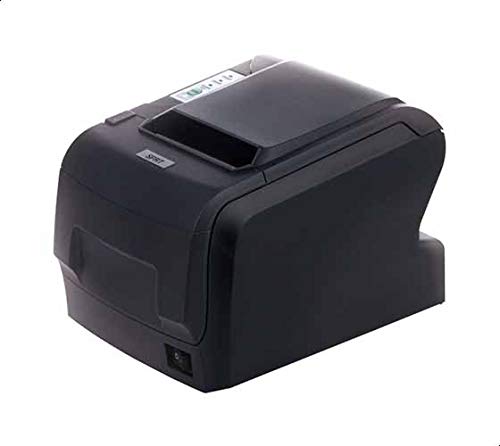
Figure 1: SPRT POS58 IVU Receipt Thermal Printer. This image displays the compact black thermal printer from an angled view, highlighting its paper output slot and the power switch located on the side.
Kullanım Talimatları
Temel Yazdırma
- Ensure the printer is powered on and connected to your computer/POS system.
- Install the necessary printer drivers on your operating system if not already installed. Refer to the driver installation guide provided separately or available from the manufacturer's webalan.
- From your application (e.g., POS software, word processor), select the SPRT POS58 IVU as your printer.
- Initiate the print command. The printer will automatically feed and print the receipt.
- Tear off the receipt against the serrated edge of the paper output slot.
Gösterge Işıkları
The printer typically has indicator lights to show its status:
- Güç ışığı: Yazıcının açık olduğunu gösterir.
- Error Light: Illuminates or blinks to indicate an error condition (e.g., paper out, print head overheat).
- Paper Out Light: Indicates that the paper roll is empty or incorrectly loaded.
Bakım
Termal Kafanın Temizlenmesi
Regular cleaning of the thermal head ensures clear print quality and extends printer life. Clean the thermal head after every 50-100 km of printing or if print quality degrades.
- Yazıcıyı kapatın ve güç kablosunu çıkarın.
- Kağıt kapağını açın.
- Wait a few minutes for the thermal head to cool down if the printer has been recently used.
- Gently wipe the thermal head surface with a cotton swab lightly moistened with absolute alcohol (ethanol).
- Allow the alcohol to evaporate completely before closing the cover and reconnecting power.
Dış Cephe Temizliği
Yazıcının dışını yumuşak bir bezle silin.amp cloth. Do not use strong solvents or abrasive cleaners.
Kağıt İşleme
- Use only high-quality thermal paper to prevent damage to the thermal head and ensure optimal print quality.
- Store thermal paper in a cool, dry place away from direct sunlight and heat.
Sorun giderme
| Sorun | Olası Neden | Çözüm |
|---|---|---|
| Yazıcı açılmıyor. | Power cable not connected; power outlet faulty; printer switch off. | Güç kablosu bağlantısını kontrol edin; farklı bir priz deneyin; güç anahtarının açık olduğundan emin olun. |
| No printing / Blank output. | Paper loaded incorrectly (upside down); paper out; driver not installed/configured; printer not selected. | Reload paper correctly (printing side facing thermal head); replace paper roll; install/reinstall drivers; select printer in application. |
| Kötü baskı kalitesi. | Thermal head dirty; low-quality paper; paper stored improperly. | Clean thermal head; use recommended thermal paper; store paper correctly. |
| Kağıt sıkışması. | Paper not loaded straight; foreign object in paper path. | Open cover, remove jammed paper carefully, reload paper straight; inspect for obstructions. |
Özellikler
| Özellik | Detay |
|---|---|
| Marka | SPRT |
| Model Numarası | POS58 IVU |
| Yazıcı Türü | Makbuz Termal Yazıcısı |
| Bağlantı Teknolojisi | USB |
| Basılı Medya | Labels (commonly used for receipts) |
| Kağıt Genişliği | 5.7 cm |
| Renk | Siyah |
| Ürün Ağırlığı | 1.82 Kilogram |
| Paket Boyutları | 28x21.4x17.8 cm |
Garanti ve Destek
Specific warranty terms and detailed support contact information are not provided within the available product data. For warranty claims, technical support, or service inquiries, please refer to the documentation included with your purchase or contact your point of sale or the manufacturer directly.
You may find additional resources and contact details on the official SPRT webalan.
Ask a question about this manual
Ask about setup, troubleshooting, compatibility, parts, safety, or missing instructions. Manuals+ will review the question and use this page’s manual context to help answer it.