
Forever ForeVigo 2 SW-330
Forever Smartwatch ForeVigo 2 SW-330 User Manual
Model: ForeVigo 2 SW-330
1. Giriş
Welcome to your new Forever Smartwatch ForeVigo 2 SW-330. This manual provides essential information for setting up, operating, and maintaining your device. Please read it carefully to ensure proper use and to maximize the features of your smartwatch.
The ForeVigo 2 SW-330 is designed to be your daily companion, offering a range of features including sports tracking, health monitoring, and smart notifications. Its durable design and long-lasting battery make it suitable for various activities.
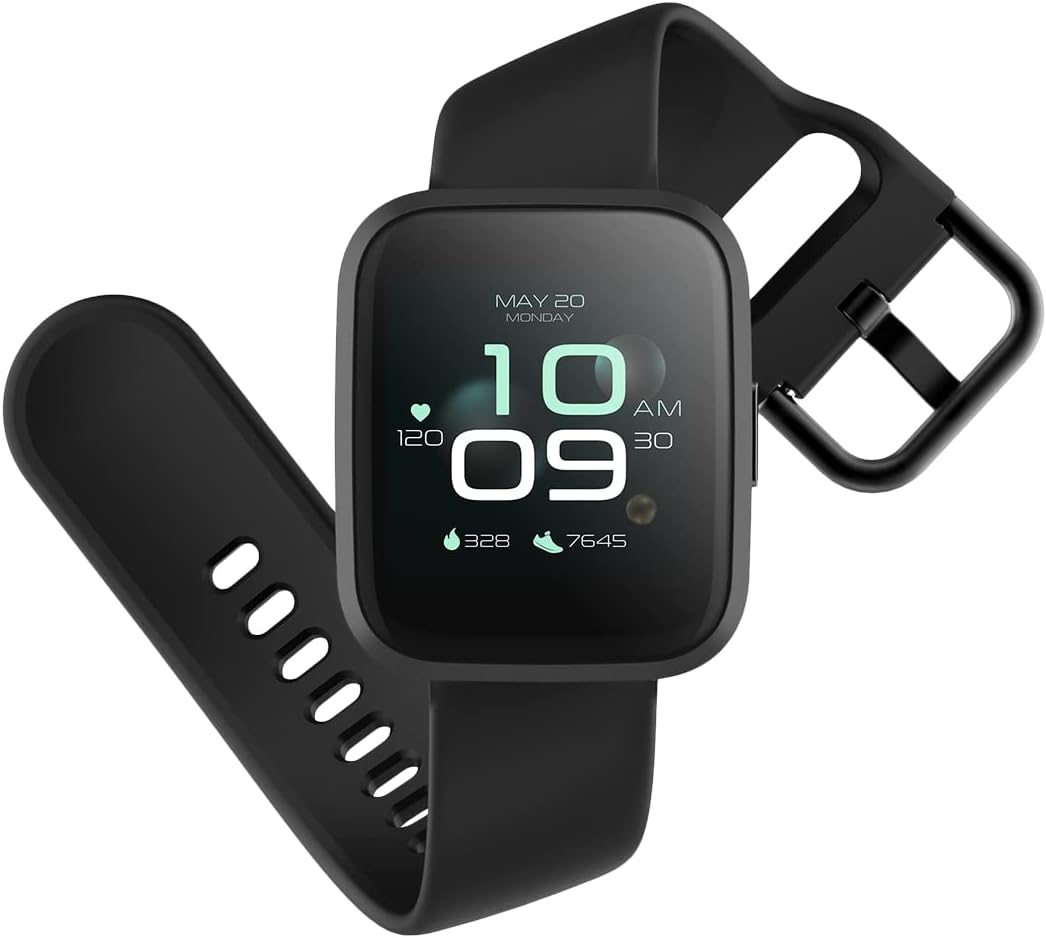
Image: The ForeVigo 2 SW-330 smartwatch with its main display showing the time, heart rate, and step count.
2. Kurulum
2.1. Akıllı Saati Şarj Etme
Before first use, fully charge your smartwatch. The device features a 180 mAh battery, providing up to 12 days of usage on a single charge. A quick charge function is available.
- Şarj kablosunu akıllı saatin arkasındaki şarj portuna bağlayın.
- Kablonun USB ucunu standart bir USB güç adaptörüne (dahil değildir) veya bir bilgisayarın USB portuna takın.
- Ekranda şarj göstergesi görüntülenecektir.
- Tam şarj için yaklaşık 2 saat bekleyin.

Image: The smartwatch screen showing a battery icon with a lightning bolt, indicating it is charging.
2.2. Açma/Kapama
- Açmak İçin: Ekran ışığı yanana kadar yan düğmeye basılı tutun.
- Kapatmak İçin: Navigate to the 'Settings' menu on the smartwatch, then select 'Power Off' or press and hold the side button and confirm power off.
2.3. Uygulama Kurulumu ve Eşleştirme
To unlock the full potential of your smartwatch, download the companion application on your smartphone. The ForeVigo 2 SW-330 is compatible with both Android and iOS devices.
- Arama the official 'Forever Smart' or 'ForeVigo' app in your smartphone's app store (Google Play Store for Android, Apple App Store for iOS).
- Uygulamayı yükleyin.
- Uygulamayı açın ve hesap oluşturmak veya giriş yapmak için ekrandaki talimatları izleyin.
- Akıllı telefonunuzda Bluetooth’u etkinleştirin.
- In the app, select 'Add Device' or 'Pair Smartwatch' and choose 'ForeVigo 2 SW-330' from the list of available devices.
- Eşleştirme isteğini hem akıllı telefonunuzdan hem de akıllı saatinizden onaylayın.
3. Akıllı Saatin Çalıştırılması
3.1. Gezinme
The ForeVigo 2 SW-330 features a 1.4-inch high-quality touchscreen for intuitive navigation. Swipe left, right, up, or down to access different functions and menus. Press the side button to return to the home screen or wake the device.

Image: The smartwatch screen showing a grid of application icons, including Goals, Heart rate, Sleep, and Messages.
3.2. Sports Functions
The smartwatch supports various sports modes to track your physical activity:
- Yüzme: Track your performance during water activities.
- Yürüme: Adım sayısını, kat edilen mesafeyi ve yakılan kalorileri takip edin.
- Koşma: Record your runs with detailed metrics.
- Doğa yürüyüşü: Track outdoor adventures.
- Bisikletçilik: Monitor your bike rides.
Access these modes through the 'Sports' menu on your smartwatch. The device includes a calorie counter, distance tracker, stopwatch, and pedometer.

Image: The smartwatch screen displaying a list of application icons, including Goals, Heart rate, Messages, and Sports.
3.3. Sağlık İzleme
- Uyku İzleme: The smartwatch monitors your sleep patterns, including light and deep sleep stagee. View Yardımcı uygulamada ayrıntılı raporlar bulunmaktadır.
- Kalp Atış Hızı Monitörü: The integrated heart rate sensor continuously tracks your heart rate. Access real-time data on the watch or historical data in the app.

Image: The smartwatch screen showing sleep tracking data, including light sleep, deep sleep, and total sleep time.
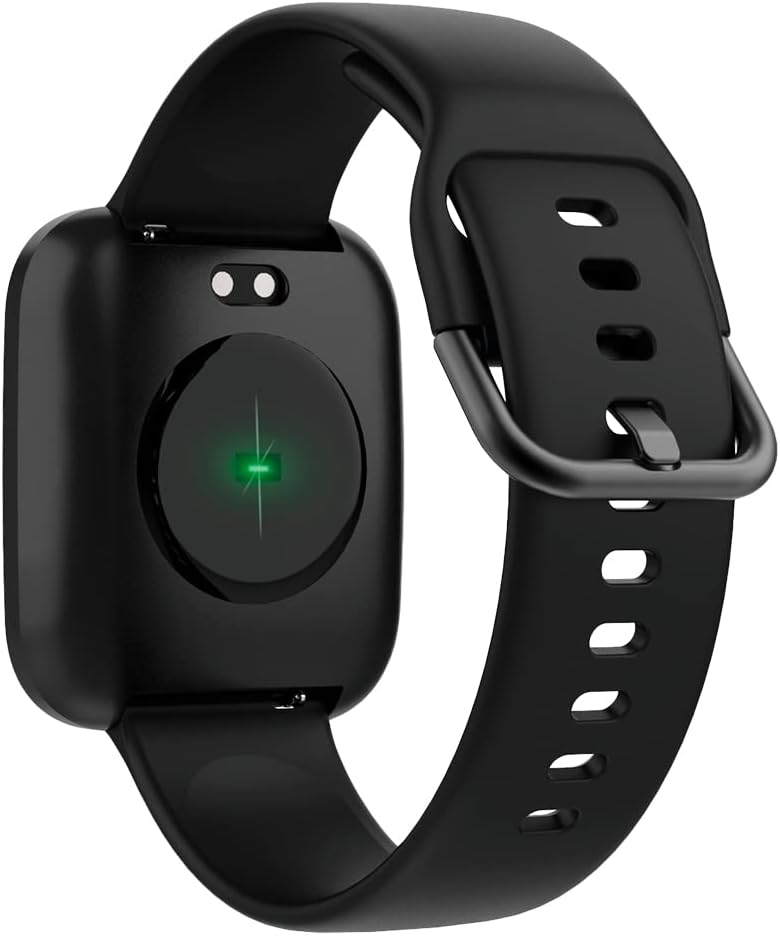
Image: The back of the smartwatch, highlighting the green light of the optical heart rate sensor.
3.4. Akıllı Özellikler
- Telefon Bildirimleri: Receive alerts for calls, messages, and app notifications directly on your wrist. Configure notification settings in the companion app.
- Müzik Kontrolü: Akıllı telefonunuzdaki müzik çalmayı (oynat, duraklat, parçaları atla) doğrudan akıllı saatinizden kontrol edin.
- Kamera Uzaktan Kumandası: Use your smartwatch as a remote shutter for your smartphone's camera.
- Daily Goals & Activity Reminders: Set daily activity goals and receive reminders to stay active throughout the day.
- Cihaz Bulucu: Use the app to locate your smartwatch if it's within Bluetooth range.
4. Bakım
4.1. Suya Dayanıklılık
The ForeVigo 2 SW-330 is waterproof according to the IP68 standard, meaning it can withstand total immersion in water. This allows for tracking swimming activities. However, it is not recommended for hot water activities (e.g., hot showers, saunas) as steam can damage the seals.
4.2. Temizlik ve Bakım
- Akıllı saatinizi ve kayışınızı düzenli olarak yumuşak bir bezle temizleyin.amp Kumaş.
- Sert kimyasallar veya aşındırıcı malzemeler kullanmaktan kaçının.
- Şarj etmeden önce şarj kontaklarının temiz ve kuru olduğundan emin olun.
4.3. Interchangeable Straps
The smartwatch features elegant and interchangeable straps made of silicone and metal. To change the strap, locate the quick-release pins on the underside of the strap and gently slide them to detach. Attach new straps by aligning the pins and sliding them into place.
5. Sorun Giderme
If you encounter issues with your ForeVigo 2 SW-330, try the following solutions:
- Akıllı saat açılmıyor: Cihazın tam şarjlı olduğundan emin olun. En az 30 dakika şarja takın.
- Akıllı telefonla eşleştirilemiyor:
- Akıllı telefonunuzda Bluetooth'un etkinleştirildiğinden emin olun.
- Akıllı saatinizin akıllı telefonunuzun menzilinde olduğundan emin olun.
- Hem akıllı saati hem de akıllı telefonunuzu yeniden başlatın.
- Yardımcı uygulamanın en son sürüme güncellenip güncellenmediğini kontrol edin.
- Yanlış sağlık verileri: Ensure the smartwatch is worn snugly on your wrist, but not too tight. Clean the heart rate sensor regularly.
- Bildirimler görünmüyor: Check notification settings in the companion app and your smartphone's system settings to ensure the app has necessary permissions.
- Ekran tepkisiz: Akıllı saati yeniden başlatmayı deneyin. Sorun devam ederse, ekranın temiz ve kuru olduğundan emin olun.
For further assistance, refer to the support section of the companion app or contact customer support.
6. Özellikler
| Özellik | Detay |
|---|---|
| Marka | SONSUZA KADAR |
| Model Numarası | SW-310 |
| Renk | Siyah |
| İşletim Sistemi Uyumluluğu | Android, iOS |
| Ekran Boyutu | 1.4 inç |
| Özel Özellikler | Lightweight, Stopwatch |
| Uyumlu Cihazlar | Akıllı telefon |
| Pil Kapasitesi | 180 mAh |
| Pil Ömrü | 12 güne kadar |
| Kablosuz İletişim | Bluetooth |
| Küresel Konumlama Sistemi | Entegre GPS |
| Suya Dayanıklılık | IP68 |
| Ağırlık | 34 gr |
| Boyutlar | 36x42x11 mm |
7. Garanti ve Destek
Your Forever Smartwatch ForeVigo 2 SW-330 comes with a manufacturer's warranty. Please refer to the warranty card included in your product packaging for specific terms and conditions. For technical support, product inquiries, or warranty claims, please contact your retailer or the official Forever customer service through their website or the companion application.
Garanti işlemleri için satın alma belgenizi saklayın.
Ask a question about this manual
Ask about setup, troubleshooting, compatibility, parts, safety, or missing instructions. Manuals+ will review the question and use this page’s manual context to help answer it.