
1. Ürün Bittiview
The TEKMAGIC W60-OUS-WT is a robust digital watch designed for various activities, including swimming, snorkeling, and scuba diving, with a water resistance rating of 10 ATM (up to 100 meters). It features a clear digital display and multiple functions to assist with daily timekeeping and sports activities.
Key features include precise time, date, and day display, a chronograph (stopwatch), countdown timer, dual time zone functionality, alarm clock, hourly chime, and an electro luminescent backlight for visibility in low light conditions. The watch is also shock resistant and comes with a comfortable TPU band.

Resim 1.1: Ön view of the TEKMAGIC W60-OUS-WT digital watch, showcasing its robust design and digital display with water splashes, indicating its water-resistant nature.
2. Düğme Fonksiyonları
Familiarize yourself with the watch buttons to operate its various functions:
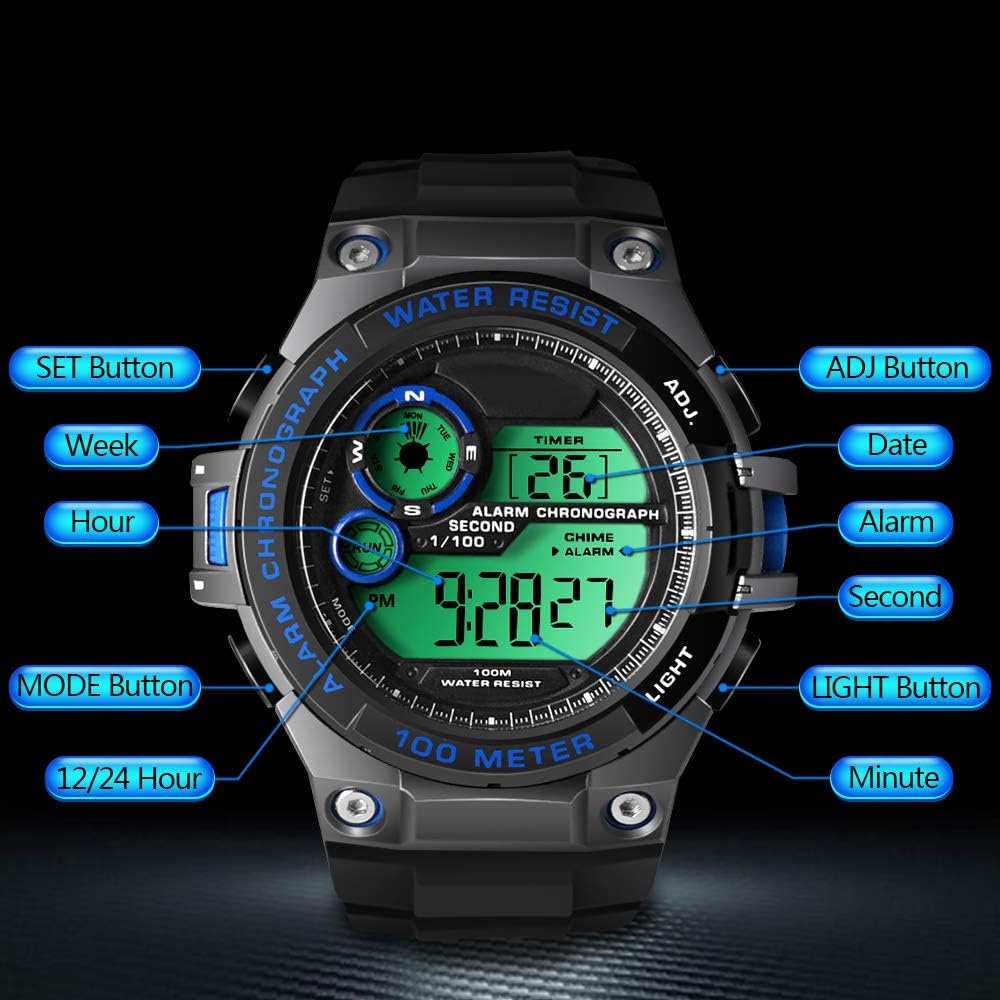
Image 2.1: Diagram illustrating the button layout and their respective functions on the TEKMAGIC W60-OUS-WT watch. Buttons include SET, MODE, 12/24 Hour, ADJ, Date, Alarm, Second, Light, and Minute.
- Ayarlama düğmesi: Ayar modlarına girmek ve seçimleri onaylamak için kullanılır.
- ADJ Düğmesi: Used to adjust values during setting modes.
- MOD Düğmesi: Cycles through different operational modes (Time, Chronograph, Countdown, Alarm, Dual Time).
- IŞIK Düğmesi: Activates the electro luminescent backlight.
- 12/24 Hour Button: 12 saatlik ve 24 saatlik zaman formatları arasında geçiş yapar.
3. İlk Kurulum
3.1 Saat ve Tarihin Ayarlanması
- Zaman Tutma Modunda, tuşuna basın ve basılı tutun AYARLAMAK Saniyeler yanıp sönmeye başlayana kadar düğmesine basın. Bu, ayar modunda olduğunuzu gösterir.
- Basın MOD button to cycle through the setting options: Seconds → Hours → Minutes → Year → Month → Day.
- Kullanın Sıfat button to increase the flashing value. For seconds, pressing Sıfat bunları 00'a sıfırlayacaktır.
- Tüm ayarlar yapıldıktan sonra, AYARLAMAK Ayar modundan çıkmak için tekrar tuşuna basın.
3.2 12/24 Saat Formatı
Zaman Tutma Modunda, tuşuna basın 12 / 24 Saat 12 saatlik (AM/PM göstergeli) ve 24 saatlik formatlar arasında geçiş yapmak için düğme.
4. İşletim Fonksiyonları
4.1 Zaman Tutma Modu
Bu varsayılan moddur ve geçerli saati (saat, dakika, saniye), tarihi ve haftanın gününü gösterir.
4.2 Kronograf (Kronometre) Modu
Kronometre fonksiyonunu kullanmak için:
- Basın MOD button repeatedly until 'CHRONO' or 'STW' appears on the display.
- Basın Sıfat Kronometreyi başlatmak için düğmeye basın.
- Basın Sıfat Duraklatmak/devam ettirmek için tekrar düğmeye basın.
- To reset the stopwatch, ensure it is paused, then press the AYARLAMAK düğme.

Image 4.1: The TEKMAGIC watch displaying the stopwatch function, with a runner in the background, illustrating its use for timing sports activities.
4.3 Geri Sayım Zamanlayıcı Modu
Geri sayım sayacını ayarlamak ve kullanmak için:
- Basın MOD button repeatedly until 'TIMER' or 'CD' appears.
- Basılı tutun AYARLAMAK Saatler yanıp sönmeye başlayana kadar düğmesine basın.
- Kullanın MOD saat, dakika veya saniyeyi seçmek için düğmeye basın ve Sıfat Değerleri ayarlamak için düğmesine basın.
- Basmak AYARLAMAK Geri sayım süresini onaylamak için.
- Basmak Sıfat Geri sayımı başlatmak veya duraklatmak için.
- Geri sayım sıfıra ulaştığında alarm çalacaktır.
4.4 Alarm Clock and Hourly Çan
Alarmı ayarlamak için:
- Basın MOD button repeatedly until 'ALARM' appears.
- Basılı tutun AYARLAMAK Saat haneleri yanıp sönene kadar düğmesine basın.
- Kullanın Sıfat Saati ayarlamak için düğmeye basın, ardından basın MOD to select minutes and use Sıfat to set them.
- Basmak AYARLAMAK alarm saatini onaylamak için.
- Basın Sıfat button in Alarm Mode to toggle the alarm ON/OFF. An alarm icon will appear when activated.
Ho'yu etkinleştirmek/devre dışı bırakmak içinurly zili, basın AYARLAMAK button in Alarm Mode. A chime icon will appear when activated.

Image 4.2: The TEKMAGIC watch displaying its alarm and calendar functions, with visual cues for waking up and checking dates.
4.5 Çift Zaman Dilimi
The watch allows you to set a second time zone:
- Basın MOD button repeatedly until 'DUAL TIME' or 'DT' appears.
- Basılı tutun AYARLAMAK Saat haneleri yanıp sönene kadar düğmesine basın.
- Kullanın Sıfat Saati ayarlamak için düğmeye basın, ardından basın MOD to select minutes and use Sıfat to set them.
- Basmak AYARLAMAK to confirm the dual time zone setting.
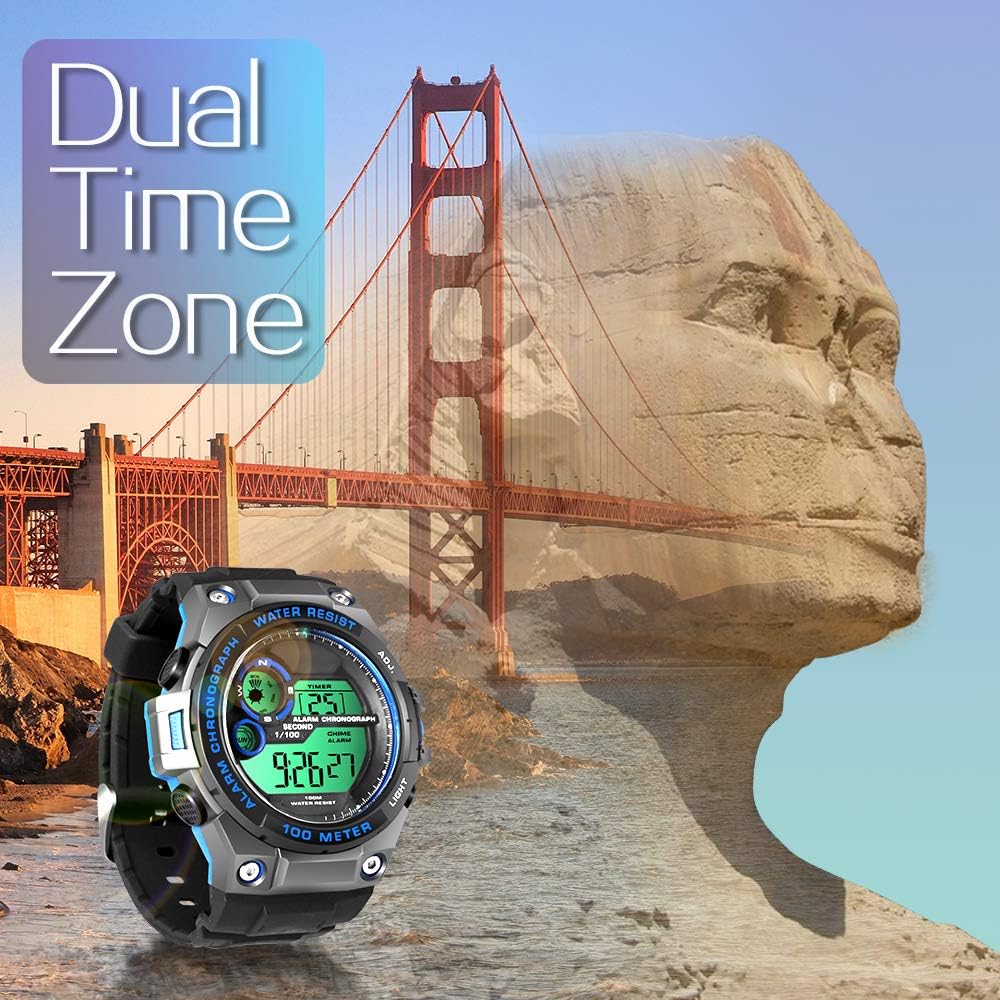
Image 4.3: The TEKMAGIC watch displaying its dual time zone feature, superimposed over an image of a bridge and a rock formation, suggesting travel and global timekeeping.
4.6 Arka Işık
Basın IŞIK button to illuminate the display for a few seconds, enhancing visibility in dark environments.

Image 4.4: The TEKMAGIC watch with its backlight activated, shown in a dimly lit setting, highlighting its visibility feature.
4.7 Water Resistance (100m / 10 ATM)
This watch is designed to withstand water pressure up to 100 meters (10 ATM), making it suitable for swimming, snorkeling, and recreational scuba diving. It is important to note the following:
- Düğmeleri su altında çalıştırmayın. Operating buttons while submerged can compromise the watch's water resistance.
- Saatinizi sıcak suya, buhara veya aşırı sıcaklık değişikliklerine maruz bırakmaktan kaçının; bu, contalara zarar verebilir.
- Rinse the watch with fresh water after exposure to saltwater to prevent corrosion.

Image 4.5: The TEKMAGIC watch displayed in an underwater scuba diving scene, emphasizing its suitability for deep-water activities.
Video 4.1: A demonstration of the TEKMAGIC watch being submerged in water, showcasing its water resistance capabilities. The watch remains functional and readable while wet.
5. Bakım
5.1 Temizlik
Saatinizi düzenli olarak yumuşak bir bezle silin.amp cloth. For stubborn dirt, use a mild soap solution and rinse thoroughly with fresh water. Ensure the watch is completely dry before storage.
5.2 Pil Değişimi
The watch uses a CR2025 battery, which typically lasts 1.5 to 2 years. When the display becomes dim or functions become erratic, it may be time to replace the battery. Battery replacement should ideally be performed by a qualified watch technician to ensure proper sealing and maintain water resistance.
5.3 Depolama
Store the watch in a cool, dry place away from direct sunlight and extreme temperatures. Avoid exposing it to strong magnetic fields.
6. Sorun Giderme
- Ekran boş veya loş: Check the battery. If the battery is low, replace it.
- Düğmeler tepkisiz: Ensure the watch is not in a locked mode (if applicable, though this model does not specify one). Try a soft reset by allowing the battery to drain completely and then replacing it, or consult a technician.
- Saatin içine su kaçmış: Daha fazla hasar görmesini önlemek için saati derhal bir profesyonele götürüp kontrol ettirin ve onarın. Kendiniz kurutmaya çalışmayın.
- Yanlış saat/tarih: Bölüm 3.1'de açıklandığı gibi saat ve tarih ayarlarını yeniden girin.
7. Özellikler

Image 7.1: Visual representation of the TEKMAGIC watch's dimensions, including case diameter (55mm), case thickness (18mm), band width (22mm), total length (258mm), and wrist circumference range (160mm-215mm).
| Özellik | Şartname |
|---|---|
| Model Numarası | W60-OUS-WT |
| Suya Dayanıklılık Derinliği | 100m (10 ATM) |
| Hareket | Dijital |
| Zaman Doğruluğu | Ayda ± 30 saniye |
| Pil Kodu | CR2025 |
| Çalışma Pil Ömrü | 1.5 ila 2 yıl |
| Kadran Pencere Malzemesi | High Transparency Resin |
| Saat Kasası Malzemesi | ABS Plastik |
| Kadran Rengi | Black + Gray + Blue |
| Kasa Çapı | 55 mm |
| Kasa Kalınlığı | 18 mm |
| Saat Kayışı Malzemesi | TPU Band |
| Bant Rengi | Siyah |
| Toka Tipi | Pin Tokası |
| Bant Genişliği | 22mm |
| Maximum Wrist Circumference | 215mm |
| Minimum Wrist Circumference | 160mm |
| Ürün Ağırlığı | 62 gr |
8. Garanti ve Destek
For warranty information, technical support, or service inquiries, please refer to the documentation included with your purchase or contact TEKMAGIC customer service directly. Keep your proof of purchase for warranty claims.