
Sharp OZJONG
SHARP Digital Alarm Clock with AccuSet
Model: OZJONG
giriiş
The SHARP Digital Alarm Clock with AccuSet is designed for effortless timekeeping. Featuring automatic time setting, a clear LED display, and user-friendly controls, this clock is ideal for any bedroom. Its AccuSet technology ensures the time is always accurate, eliminating the need for manual adjustments, making it perfect for seniors, children, or anyone seeking a hassle-free alarm clock solution.

Şekil 1: Ön view of the SHARP Digital Alarm Clock with green LED display.
Temel Özellikler
- AccuSet Automatic Time Set: The clock is pre-programmed to automatically set the correct time, removing the need for manual adjustments. Simply select your time zone.
- Quick Daylight Savings Time (DST) Adjustment: A convenient switch allows for easy adjustment for Daylight Savings Time (+1 hour) or Standard Time (-1 hour).
- High/Low Dimmer Control: Adjust the brightness of the LED display to your preference, ensuring comfortable viewgündüz veya gece.
- Pil Yedekleme: A pre-installed CR2032 button cell battery provides backup for time settings during power outages, ensuring continuous accuracy.
- Saat Dilimi Seçimi: Easily select your local time zone from the options provided at the bottom of the clock.

Figure 2: Diagram illustrating the key features and functionalities of the alarm clock.
Kurulum Kılavuzu
- Paketin açılması: Carefully remove the alarm clock from its packaging.
- Battery Installation (Pre-installed): The CR2032 button cell battery for backup is pre-installed in a screw-secured cabinet at the bottom of the clock. This battery is designed to last for several years. No immediate action is required for initial setup.
- Saat Dilimi Seçimi: Before plugging in the clock, locate the time zone selection switch at the bottom of the unit. Select your correct time zone (e.g., EST, CST, MST, PST). The default time zone is Eastern Standard Time.
- Güç Bağlantısı: Plug the clock into an approved electrical source. The AccuSet feature will automatically program the correct time based on your selected time zone.
- Daylight Savings Time (DST) Adjustment: If applicable, slide the DST switch at the bottom of the clock to "ON" to add one hour (+1 hr) for Daylight Savings Time. For Standard Time, slide the switch to "OFF" to subtract one hour (-1 hr).

Figure 3: Top panel controls for setting time, alarm, and adjusting display.
Kullanım Talimatları
Alarmı Ayarlama
- Basın ALARM button once. The alarm time will appear on the display.
- Alarm saati görüntülenirken, tuşuna basın. SAAT Alarm saatini ayarlamak için düğmesine basın.
- Basın DAKİKA Alarm dakikasını ayarlamak için düğmesine basın.
- Alarmı etkinleştirmek veya devre dışı bırakmak için tuşuna basın ALARM AÇIK / KAPALI button. An alarm indicator light (usually a small LED) will illuminate when the alarm is active.
- To return to the current time display, press the ZAMAN button or wait a few seconds for it to revert automatically.
Erteleme İşlevini Kullanma
Alarm çaldığında, büyük düğmeye basın. UYUKLAMA button located on the top of the clock. This will temporarily silence the alarm for a set period (typically 9 minutes), allowing for extra rest. The alarm will sound again after the snooze period ends.
Adjusting Display Brightness (Dimmer Control)
The clock features a High/Low dimmer control to adjust the display brightness. Locate the DIMMER HI/LO button on the top panel. Press this button to toggle between high and low brightness settings to suit your environment and preference.

Figure 4: Illustration of the High & Low Display Dimmer Control.
Bakım
- Temizlik: To clean the clock, use a soft, dry cloth. Do not use abrasive cleaners or solvents, as they may damage the finish.
- Pil Değişimi: The CR2032 backup battery is designed for long-term use. If the clock loses time during a power outage after several years, it may be time to replace the battery. This is located in a screw-secured compartment at the bottom of the clock.
- Atama: Place the clock on a stable, flat surface. Avoid placing it in direct sunlight, near heat sources, or in areas with high humidity.
Sorun giderme
| Sorun | Olası Neden | Çözüm |
|---|---|---|
| Clock does not display time after plugging in. | Not connected to power, or power outlet is not active. | Güç kablosunun çalışan bir elektrik prizine güvenli bir şekilde takıldığından emin olun. |
| Zaman yanlış. | Incorrect time zone selected, or DST switch is set incorrectly. | Verify the time zone switch at the bottom of the clock is set to your local zone. Check the DST switch position. |
| Alarm çalmıyor. | Alarm is not activated, or alarm volume is too low (if adjustable). | Ensure the alarm is turned ON using the ALARM ON/OFF button. Check for an alarm indicator light. |
| Ekran çok parlak veya çok loş. | Dimmer ayarının yapılması gerekiyor. | Press the DIMMER HI/LO button to cycle through brightness settings. |
| Saat, elektrik kesintisi sırasında zaman kaybediyor.tage. | Backup battery is depleted. | Replace the CR2032 backup battery located in the compartment at the bottom of the clock. |
Özellikler
| Özellik | Detay |
|---|---|
| Marka | Keskin |
| Model Numarası | OZJONG |
| Renk | Black - Green Led |
| Görüntü Türü | Dijital |
| Özel Özellikler | Alarm, Daylight Saving, Auto Dimmable |
| Ürün Boyutları | 5.5"G x 2.6"Y |
| Güç Kaynağı | Kablolu Elektrik, Akülü |
| Yedek Pil | CR2032 (önceden takılı) |
| Malzeme | Plastik |
| Ürün Ağırlığı | 9.9 ons |
| Montaj Tipi | Masaüstü |
| UPC | 049353006079 |
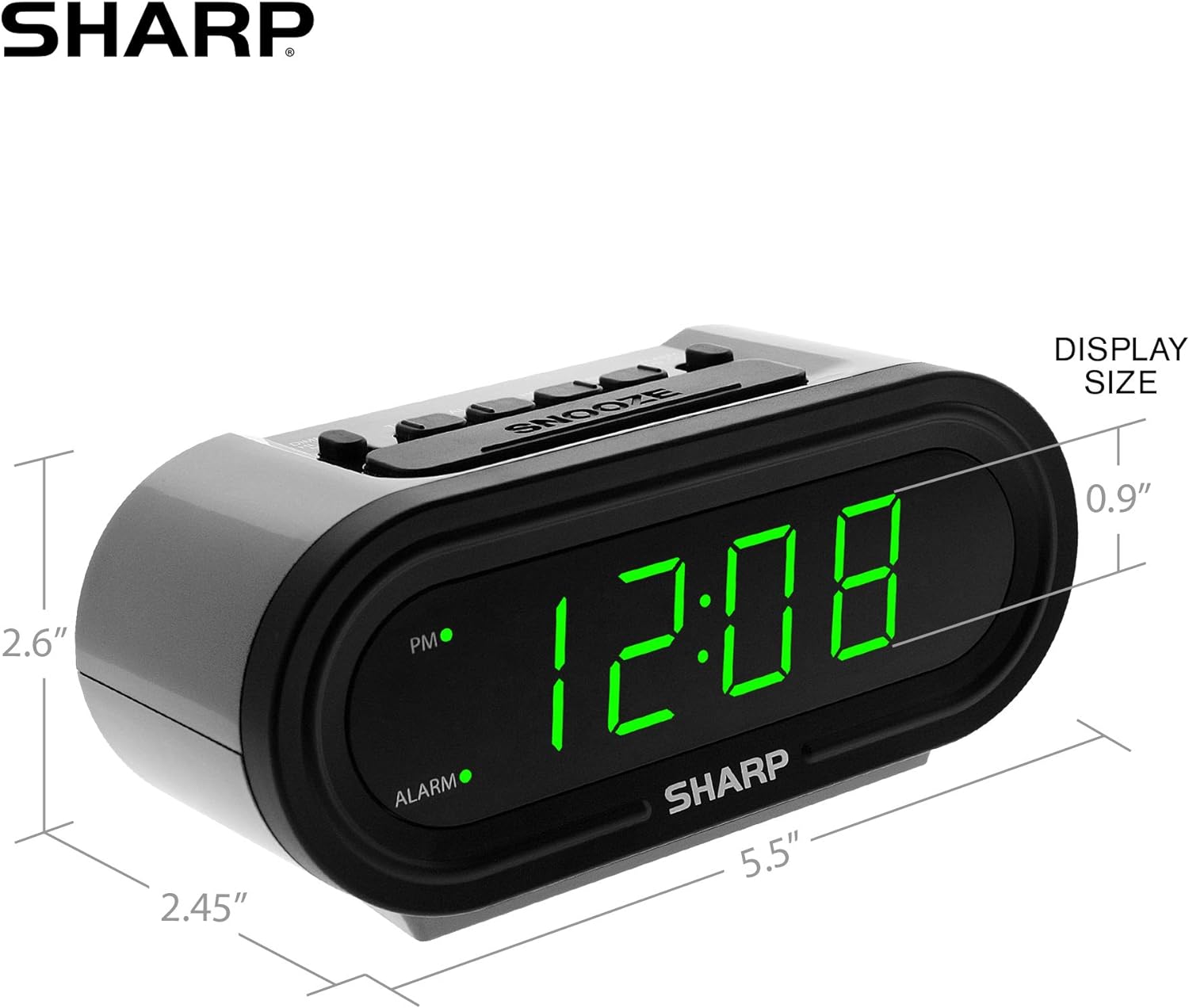
Figure 5: Product dimensions for easy reference.
Garanti ve Destek
For warranty information or technical support, please refer to the contact details provided in your product packaging or visit the official Sharp webalan. Garanti talepleri için satın alma makbuzunuzu saklayın.
İlgili Belgeler - OZJONG
 |
Sharp SPC960 Atom Saati Kullanım Kılavuzu ve Garanti Bilgileri Sharp SPC960 radyo kontrollü atom saati için kurulum, çalıştırma, sinyal alımı, manuel zaman ayarı, pil değişimi, bakım, müşteri hizmetleri ve garanti detaylarını kapsayan kapsamlı kılavuz. |
 |
Sharp SPC876 Atomik Duvar Saati Kullanım Kılavuzu ve Kurulum Rehberi Sharp SPC876 Atomik Duvar Saati'nin kurulumu ve çalıştırılmasına ilişkin kapsamlı kılavuz; özellikler, saat dilimi ayarları, sinyal alımı ve sorun giderme konularını içermektedir. |
 |
Sharp SPC276 Bluetooth ve Uyku Sesleri Özellikli Dijital Alarm Saati: Kullanım Kılavuzu Sharp SPC276 Dijital Alarm Saati'nin özellikleri, kurulumu, alarm fonksiyonları, Bluetooth bağlantısı, uyku sesleri ve güvenlik önlemlerini kapsayan kapsamlı kullanım kılavuzu. |
 |
SHARP DL-EL81N-W LED Floodlight (Narrow Beam) - Technical Specifications Detailed technical specifications for the SHARP DL-EL81N-W LED floodlight, featuring narrow beam distribution. Includes dimensions, power consumption, luminous flux, energy efficiency, color temperature, CRI, weight, and IP rating. |
 |
Burke County Kamu Okulları Sharp ile Baskı Ortamını Optimize Ediyor Burke County Kamu Okullarının, gelişmiş çok işlevli yazıcılar ve entegre baskı yönetimi aracılığıyla baskı altyapısını modernize ederek önemli maliyet tasarrufları, gelişmiş belge güvenliği ve gelişmiş operasyonel verimlilik elde etmek için Sharp ile nasıl ortaklık kurduğunu öğrenin. |
 |
Sharp Appliance Savings Event: Save Up to $400 on Select Models Explore the Sharp Appliance Savings Event offering up to $400 in discounts on qualifying Sharp refrigerators, dishwashers, cooking ranges, and microwaves. Event runs September 11, 2025, to March 31, 2026. View the full list of eligible SKUs and models. |
Ask a question about this manual
Ask about setup, troubleshooting, compatibility, parts, safety, or missing instructions. Manuals+ will review the question and use this page’s manual context to help answer it.