
giriiş
This manual provides detailed instructions for the safe and efficient use of your XO B26 Bluetooth 4.2 Wireless Earbud. Please read this manual thoroughly before using the product and retain it for future reference.
Ürün Bittiview
The XO B26 is a single Bluetooth 4.2 wireless earbud designed for mobile phones, offering ease of use and portability. It is crafted from high-quality materials to ensure durability and a secure fit.
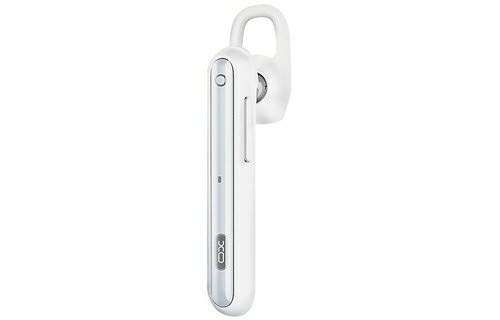
Image: The XO B26 Bluetooth Wireless Earbud, shown in white with a silver accent, featuring its ergonomic design and ear hook.
Temel Özellikler:
- Bluetooth 4.2 connectivity for stable wireless connection.
- Kolay taşınabilirlik için kompakt ve hafif tasarım.
- Güvenli ve rahat bir kullanım için ergonomik olarak tasarlanmıştır.
- Touch control method for intuitive operation.
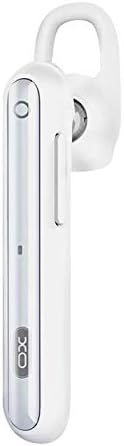
Resim: Yakın çekim view of the XO B26 earbud, highlighting the control button and sleek design.
Kurmak
1. Charging the Earbud
- Connect the charging cable (not included) to the earbud's charging port.
- Kablonun diğer ucunu uyumlu bir USB güç kaynağına takın.
- Gösterge ışığı şarj durumunu gösterecektir. Tam şarj yaklaşık 2 saat sürer.
- Once fully charged, disconnect the earbud from the power source.
2. Bir Cihazla Eşleştirme
- Ensure the earbud is fully charged and turned off.
- Press and hold the multi-function button on the earbud until the indicator light flashes red and blue alternately, indicating it is in pairing mode.
- On your mobile phone or compatible device, enable Bluetooth and search for available devices.
- Select "XO B26" from the list of found devices.
- Once paired, the indicator light will flash blue slowly, and you may hear a confirmation tone.
- Şifre sorulursa "0000" girin.
Kullanım Talimatları
Güç Açık/Kapalı
- Güç Açık: Mavi gösterge ışığı yanıp sönene kadar çok fonksiyonlu düğmeyi yaklaşık 3 saniye basılı tutun.
- Kapat: Çok fonksiyonlu düğmeye yaklaşık 5 saniye basılı tutun; kırmızı gösterge ışığı yanıp sönecek ve ardından sönecektir.
Making and Receiving Calls (Touch Control)
- Cevap Çağrısı: Briefly tap the multi-function button when an incoming call rings.
- Çağrı Sonu: Briefly tap the multi-function button during a call.
- Çağrıyı Reddet: Gelen arama sırasında çok fonksiyonlu düğmeye yaklaşık 2 saniye basılı tutun.
- Son Numarayı Tekrar Ara: Double-tap the multi-function button when not on a call.
Music Playback (Touch Control)
- Oynat/Duraklat: Briefly tap the multi-function button to play or pause music.
- Sonraki Parça: Press and hold the multi-function button for approximately 2 seconds to skip to the next track.
- Ses Kontrolü: Volume is typically controlled via the connected device.
Bakım
Temizlik
- Wipe the earbud with a soft, dry, lint-free cloth.
- Aşındırıcı temizleyiciler, çözücüler veya sprey temizleyiciler kullanmayın.
- Şarj portunu toz ve kalıntılardan uzak tutun.
Depolamak
- Store the earbud in a cool, dry place away from direct sunlight and extreme temperatures.
- Avoid storing near magnetic fields.
Pil Bakımı
- Charge the earbud regularly, even if not in use, to maintain battery health.
- Pilin sık sık tamamen boşaltılmasından kaçının.
Sorun giderme
| Sorun | Olası Çözüm |
|---|---|
| Earbud does not power on. | Ensure the earbud is fully charged. Press and hold the multi-function button for a longer duration. |
| Cihazla eşleştirilemiyor. | Make sure the earbud is in pairing mode (flashing red and blue). Turn off and on Bluetooth on your device. Move the earbud closer to your device. |
| No sound during music or calls. | Check the volume level on both the earbud and your connected device. Ensure the earbud is properly paired and connected. |
| Kötü ses kalitesi. | Ensure there are no obstructions between the earbud and your device. Move closer to your device. Check for interference from other wireless devices. |
| Earbud not charging. | Verify the charging cable is securely connected. Try a different USB power source or cable. Ensure the charging port is clean. |
Özellikler
| Özellik | Detay |
|---|---|
| Marka | XO |
| Model Adı | B26 |
| Renk | Beyaz |
| Bluetooth Sürümü | 4.2 |
| Kablosuz İletişim Teknolojisi | Kablosuz |
| Uyumlu Cihazlar | Multiple (Mobile Phones) |
| Kontrol Yöntemi | Dokunmak |
| Konuşma Zamanı | Yaklaşık 3 saat |
| Müzik Zamanı | Yaklaşık 3 saat |
| Şarj Süresi | Yaklaşık 2 saat |
| Dahil Bileşenler | Kulak Yastıkları |
| Ürün Ağırlığı | 106 gram |
| Nakliye Boyutları | 17.8x3.4x0.8 cm |
| ASIN | B08WT1RK59 |
Güvenlik Bilgileri
Ürüne zarar gelmemesi veya kendinizin yaralanmaması için lütfen aşağıdaki güvenlik yönergelerine uyun:
- Do not disassemble, repair, or modify the earbud.
- Keep the earbud away from water, moisture, and extreme temperatures.
- İşitme hasarını önlemek için yüksek ses seviyelerine uzun süre maruz kalmaktan kaçının.
- Çocukların ve evcil hayvanların erişemeyeceği yerde saklayınız.
- Use only compatible charging accessories.
Garanti ve Destek
Garanti bilgileri veya teknik destek için lütfen satın alma sırasında verilen belgelere bakın veya satıcınızla iletişime geçin. Garanti talepleri için satın alma belgenizi saklayın.