
Bytech BY-AU-BS-152-BK
Bytech True Wireless Bluetooth Boost Link True Speaker User Manual
Model: BY-AU-BS-152-BK
giriiş
Satın aldığınız için teşekkür ederizasing the Bytech True Wireless Bluetooth Boost Link True Speaker. This manual provides essential information for setting up, operating, and maintaining your new speakers. Please read this manual thoroughly before use to ensure proper operation and to maximize your listening experience. These speakers feature True Wireless Stereo (TWS) functionality, Bluetooth connectivity, FM Radio, and Bass Boost for rich audio.
Güvenlik Bilgileri
- Hoparlörleri aşırı sıcaklıklara, neme veya doğrudan güneş ışığına maruz bırakmayın.
- Hoparlörleri düşürmekten veya şiddetli darbelere maruz bırakmaktan kaçının.
- Do not disassemble, repair, or modify the speakers yourself. Refer all servicing to qualified personnel.
- Hoparlörleri sudan ve diğer sıvılardan uzak tutun.
- Yalnızca belirtilen şarj kablosunu ve güç adaptörünü kullanın.
- Hoparlörleri yumuşak, kuru bir bezle temizleyin. Aşındırıcı temizleyiciler veya çözücüler kullanmayın.
- Listen at moderate volume levels to avoid hearing damage.
Paket İçeriği

Image: The Bytech Boost Link True Wireless Speakers shown in their retail packaging, highlighting the two speakers and the Bluetooth connectivity feature.
Lütfen tüm ürünlerin mevcut ve iyi durumda olduğundan emin olun:
- 2 x Bytech Boost Link True Wireless Speakers
- 1 x Şarj Kablosu (USB)
- 1 x Kullanım Kılavuzu (bu belge)
Ürün Bittiview

Resim: Yakın çekim ön görünüm view of the two Bytech Boost Link True Wireless Speakers, showing the speaker grilles and control buttons at the bottom.
Hoparlörün bileşenlerini ve kontrollerini iyice öğrenin:
- Hoparlör Izgarası: Protects the speaker driver.
- Kontrol Düğmeleri:
- Güç Düğmesi: Power On/Off, Play/Pause.
- Mod Düğmesi: Switch between Bluetooth, FM Radio, etc.
- Önceki Parça/Sesi Azaltma Düğmesi: Önceki parçaya dönmek için kısa basın, sesi kısmak için uzun basın.
- Sonraki Parça/Sesi Açma Düğmesi: Sonraki parçaya geçmek için kısa basın, sesi açmak için uzun basın.
- Şarj Portu: USB şarj kablosunu bağlamak için.
- LED Göstergesi: Shows power status, charging status, and pairing status.
Kurmak
Hoparlörleri Şarj Etme
Before first use, fully charge both speakers. Connect the supplied USB charging cable to the charging port on each speaker and plug the other end into a USB power adapter (not included) or a computer's USB port. The LED indicator will show charging status and turn off or change color when fully charged.
Açma/Kapatma
- Açmak İçin: Press and hold the Power button on each speaker until the LED indicator lights up and you hear a power-on prompt.
- Kapatmak İçin: Press and hold the Power button on each speaker until the LED indicator turns off and you hear a power-off prompt.
Kullanım Talimatları
Bluetooth Pairing (Single Speaker Mode)
- Hoparlörün açık olduğundan ve Bluetooth eşleştirme modunda olduğundan emin olun (LED göstergesi yanıp sönecektir).
- Cihazınızda (akıllı telefon, tablet, dizüstü bilgisayar) Bluetooth'u etkinleştirin ve kullanılabilir cihazları arayın.
- Select "BYTECH BOOST LINK" (or similar name) from the list.
- Eşleştirme işlemi tamamlandığında, LED göstergesi yanıp sönmeyi bırakacak ve sabit kalacaktır; ayrıca bir onay sesi duyacaksınız.
True Wireless Stereo (TWS) Pairing (Two Speakers)
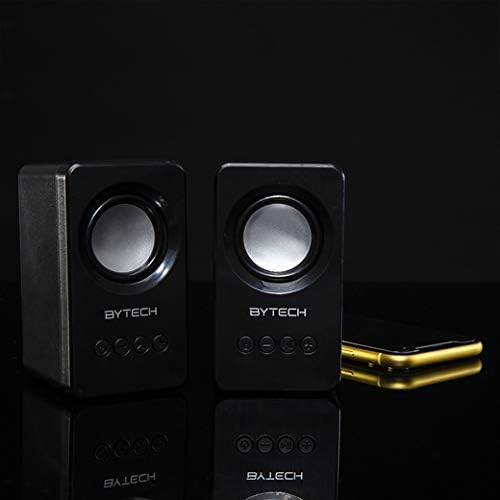
Image: The two Bytech Boost Link True Wireless Speakers positioned next to a smartphone, symbolizing their ability to connect wirelessly to each other and a device for stereo sound.
For a true stereo sound experience, you can pair both speakers together:
- Power on both Bytech Boost Link speakers. Do not connect them to your Bluetooth device yet.
- The speakers will automatically attempt to pair with each other. You will hear a confirmation sound when they are successfully linked for TWS. One speaker will become the master (left channel) and the other the slave (right channel).
- Once TWS paired, the master speaker will enter Bluetooth pairing mode (LED flashing).
- On your device, enable Bluetooth and search for "BYTECH BOOST LINK". Connect to this single entry.
- Artık her iki hoparlör de stereo ses verecek.
- Not: If the speakers do not automatically pair, try double-pressing the Mode button on one of the speakers to initiate TWS pairing.
FM Radyo İşlemi
- Power on the speaker(s).
- Basın Mod FM radyo uyarısını duyana kadar düğmeye art arda basın.
- İstasyonları otomatik olarak taramak ve kaydetmek için, tuşuna basılı tutun. Oynat/Duraklat button. The speaker will scan and store available FM stations.
- Kullanın Önceki Parça Ve Sonraki Parça Kaydedilen istasyonlar arasında gezinmek için düğmeler.
Ses Çalma ve Ses Seviyesi Kontrolü
- Oynat/Duraklat: Güç düğmesine kısa basın.
- Sonraki Parça: Sonraki Parça/Ses Açma düğmesine kısa süre basın.
- Önceki parça: Önceki Parça/Ses Kısma düğmesine kısa süre basın.
- Sesi aç: Sonraki Parça/Ses Açma düğmesine uzun süre basın.
- Sesi kıs: Önceki Parça/Ses Kısma düğmesine uzun süre basın.
Bakım
- Temizlik: Use a soft, dry, lint-free cloth to clean the surface of the speakers. Do not use liquid cleaners, aerosols, or solvents.
- Depolamak: Uzun süre kullanılmadığı zamanlarda hoparlörleri serin, kuru ve doğrudan güneş ışığından ve aşırı sıcaklıklardan uzak bir yerde saklayın.
- Pil Bakım: To prolong battery life, avoid fully discharging the battery frequently. Charge the speakers regularly, even if not in use.
Sorun giderme
| Sorun | Olası Neden | Çözüm |
|---|---|---|
| Hoparlör açılmıyor. | Pil zayıf. | Hoparlörü tam olarak şarj edin. |
| Bluetooth üzerinden eşleştirme yapılamıyor. | Hoparlör eşleştirme modunda değil; Cihazın Bluetooth'u kapalı; Cihazdan çok uzakta. | Ensure speaker LED is flashing; Turn on Bluetooth on your device; Move speaker closer to device (within 10 meters). |
| Ses yok. | Volume too low; Speaker not connected; Incorrect mode. | Increase volume on speaker and device; Re-pair Bluetooth; Ensure correct mode (Bluetooth/FM). |
| TWS eşleştirmesi başarısız. | Hoparlörler zaten bir cihaza bağlı; Hoparlörler birbirinden çok uzakta. | Disconnect speakers from any device; Power off and on both speakers, then try TWS pairing again; Ensure speakers are close to each other. |
| FM radyo alımı zayıf. | Zayıf sinyal; Girişim. | Relocate the speaker to an area with better reception; Extend the charging cable (can act as an antenna). |
Özellikler
- Modeli: TARAFINDAN-AU-BS-152-BK
- Marka: Baytek
- Bağlantı Teknolojisi: Kablosuz (Bluetooth)
- Ses Çıkış Modu: Çevrelemek
- Hoparlör Tipi: Çevresel Ses
- Özel Özellikler: Wireless Bluetooth, Bass Boost, FM Radio, True Wireless Stereo (TWS)
- Önerilen Kullanımlar: Müzik Çalarlar için
- Uyumlu Cihazlar: Dizüstü Bilgisayar, Tablet, Akıllı Telefon
- Denetleyici Tipi: Cihaz üzerindeki düğmeler
- Paket Boyutları: 20.7x16x9 cm
- Ağırlık: 560 gr
Garanti ve Destek
Bytech products are designed and manufactured to the highest quality standards. For information regarding warranty coverage, technical support, or service inquiries, please refer to the warranty card included with your purchase or visit the official Bytech webLütfen garanti talepleriniz için satın alma belgenizi saklayın.
For further assistance, please contact Bytech customer support.
Ask a question about this manual
Ask about setup, troubleshooting, compatibility, parts, safety, or missing instructions. Manuals+ will review the question and use this page’s manual context to help answer it.