
1. Giriş
Satın aldığınız için teşekkür ederizasing the QFX E-B3 Bluetooth Professional High-Power Speaker. This manual provides essential information for the safe and efficient operation of your speaker. Please read it thoroughly before use and retain it for future reference.
The QFX E-B3 is designed to deliver powerful audio with features including Bluetooth connectivity, FM radio, USB/SD card playback, LED party lights, and a 250W power amplifier. It also supports True Wireless System (TWS) for stereo pairing with another compatible speaker.
2. Güvenlik Bilgileri
- Güç Kaynağı: Hoparlörü yalnızca cihaz üzerinde belirtilen güç kaynağına bağlayın.
- Havalandırma: Hoparlörün etrafında yeterli havalandırma olduğundan emin olun. Havalandırma açıklıklarını hiçbir şekilde kapatmayın.
- Su ve Nem: This speaker is not waterproof. Do not expose it to rain, moisture, or any liquids to prevent electric shock or fire.
- Sıcaklık: Keep the speaker away from heat sources such as radiators, heat registers, stoves, or other apparatus that produce heat.
- Temizlik: Unplug the speaker from the power outlet before cleaning. Use a dry cloth for cleaning. Do not use liquid cleaners or aerosol cleaners.
- Servis: Bu ürüne kendiniz servis vermeye çalışmayın. Tüm servis işlemleri için kalifiye servis personeline başvurun.
- Atama: Hoparlörü düşmesini önlemek için sağlam, düz bir yüzeye yerleştirin.
3. Paket İçeriği
Paketin içinde tüm öğelerin mevcut olduğundan emin olun:
- QFX E-B3 High-Power Speaker
- Mikrofon
- Uzaktan kumanda
- AC Güç Kablosu
- Kullanım Kılavuzu (bu belge)
4. Ürün Bittiview
The QFX E-B3 speaker features dual 15-inch woofers and a 1-inch tweeter, protected by a metal grill. It includes integrated handles and wheels for portability.

Şekil 4.1: Ön view of the QFX E-B3 Speaker.
Rear Panel Controls and Ports
The rear panel houses all input/output connections and control knobs.
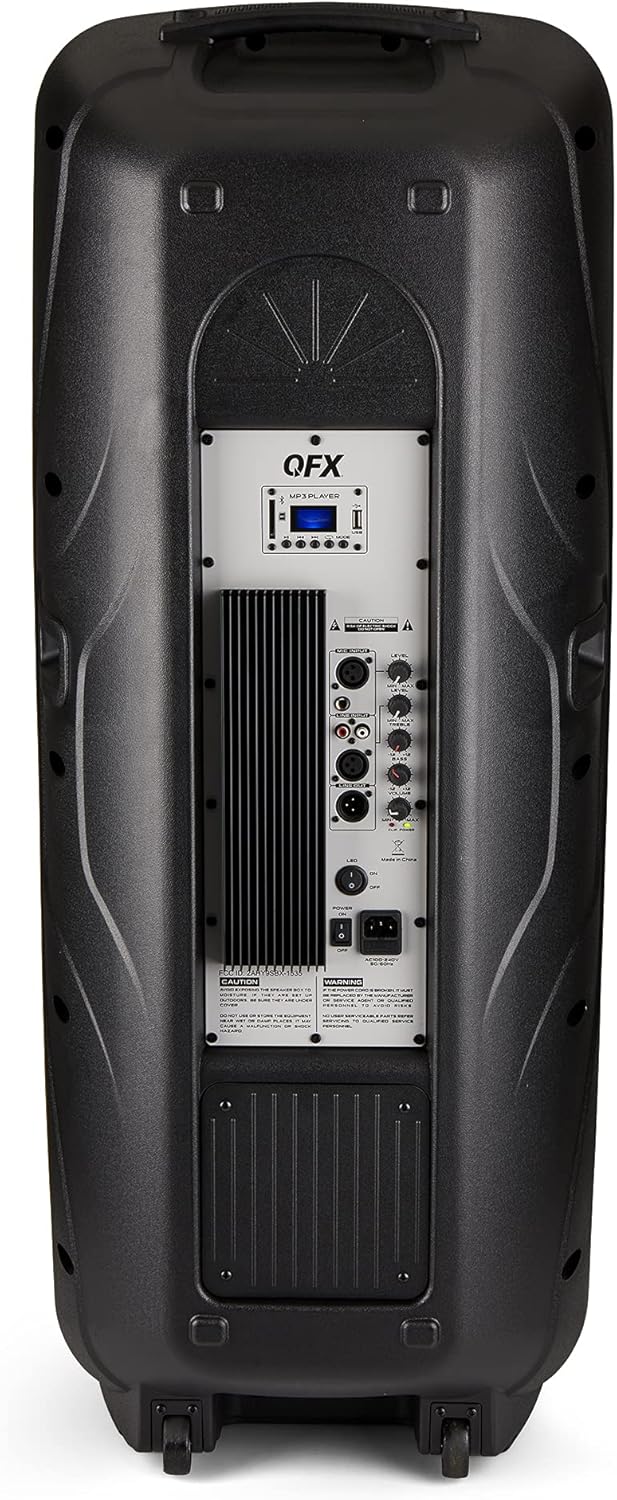
Figure 4.2: Rear panel with controls and ports.
- Güç düğmesi: Hoparlörü AÇAR/KAPATIR.
- AC Girişi: Connects the AC power cable.
- USB/SD Card Ports: Ses oynatmak için fileUSB sürücülerden veya SD kartlardan.
- Ekran Görüntüsü: Mevcut modu ve parça bilgilerini gösterir.
- Mod Düğmesi: Switches between input modes (Bluetooth, FM, USB, SD, RCA).
- Oynat/Duraklat Düğmesi: Controls playback for USB/SD/Bluetooth.
- Önceki/Sonraki Parça Düğmeleri: Navigates tracks or FM stations.
- Ana Ses Düğmesi: Genel ses seviyesini ayarlar.
- Bass/Treble Control Knobs: Adjusts low and high frequencies.
- XLR Mikrofon Girişi: Connects a wired microphone.
- Microphone Volume/Echo Knobs: Adjusts microphone volume and echo effect.
- RCA Girişi (L/R): Connects external audio devices via RCA cables.
- XLR Line Input/Output: For connecting to other audio equipment.
5. Kurulum
İlk Yerleştirme
Place the speaker on a stable, flat surface. For optimal sound, position it in a central location within the listening area. The integrated wheels and handle allow for easy transport.

Figure 5.1: Speaker being moved with handle and wheels.
Güç Bağlantısı
- Hoparlörün güç düğmesinin KAPALI konumda olduğundan emin olun.
- Connect the AC power cable to the AC input on the rear panel of the speaker.
- AC güç kablosunun diğer ucunu standart bir duvar prizine takın.
- Flip the power switch to the ON position. The display screen will illuminate.
6. Kullanım Talimatları
Bluetooth Eşleştirme
- Turn on the QFX E-B3 speaker.
- Basın MOD button on the speaker or remote control until "BLUE" appears on the display screen, indicating Bluetooth mode.
- Mobil cihazınızda (akıllı telefon, tablet vb.) Bluetooth'u etkinleştirin.
- Arama available Bluetooth devices and select "QFX E-B3" from the list.
- Once paired, the speaker will emit a confirmation sound. You can now play audio from your device through the speaker.
True Wireless System (TWS) Pairing
TWS allows two QFX E-B3 speakers to connect wirelessly for a stereo sound experience. This feature works only in Bluetooth mode.
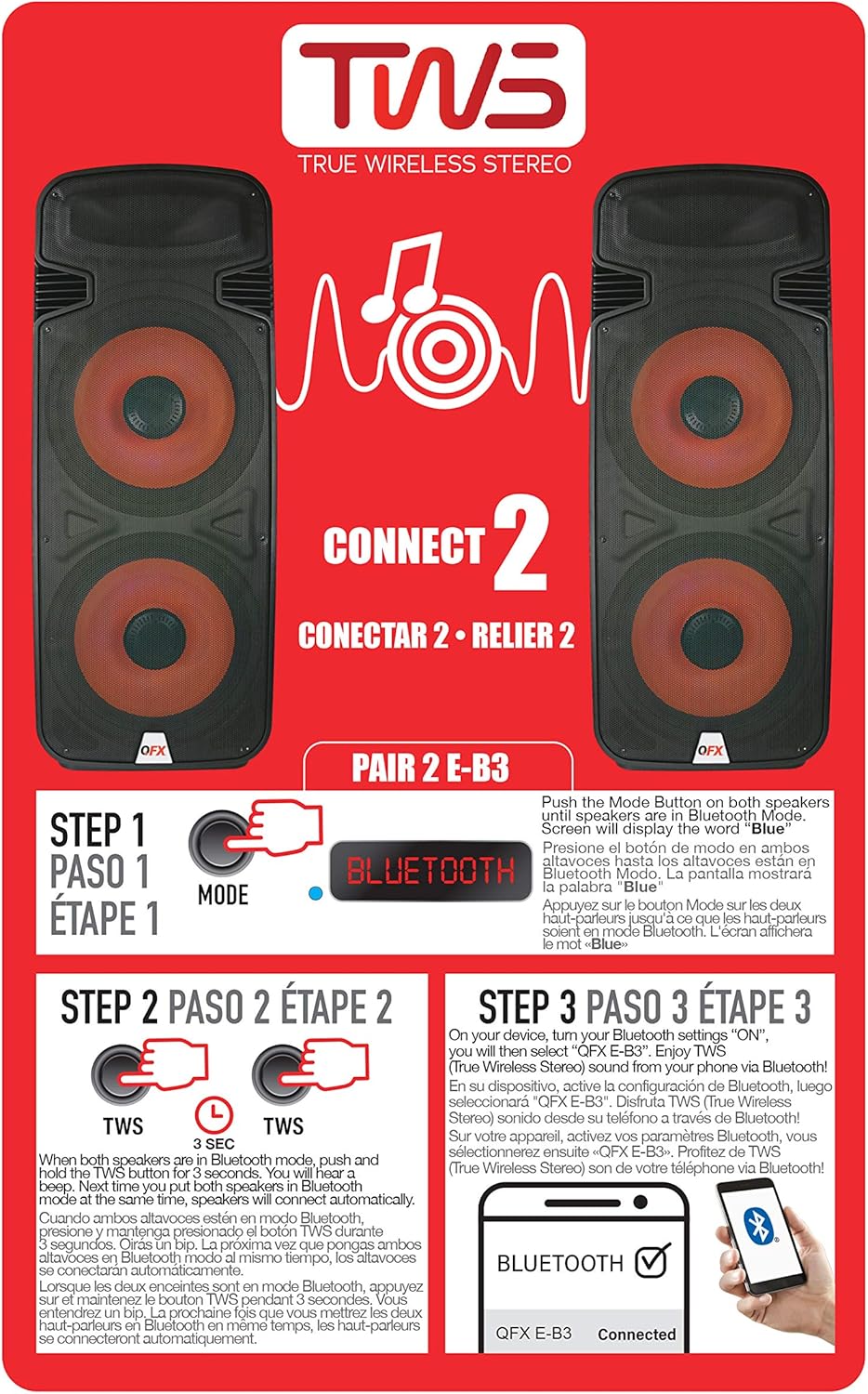
Figure 6.1: TWS Pairing Instructions.
- Ensure both QFX E-B3 speakers are powered on and in Bluetooth mode. The display on both speakers should show "BLUE".
- Hoparlörlerden birinde (bu sizin ana hoparlörünüz olacak), aşağıdaki düğmeye basılı tutun. TWS button for approximately 3 seconds. The speakers will attempt to connect to each other.
- Once successfully paired, you will hear a confirmation sound, and the display on the primary speaker will show "BLUE" while the secondary speaker will show "BLUE" as well.
- On your Bluetooth-enabled device, search for and select "QFX E-B3". The two speakers will now play audio in stereo.
FM Radyo İşlemi
- Basın MOD button to switch to FM radio mode. The display will show the FM frequency.
- Basılı tutun Oynat/Duraklat button to initiate an automatic scan for FM stations. The speaker will save all found stations.
- Kullanın Önceki/Sonraki Parça buttons to navigate through the saved FM stations.
USB/SD Kart Oynatma
- Insert a USB flash drive or SD card (with compatible audio files) arka paneldeki ilgili porta takın.
- The speaker will automatically switch to USB/SD mode and begin playing the audio fileEğer değilse, s'ye basın. MOD USB veya SD modunu seçmek için düğme.
- Kullanın Oynat/Duraklat Ve Önceki/Sonraki Parça oynatmayı kontrol etmek için düğmeler.
Mikrofon Girişi
- Connect a microphone to the XLR Microphone Input on the rear panel.
- Adjust the Microphone Volume and Echo knobs to achieve the desired sound.
RCA Girişi
- Connect an external audio source (e.g., CD player, mixer) to the RCA Input (L/R) ports using appropriate RCA cables.
- Basın MOD button to select RCA input mode.
- Adjust the master volume on the speaker and the volume on your external audio source.
LED Parti Işıkları
The speaker features integrated LED party lights that activate automatically when the speaker is powered on. There are no specific controls for the LED lights mentioned; they are designed to enhance the audio experience.
7. Bakım
Temizlik
- Temizlemeden önce hoparlörün fişini mutlaka çekin.
- Hoparlörün dış yüzeylerini silmek için yumuşak, kuru bir bez kullanın.
- Cilaya zarar verebileceğinden aşındırıcı temizleyiciler, cilalar veya çözücüler kullanmayın.
- Havalandırma açıklıklarını toz ve döküntülerden temiz tutun.
Depolamak
When not in use for extended periods, store the speaker in a cool, dry place, away from direct sunlight and extreme temperatures. Cover the speaker to protect it from dust.
8. Sorun Giderme
If you encounter issues with your QFX E-B3 speaker, refer to the following common problems and solutions:
| Sorun | Olası Neden | Çözüm |
|---|---|---|
| Güç yok | Power cable not connected; Power outlet not active; Speaker power switch off. | Ensure AC cable is securely connected to speaker and outlet. Check if outlet is working. Turn speaker power switch ON. |
| Ses yok | Volume too low; Incorrect input mode selected; Audio source not playing. | Increase master volume. Press MODE button to select correct input. Ensure audio source is playing and its volume is up. |
| Bluetooth bağlanmıyor | Speaker not in Bluetooth mode; Device Bluetooth off; Speaker already paired to another device; Device too far. | Ensure speaker is in Bluetooth mode ("BLUE" on display). Turn on device Bluetooth. Disconnect from other devices. Move device closer to speaker (within 30 feet). |
| TWS eşleştirmesi başarısız oldu | Hoparlörler Bluetooth modunda değil; TWS düğmesine yeterince uzun süre basılmadı. | Ensure both speakers are in Bluetooth mode. Press and hold the TWS button on one speaker for 3 seconds. |
| USB/SD oynatma çalışmıyor. | Yanlış mod; Uyumsuz file format; Corrupted USB/SD card. | Press MODE to select USB/SD. Ensure audio files are in a compatible format (e.g., MP3). Try a different USB/SD card. |
9. Özellikler
| Özellik | Şartname |
|---|---|
| Marka | QFX |
| Model Numarası | E-B3 |
| Hoparlör Maksimum Çıkış Gücü | 250 Watt |
| Bağlantı Teknolojisi | USB, Bluetooth |
| Ses Çıkışı Modu | Stereo |
| Montaj Tipi | Plug Mount, Wheel Mount |
| Hoparlör Tipi | Woofer (Dual 15 Inches) |
| Denetleyici Türü | Uzaktan kumanda |
| Renk | Party LED |
| Su Geçirmez | YANLIŞ |
| Kontrol Yöntemi | Uzak |
| Woofer Çapı | 15 inç |
| Ses Kanalı Sayısı | 2.0 |
| Kablosuz Teknoloji | Bluetooth |
| Bağlantı Protokolü | Bluetooth |
| Güç Kaynağı | Kablolu Elektrik |
| Ses Sürücüsü Türü | Dinamik Sürücü |
| Ses Sürücüsü Boyutu | 15 inç |
| Ürün Boyutları (D x G x Y) | 16.77"D x 13.98"G x 23.74"Y |
| Ürün Ağırlığı | 13.2 Pound |
| Uyumlu Cihazlar | Dizüstü bilgisayar, MP3 çalar, akıllı telefon, tablet, televizyon |
| UPC | 606540039618 |
10. Garanti Bilgileri
This product is covered by a limited warranty. For specific details regarding warranty coverage and terms, please refer to the warranty information provided at the point of purchase or contact QFX customer support directly. The warranty is typically per contract with the retailer.
11. Destek
For technical assistance, troubleshooting beyond this manual, or inquiries about your QFX E-B3 speaker, please contact QFX customer support or your retailer. Contact information can usually be found on the manufacturer's websitede veya satın alma fişinizde yer almaktadır.