
1. Giriş
Thank you for choosing the Selvim WiFi Mini Projector. This portable movie projector offers 1080P compatibility, a large 200-inch display, Bluetooth audio, and a 60,000-hour LED lamp life. It is designed for versatile connectivity with devices such as TV sticks, HDMI, USB, laptops, PS4, and iOS/Android smartphones. This manual provides detailed instructions for setup, operation, and maintenance to ensure you get the best experience from your projector.
2. Paket İçeriği
Lütfen aşağıdaki öğelerin kutucuğunu işaretleyin:
- Selvim WiFi Mini Projector
- Uzaktan Kumanda (piller dahil değildir)
- Güç kablosu
- HDMI Kablosu
- AV Cable (3-in-1 RCA to 3.5mm jack)
- Lens Temizleme Bezi
- Ayarlanabilir Ayak Vidası
- Kullanıcı Kılavuzu
3. Ürün Bittiview
The Selvim Mini Projector features a compact design with multiple connectivity options and user-friendly controls.
3.1 Ön ve Arka View
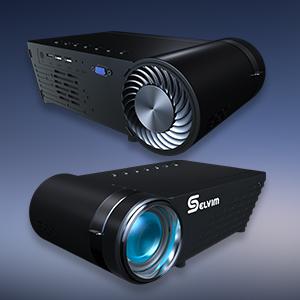
Resim: Ön ve arka view of the Selvim Mini Projector, highlighting its compact design and various ports.
3.2 Bağlantı Noktaları ve Kontroller
- IR Alıcı: Uzaktan kumanda sinyalleri için.
- HDMI Bağlantı Noktası: Connect to HDMI-enabled devices (laptops, game consoles, TV sticks).
- USB1/USB2 Bağlantı Noktaları: Connect USB storage devices or power compatible streaming sticks.
- AV/AUX Girişi: Connect devices using the included AV cable.
- VGA Bağlantı Noktası: VGA çıkışı olan bilgisayarlara bağlanın.
- Ses Çıkışı (3.5 mm): Harici hoparlör veya kulaklık bağlayın.
- Güç Girişi: Güç kablosunu bağlayın.
- Odak Halkası: Adjust for image clarity.
- Keystone Düzeltmesi: Adjust image shape (±15 degrees).
- On-device Control Buttons: Navigate menus and adjust settings directly on the projector.

Image: The rear panel of the Selvim Mini Projector, clearly showing the HDMI, USB, AV, AUX, and VGA ports for multi-device connectivity.
4. Kurulum
4.1 Yerleşim ve Ekran Boyutu
Position the projector on a stable surface or mount it using a tripod or ceiling mount. The recommended projection distance is 2-5 meters (approximately 6.5-16.4 feet) for a screen size of 50-200 inches.
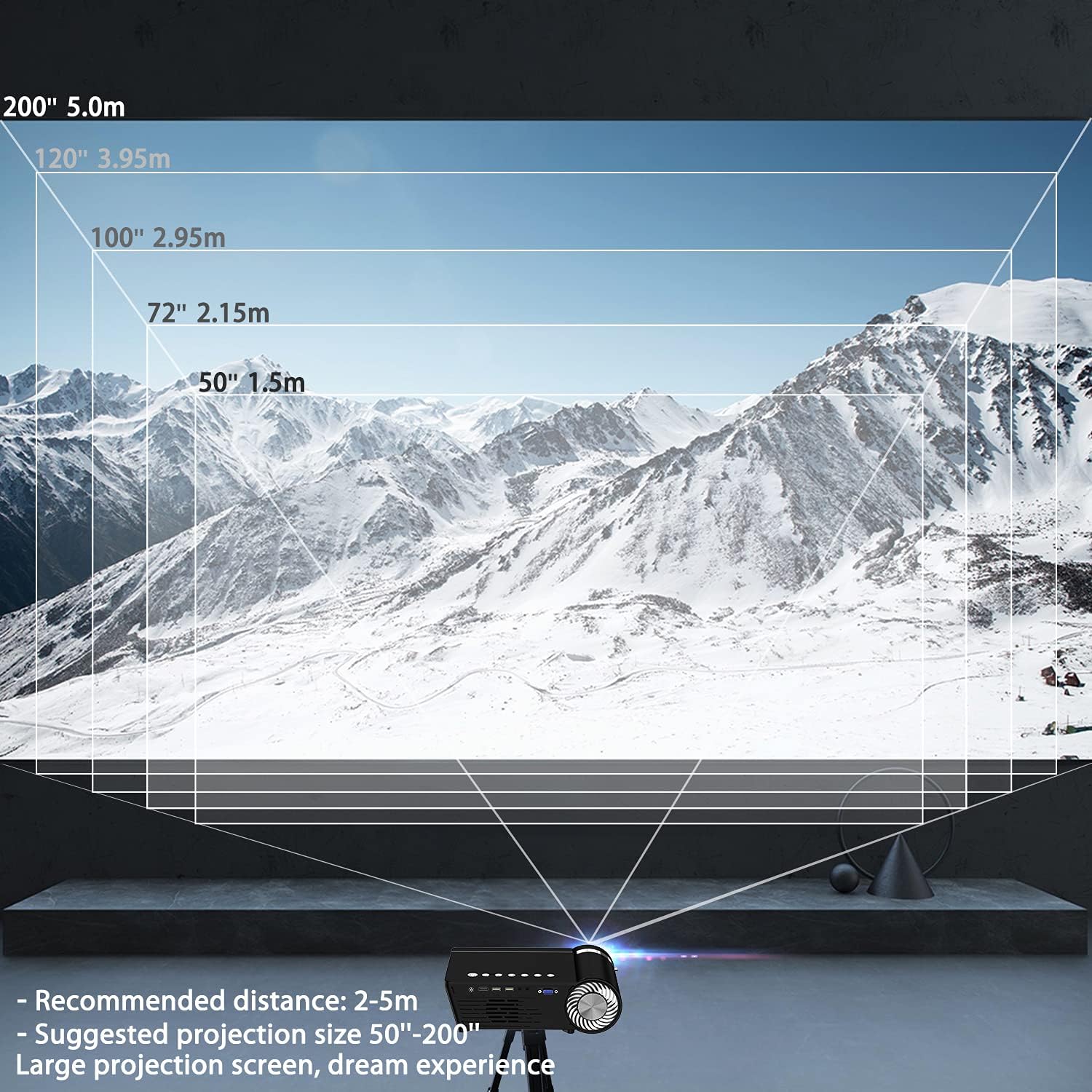
Image: A diagram illustrating recommended projection distances (1.5m for 50", 2.15m for 72", 2.95m for 100", 3.95m for 120", 5.0m for 200") for various screen sizes.
4.2 Güç Bağlantısı
Güç kablosunu projektörün güç girişine ve ardından bir elektrik prizine bağlayın.
4.3 Odak ve Trapez Düzeltme
After powering on, adjust the focus ring on the lens until the image is clear. Use the keystone correction dial to correct any trapezoidal distortion, ensuring the projected image is rectangular.

Image: A visual representation of how focus and keystone adjustments affect the projected image, showing a blurry image being sharpened by focus and a trapezoidal image being corrected to a rectangle by keystone.
4.4 Bağlantı Seçenekleri
Projeksiyon cihazı çeşitli kablolu ve kablosuz bağlantıları desteklemektedir:
- HDMI: Connect your laptop, game console, or streaming device via an HDMI cable.
- USB BAĞLANTI: Medya dosyalarını oynatmak için bir USB flash sürücü takın. filedoğrudan s.
- AV/VGA: Use the provided AV cable or a VGA cable for older devices.
- Bluetooth 5.0: Daha iyi ses deneyimi için harici Bluetooth hoparlör veya kulaklık bağlayın.
- WiFi Bağlantısı: For screen mirroring from iOS and Android devices.

Image: The Selvim Mini Projector connected wirelessly to Bluetooth 5.0 headphones and earbuds, illustrating stable signal transmission and a superior stereo experience.
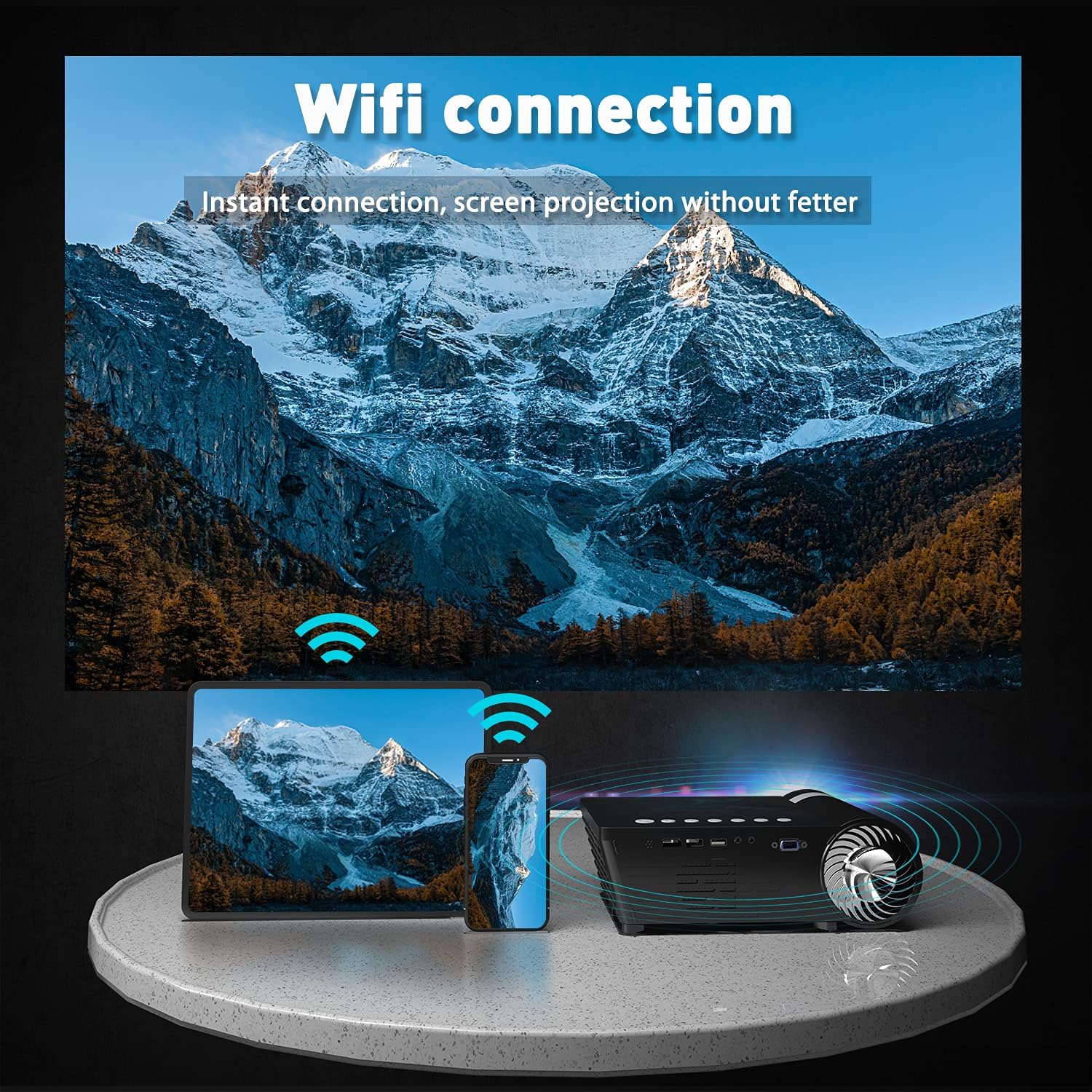
Image: The Selvim Mini Projector demonstrating WiFi connection for instant screen projection from a smartphone and tablet.
5. Kullanım Talimatları
5.1 Temel Kontroller
Use the included remote control or the buttons on top of the projector to navigate the menu, select input sources, and adjust settings.

Image: A four-panel image showing the projector's main menu, remote control interaction, and options for iOS and Android screen mirroring.
5.2 Giriş Kaynağı Seçimi
From the main menu, select the desired input source (HDMI, USB, AV, VGA, or Miracast for screen mirroring) using the remote or projector buttons.
5.3 Kablosuz Ekran Yansıtma (iOS/Android)
Akıllı telefonunuzun veya tabletinizin ekranını yansıtmak için:
- Select 'Miracast' or 'iOS Display' / 'Android Display' from the projector's main menu.
- On your mobile device, go to WiFi settings and connect to the projector's WiFi network (e.g., 'PROJECTOR-XXXX').
- Bir tane aç web browser on your mobile device and enter the IP address displayed on the projector screen (e.g., 192.168.49.1).
- Üzerinde webpage, select 'WiFi AP' and then 'Scan' to find your home WiFi network.
- Connect your mobile device to your home WiFi network.
- Ensure your mobile device is connected to the same WiFi network as the projector.
- For iOS, activate 'Screen Mirroring' from your Control Center and select the projector. For Android, use the 'Screen Cast' or 'Wireless Display' function.
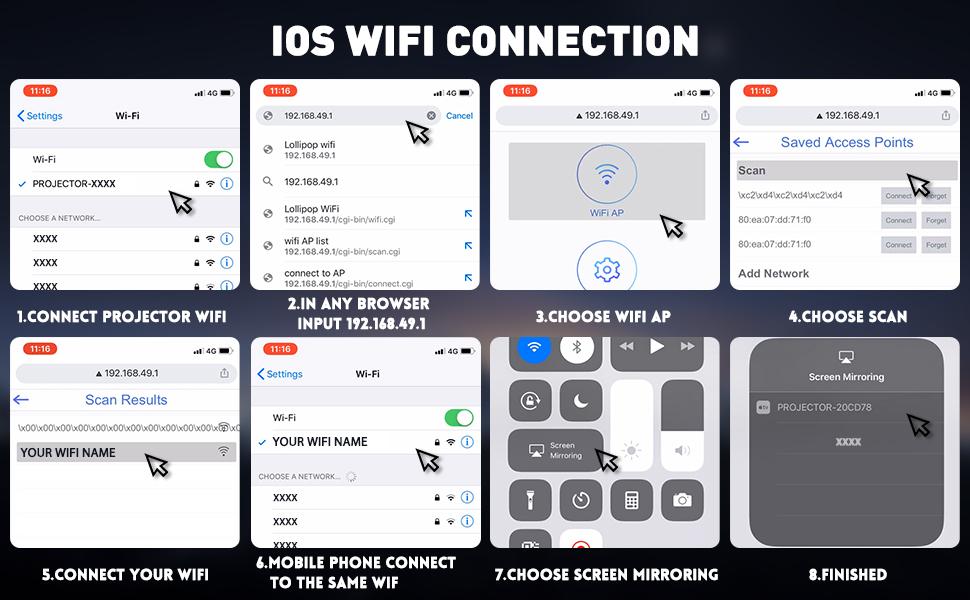
Image: A detailed eight-step visual guide demonstrating how to connect an iOS device to the Selvim Mini Projector for screen mirroring via WiFi.
5.4 Bluetooth Ses Eşleştirme
Bluetooth ses cihazıyla eşleştirmek için:
- Bluetooth hoparlörünüzün veya kulaklığınızın eşleştirme modunda olduğundan emin olun.
- On the projector, navigate to the 'Sound' settings menu.
- Select 'Bluetooth On' and then 'Scan Device'.
- Choose your Bluetooth device from the list to pair.
6. Bakım
6.1 Lens Temizliği
Regularly clean the projector lens using the provided cleaning cloth or a soft, lint-free cloth. Avoid abrasive materials that could scratch the lens.

Image: A cutaway diagram showing the multi-layer glass lens of the Selvim Mini Projector, emphasizing its optical quality.
6.2 Soğutma Sistemi
The projector features an efficient cooling system with multiple fans to dissipate heat and ensure a long lamp life. Ensure the ventilation vents are not blocked during operation.
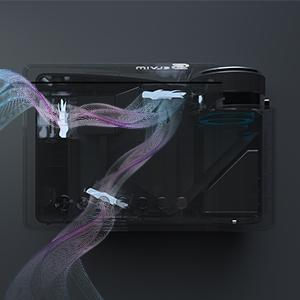
Image: An internal diagram of the Selvim Mini Projector showing the airflow and cooling system, designed to maintain optimal operating temperature.
6.3 LED Solamp Hayat
The projector utilizes an LED lamp with an impressive lifespan of up to 60,000 hours, providing years of reliable use.
7. Sorun Giderme
- Resim Yok: Check power connection, input source selection, and cable connections. Ensure the lens cap is removed.
- Bulanık Görüntü: Adjust the focus ring. If edges are blurry, adjust keystone correction. Ensure the projection distance is within the recommended range.
- Ses Yok: Check volume settings on both the projector and the source device. Ensure external speakers are properly connected or Bluetooth is paired correctly.
- Ekran Yansıtma Sorunları: Ensure both the projector and your mobile device are connected to the same WiFi network. For iOS, verify Screen Mirroring is active. For Android, check 'Screen Cast' or 'Wireless Display' settings. Some apps or content may be protected and not allow mirroring.
- Aşırı Isınma: Ensure ventilation vents are clear and not obstructed. Operate the projector in a well-ventilated area.
8. Özellikler
| Marka | Selvim |
| Örnek | B08RYTXVY8 |
| Ekran Çözünürlüğü Maksimum | 1920 x 1080 (1080P Compatible) |
| Bağlantı Teknolojisi | Bluetooth, HDMI, USB, VGA |
| Özel Özellikler | Dahili Wi-Fi, Taşınabilir, Kablosuz |
| Ürün Ağırlığı | 3.91 pound |
| Paket Boyutları | 12.76 x 8.86 x 5 inç |
| LED Solamp Hayat | 60,000 Saat |
| Anahtar Ebatı Düzeltme | ±15 derece |
9. Garanti ve Destek
For warranty information or technical support, please refer to the contact details provided with your purchase or visit the official Selvim webSite. Satın alma fişinizi, garanti talepleriniz için satın alma belgeniz olarak saklayın.