
1. Giriş
This manual provides detailed instructions for the installation, operation, maintenance, and troubleshooting of your ATOTO AC-HD03LR 720P Rear View Backup Camera. Please read this manual thoroughly before using the product to ensure correct usage and optimal performance. Keep this manual for future reference.
2. Ürün Bittiview
Temel Özellikler
- HD 720P Video Output: Provides clear 720P HD video signals for enhanced visibility.
- 180-Degree Ultra-Wide Angle: Offers an expansive field of view Kör noktaları en aza indirmek için.
- Real-time Rear View (LRV): Arkayı gösterir view in real-time even when driving forward, aiding in obstacle avoidance.
- Sanal Çevre View (VSV) Parking Assist: Compatible with specific ATOTO head units to provide a simulated bird's-eye view for parking.
- Gece Görüşü Yeteneği: Düşük ışık koşullarında net görüş sağlar.
- IP67 Su Geçirmezlik Derecesi: Çeşitli hava koşullarına dayanacak şekilde tasarlanmıştır.
- Kolay Kurulum: Simple setup with an included 8-meter extension wire.
Uyumluluk
This camera is specifically designed for use with the following ATOTO car stereo models:
- ATOTO A6PF/PL/PP series
- ATOTO S8 series (excluding S8 UN/PN/MS/Gen4 models)
- ATOTO S8 Gen1 models (requires firmware update for LRV function)
Not: Bu kamera uyumlu değil with ATOTO A6GC, F7, A5, or X10 models, or other car stereo brands.

Image: The 180-degree wide-angle view provides a significantly broader perspective compared to standard cameras, enhancing situational awareness. The 720P image quality ensures clear and detailed visuals, superior to 480-line resolution.
3. Paket İçeriği
Aşağıda listelenen tüm öğelerin paketinizde bulunduğunu doğrulayın:
- 1x ATOTO AC-HD03LR Rear Wide-Angle Camera
- 1x 8-Meter Extension Wire
- 2x Montaj Vidaları
- 1 adet Yapışkanlı Etiket
- 1x Calibration Cloth

Image: The package includes the AC-HD03LR camera (01), an 8-meter extension wire (02), two screws (03), an adhesive sticker (04), and a calibration cloth (05).
4. Kurulum ve Kurulum
Kablolama Şeması
Follow the wiring diagram below for proper connection to your ATOTO car stereo system. Ensure all connections are secure to prevent signal loss or power issues.
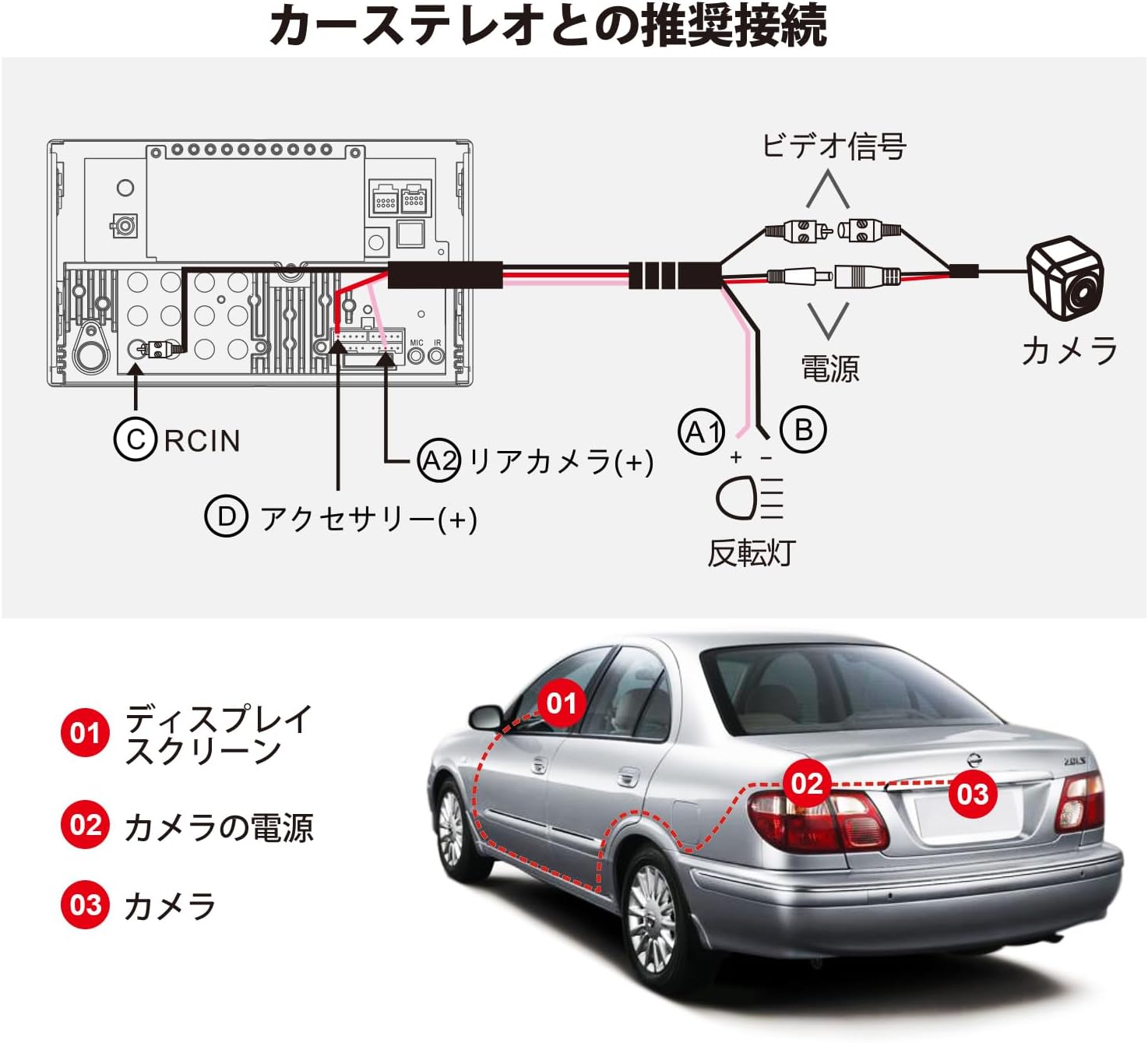
Image: Recommended connection diagram. The camera's video signal connects to the car stereo's RCIN (C). The camera's power (A1, B) connects to the reversing light and accessory power (D), while the rear camera trigger wire (A2) connects to the car stereo's rear camera input.
Kurulum Adımları
- Kamerayı Monte Edin: Choose a suitable location on the rear of your vehicle, typically near the license plate, for optimal viewing. Secure the camera using the provided screws or adhesive sticker.
- Kabloyu Yönlendirin: Carefully route the 8-meter extension wire from the camera to the car stereo unit. Ensure the cable is protected from sharp edges, heat, and moving parts.
- Gücü bağlayın: Connect the camera's power wire (red) to the vehicle's reversing light power supply (typically 12V). Connect the ground wire (black) to a suitable chassis ground point.
- Connect Video Signal: Plug the RCA video connector from the camera's extension wire into the 'RCIN' (Rear Camera Input) port on your ATOTO car stereo.
- Connect Trigger Wire: Connect the camera's trigger wire (usually a thin red wire on the RCA cable) to the 'Rear Camera (+)' or 'Reverse Gear Signal' input on your ATOTO car stereo. This tells the stereo when to switch to the camera view.
- Test İşlevselliği: Before finalizing the installation, turn on your car stereo and engage reverse gear to ensure the camera displays correctly.
5. Kullanım Talimatları
Sanal Çevre View (VSV) Parking
The VSV function, available on compatible ATOTO S8 (Gen2) Android car stereos, uses the AC-HD03LR camera to create a simulated bird's-eye view of your vehicle's surroundings. This feature significantly enhances parking safety by providing a comprehensive overhead perspective.
- To activate VSV, ensure your ATOTO S8 (Gen2) head unit has the necessary firmware and image stitching algorithm.
- The system will process the camera's 180-degree input to generate a dynamic, simulated 360-degree view on your car stereo screen.
- Your vehicle's position and surrounding obstacles will be clearly distinguished on the display.
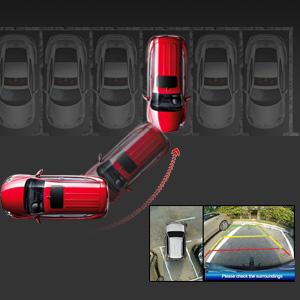
Image: A simulated bird's-eye view from the VSV parking assist system, showing the vehicle's position relative to parking lines and surrounding objects.
Real-time Rear View (Soldan sağa)
The LRV function allows you to view the rear of your vehicle in real-time, even when driving forward. This is particularly useful for monitoring traffic behind you or checking for blind spots.
- This feature is supported by specific ATOTO head units and requires a firmware update for S8 Gen1 models.
- Consult your car stereo's manual for instructions on how to activate and switch to the real-time rear view görüntülemek.
Kamera Kalibrasyonu
Calibration is essential for accurate VSV display. The included calibration cloth is used to help the system map the camera's view correctly. Perform calibration in a flat, open area with good lighting.

Image: Vehicle positioned over the calibration cloth. The distance between the cloth's center and the rear bumper may vary by vehicle type, but the entire cloth should be visible on screen for proper calibration.

Image: Calibration steps on the car stereo display. Step 1: Select Vehicle Size by entering parameters. Step 2: Start Calibration by touching 'Calibration' on the rear camera video screen. Step 3: Center the Rear Video Image if the camera is not centrally mounted. Step 4: Trim Rear View kamera şakasıtage to remove black blocks in corners and adjust the back shade.
6. Bakım
Düzenli bakım, kameranızın uzun ömürlü olmasını ve en iyi performansı göstermesini sağlar.
- Temizlik: Kameranın lensini düzenli olarak yumuşak bir bezle temizleyin.amp Kir, toz veya su lekelerini temizlemek için bir bez kullanın. Lensi çizebilecek aşındırıcı temizleyicilerden kaçının.
- Denetleme: Regularly check the camera's mounting and wiring for any signs of damage, corrosion, or loose connections. Ensure the camera is securely fastened.
- Suya Maruz Kalma: While the camera is IP67 waterproof, avoid directing high-pressure water jets directly at the camera during car washes, as this could potentially compromise the seal over time.
7. Sorun Giderme
If you encounter issues with your ATOTO AC-HD03LR camera, refer to the following common problems and solutions:
| Sorun | Olası Neden | Çözüm |
|---|---|---|
| Ekranda görüntü yok | Gevşek video kablosu bağlantısı Kameraya güç gelmiyor. Incorrect trigger wire connection Kamera arızası | RCA video kablosunun her iki ucundaki bağlantıyı kontrol edin. Verify camera power supply (12V) and ground connections. Ensure trigger wire is correctly connected to the car stereo's reverse input. Test camera with another compatible display if possible. |
| Görüntü bulanık veya bozuk | Kirli lens Yanlış kamera açısı Firmware issue on head unit Calibration required/incorrect | Kamera lensini temizleyin. Adjust camera angle for optimal view. Ensure car stereo firmware is up-to-date. Perform camera calibration as per instructions. |
| VSV/LRV not working | Incompatible head unit Firmware not updated Calibration not performed | Confirm head unit compatibility (ATOTO A6PF/PL/PP, S8 series). Update car stereo firmware, especially for S8 Gen1 models. Perform camera calibration. |
| Image has black blocks in corners | Calibration trimming needed | Follow Step 4 of the calibration process to trim the video footage. |
8. Özellikler
| Özellik | Şartname |
|---|---|
| Ürün Modeli | AC-HD03LR (North American version, with license plate mounting bracket) |
| Görüntü Sensörü Formatı | 1/2.9 inç CMOS |
| Pikseller | 1280(Y) x 720(D) |
| Beyaz Dengesi | Otomatik |
| Arka Işık Telafisi | Evet |
| Gürültü Azaltma | 3D DNR |
| Video Kare Hızı | 720P @ 30FPS |
| Video Sinyal Çıkışı | Analog HD signal, 1.0 Vp-p / 75Ω |
| Çalışma Hacmitage | Doğru Akım 12V |
| Çalışma Akımı | 130mA ~ 150mA |
| Çalışma Sıcaklığı | -30°C ~ +80°C (-22°F ~ 176°F) |
| Arka View Kılavuz | Not built-in, provided by car stereo system |
| Su Geçirmezlik Derecesi | IP67 |
| Gece Görüşü | Evet |
| Lens Alanı View | 180 derece |
| Montaj Tipi | Yüzey Montajı |
9. Garanti ve Destek
ATOTO products are designed for reliability and performance. For warranty information, technical support, or service inquiries, please refer to the warranty card included with your product or visit the official ATOTO website. You can also contact ATOTO customer service directly through their support channels.
Official ATOTO Webalan: www.myatoto.com