
1. Giriş
The Carrera RC Mario Kart Yoshi Quad (Model 370200997X) is a remote-controlled vehicle designed for users aged 6 and up. This manual provides essential information for the safe and optimal use of your RC Yoshi Quad, ensuring an enjoyable experience. Please read all instructions carefully before operating the product.
2. Kutuda Neler Var?
Tüm parçaları dikkatlice ambalajından çıkarın ve aşağıdaki öğelerin eksiksiz olduğundan emin olun:
- Carrera RC Yoshi Quad Vehicle
- Uzaktan kumanda
- 3.2V 700 mAh LiFePo4 Battery (for vehicle)
- USB Şarj Kablosu
- Kullanım Kılavuzu

Image: The Carrera RC Mario Kart Yoshi Quad shown in its original retail packaging, indicating included components.
3. Kurulum
3.1. Araç Aküsünün Şarj Edilmesi
Before first use, fully charge the vehicle's 3.2V 700 mAh LiFePo4 battery. The charging process typically takes approximately 50 minutes.
- Connect the USB charging cable to the vehicle's charging port.
- Plug the other end of the USB cable into a compatible USB power source (e.g., computer, USB wall adapter, power bank).
- The charging indicator light on the vehicle or cable will show the charging status (refer to specific indicator behavior in the quick start guide if available).
- Şarj işlemi tamamlandığında kabloyu çıkarın.

Image: The Yoshi Quad vehicle, ready for battery charging via its USB cable.
3.2. Uzaktan Kumanda Pilinin Kurulumu
The remote control requires batteries for operation. Please ensure you use the correct type and polarity.
- Uzaktan kumandanın arkasındaki pil bölmesini bulun.
- Pil bölmesinin kapağını açın.
- Insert the required batteries (e.g., AA or AAA, typically 2x) according to the polarity markings (+/-).
- Pil bölmesi kapağını sıkıca kapatın.
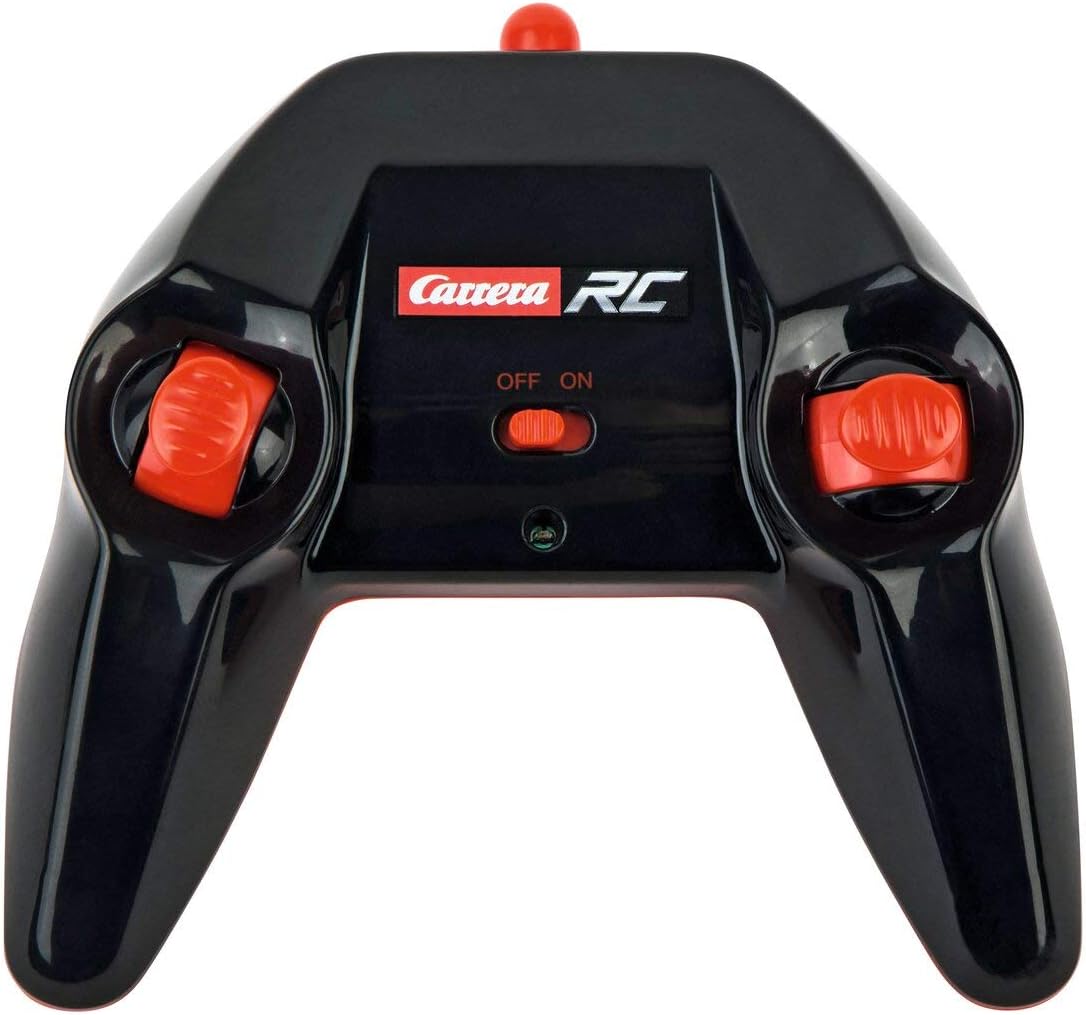
Image: The Carrera RC remote control, showing its design and controls.
3.3. Araç ve Uzaktan Kumandanın Eşleştirilmesi
To establish a connection between the vehicle and the remote control, follow these steps:
- Ensure both the vehicle and the remote control have fresh or fully charged batteries.
- Aracı güç düğmesini kullanarak çalıştırın.
- Uzaktan kumandayı güç düğmesinden açın.
- The vehicle and remote control should automatically pair. A successful connection is usually indicated by a solid light on both devices (refer to your quick start guide for specific light indicators).
Video: This video demonstrates the unboxing, battery installation, and initial pairing process for the Carrera RC Mario Kart Yoshi Quad.
4. Kullanım Talimatları
Once paired, you can begin operating your Carrera RC Yoshi Quad.
- İleri geri: Use the throttle trigger or joystick on the remote control to move the vehicle forward or backward.
- Direksiyon: Use the steering wheel or directional controls on the remote control to turn the vehicle left or right.
- Hız: The Yoshi Quad can reach speeds of up to 9 km/h. Adjust your control input for desired speed.
- Menzil: Operate the vehicle within the specified range of the remote control to maintain connection and avoid loss of control.
Güvenlik Önlemleri:
- Always operate in open areas, away from people, pets, and obstacles.
- Su yakınında veya ıslak koşullarda çalıştırmayın.
- Avoid operating on public roads or near traffic.
- Supervise younger children during operation.
5. Bakım
5.1. Temizlik
To maintain the appearance and functionality of your RC Yoshi Quad:
- Wipe the vehicle and remote control with a soft, dry cloth after each use.
- Do not use harsh chemicals or solvents, as these can damage the plastic.
- Avoid getting water into electronic components.
5.2. Pil Bakımı ve Saklama
- Always remove batteries from the remote control if not in use for extended periods.
- Store the vehicle's LiFePo4 battery in a cool, dry place, away from direct sunlight and extreme temperatures.
- Pili aşırı şarj etmeyin veya tamamen boşaltmayın.
6. Sorun Giderme
If you encounter issues with your RC Yoshi Quad, refer to the following common problems and solutions:
| Sorun | Olası Neden | Çözüm |
|---|---|---|
| Araç hareket etmiyor. | Low or uncharged vehicle battery. Remote control batteries are dead or incorrectly installed. Araç ve uzaktan kumanda eşleştirilmemiş. | Charge vehicle battery. Replace/install remote control batteries correctly. Re-pair vehicle and remote control. |
| Poor control range or intermittent connection. | Diğer RC cihazlarından veya elektroniklerden kaynaklanan parazit. Etkin menzilin ötesinde çalışıyor. Piller zayıf. | Başka bir yere taşının. Operate closer to the vehicle. Pilleri şarj edin/değiştirin. |
| Araç yavaş veya düzensiz hareket ediyor. | Araç aküsü düşük. Obstruction in wheels/axles. | Charge vehicle battery. Check and clear any obstructions. |
7. Özellikler
| Marka | Kariyer |
| Model Adı | 370200997X |
| Karakter | Yoshi |
| Araç Tipi | Dörtlü |
| Malzeme | Plastik |
| Renk | Multicolor (predominantly Green) |
| Yaş Aralığı (Açıklama) | 6+ yıl |
| Maksimum Hız | Saatte 9 kilometre |
| Güç Kaynağı | Pil ile çalışır |
| Araç Akü Tipi | 1 Lithium-ion (3.2V 700 mAh LiFePo4) - included |
| Şarj Süresi | Yaklaşık 50 dakika |
| Çalışma Süresi | 30 dakikaya kadar |
| Uzaktan Kumanda Tipi | Radio Control (2.4 GHz) |
| Boyutlar (Ürün) | 36.5 x 20.5 x 23 santimetre |
| Ağırlık (Ürün) | 1.06 Kilogram |
| Özel Özellik | Yanıp sönen ışık |
| Menşei ülke | Çin |
8. Garanti ve Destek
8.1. Üretici Garantisi
This Carrera RC product is covered by a 2 yıllık üretici garantisi. Please retain your proof of purchase for any warranty claims. The warranty covers defects in materials and workmanship under normal use.
8.2. Müşteri Desteği
For technical assistance, spare parts, or warranty inquiries, please contact Carrera customer support. Refer to the contact information provided on the product packaging or the official Carrera webalan.