1. Ürün Bittiview
This manual provides instructions for the 180W 19.5V 9.2A AC Adapter Charger, model SL195334. This power supply is designed to provide reliable power to compatible laptops, specifically MSI GT60 and GT70 models. It features an input voltage range of 100-240V, making it suitable for worldwide use, and delivers a stable 19.5V output at 9.2A (180W).
The adapter is equipped with a 5.5mm x 2.5mm barrel tip connector to ensure proper fit with specified devices. It replaces part number ADP-180NB BC.
2. Güvenlik Bilgileri
Please read all safety instructions before using this product to prevent injury or damage to your device.
- Elektriksel Güvenlik: Do not expose the adapter to water, moisture, or extreme temperatures. Use only with compatible voltage satış noktaları.
- Havalandırma: Ensure adequate ventilation around the adapter during use. Do not cover it with cloth or place it in an enclosed space.
- Kablo Bakımı: Avoid bending, twisting, or pinching the power cord. Do not place heavy objects on the cord.
- Bağlantı Kesilmesi: Disconnect the power adapter from the wall outlet during lightning storms or when unused for extended periods.
- Sertifikalar: This adapter is designed with international safety features including Over Voltage Protection (OVP), Over Current Protection (OCP), and Short Circuit Protection (SCP). It is CE, FCC, ROHS, and UL certified.
- Tamirat: Do not attempt to open or repair the adapter yourself. Refer all servicing to qualified personnel.
3. Paket İçeriği
Paketin içinde tüm öğelerin mevcut olduğundan emin olun:
- 1 x 180W AC Adapter
- 1 x Power Cord (US plug, compatible with your country)

Resim 1: Üst view of the AC Adapter with cables. This image shows the main adapter unit, the attached DC output cable with its barrel connector, and the detachable AC input power cord.
4. Kurulum Talimatları
- Güç Kablosunu bağlayın: Insert the 3-prong end of the AC power cord into the AC input port on the adapter. Ensure it is firmly seated.
- Duvar Prizine Bağlayın: Plug the other end of the AC power cord into a standard wall electrical outlet (100-240V).
- Dizüstü Bilgisayara Bağlan: Insert the barrel tip connector of the DC output cable into the power input port on your compatible MSI GT60 or GT70 laptop.
- Bağlantıyı Doğrulayın: Ensure all connections are secure. The laptop should indicate that it is receiving power or charging.
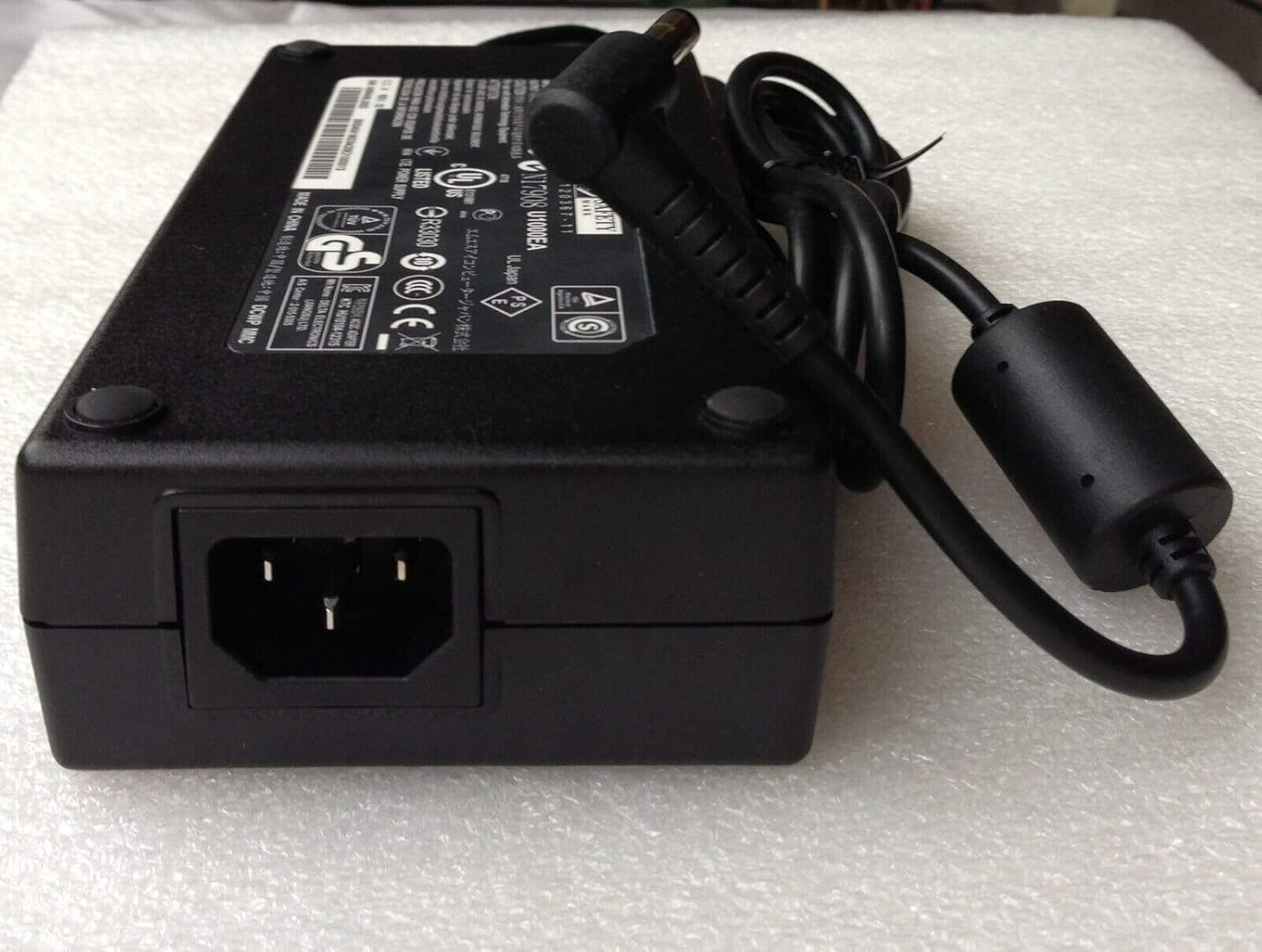
Resim 2: Yan view of the AC Adapter showing the AC input port. This image highlights where the detachable 3-prong power cord connects to the adapter unit.
5. Kullanım Talimatları
Once properly connected, the adapter will automatically supply power to your laptop and charge its battery. No additional user interaction is required for basic operation.
- Always ensure the adapter is connected to a functioning power outlet.
- If your laptop is not charging, verify all connections are secure and the power outlet is active.
- Avoid using the adapter in environments with excessive heat or humidity.
6. Bakım
- Temizlik: Temizlemeden önce adaptörü tüm güç kaynaklarından ayırın. Dış yüzeyi silmek için yumuşak, kuru bir bez kullanın. Sıvı temizleyiciler veya aerosoller kullanmayın.
- Depolamak: When not in use, store the adapter in a cool, dry place. Avoid tightly wrapping the cables to prevent damage.
- Denetleme: Periodically inspect the power cord and adapter for any signs of damage, such as frayed wires or cracks. If damage is found, discontinue use and replace the adapter.
7. Sorun Giderme
| Sorun | Olası Neden | Çözüm |
|---|---|---|
| Dizüstü bilgisayar şarj olmuyor. | Loose connection, faulty outlet, incompatible adapter. | Ensure all cables are securely connected. Test the wall outlet with another device. Verify the adapter specifications match your laptop's requirements. |
| Adaptör aşırı derecede ısınıyor. | Poor ventilation, overloaded circuit, internal fault. | Ensure the adapter is in a well-ventilated area. Disconnect and allow to cool. If overheating persists, discontinue use. |
| Sparking at outlet. | Loose plug, faulty outlet, damaged cord. | Immediately unplug the adapter. Do not use the outlet or adapter. Consult a qualified electrician or replace the adapter if damaged. |
Sorun giderme adımları sorunu çözmezse, lütfen Garanti ve Destek bölümüne bakın.
8. Özellikler
| Model Numarası | SL195334 |
| Giriş Voltage | 100-240V AC |
| Giriş Frekansı | 50-60Hz |
| Çıkış Hacmitage | 19.5V doğru akım |
| Çıkış Akımı | 9.2A |
| Çıkış Gücü | 180W |
| Konektör Boyutu | 5.5mm x 2.5mm Barrel Tip |
| Uyumlu Modeller | MSI GT60, MSI GT70 |
| Replace Part Number | ADP-180NB BC |
| Sertifikalar | CE, FCC, ROHS, UL |
| Koruma Özellikleri | OVP (Hacim Fazlasıtage Protection), OCP (Over Current Protection), SCP (Short Circuit Protection) |
9. Garanti ve Destek
Bu ürün bir 12 ay garanti Satın alma tarihinden itibaren geçerlidir. Bu garanti, normal kullanım koşullarında üretim hatalarını ve malzeme kusurlarını kapsar.
Garanti, yanlış kullanım, kaza, yetkisiz değişiklik veya hatalı montajdan kaynaklanan hasarları kapsamaz. Garanti talepleri için lütfen satın alma belgenizi saklayın.
For technical support or warranty inquiries, please contact your retailer or the manufacturer directly. Contact information is typically provided on the product packaging or the retailer's webalan.