
giriiş
This manual provides detailed instructions for the installation, operation, and maintenance of your EKEN V7 HD 1080P Smart WiFi Video Doorbell. Please read this manual thoroughly before using the product to ensure proper functionality and safety. Keep this manual for future reference.
Paket İçeriği
Aşağıda listelenen tüm ürünlerin paketinizde mevcut olduğundan emin olun. Eksik veya hasarlı bir ürün varsa, lütfen müşteri hizmetleriyle iletişime geçin.

Image: The EKEN V7 Video Doorbell, two blue rechargeable batteries, and a dual-slot battery charger. These are the primary components included in the package.
- EKEN V7 HD 1080P Smart WiFi Video Doorbell
- Rechargeable Batteries (2 pcs)
- Pil Şarj Cihazı
- Montaj Braketi
- Montaj Vidaları ve Duvar Dübelleri
- Kullanım Kılavuzu (bu belge)
Ürün Bittiview
The EKEN V7 Video Doorbell is a smart security device designed to provide real-time video monitoring and two-way audio communication with visitors at your door. It features 1080P Full HD resolution, night vision, and a wide-angle lens for comprehensive coverage.

Resim: Ön view of the EKEN V7 Video Doorbell, showing the camera lens, motion sensor, and illuminated doorbell button.
Temel Özellikler:
- 1080P Full HD Video: Clear video streaming and recording.
- 166° Wide-angle Lens: Geniş alan view to cover your entryway.
- Gece Görüşü: Infrared LEDs for clear visibility in low-light conditions.
- İki Yönlü Ses: Speak and listen to visitors remotely via the mobile app.
- PIR Hareket Algılama: Alerts you to movement at your door.
- Hava Koşullarına Dayanıklı: Çeşitli hava koşullarına dayanacak şekilde tasarlanmıştır.
- 2.4G WiFi Bağlantısı: Connects to your home network for remote access.
- Uzun Pil Ömrü: Efficient power consumption for extended use.
- Bulut Depolama: Optional cloud service for video recording storage.

Image: An infographic highlighting the key features of the EKEN V7 Video Doorbell, such as 1080P Full HD, PIR Motion Detection, Night Vision, 166° Wide-angle Camera Lens, Long Battery Life, and 7 Days Free Cloud Service.

Image: A visual representation comparing the doorbell's view during the day (color) and at night (monochrome infrared), demonstrating the 166-degree wide-angle lens.
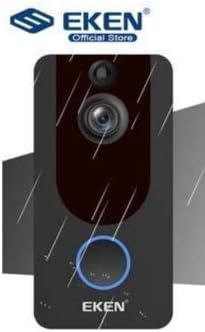
Image: The EKEN V7 Video Doorbell depicted with rain effects, illustrating its weather-resistant design suitable for outdoor installation.
Kurmak
1. Pillerin Şarj Edilmesi
- Insert the two rechargeable batteries into the provided battery charger.
- Şarj cihazını bir güç kaynağına bağlayın.
- Allow the batteries to charge fully before first use. The indicator light on the charger will change when charging is complete.
2. Installing the Doorbell
- Choose a suitable location near your door, ensuring a clear view ve iyi bir Wi-Fi sinyali.
- Use the mounting bracket as a template to mark drill holes on the wall.
- Gerekirse delikler açın ve duvar dübelleri yerleştirin.
- Montaj braketini verilen vidaları kullanarak duvara sabitleyin.
- Insert the charged batteries into the doorbell unit.
- Kapı zili ünitesini montaj braketine takın ve yerine sağlam bir şekilde oturduğundan emin olun.
3. Wi-Fi'ye Bağlanma ve Uygulama Kurulumu
- Download the official EKEN doorbell app from your smartphone's app store (iOS or Android).
- Uygulamayı açın ve bir hesap oluşturun veya giriş yapın.
- Follow the in-app instructions to add your new doorbell device. This typically involves scanning a QR code on the doorbell or manually entering its ID.
- Connect the doorbell to your 2.4GHz Wi-Fi network. Ensure your phone is also connected to the same 2.4GHz network during setup.
- Bağlantı kurulduktan sonra şunları yapabileceksiniz: view live video, receive notifications, and adjust settings through the app.
Kullanım Talimatları
Canlı View ve İki Yönlü Ses
- Open the EKEN app on your smartphone.
- Select your doorbell from the device list to access the live video feed.
- To speak to a visitor, tap the microphone icon in the app. To listen, ensure the speaker icon is enabled.

Image: A user communicating with a delivery person at their door using the EKEN V7 Video Doorbell's two-way audio feature through the mobile application.
Hareket Algılama Uyarıları
- When motion is detected, the doorbell will send a push notification to your smartphone.
- için bildirime dokunun view Canlı yayın veya kaydedilmiş etkinlik.
- Adjust motion sensitivity settings within the app to minimize false alerts.
Video Kaydı ve Oynatma
- The doorbell automatically records video when motion is detected or the doorbell button is pressed.
- Recorded videos are stored in the cloud (subscription may be required after initial free period) or on a local SD card (if supported and installed).
- Access and playback recorded events through the app's history or event log.

Image: The EKEN V7 Video Doorbell shown next to a smartphone displaying a live 1080P Full HD video feed, illustrating remote monitoring capabilities.
Bakım
- Temizlik: Kamera merceğini ve kapı zili yüzeyini yumuşak bir bezle nazikçe silin.amp Bez. Aşındırıcı temizleyicilerden veya çözücülerden kaçının.
- Pil Yönetimi: Recharge batteries when the app indicates low power. For optimal performance, consider having a spare set of charged batteries.
- Donanım Yazılımı Güncellemeleri: Regularly check the app for available firmware updates for your doorbell. Updates can improve performance and add new features.
- Wi-Fi Bağlantısı: Ensure your Wi-Fi router is functioning correctly and the doorbell has a strong signal for uninterrupted operation.
Sorun giderme
- Kapı zili Wi-Fi'ye bağlanmıyor:
- Ensure your Wi-Fi network is 2.4GHz. The doorbell does not support 5GHz networks. Check Wi-Fi password and signal strength. Try resetting the doorbell and your router.
- Hareket algılama uyarısı yok:
- Verify that motion detection is enabled in the app settings. Adjust sensitivity levels. Ensure the doorbell's view engellenmemiştir.
- Poor video quality or lag:
- Check your Wi-Fi signal strength at the doorbell's location. Move the router closer or consider a Wi-Fi extender. Ensure your internet connection is stable.
- Çift yönlü ses çalışmıyor:
- Check microphone and speaker permissions for the app on your smartphone. Ensure the doorbell's microphone and speaker are not obstructed.
- Kapı zili açılmıyor:
- Ensure batteries are fully charged and correctly inserted. If using wired power, check connections.
Özellikler
| Özellik | Detay |
|---|---|
| Marka | EKEN |
| Örnek | V7 |
| Video Kayıt Çözünürlüğü | 1080p Full HD |
| Fotoğraf Sensörü Teknolojisi | CMOS |
| Bağlantı Teknolojisi | Wi-Fi (sadece 2.4 GHz) |
| Özel Özellikler | Night Vision, Two-Way Audio, PIR Motion Detection, Weather Resistant |
| Görüntü Sabitleme | HAYIR |
| Üretici Referansı | Ia-112 |
| ASIN | B08PMXWFF3 |
| İlk Mevcut Tarih | 17 Aralık 2020 |
Garanti ve Destek
For warranty information and technical support, please refer to the official EKEN website or contact their customer service directly. Details regarding specific warranty periods and support channels are typically provided with your purchase documentation or on the manufacturer's webalan.
Guaranteed software updates until: Unknown.