
giriiş
This manual provides essential instructions for the proper use and maintenance of your Vikefon Type C Charging and Data Cable. This 1-meter cable is designed for efficient charging and high-speed data transfer between your Type C enabled devices and compatible power sources or computers.

Image: The Vikefon Type C Charging and Data Cable, featuring a standard USB-A connector on one end and a reversible USB-C connector on the other.
Ürün Özellikleri
- USB Connector Quality: Ensures reliable charging and high-speed data transmission.
- Güç Çıkışı: Supports up to 5V, 3 Amp hızlı şarj için.
- Evrensel Uyumluluk: Fully compatible with all Type C mobile devices for fast charging and syncing.
- Çift yönlü USB Tip-C Konnektör: Allows for quick and easy connections in any orientation.
- Dayanıklı Tasarım: Features intricate nylon braiding for enhanced durability and longevity, outlasting standard cables.
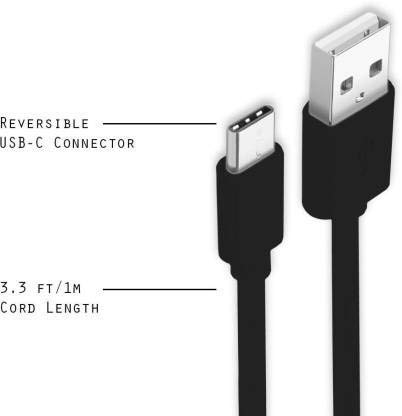
Image: A diagram illustrating the reversible nature of the USB-C connector and the cable's 1-meter (3.3 ft) cord length.
Kurmak
- Bağlayıcıları Tanımlayın: The cable has a standard USB-A connector on one end and a smaller, oval-shaped USB Type-C connector on the other.
- Güç kaynağına/bilgisayara bağlayın: Insert the USB-A end of the cable into a compatible USB port on a wall adapter, power bank, car charger, or computer.
- Cihaza Bağlan: Insert the USB Type-C end into the charging/data port of your smartphone, tablet, or other Type C enabled device. The USB Type-C connector is reversible, so it can be inserted in either orientation.
- Bağlantıyı Doğrulayın: Ensure both ends are securely connected. Your device should indicate that it is charging or connected for data transfer.
Kullanım Talimatları
Cihazınızı Şarj Etme
- Connect the USB-A end of the cable to a compatible USB power adapter (e.g., wall charger, car charger, power bank).
- Connect the USB Type-C end to your device's charging port.
- Ensure the power adapter is plugged into a live power outlet. Your device should begin charging.
Veri Aktarımı
- Kablo'nun USB-A ucunu bilgisayarınızdaki bir USB portuna bağlayın.
- Connect the USB Type-C end to your device.
- On your device, you may receive a prompt asking to allow data access or to select a USB connection mode (e.g., "File Transfer," "MTP"). Select the appropriate option to enable data transfer.
- Your device should appear as a removable drive or media device on your computer, allowing you to transfer files.
Bakım
- Uygun Kullanım: Kabloyu takarken veya çıkarırken daima konektör başlığından tutun. İç tellere zarar vermemek için kablonun kendisini doğrudan çekmekten kaçının.
- Bükülmekten Kaçının: Do not excessively bend or crimp the cable, especially near the connectors, as this can cause internal wire breakage.
- Depolamak: Store the cable in a clean, dry place away from extreme temperatures and direct sunlight. Avoid tangling the cable.
- Temizlik: If necessary, gently wipe the cable and connectors with a dry, soft cloth. Do not use liquids or abrasive cleaners.

Resim: Yakın çekim view highlighting the durable metal heads of the Vikefon Type C cable connectors, designed for anti-oxidation and corrosion resistance.
Sorun giderme
- Cihaz Şarj Olmuyor:
- Kablonun her iki ucunun da güvenli bir şekilde bağlandığından emin olun.
- Güç adaptörünün düzgün çalıştığından ve prize takılı olduğundan emin olun.
- Farklı bir güç adaptörü veya USB portu kullanmayı deneyin.
- Cihazınızın şarj portunda herhangi bir kir veya hasar olup olmadığını kontrol edin.
- Yavaş Şarj:
- Ensure you are using a power adapter that supports fast charging (e.g., 3A output).
- Cihazınızda gereksiz tüm arka plan uygulamalarını kapatın.
- Veri Transferi Yok:
- Confirm the cable is properly connected to both your device and computer.
- On your device, check the notification panel for USB options and select "File "Aktarım" veya "MTP."
- Bilgisayarınızdaki farklı bir USB bağlantı noktasına bağlanmayı deneyin.
- Hem cihazınızı hem de bilgisayarınızı yeniden başlatın.
Özellikler
| Özellik | Detay |
|---|---|
| Marka | Vikefon |
| Model Adı | C tipi |
| Model Numarası | C 0129 Türü |
| Bağlayıcı Türü | USB Tip C (Erkek-Erkek) |
| Kablo Tipi | USB |
| Uyumlu Cihazlar | Laptop, PC, Smartphone (e.g., Xiaomi Redmi 8A, Poco M2, Poco M2 Pro, Samsung, Motorola, Lenovo, Lava, Sony, HTC, LG, Karbonn, Maxx) |
| Özel Özellikler | Charging Wire, Durable, High Data Transfer Rate, High Quality, Long Length |
| Veri Aktarım Hızı | Up to 0.48 Gigabits Per Second (480 Mbps) |
| Bağlantı Teknolojisi | USB |
| Şartname Karşılandı | ISO |
| Renk | Siyah |
| Öğe Şekli | Yuvarlak |
| Outer Material Type | Rubber (with Nylon Braiding) |
| Kablo Uzunluğu | 1 Metre |
Garanti ve Destek
Specific warranty details for the Vikefon Type C Charging and Data Cable are not provided in this manual. For information regarding warranty coverage, returns, or technical support, please refer to the product packaging or contact the manufacturer directly through their official channels.


