
1. Giriş
Satın aldığınız için teşekkür ederizasing the Boytone BT-120MX 12 Channel Bluetooth Studio Audio Mixer. This professional audio mixer is designed for a variety of applications, including studio recording, live performances, and DJ setups. It features 12 channels, Bluetooth connectivity, a USB MP3 player, PC recording capabilities, 48V phantom power, and a 24-bit digital effect processor. This manual provides detailed instructions for setup, operation, and maintenance to ensure optimal performance and longevity of your device.
2. Güvenlik Bilgileri
- Güç Kaynağı: Yalnızca belirtilen güç adaptörünü kullanın. Voltajın düşük olduğundan emin olun.tage yerel elektrik kaynağınıza uygundur.
- Su ve Nem: Mikseri suya, yağmura veya aşırı neme maruz bırakmayın. Sıvı dolu nesneleri cihazın üzerine koymaktan kaçının.
- Havalandırma: Ünitenin etrafında yeterli havalandırma olduğundan emin olun. Havalandırma açıklıklarını kapatmayın.
- Isı Kaynakları: Mikseri radyatörler, ısıtma petekleri, sobalar veya diğer ısı üreten cihazlar gibi ısı kaynaklarından uzak tutun.
- Temizlik: Disconnect power before cleaning. Use a dry, soft cloth. Do not use liquid cleaners or aerosols.
- Servis: Bu ürüne kendiniz servis vermeye çalışmayın. Tüm servis işlemleri için kalifiye servis personeline başvurun.
- Hayali güç: When using 48V phantom power, ensure condenser microphones are connected before activating to prevent damage.
3. Paket İçeriği
Paketin içinde tüm öğelerin mevcut olduğundan emin olun:
- Boytone BT-120MX Audio Mixer
- Güç Adaptörü
- USB kablosu
- Kullanım Kılavuzu (bu belge)
4. Ürün Bittiview
The Boytone BT-120MX is a versatile 12-channel mixer designed for comprehensive audio control. It features a robust metal chassis and intuitive controls for various audio sources.

Şekil 4.1: Ön view of the Boytone BT-120MX Audio Mixer. This image displays the full layout of the mixer's controls and input/output sections.
4.1 Giriş/Çıkış Bağlantıları
The mixer offers a wide range of connectivity options for various audio equipment.

Şekil 4.2: Ayrıntılı view of the input and output ports on the Boytone BT-120MX. This includes XLR/1/4" combo jacks, RCA inputs, 1/4" mono/stereo inputs, send/return jacks, and main outputs.
- XLR/1/4" Combo Inputs (Channels 1-4): For microphones (XLR) or line-level instruments (1/4").
- 1/4" Line Inputs (Channels 5-12): For line-level instruments or audio devices.
- RCA Inputs (Stereo Pairs): For connecting consumer audio devices.
- Main Outputs (1/4" L/R): Güce bağlanın ampkaldırıcılar veya güçlü hoparlörler.
- Headphone Jack (1/4"): For monitoring audio.
- USB Bağlantı Noktası: For PC recording/playback and USB MP3 player functionality.
4.2 Kontrol Paneli Özellikleri
The mixer's control panel provides comprehensive adjustments for each channel and master output.

Figure 4.3: Close-up of the Bluetooth and USB section of the Boytone BT-120MX. This highlights the USB port for media playback and PC connection, and the Bluetooth indicator.
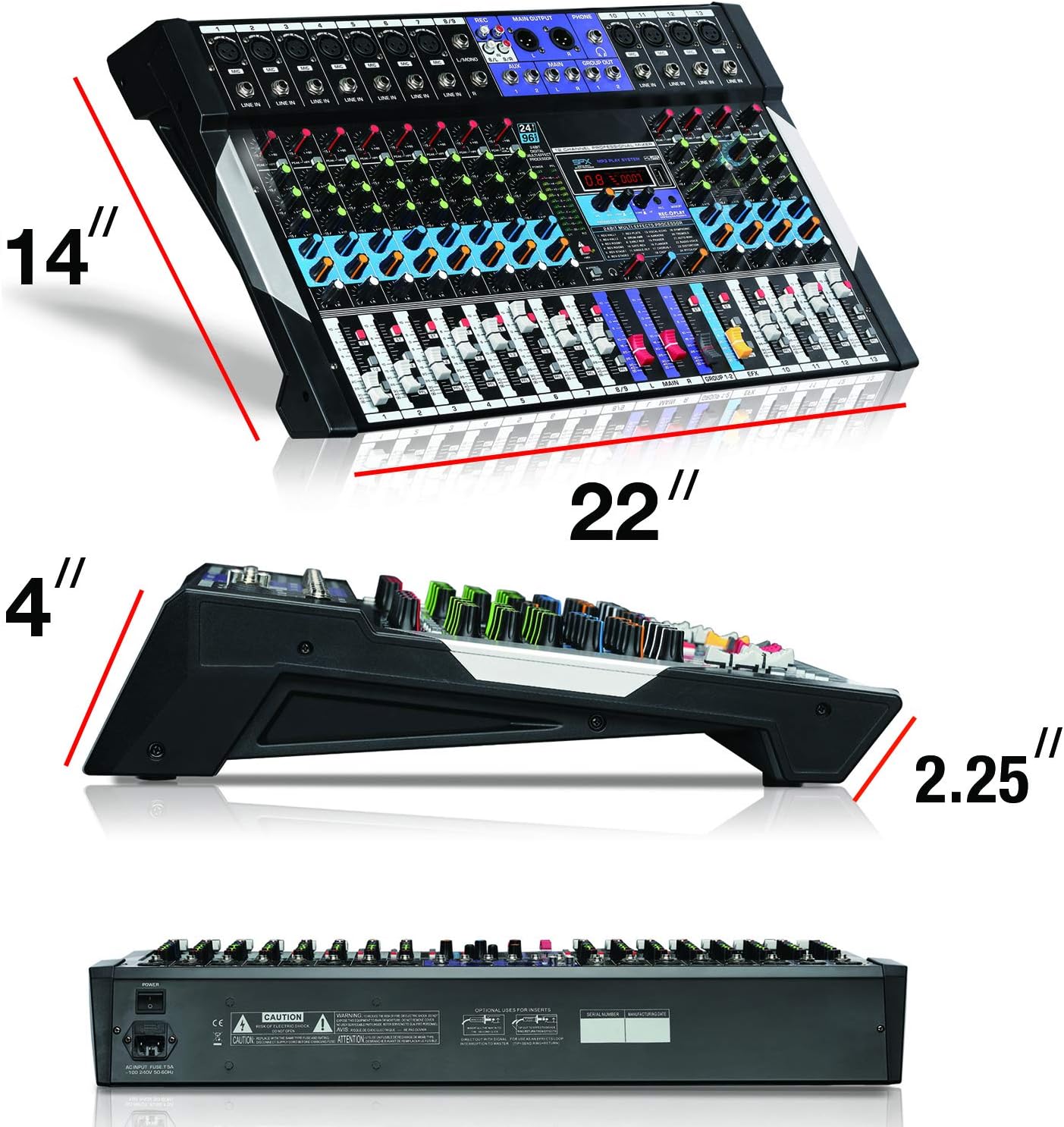
Figure 4.4: Close-up of the 24-bit digital multi-effect processor section. This shows the display, parameter controls, and effect selection options.
- Kazanç Kontrolü: Her kanal için giriş hassasiyetini ayarlar.
- High, Mid, Low EQ: Three-band equalizer for tone shaping on each channel.
- AUX Send: Controls the level of the channel signal sent to the AUX output for external effects or monitoring.
- Pan Kontrolü: Kanal sinyalinin stereo konumunu ayarlar.
- Kanal Kısıcıları: Controls the volume level of individual channels.
- Ana Miks Fader'ları: Genel çıkış hacmini kontrol eder.
- +48V Phantom Power Switch: Kondenser mikrofonlar için fantom gücünü etkinleştirir.
- 24BIT Digital Multi Effect Processor: Provides various digital effects (e.g., reverb, delay) with parameter adjustments.
- USB/MP3 Player Controls: Playback, pause, skip, and mode selection for USB media.
- Bluetooth Göstergesi: Bluetooth bağlantı durumunu gösterir.
5. Kurulum Kılavuzu
Follow these steps to set up your Boytone BT-120MX mixer.
5.1 Güç Bağlantısı
- Mikserin güç düğmesinin KAPALI konumda olduğundan emin olun.
- Connect the power adapter to the mixer's power input.
- Güç adaptörünü uygun bir elektrik prizine takın.
5.2 Ses Kaynaklarını Bağlama
- Mikrofonlar: Connect XLR microphones to the XLR inputs (Channels 1-4). If using condenser microphones, ensure the +48V phantom power is OFF before connecting, then activate it after connection.
- Cihazlar/Hat Cihazları: Connect instruments (e.g., keyboards, guitars with preamps) or other line-level devices to the 1/4" line inputs or RCA inputs.
- USB aleti: MP3 içeren bir USB flash sürücü takın fileoynatmak için USB bağlantı noktasına takın.
5.3 Çıkış Aygıtlarının Bağlanması
- Hoparlörler/Ampcankurtaranlar: Connect the mixer's MAIN OUT (1/4" L/R) to your power amplifli veya güçlendirilmiş hoparlörler.
- Kulaklıklar: Connect headphones to the 1/4" HEADPHONE jack for monitoring.
5.4 PC Connection for Recording/Playback
- Mikseri bir USB kablosu kullanarak bilgisayarınıza bağlayın.
- Your computer should recognize the mixer as an audio device. Select it as the input/output device in your audio software settings.
6. Kullanım Talimatları
6.1 Temel Karıştırma
- Turn on the mixer and all connected audio devices.
- Set all channel faders and the main mix faders to their lowest position.
- For each active channel, gradually increase the GAIN control until the PEAK LED flashes only occasionally.
- Adjust the HIGH, MID, and LOW EQ controls to shape the tone of each input.
- Slowly raise the channel fader for each input to the desired level.
- Adjust the MAIN MIX faders to control the overall output volume.
- Use the PAN control to position the sound within the stereo field.
6.2 Bluetooth Bağlantısı
- Press the MODE button on the USB/MP3 player section until 'BT' or 'Bluetooth' is displayed.
- Bluetooth özellikli cihazınızda (akıllı telefon, tablet vb.) kullanılabilir cihazları arayın.
- Select 'Boytone Mixer' or a similar name from the list to pair.
- Once paired, audio from your device will stream wirelessly to the mixer. Adjust the USB/MP3 channel fader for volume control.
6.3 USB MP3 Çalar
- MP3 ses dosyası içeren bir USB flash sürücü takın fileUSB bağlantı noktasına takın.
- The mixer will automatically switch to USB mode or you may need to press the MODE button.
- Oynatmayı kontrol etmek için OYNAT/DURAKLAT, ÖNCEKİ ve SONRAKİ düğmelerini kullanın.
- Adjust the USB/MP3 channel fader for volume control.
6.4 PC Recording
- Connect the mixer to your PC via USB.
- Open your preferred Digital Audio Workstation (DAW) software (e.g., Audacity, GarageBand, Ableton Live).
- In your DAW's audio settings, select the Boytone mixer as the input device.
- Arm a track for recording and begin recording. The main mix output of the mixer will be sent to your PC.
6.5 Dijital Efekt İşlemcisi
- Use the PROGRAM knob to select from the available 24 digital effects (e.g., Reverb, Delay, Chorus). The selected effect number will be displayed.
- Adjust the PARAMETER knob to fine-tune the selected effect (e.g., decay time for reverb, delay time for echo).
- Use the EFX SEND controls on each channel to send a portion of that channel's signal to the effects processor.
- Adjust the EFX RETURN fader to control the overall volume of the applied effect in the main mix.
6.6 +48V Fantom Güç
The +48V phantom power supplies voltage to condenser microphones. Ensure dynamic microphones are not connected when phantom power is active, as this may cause damage.
- Connect your condenser microphone(s) to the XLR inputs.
- Locate the +48V PHANTOM POWER switch and activate it. The indicator LED will illuminate.
- Deactivate phantom power before disconnecting condenser microphones.
7. Bakım
- Temizlik: Regularly wipe the mixer's surface with a soft, dry cloth. Avoid abrasive cleaners or solvents.
- Depolamak: When not in use, store the mixer in a cool, dry place, away from direct sunlight and extreme temperatures.
- Kablo yönetimi: Ensure cables are not tangled or stressed, which can lead to damage.
8. Sorun Giderme
| Sorun | Olası Neden | Çözüm |
|---|---|---|
| Ses çıkışı yok | Power off; incorrect connections; faders down; gain too low; output device issues. | Check power, all cable connections, channel faders, main mix faders, and gain controls. Verify external amplifier/speakers are on and working. |
| Bozuk ses | Gain too high; input signal too strong; damaged cables. | Reduce GAIN control. Check input source level. Replace faulty cables. |
| Bluetooth bağlanmıyor | Mixer not in Bluetooth mode; device too far; interference; device already paired. | Ensure mixer is in BT mode. Move device closer. Disconnect from other Bluetooth devices. Try re-pairing. |
| USB MP3 çalar çalışmıyor | Yanlış file format; USB drive not recognized; mixer not in USB mode. | Emin olmak files are MP3 format. Try a different USB drive. Press MODE to select USB. |
| Hayalet güç çalışmıyor. | Switch not activated; faulty microphone/cable. | Ensure +48V switch is ON and indicator is lit. Test with another condenser microphone or XLR cable. |
9. Özellikler
| Özellik | Detay |
|---|---|
| Marka | Boyton |
| Örnek | BT-120MX |
| Kanal Sayısı | 12 |
| Bağlantı Teknolojisi | Bluetooth, USB |
| Güç Kaynağı | Kablolu Elektrik |
| Frekans Tepkisi | 20 Hz - 20 KHz |
| Çıkış Bağlantı Tipi | RCA, TRS (1/4") |
| Ses Giriş Türleri | XLR, RCA, 1/4" mono/stereo, USB |
| Cilttage | 110V |
| Hayali güç | +48V |
| Dijital Efektler | 24-bit Multi Effect Processor |
| Ürün Ağırlığı | 18 Pound |
| UPC | 643307992601 |
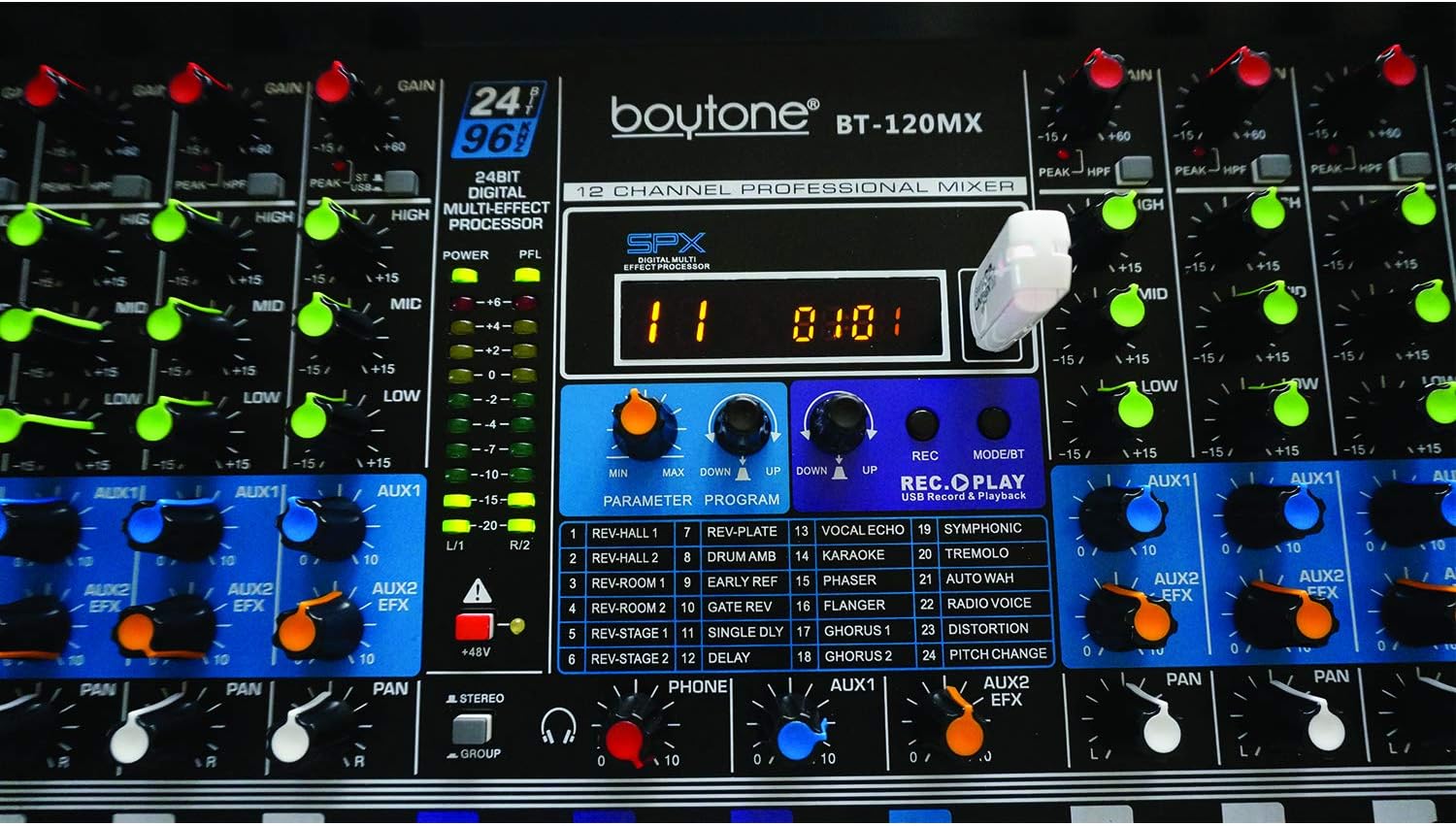
Figure 9.1: Dimensions of the Boytone BT-120MX mixer, showing approximate height, width, and depth.
10. Garanti ve Destek
Boytone products are designed for reliability and performance. This product is covered by a limited warranty against defects in materials and workmanship. For specific warranty terms and conditions, please refer to the warranty card included with your product or visit the official Boytone webalan.
For technical support, troubleshooting assistance, or service inquiries, please contact Boytone customer support through their official website or the contact information provided in your product packaging. Please have your model number (BT-120MX) and purchase information ready when contacting support.