
giriiş
This instruction manual provides essential information for the proper setup, operation, and maintenance of your Como Audio Analog Turntable, Model CATA. Please read this manual thoroughly before using the product to ensure optimal performance and longevity.
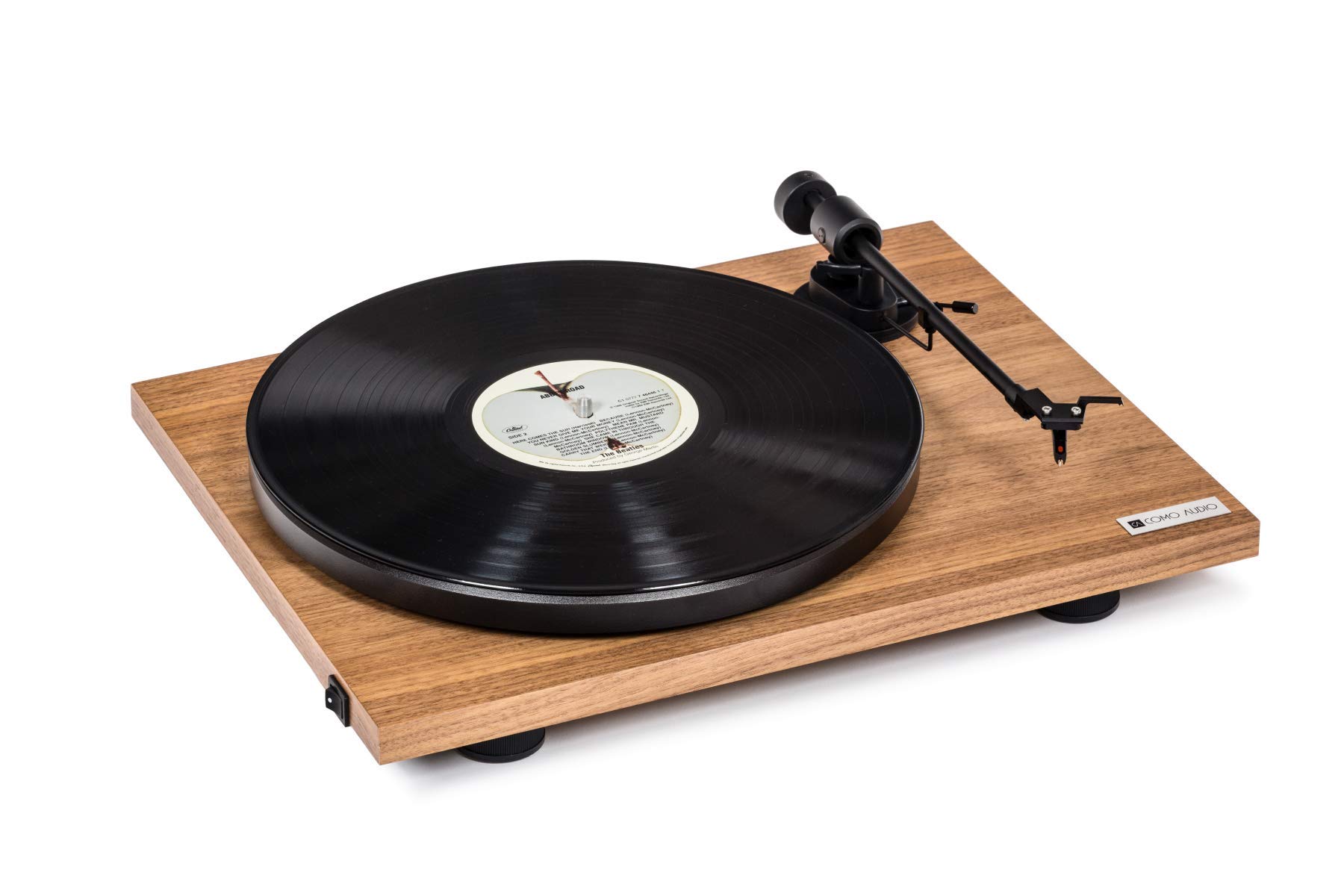
Image: The Como Audio Analog Turntable, featuring a walnut wood plinth, black platter, and tonearm.

Resim: Ayrıntılı view of the rich walnut finish on the turntable's plinth, showcasing the wood grain.
Paket İçeriği
Before proceeding with setup, ensure all components are present and undamaged:
- Como Audio Analog Turntable unit
- Pre-mounted Ortofon cartridge/stylus
- Plak
- tahrik Kayışı
- Removable clear dust cover
- Keçe mat
- Ses kablosu
- Power supply (15V/0.8A, universal 110V-240V, 50-60Hz)
- Kullanım Kılavuzu (bu belge)
Kurulum Talimatları
1. Paketin Açılması ve Yerleştirilmesi
- Tüm bileşenleri dikkatlice ambalajından çıkarın.
- Pikapı, doğrudan güneş ışığından, ısı kaynaklarından ve aşırı titreşimden uzak, sabit ve düz bir yüzeye yerleştirin.
2. Tabla ve Tahrik Kayışının Kurulumu
- Place the platter onto the spindle located on the turntable plinth.
- Locate the drive belt. Gently stretch the belt around the motor pulley (small metal cylinder) and the inner rim of the platter. Ensure the belt is not twisted.
3. Cartridge and Stylus
The Como Audio Analog Turntable comes with a premium Ortofon cartridge and stylus pre-mounted. No adjustment of counterweight or anti-skating is required for initial setup.
4. Toz Kapağı Montajı

Image: Detail of the removable clear dust cover, designed to protect the turntable from dust.
- Carefully align the hinges of the clear dust cover with the corresponding slots on the rear of the turntable plinth.
- Gently push down until the dust cover is securely in place. The dust cover is removable for cleaning or when not in use.
5. Ses Bağlantısı
The turntable offers selectable Line output or Phono output. Choose the appropriate connection for your audio system:
- Line Output (Integrated Phono Pre-Amp): Use this option if your amplifier or music system (e.g., Como Audio music system) has an Auxiliary (AUX) input and does not have a dedicated Phono input. Connect the included audio cable from the turntable's Line Out to your system's AUX input.
- Fono Çıkışı: Use this option if your amplifier or music system has a dedicated Moving Magnet (MM) Phono input. Connect the included audio cable from the turntable's Phono Out to your system's Phono input. Ensure your amplifier's Phono input is selected.
Not: If experiencing a humming noise, ensure proper grounding. Some audio systems may require a separate ground wire connection if available on your ampcankurtaran.
6. Güç Bağlantısı
- Connect the power supply cable to the DC input jack on the rear of the turntable.
- Güç adaptörünü uygun bir duvar prizine takın.
Kullanım Talimatları
1. Cihazı Açma ve Hız Seçimi
- Locate the integrated power and speed control switch, typically on the bottom left side of the turntable plinth.
- Turn the switch to select either 33 1/3 Devir/Dakika for LPs or 45 RPM for singles. The platter will begin to spin.
2. Plak Çalma

Image: The turntable with a record spinning on the platter, and the tonearm positioned over the record.
- Keçe matı tabağa yerleştirin.
- Carefully place a vinyl record onto the felt mat.
- Kaldırma kolunu kullanarak pikap kolunu yavaşça yukarı kaldırın.
- Position the stylus over the desired starting groove of the record.
- İğnenin plağın üzerine inmesini sağlamak için kolu yavaşça aşağı indirin.
- Adjust the volume on your connected audio system.
3. Oynatmayı Durdurma
- Plak çalmayı bitirdiğinizde veya çalmayı durdurmak istediğinizde, kolu kullanarak pikap kolunu yavaşça yukarı kaldırın.
- Return the tonearm to its rest position and secure it with the tonearm clip.
- Turn the power/speed switch to the "Off" position to stop the platter from spinning.
- Not: This turntable does not feature an automatic shut-off function. The platter will continue to spin until manually turned off.
Bakım
1. Pikapın Temizlenmesi
- Always power off and unplug the turntable before cleaning.
- Use a soft, dry, lint-free cloth to wipe the plinth and platter. Avoid abrasive cleaners or solvents.
- Toz kapağı için, gerekirse yumuşak bir bez ve hafif, aşındırıcı olmayan bir temizleyici kullanın.
2. Kalem Bakımı
- Regularly clean the stylus using a dedicated stylus brush, brushing gently from back to front.
- Kalem ucuna parmaklarınızla dokunmaktan kaçının.
- A worn or damaged stylus can harm your records and degrade sound quality. Replace the stylus when necessary (typically after 500-1000 hours of playback, depending on usage and record condition).
3. Tahrik Kayışı
The drive belt is a wear item. If you notice inconsistent speed or the platter not spinning, the belt may need to be inspected or replaced. Contact Como Audio support for replacement parts.
Sorun giderme
| Sorun | Olası Neden | Çözüm |
|---|---|---|
| Hiç ses yok veya çok az ses var. |
|
|
| Vızıltı sesi |
|
|
| Inconsistent or incorrect playback speed |
|
|
| Pikap dönmüyor |
|
|
Özellikler
| Özellik | Detay |
|---|---|
| Model Numarası | KATA |
| Ürün Boyutları (U x G x Y) | 16.3 x 12.6 x 4.65 inç |
| Ürün Ağırlığı | 11.68 pound |
| Marka | Como Ses |
| Maksimum Dönme Hızı | 45 RPM |
| Dahil Bileşenler | Pre-mounted Ortofon cartridge/stylus, audio cable, power supply, dust cover, felt mat |
| Özel Özellikler | Belt-Drive, Built-In Cartridge, Integrated Phono Pre-Amp, DC Motor with TPE Dampinmek |
| Malzeme | Engineered Wood (MDF), Plastic |
| Renk | Ceviz |
| Uyumlu Cihazlar | Speaker, Personal Computer (via appropriate audio input) |
| Motor Tipi | Doğru akım motoru |
Garanti ve Destek
For warranty information, technical support, or replacement parts, please contact Como Audio directly through their official webSite veya müşteri hizmetleri kanallarından satın alma işleminizi gerçekleştirin. Satın alma belgeniz olarak satın alma fişinizi saklayın.
Official Como Audio Webalan: www.comoaudio.com