
giriiş
Thank you for choosing the Yaheetech Multi-Functional Drafting Table. This product is designed to provide a versatile and comfortable workspace for various activities, including drawing, crafting, reading, and general office tasks. Its adjustable tabletop and sturdy construction make it an ideal addition to any home or office environment. Please read this manual thoroughly before assembly and use to ensure proper setup and safe operation.

Bir fazlaview of the Yaheetech drafting table, showcasing its adjustable tabletop feature with artwork.
Güvenlik Bilgileri
- Montaj ve kullanım öncesinde tüm talimatları dikkatlice okuyunuz.
- Tüm ambalaj malzemelerini çocuklardan uzak tutun.
- Montaj işlemine başlamadan önce tüm parçaların eksiksiz ve hasarsız olduğundan emin olun. Eksik veya kırık parçalar varsa kullanmayın.
- Çizilmeleri önlemek için ürünü yumuşak ve temiz bir yüzeyde monte edin.
- Tüm vidaları ve cıvataları iyice sıkın, ancak aşırı sıkmayın. Periyodik olarak bağlantı elemanlarını kontrol edin ve gerekirse yeniden sıkın.
- Do not stand or sit on the table surface, except for the designated stool.
- Keep hands and fingers clear of moving parts, especially when adjusting the tabletop angle.
- Dengeli durması için masayı düz bir yüzeye yerleştirin.
- Maximum weight capacity for the tabletop is approximately 50 lbs (22.7 kg). Do not exceed this limit.
Paket İçeriği
Lütfen aşağıda listelenen tüm bileşenlerin paketinizde bulunduğundan emin olun:
- Drafting Table Frame Components
- Tabletop Panels (Fixed and Adjustable)
- Stool Components (Seat, Legs, Crossbars)
- Donanım Seti (Vidalar, Cıvatalar, Pullar, Allen Anahtar)
- Movable Pencil Ledge
- Assembly Instructions Manual (This document)
Kurulum ve Montaj
Assembly is required for this product. It is recommended to have two people for easier and safer assembly. Please refer to the detailed assembly instructions provided in the included PDF manual for step-by-step guidance. A general overview of the process is provided below.
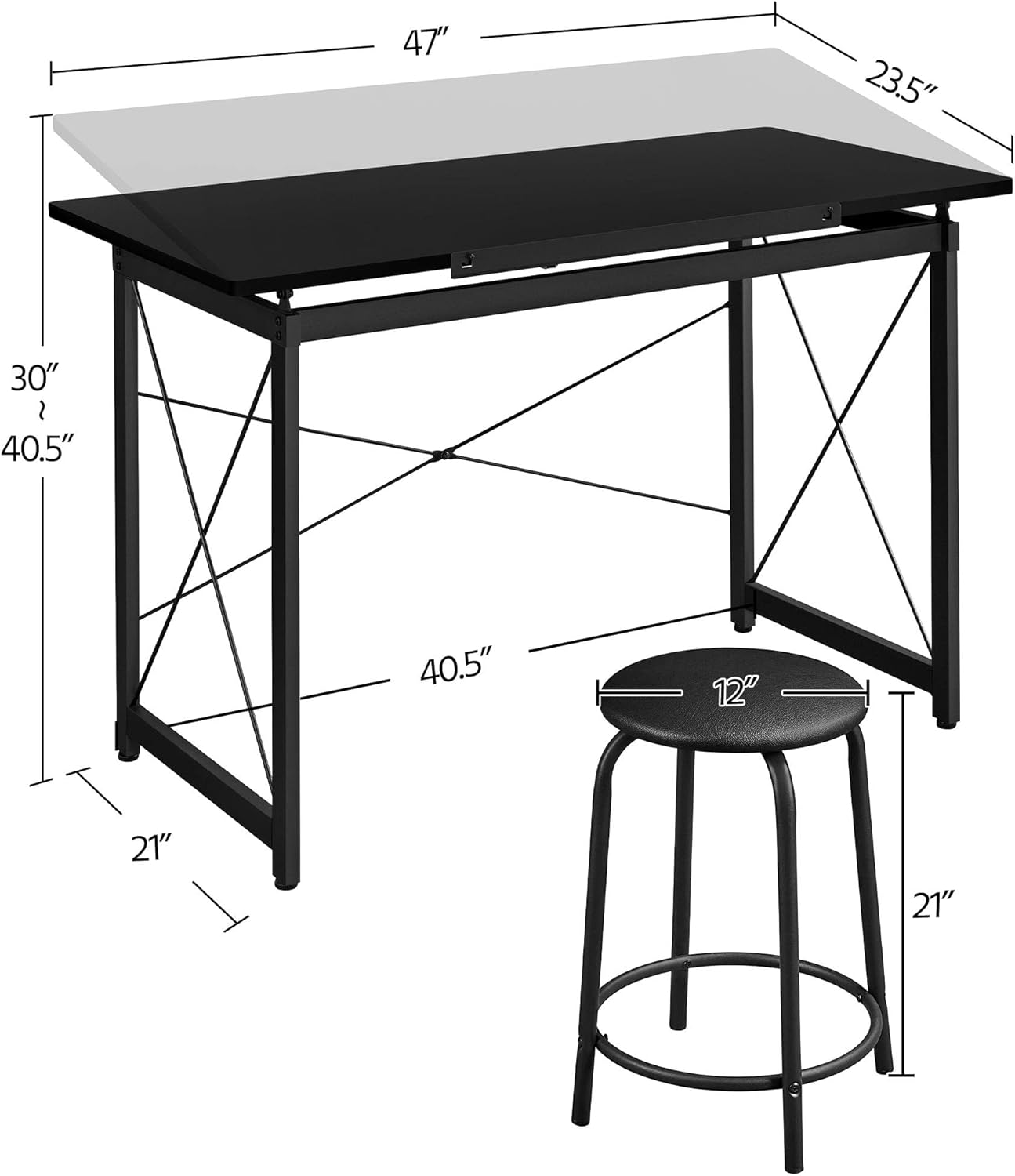
A diagram illustrating the key measurements of the drafting table and stool, including length, width, height, and adjustable range.
Genel Kurul Adımları:
- Parçaları Paketinden Çıkarın ve Tanımlayın: Carefully remove all components from the packaging and lay them out. Compare them with the parts list in the detailed manual to ensure everything is present.
- Masa Çerçevesini Birleştirin: Attach the crossbars and support beams to the main leg frames using the provided hardware. Ensure all connections are secure.
- Attach Tabletop Panels: Secure the fixed and adjustable tabletop panels to the assembled frame. Pay attention to the hinge mechanism for the adjustable section.
- Tabureyi monte edin: Connect the stool legs to the seat and secure the crossbars for stability.
- Aksesuarların Kurulumu: Attach the movable pencil ledge to the front edge of the adjustable tabletop.
- Son Kontrol: Once assembled, gently shake the table and stool to ensure stability. Tighten any loose fasteners.
Ayrıntılı görsel talimatlar için lütfen resmi talimatlara bakın Kurulum Kılavuzu (PDF).
Kullanım Talimatları
Adjusting the Tabletop Angle:
The Yaheetech Drafting Table features an adjustable tabletop, allowing you to tilt the surface to your preferred angle for various tasks. To adjust:
- Lift the Tabletop: Gently lift the front edge of the adjustable tabletop.
- Select Angle: As you lift, you will notice a support mechanism with multiple notches. Select the desired angle by resting the tabletop support bar into one of these notches.
- Güvenli Konum: Ensure the support bar is firmly seated in the notch before applying pressure to the tabletop.
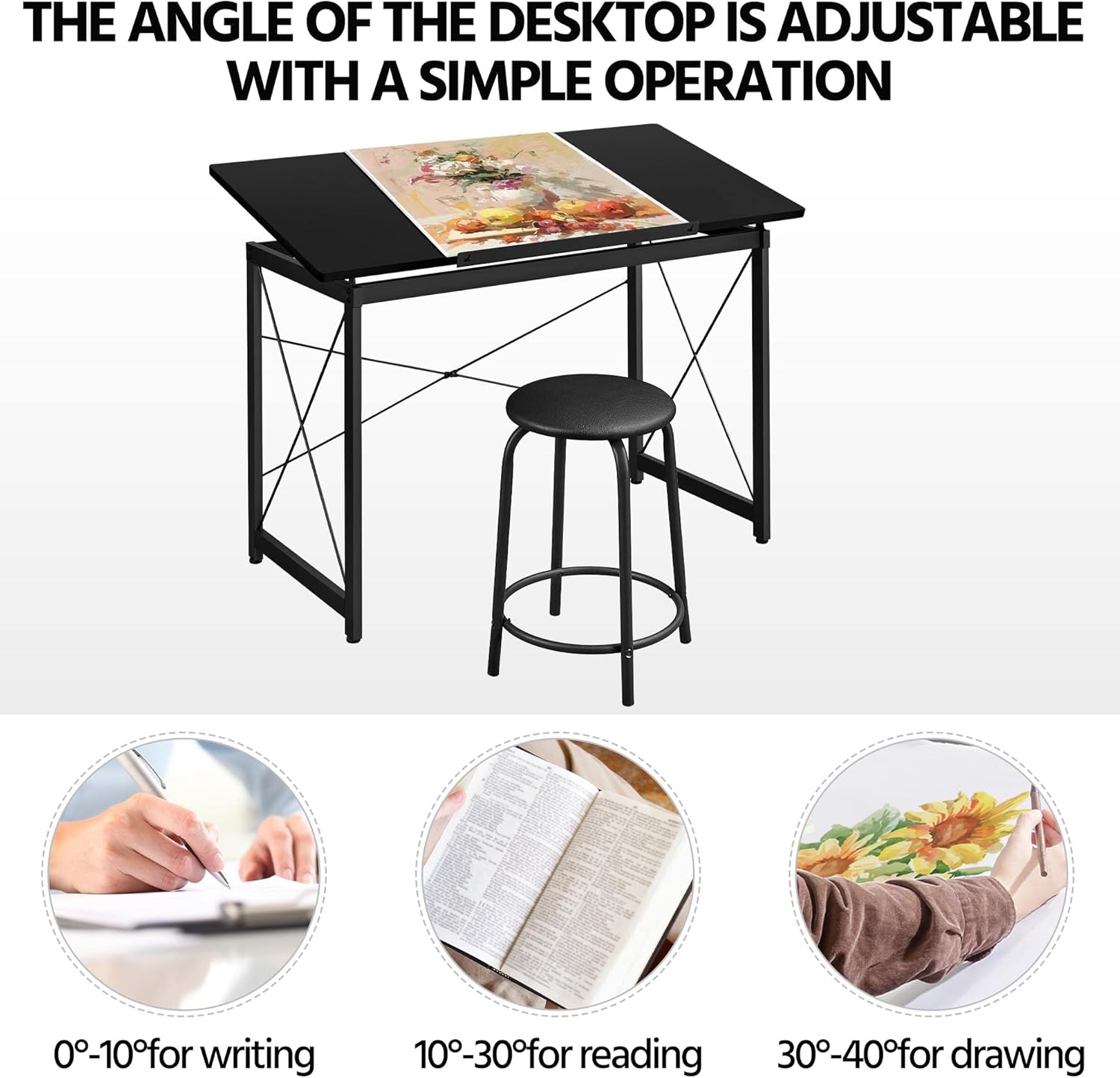
This image highlights the adjustable tabletop feature, indicating optimal angles for different activities: 0-10 degrees for writing, 10-30 degrees for reading, and 30-40 degrees for drawing.
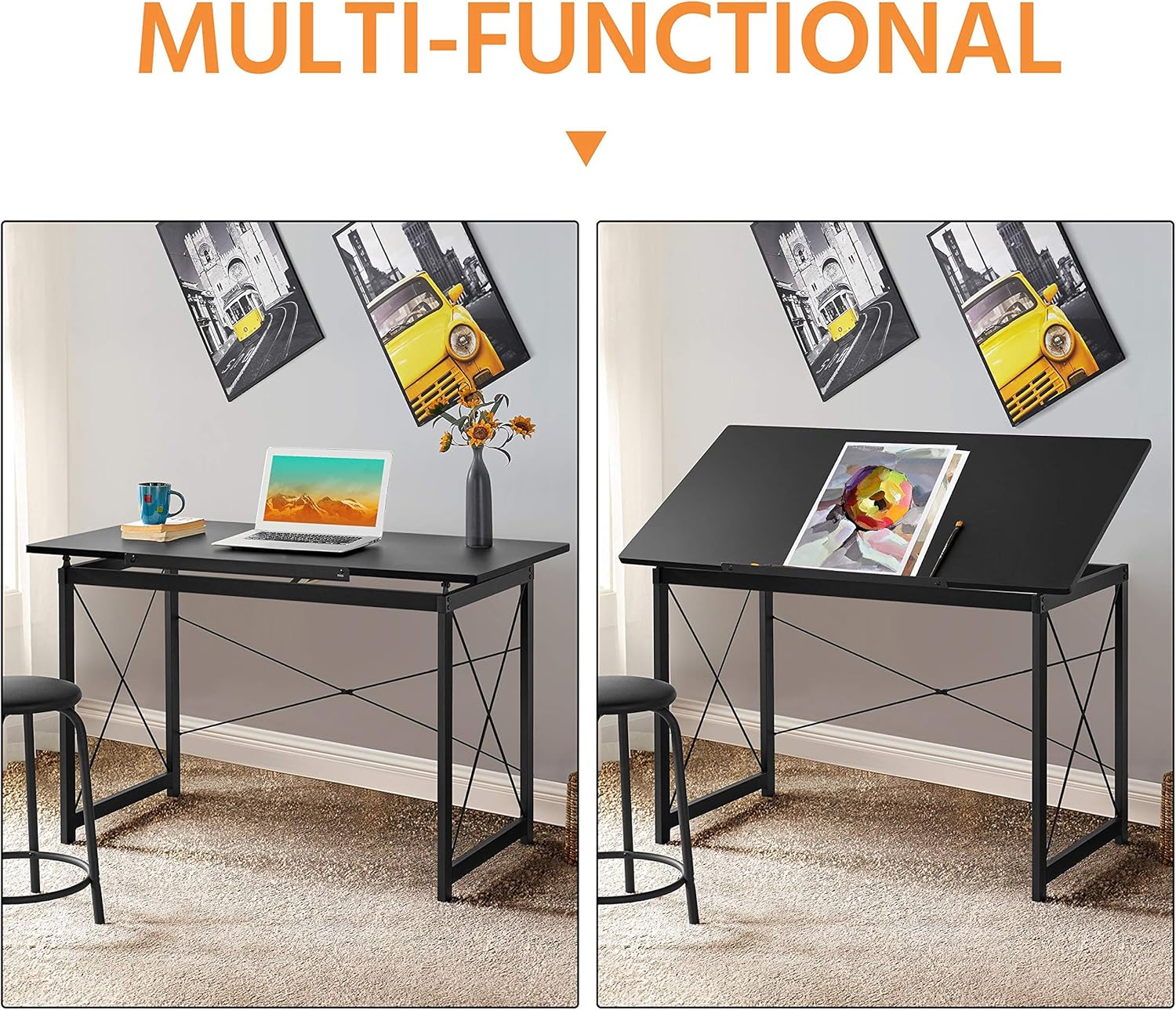
İki views of the table side-by-side, illustrating its transformation from a flat desk suitable for laptop use to a tilted drafting table for creative work.
Using the Movable Pencil Ledge:
The movable pencil ledge can be attached to the front edge of the adjustable tabletop to prevent items like pencils, pens, or papers from sliding off when the table is tilted. Simply slide it into the designated slots on the front edge of the tabletop.

Ayrıntılı views of the table's construction and features, including the smooth rounded edges for safety, a movable pencil ledge to prevent items from sliding, the robust steel frame for stability, and adjustable screw-in protective pads for floor protection and leveling.
Genel Kullanım:
The table can be used flat for general desk work, such as using a laptop, or tilted for drawing, drafting, or reading. The included stool provides comfortable seating for extended periods of use.
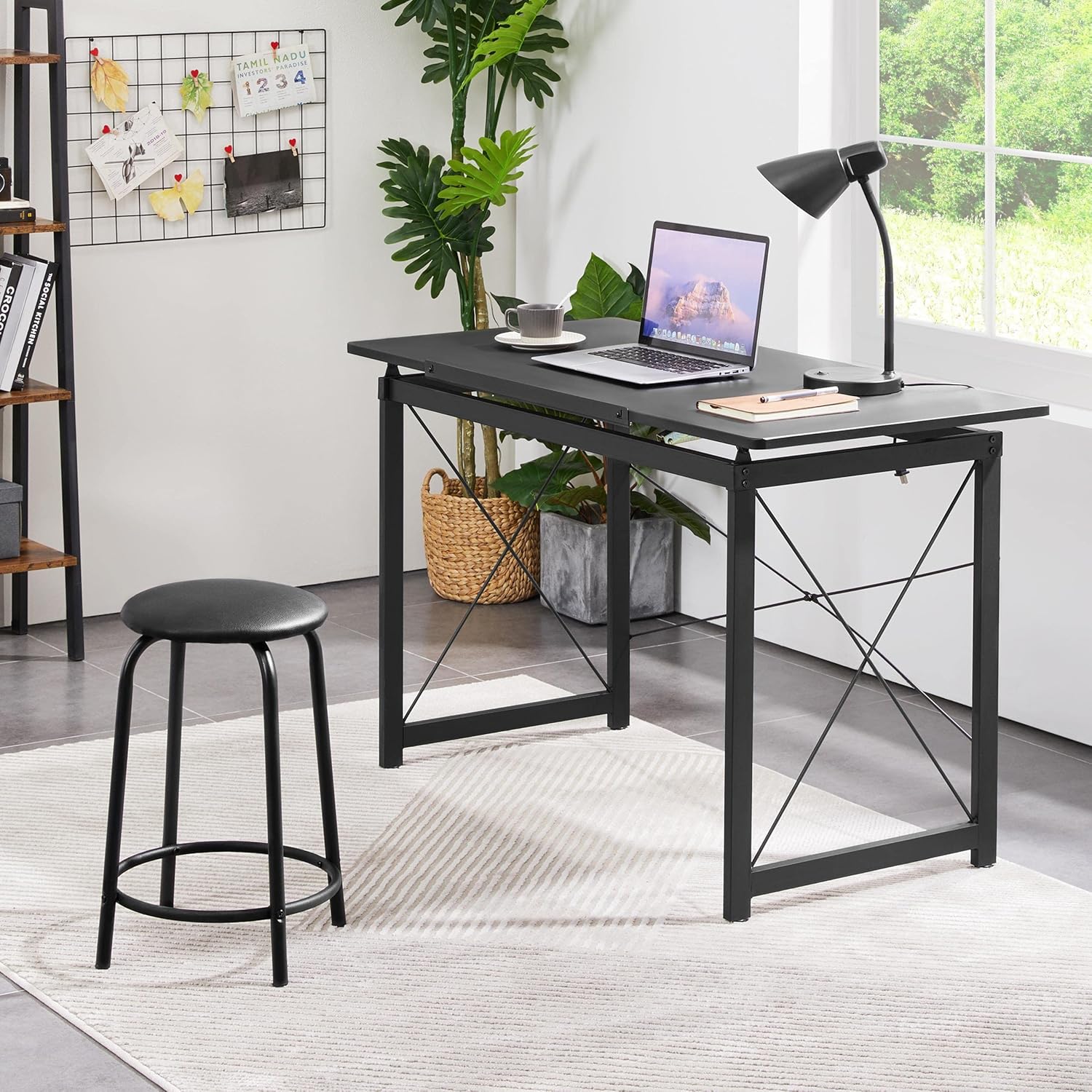
The drafting table configured as a standard desk, demonstrating its versatility for general office or home use, alongside the stool.

A person actively using the drafting table with the tabletop tilted, engaged in drawing, showcasing the ergonomic benefits of the adjustable design.
Bakım
- Temizlik: Masa tablasını ve çerçevesini yumuşak bir bezle silin.amp Kumaşa zarar verebileceğinden sert kimyasallar veya aşındırıcı temizleyiciler kullanmaktan kaçının.
- Düzenli Kontroller: Periodically inspect all screws and bolts to ensure they remain tight. Retighten as necessary to maintain stability and safety.
- Aşırı Nemden Kaçının: Do not expose the table to excessive moisture or direct sunlight for prolonged periods, as this may cause warping or discoloration.
- Yağlama: If the tabletop adjustment mechanism becomes stiff, a small amount of silicone-based lubricant can be applied to the moving parts.
Sorun giderme
| Sorun | Olası Neden | Çözüm |
|---|---|---|
| Masa sallanıyor/dengesiz. | Loose fasteners; Uneven floor | Ensure all screws and bolts are tightened. Adjust the screw-in protective pads on the feet to level the table on uneven surfaces. |
| Tabletop adjustment is stiff | Lack of lubrication; Dust/debris in mechanism | Clean the adjustment mechanism. Apply a small amount of silicone-based lubricant to the moving parts. |
| Montaj sırasında eksik parçalar | Paketleme hatası | Contact Yaheetech customer support with your purchase details and the specific missing parts. |
| Yüzeyde çizikler | Improper handling; Sharp objects | Use a soft cloth for cleaning. Avoid placing sharp or abrasive objects directly on the tabletop. Consider using a desk mat. |
Özellikler
| Özellik | Detay |
|---|---|
| Marka | Yaheetech |
| Ürün Boyutları (UxGxY) | 47.2'' x 23.6'' x (30-40.6)'' (approx. 55.51"D x 23.62"W x 35.83"H) |
| Taban Malzemesi | Alaşımlı Çelik |
| Üst Malzeme Türü | Plastik |
| Bitiş Türü | Toz Boyalı |
| Özel Özellik | Adjustable Tabletop |
| Oda Tipi | Ofis, Ev, Okul |
| Montaj Gerekli | Evet |
| Çekmece Sayısı | 2 (implied from product details, though not explicitly visible as drawers in images, often refers to side storage) |
Müşteri Desteği
For any questions, concerns, or assistance with your Yaheetech Multi-Functional Drafting Table, please contact our customer support team. Refer to your purchase documentation or the Yaheetech official webiletişim bilgileri için site.
Please have your product model number (B08NFY86ZG) and purchase date ready when contacting support.