
giriiş
The 4smarts Powerbank Enterprise 2 is a high-capacity 20000 mAh portable charger designed to provide fast and efficient power to a wide range of electronic devices. With a total output of 130 watts and multiple charging ports, it supports various fast charging standards, including Power Delivery (PD), Qualcomm Quick Charge 3.0 (QC3.0), and Samsung Adaptive Fast Charge. This manual provides essential information for the safe and optimal use of your power bank.

Image: The 4smarts Powerbank Enterprise 2, highlighting its 130W output capability.
Kurmak
İlk Şarj
Before first use, fully charge your 4smarts Powerbank Enterprise 2. For the fastest charging experience, use a 100W Power Delivery (PD) compatible wall charger and a USB-C to USB-C cable (sold separately). The power bank can be fully recharged in approximately 60 minutes with a 100W charger.
LED Göstergeleri
The power bank features LED indicators to display the current charge level. Observe these lights to monitor the battery status during charging and discharging.
Kullanım Talimatları
Power Bank'ı Şarj Etme
- Connect a compatible charging cable to either the USB-C1 or USB-C2 input port on the power bank. For optimal speed, use the USB-C1 port with a 100W PD charger.
- Alternatif olarak, şunu kullanabilirsiniz: Mikro USB input port with a compatible cable and charger.
- Şarj ilerlemesini göstermek için LED göstergeler yanacaktır. Tamamen şarj olduğunda tüm LED'ler sürekli yanacaktır.
Harici Cihazları Şarj Etme
The Powerbank Enterprise 2 offers multiple output ports to charge your devices:
- USB-C1 Output (PD/PPS): Up to 100W for fast charging laptops (e.g., MacBook Pro), tablets, and smartphones.
- USB-C2 Output (PD): Up to 30W for fast charging tablets and smartphones.
- USB-A Çıkışı (QC3.0): Up to 18W for devices supporting Qualcomm Quick Charge 3.0 or other standard charging protocols.
Bir cihazı şarj etmek için:
- Connect your device to the appropriate output port on the power bank using a compatible charging cable.
- Power bank, cihazınızı otomatik olarak şarj etmeye başlayacaktır. Başlamazsa, şarjı etkinleştirmek için güç düğmesine bir kez basın.
- You can charge multiple devices simultaneously. The total output is up to 130W (e.g., USB-C1 at 100W + USB-C2 at 30W). For safety, if the total output exceeds 130W, the power bank will regulate the output of each port accordingly.

Image: Diagram illustrating the various input and output ports of the power bank, including their respective wattages and functions (Micro USB input, USB-C1 input/output with PD/PPS, USB-C2 input/output with PD, and USB-A output with QC3.0).
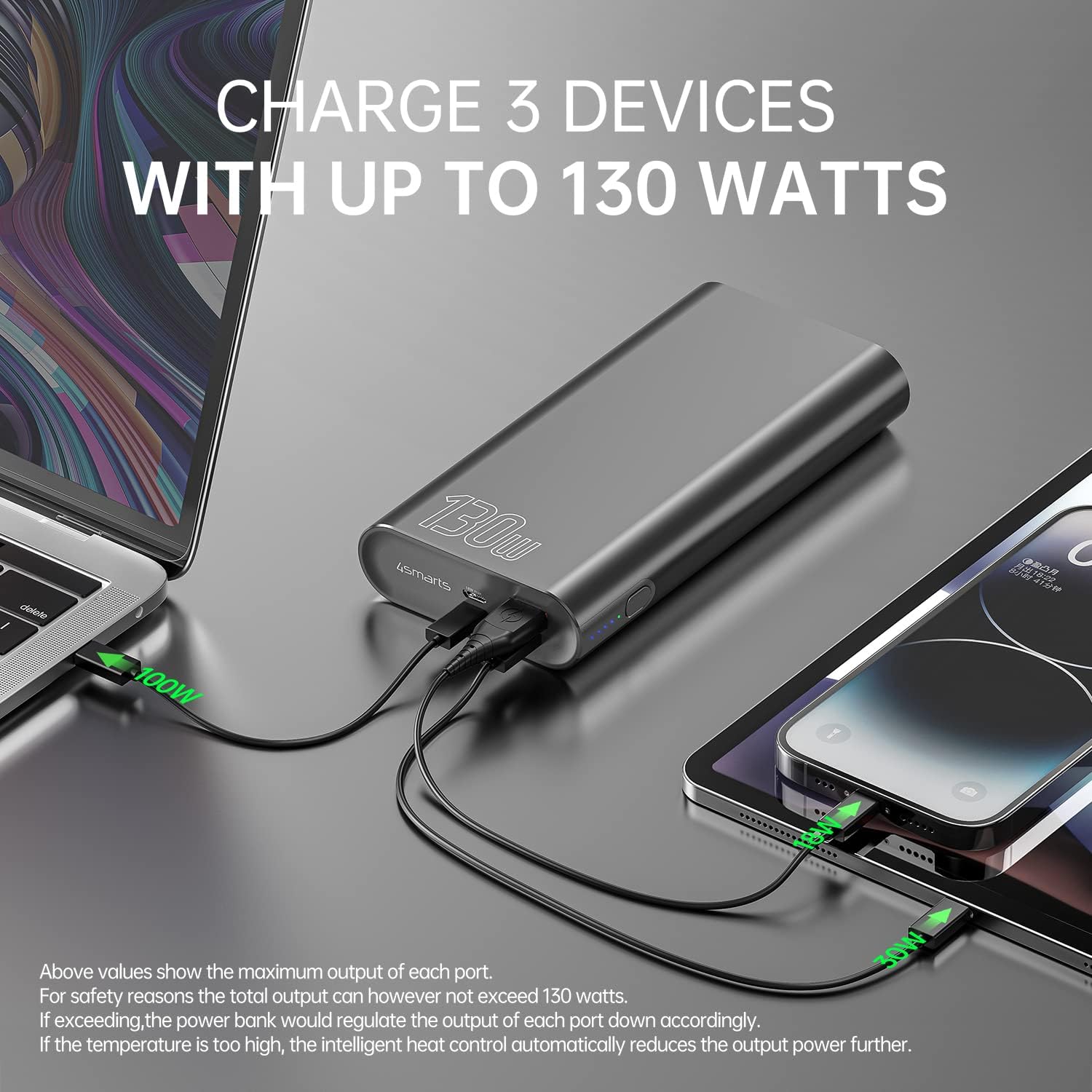
Image: The power bank connected and simultaneously charging a laptop and a tablet, demonstrating its multi-device charging capability.

Image: The power bank charging a MacBook Pro 16", illustrating 100W fast charging to reach 50% in 45 minutes.
Bakım
- Temizlik: Power bank'i temizlemek için yumuşak, kuru bir bez kullanın. Sert kimyasallar veya aşındırıcı malzemeler kullanmaktan kaçının.
- Depolamak: Powerbank'i serin, kuru ve doğrudan güneş ışığından, aşırı sıcaklıklardan ve nemden uzak bir yerde saklayın.
- Pil Bakım: Pil ömrünü uzatmak için, düzenli kullanımda değilse, power bank'i en az üç ayda bir tamamen şarj edin. Pilin uzun süre tamamen boşalmasından kaçının.
- İşleme: Do not drop, puncture, or disassemble the power bank. This can damage the internal components and void the warranty.
Sorun giderme
- Powerbank şarj olmuyor: Ensure the charging cable and wall adapter are functioning correctly and are securely connected. For fastest charging, use a 100W PD charger with the USB-C1 port.
- Cihaz powerbank'ten şarj olmuyor: Ensure the power bank has sufficient charge. Press the power button to activate output if necessary. Check that the cable connecting your device to the power bank is not damaged and is compatible.
- Yavaş şarj oluyor: Verify that your device and cable support fast charging protocols (PD, QC3.0) and are connected to the appropriate high-output port (USB-C1 for up to 100W, USB-C2 for up to 30W, USB-A for up to 18W).
- Aşırı Isınma: The power bank features intelligent heat control. If the temperature is too high, it will automatically reduce output power. Ensure proper ventilation during use.
The 4smarts Powerbank Enterprise 2 is equipped with multiple safety features, including overload protection, short circuit protection, intelligent charge shutdown, and deep discharge protection, to ensure safe operation.

Image: An internal diagram of the power bank, showcasing its certified safety features such as overload protection, short circuit protection, intelligent charge shutdown, and deep discharge protection.
Özellikler
| Özellik | Detay |
|---|---|
| Model Adı | Powerbank Enterprise 2 |
| Ürün Model Numarası | 4S468747 |
| Pil Kapasitesi | 20000 mAh |
| Pil Hücresi Kompozisyonu | Lithium-ion (4 Tesla 21700 Li-ion cells) |
| Mikro USB Girişi | DC 5V/2A, 9V/2A, 12V/1.5A (Maks 18W) |
| USB-C1 Input/Output (PD/PPS) | DC 5V/3A, 9V/3A, 12V/3A, 15V/3A, 20V/5A (Max 100W) |
| USB-C2 Input/Output (PD) | DC 5V/3A, 9V/3A, 12V/3A, 15V/2A, 20V/1.5A (Max 30W) |
| USB-A Output (QC3.0) | DC 5V/3A, 9V/2A, 12V/1.5A (Maks 18W) |
| Toplam Çıktı | 130W (USB-C1 100W + USB-C2 30W) |
| Power Bank Charging Time | Approx. 60 minutes (with 100W AC charger and cable, sold separately) |
| Boyutlar (U x G x Y) | 15.2 x 7.5 x 2.5 cm (5.98 x 2.95 x 0.98 inç) |
| Ürün Ağırlığı | 515 gram (1.13 lb) |
| Renk | Siyah |
| Özel Özellikler | Fast Charging, Overload Protection, Short Circuit Protection, Deep Discharge Protection |
| Önerilen Kullanımlar | iPhone, Laptop, Smartphone, Tablet |
Güvenlik Bilgileri
- Powerbank'i suya, ateşe veya aşırı sıcaklıklara maruz bırakmayın.
- Güç bankasını düşürmekten veya güçlü darbelere maruz bırakmaktan kaçının.
- Do not attempt to disassemble, repair, or modify the power bank.
- Çocukların erişemeyeceği yerde saklayınız.
- Yalnızca orijinal veya onaylı uyumlu şarj kabloları ve adaptörleri kullanın.
- Taşınabilir güç bankasını, elektronik atıklarla ilgili yerel düzenlemelere uygun olarak sorumlu bir şekilde imha edin.
Garanti ve Destek
Garanti
The 4smarts Powerbank Enterprise 2 comes with a manufacturer's warranty. Please refer to the warranty card included in the product packaging or visit the official 4smarts webBölgenize özgü ayrıntılı garanti şartları ve koşulları için siteyi ziyaret edin.
Müşteri Desteği
For technical assistance, troubleshooting, or any questions regarding your 4smarts Powerbank Enterprise 2, please contact 4smarts customer support. Contact information can typically be found on the official 4smarts webSitede veya ürün ambalajında.


