
Sygonix SY-4532434
Sygonix RSL Wireless Socket Set Instruction Manual
Model: SY-4532434
1. Giriş
Thank you for choosing the Sygonix RSL Wireless Socket Set. This set includes three remote-controlled sockets and one remote control, designed to provide convenient wireless control over your electrical appliances. This manual provides essential information for safe and efficient use, including setup, operation, maintenance, and troubleshooting.
Paket İçeriği
- 3 x Sygonix RSL Wireless Sockets
- 1 x Uzaktan Kumanda
- 1 x CR2032 Battery (for remote control)
- 1 x Kullanım Kılavuzu (bu belge)
Temel Özellikler
- Wireless control of up to 3 devices.
- Compatible with other Sygonix RSL 433MHz transmitters (e.g., models 1761736, 1761748, 1761740, 1761732, 1761735, 1761752, 1761744).
- Maximum output power of 1000 W per socket.
- LED indicators for operational and pairing status.
- Enhanced touch protection.
- Aşırı yük ve aşırı ısınma koruması.
- Çalışma frekansı: 433.92 MHz.
- Remote control with up to 12 channels and LED transmission indicator.
- Operating range of up to 30 meters in open field conditions.

Image 1.1: The Sygonix RSL Wireless Socket Set, showing three sockets and the remote control.
2. Güvenlik Talimatları
Please read these safety instructions carefully before using the device. Failure to follow these instructions may result in electric shock, fire, or serious injury.
- Sadece İç Mekanda Kullanım: This product is designed for indoor use in dry environments. Do not expose to moisture, rain, or extreme temperatures.
- Elektrik Yükü: Do not exceed the maximum output power of 1000 W per socket. Overloading can cause overheating and fire hazards.
- Cilttage: Ensure the connected devices operate within the specified voltage range of 230 V/AC.
- Çocuklar: Keep the device and remote control out of reach of children. The product features enhanced touch protection, but supervision is always recommended.
- Zarar: Do not operate the device if it is damaged. Disconnect it from the power supply immediately and contact qualified personnel for repair.
- Sökme: Do not attempt to disassemble or modify the device. This will void the warranty and may pose safety risks.
- Pil Güvenliği: The remote control uses a CR2032 button cell battery. Keep batteries away from children. If swallowed, seek immediate medical attention. Dispose of used batteries responsibly.
3. Kurulum
3.1 Uzaktan Kumanda Pilinin Takılması
- Uzaktan kumandanın arkasındaki pil bölmesini bulun.
- Bölme kapağını açın.
- CR2032 pili pozitif (+) tarafı yukarı bakacak şekilde yerleştirin.
- Pil bölmesi kapağını sıkıca kapatın.
3.2 Pairing Sockets with the Remote Control
Each socket needs to be paired with the remote control to function. The remote control supports up to 12 channels.
- Plug the wireless socket into a wall outlet. The LED indicator on the socket will flash slowly.
- Within 5 seconds of plugging in the socket, press the desired "ON" button (e.g., 1 ON, 2 ON, 3 ON) on the remote control.
- The LED indicator on the socket will flash rapidly and then turn solid, indicating successful pairing.
- Repeat this process for each wireless socket you wish to pair.
- To unpair a socket, plug it into a wall outlet, and within 5 seconds, press the corresponding "OFF" button on the remote control. The LED will flash rapidly and then turn off.
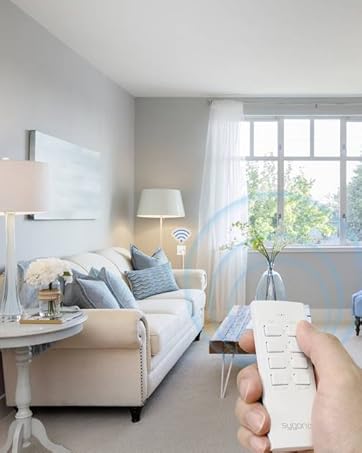
Image 3.1: A hand operating the remote control, demonstrating wireless functionality with a socket.
4. Operating the Wireless Sockets
Once paired, you can control your connected devices using the remote control.
4.1 Bireysel Kontrol
- To turn on a device connected to a specific socket, press the corresponding "ON" button (e.g., 1 ON) on the remote control. The LED on the socket will illuminate.
- To turn off a device connected to a specific socket, press the corresponding "OFF" button (e.g., 1 OFF) on the remote control. The LED on the socket will turn off.
4.2 Grup Kontrolü
- To turn on all paired devices simultaneously, slide the switch on the remote control to "ALL ON".
- To turn off all paired devices simultaneously, slide the switch on the remote control to "ALL OFF".
The remote control has an LED transmission indicator that lights up when a button is pressed, confirming signal transmission.
The maximum operating range is 30 meters in an open field. Obstacles such as walls, furniture, and other electronic devices may reduce this range.
5. Bakım
5.1 Temizlik
- Before cleaning, ensure the sockets are unplugged from the wall outlets and no devices are connected.
- Wipe the devices with a soft, dry, lint-free cloth.
- Yüzeye zarar verebileceğinden aşındırıcı temizleyiciler, çözücüler veya sert kimyasallar kullanmayın.
- Do not immerse the devices in water or any other liquid.
5.2 Pil Değişimi
If the remote control's range decreases or the LED transmission indicator does not light up, the CR2032 battery may need replacement. Follow the steps in Section 3.1 to replace the battery.
6. Sorun Giderme
| Sorun | Olası Neden | Çözüm |
|---|---|---|
| Socket does not respond to remote control. |
|
|
| Connected device does not turn on/off. |
|
|
| Azaltılmış çalışma aralığı. |
|
|
7. Özellikler
| Özellik | Şartname |
|---|---|
| Model Numarası | SY-4532434 |
| ASIN | B08HT3T2SC |
| Marka | Sygonix |
| Soket Sayısı | 3 |
| Max. Output Power per Socket | 1000 B |
| Çalışma Frekansı | 433.92 MHz |
| Max. Range (open field) | 30 metre |
| Güç Kaynağı | 230 V/AC |
| Kanal Sayısı (Uzaktan) | 12 |
| Uzaktan Kumanda Pili | CR2032 (dahil) |
| Konum | Kapalı |
| Montaj Tipi | Takılabilir soket |
| Renk | Beyaz |
| Paket Boyutları | 49x41.2x15.1 cm |
| Paket Ağırlığı | 26 kilo |


Resim 7.1: Ön ve arka views of a single Sygonix RSL wireless socket.
8. Garanti ve Destek
8.1 Garanti Bilgileri
This product comes with a minimum 2-year warranty from the date of purchase. Please retain your proof of purchase for warranty claims. The warranty covers manufacturing defects and malfunctions under normal use. It does not cover damage caused by misuse, accidents, unauthorized modifications, or failure to follow the instructions in this manual.
8.2 Müşteri Desteği
For technical assistance, troubleshooting beyond the scope of this manual, or warranty inquiries, please refer to the contact information provided with your purchase or visit the official Sygonix website. Please have your model number (SY-4532434) and proof of purchase ready when contacting support.
Ask a question about this manual
Ask about setup, troubleshooting, compatibility, parts, safety, or missing instructions. Manuals+ will review the question and use this page’s manual context to help answer it.