
cable XR15
XR15 Voice Control Remote Instruction Manual
Model: XR15 | Brand: cable
1. Giriş
This manual provides instructions for the XR15 Voice Control Remote, designed for use with Xfinity and Comcast X1, Xi6, Xi5, and XG2 systems. The remote allows users to control their television and compatible TV box, offering features such as voice commands, backlit keypad, and direct access to accessibility options.

Image 1.1: The XR15 Voice Control Remote, a replacement remote for Xfinity Comcast systems.
2. Paket İçeriği
Paketin içinde tüm öğelerin mevcut olduğundan emin olun:
- 1 x XR15 Voice Control Remote
- 2 x AA Pil
- 1 x User's Guide (this document)
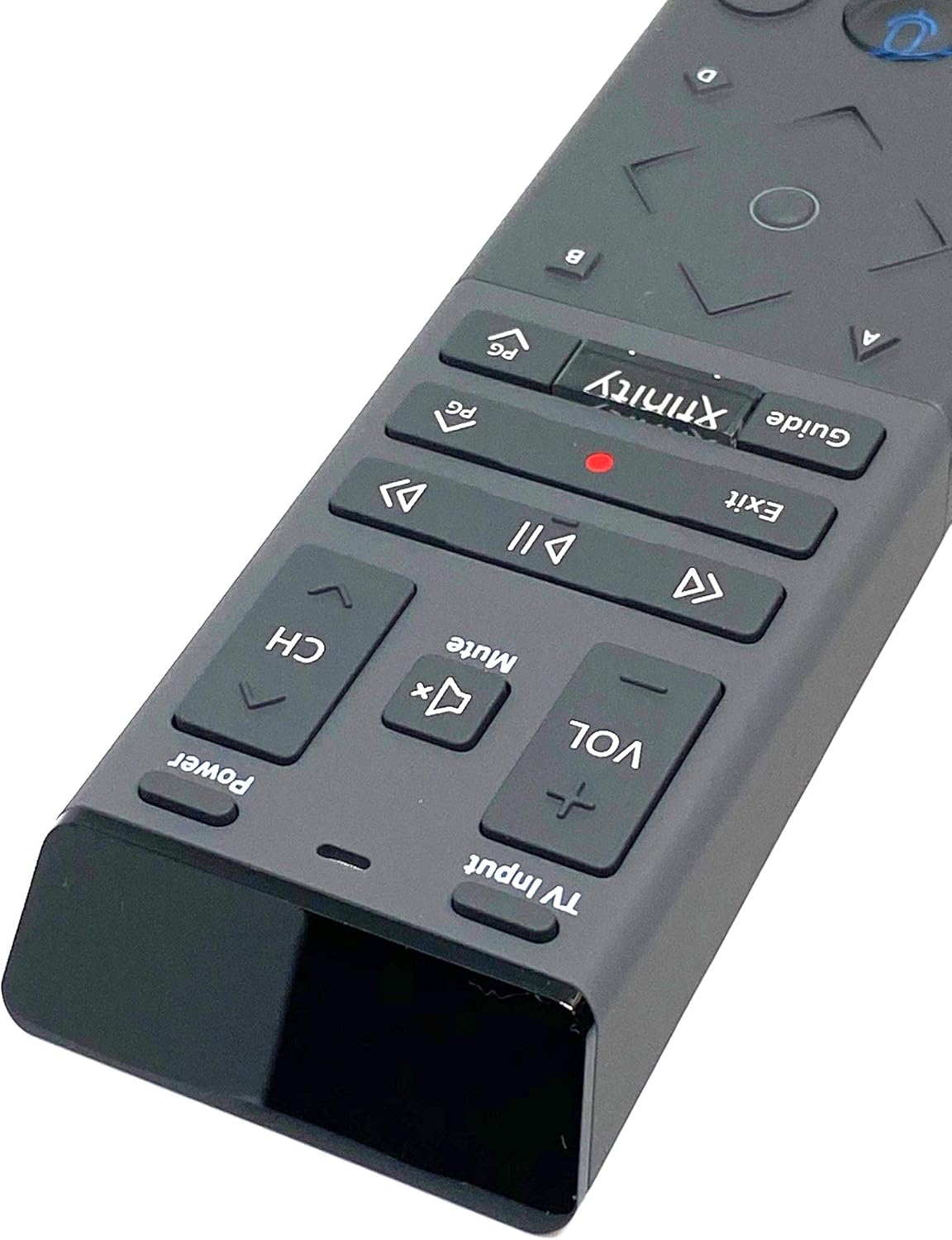
Image 2.1: The XR15 Voice Control Remote as received in its protective packaging.
3. Temel Özellikler
The XR15 Voice Control Remote offers several advanced features for an enhanced user experience:
- Ses Kontrolü: Use voice commands to change channels, search for content, and get recommendations.
- Arkadan Aydınlatmalı Tuş Takımı: Buttons illuminate for visibility in low-light conditions.
- Her Yere Nişan Alma Özelliği: Operates without needing to point directly at the device.
- Otomatik Eşleştirme: Simplifies the setup process with compatible devices.
- Erişilebilirlik Özellikleri: Quick access to Closed Captioning, video description, and voice guidance.
- TV Giriş Kontrolü: Manage TV power and input settings.
4. Kurulum
4.1 Pil Kurulumu
To power your remote, install the two AA batteries provided:
- Uzaktan kumandanın arkasındaki pil bölmesini bulun.
- Pil kapağını açmak için aşağı doğru kaydırın.
- İki adet AA pil takın ve pozitif (+) ve negatif (-) kutupların bölmenin içindeki göstergelerle doğru şekilde hizalandığından emin olun.
- Pil kapağını güvenli bir şekilde yerine oturana kadar yerine kaydırın.

Resim 4.1: Arka view of the XR15 remote, highlighting the battery compartment area.
4.2 Eşleştirme Talimatları
The XR15 remote can be paired with your Xfinity X1 TV Box and television for full functionality. Follow these steps:
- Pairing with X1 TV Box:
- Ensure your TV Box is powered on.
- Point the remote at the TV Box.
- Basılı tutun Xfinity düğme ve Bilgi (i) button simultaneously for five seconds until the status light on the remote changes from red to green.
- Eşleştirme işlemini tamamlamak için ekrandaki talimatları izleyin.
- Pairing with Television (for TV Power and Volume):
- After pairing with the TV Box, the remote may automatically attempt to pair with your TV.
- If not, or if it fails, press and hold the Kurmak button (usually a small, recessed button on the side or back, or a combination of buttons like Xfinity Ve Sesini kapatmak) until the status light turns green.
- Enter the TV brand code. Refer to your TV's user manual for specific codes if the Xfinity codes do not work.
- Test edin Güç Ve Hacim buttons. If they work, the pairing is successful.
5. Kullanım Talimatları
The XR15 remote features a clear layout for intuitive control. Below is a guide to its primary buttons and their functions:

Resim 5.1: Yakın çekim view of the upper section of the XR15 remote, showing TV Input, Volume, Mute, Power, and Channel buttons.
5.1 Düğme Fonksiyonları
| Düğme | İşlev |
|---|---|
| Güç | Turns the TV and compatible TV Box on or off. |
| TV Girişi | Cycles through available TV input sources. |
| VOL + / VOL- | Sesi artırır veya azaltır. |
| Sesini kapatmak | Sesi açar veya kapatır. |
| CH+ / CH- | Sonraki veya önceki kanalı seçer. |
| Oynat/Duraklat (►▮▮) | Canlı TV yayınlarını, Xfinity On Demand içeriklerini veya DVR kayıtlarını oynatır veya duraklatır. |
| FF (►►) | Xfinity On Demand veya DVR içeriğini ileri sarar. |
| Rew (◄◄) | Xfinity On Demand veya DVR içeriğini geri sarar. |
| Çıkış | Exits on-screen guides; stops and exits Xfinity On Demand and DVR content. Returns to "Live" point during live TV replay. |
| Record (Red Dot) | Mevcut programı kaydeder. |
| Xfinity | Displays the main menu of the guide, providing access to DVR and Xfinity On Demand. |
| Rehber | Televizyon yayın akışını görüntüler. |
| Ses Kontrolü (Mikrofon simgesi) | Activates voice command functionality. Press and speak into the remote. |
| Directional Pad (Up, Down, Left, Right, OK) | Menüler arasında gezinir ve seçenekleri belirler. |
| Bilgi (i) | Geçerli program veya seçili öğe hakkında bilgi görüntüler. |
| Sayı Takımı (0-9) | Doğrudan kanal numaralarını veya diğer sayısal girdileri girer. |

Resim 5.2: Yakın çekim view of the lower section of the XR15 remote, featuring the voice control button, directional pad, and numeric keypad.
6. Bakım
To ensure the longevity and optimal performance of your XR15 Voice Control Remote, follow these maintenance guidelines:
- Temizlik: Kumandayı yumuşak, kuru bir bezle silin. İnatçı kirler için hafifçe kurulayın.ampBezi su veya aşındırıcı olmayan yumuşak bir temizleyici ile silin. Aşırı nemden kaçının.
- Pil Değişimi: Replace batteries when the remote's performance degrades or the status LED indicates low power. Always use new AA batteries and dispose of old batteries responsibly.
- Depolamak: Uzaktan kumandayı serin, kuru ve doğrudan güneş ışığından ve aşırı sıcaklıklardan uzak bir yerde saklayın.
- Damlalardan Kaçının: Uzaktan kumandayı fiziksel darbelere karşı koruyun, çünkü düşmeler iç bileşenlere zarar verebilir.
7. Sorun Giderme
If you encounter issues with your XR15 Voice Control Remote, refer to the following common problems and solutions:
- Uzaktan Kumanda Yanıt Vermiyor:
- Pil yönünü kontrol edin ve yeni piller kullandığınızdan emin olun.
- Verify the remote is paired correctly with your X1 TV Box and TV (refer to Section 4.2).
- Ensure there are no obstructions between the remote and the TV Box/TV.
- Sesli Komutlar Çalışmıyor:
- Ensure the remote is paired for voice control (refer to Section 4.2).
- Mikrofona net ve doğrudan konuşun.
- Check your Xfinity X1 system settings for voice control activation.
- TV Power/Volume Not Working:
- Confirm the remote is programmed with the correct TV code (refer to Section 4.2).
- Try re-programming the TV code, potentially using codes from your TV's original manual.
- Backlight Not Illuminating:
- The backlight activates when the remote is moved or a button is pressed. If it doesn't, check batteries.
- Ensure the remote is not in a power-saving mode if such an option exists in your Xfinity settings.
8. Özellikler
| Özellik | Detay |
|---|---|
| Model Numarası | XR15 |
| Marka | kablo |
| Ürün Boyutları | 12 x 3 x 1 inç |
| Ürün Ağırlığı | 5.9 ons |
| Piller Gerekli | 2 adet AA pil |
| Özel Özellikler | Backlit, Voice Search |
| Maksimum Desteklenen Cihaz Sayısı | 1 (TV Box + TV) |
| Uyumlu Cihazlar | Set Top Box, Television (Xfinity X1, Xi6, Xi5, XG2) |
| Bağlantı Teknolojisi | Radyo Frekansı (RF) |
| İlk Mevcut Tarih | 7 Eylül 2020 |
9. Garanti ve Destek
For warranty information or technical support, please refer to the documentation provided by your service provider (Xfinity/Comcast) or contact the product manufacturer directly. Keep your purchase receipt for warranty claims.
Ask a question about this manual
Ask about setup, troubleshooting, compatibility, parts, safety, or missing instructions. Manuals+ will review the question and use this page’s manual context to help answer it.