
1. Giriş
Thank you for choosing the Sharkoon CA300T ATX PC Case. This full tower case is designed for high-performance gaming systems, offering extensive compatibility, efficient cooling, and advanced cable management features. This manual provides essential information for the proper setup, operation, and maintenance of your new PC case.
2. Güvenlik Bilgileri
- Bilgisayar kasasının içine herhangi bir bileşen takmadan veya çıkarmadan önce daima güç kaynağını duvar prizinden ayırın.
- Handle components with care to avoid damage from electrostatic discharge. Consider using an anti-static wrist strap.
- Küçük parçaları ve ambalaj malzemelerini çocuklardan uzak tutun.
- Avoid placing the PC case in direct sunlight, near heat sources, or in environments with high humidity.
- Do not attempt to modify the case structure, as this may void your warranty and cause damage.
3. Paket İçeriği
Lütfen paket içeriğini kontrol ederek tüm öğelerin mevcut olduğundan emin olun:
- Sharkoon CA300T ATX Bilgisayar Kasası
- Accessory box (screws, cable ties, standoffs, etc.)
- RGB lighting controller (if applicable)
- Kullanım Kılavuzu (bu belge)
4. Ürün Bittiview ve Özellikler
The Sharkoon CA300T is a premium full tower ATX PC case designed for enthusiasts. It features a modern design with robust construction, tempered glass panels, and advanced cooling options.
Temel Özellikler:
- Full Tower Design: Ample space for high-end components and custom liquid cooling solutions.
- Temperli Cam Paneller: Side panels made of tempered glass for a clear view iç bileşenlerin.
- RGB Aydınlatma: Integrated RGB lighting for customizable aesthetics.
- Optimize Edilmiş Hava Akışı: Includes three 120mm fans and supports multiple radiators for superior cooling.
- Advanced Cable Management: Features an openable cable pocket/channel and ample routing options for a clean build.
- Toz Filtreleri: Three-layer top plate with a dust filter to maintain system cleanliness.
- Kapsamlı Bağlantı: Front panel includes 2x USB 3.0 ports and additional USB ports.
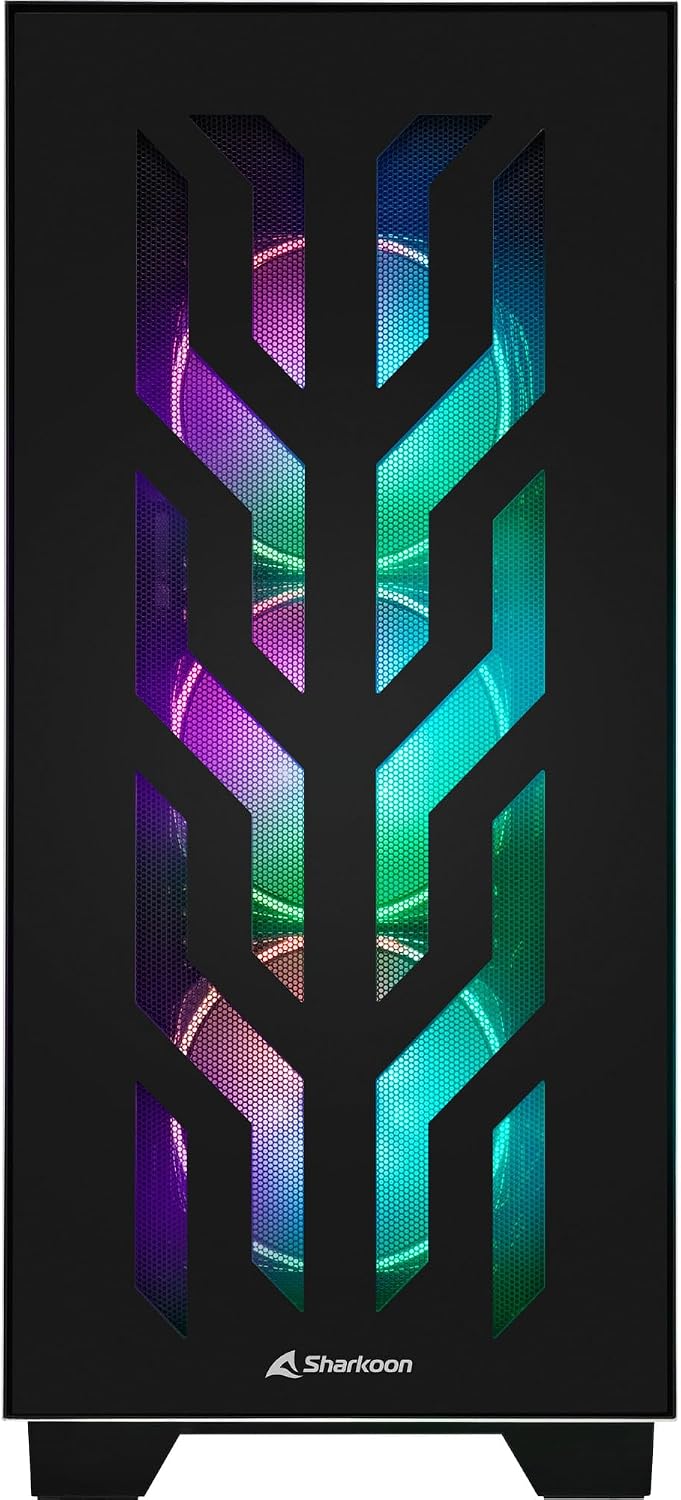
Şekil 4.1: Ön view of the Sharkoon CA300T PC case, showcasing the illuminated RGB fans behind the mesh panel.
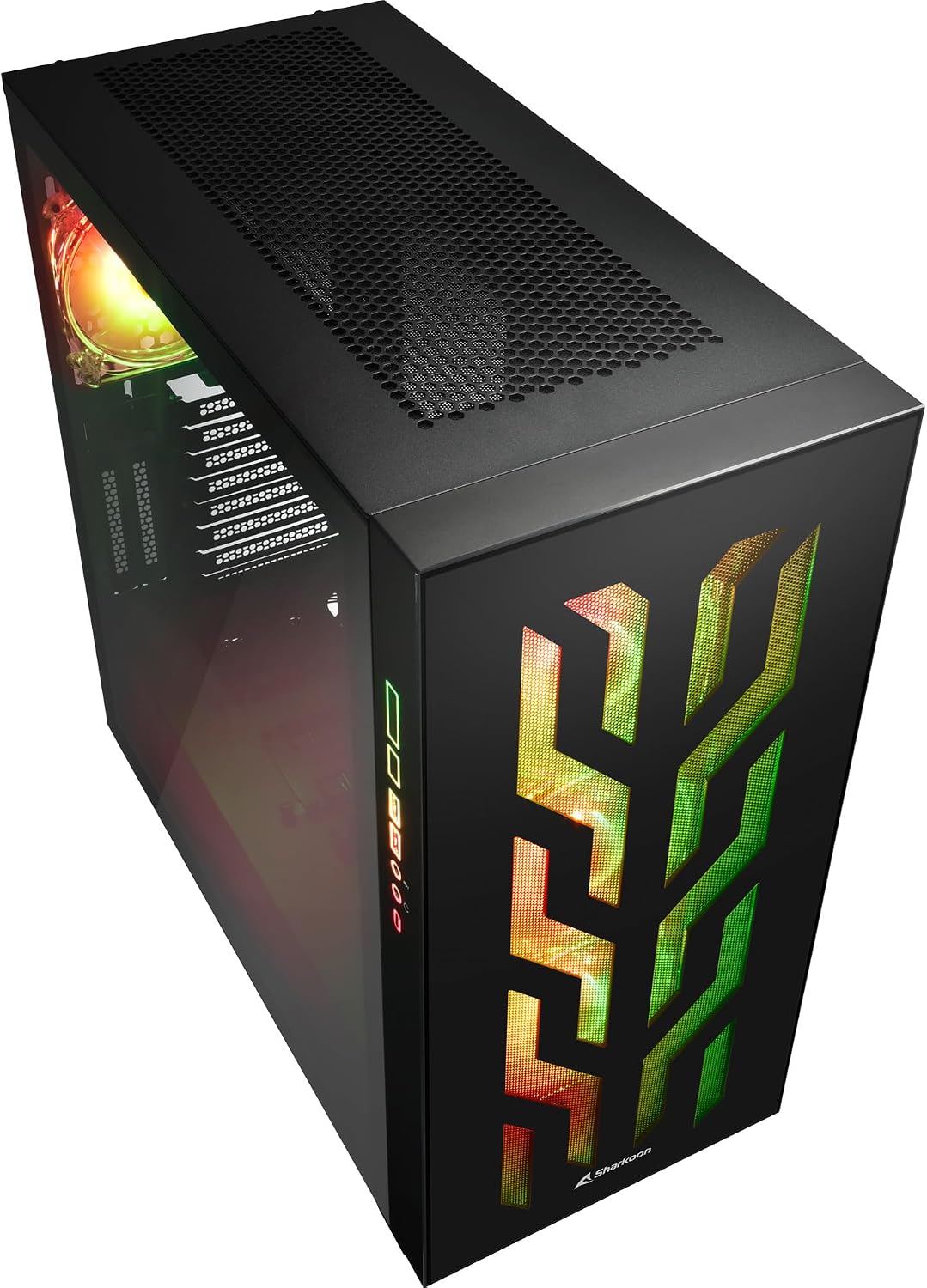
Şekil 4.2: Açısal view of the Sharkoon CA300T PC case, showing the tempered glass side panel and the vibrant RGB lighting from the interior.
5. Kurulum
5.1 Paketin açılması
- Bilgisayar kasasını ambalajından dikkatlice çıkarın.
- Taşıma sırasında oluşabilecek herhangi bir hasar belirtisi için kutuyu inceleyin. Herhangi bir hasar tespit ederseniz satıcınızla iletişime geçin.
- Locate the accessory box inside the case, which contains screws and other installation hardware.
5.2 Yan Panellerin Çıkarılması
The Sharkoon CA300T features tempered glass side panels for easy access to components.
- Locate the two screws on the rear of the case securing the side panel.
- Bu iki vidayı sökün.
- Gently pull the panel upwards and away from the case to remove it. Repeat for the other side if necessary.

Şekil 5.1: İç mekan view of the Sharkoon CA300T PC case, showing the main compartment with the left tempered glass panel removed, ready for component installation.

Şekil 5.2: İç mekan view of the Sharkoon CA300T PC case with the left side panel completely removed, exposing the motherboard tray and various mounting points.
5.3 Anakart Kurulumu
- Install the necessary standoffs onto the motherboard tray according to your ATX motherboard's screw holes.
- Carefully place your ATX motherboard onto the standoffs, aligning the screw holes.
- Anakartı verilen vidalarla sabitleyin.
5.4 Güç Kaynağı Ünitesi (PSU) Kurulumu
The CA300T supports bottom-mounted power supplies.
- Güç kaynağını kasanın arka alt kısmındaki özel bölmesine yerleştirin.
- Güç kaynağını arka taraftan vidalarla kasaya sabitleyin.
5.5 Sürücü Kurulumu
The case provides internal bays for 3.5-inch and 2.5-inch drives.
- Locate the drive cages or mounting points for your 3.5-inch or 2.5-inch drives.
- Mount your drives using the appropriate screws or tool-less mechanisms.
5.6 Grafik Kartı ve Genişletme Kartı Kurulumu
The case offers multiple expansion slots and supports vertical GPU mounting.
- Kasanın arka tarafındaki gerekli genişletme yuvası kapaklarını çıkarın.
- Ekran kartınızı veya diğer genişletme kartlarınızı anakartınızdaki PCIe yuvalarına takın.
- Secure the cards with screws. For vertical GPU mounting, an additional riser cable (not included) is required.
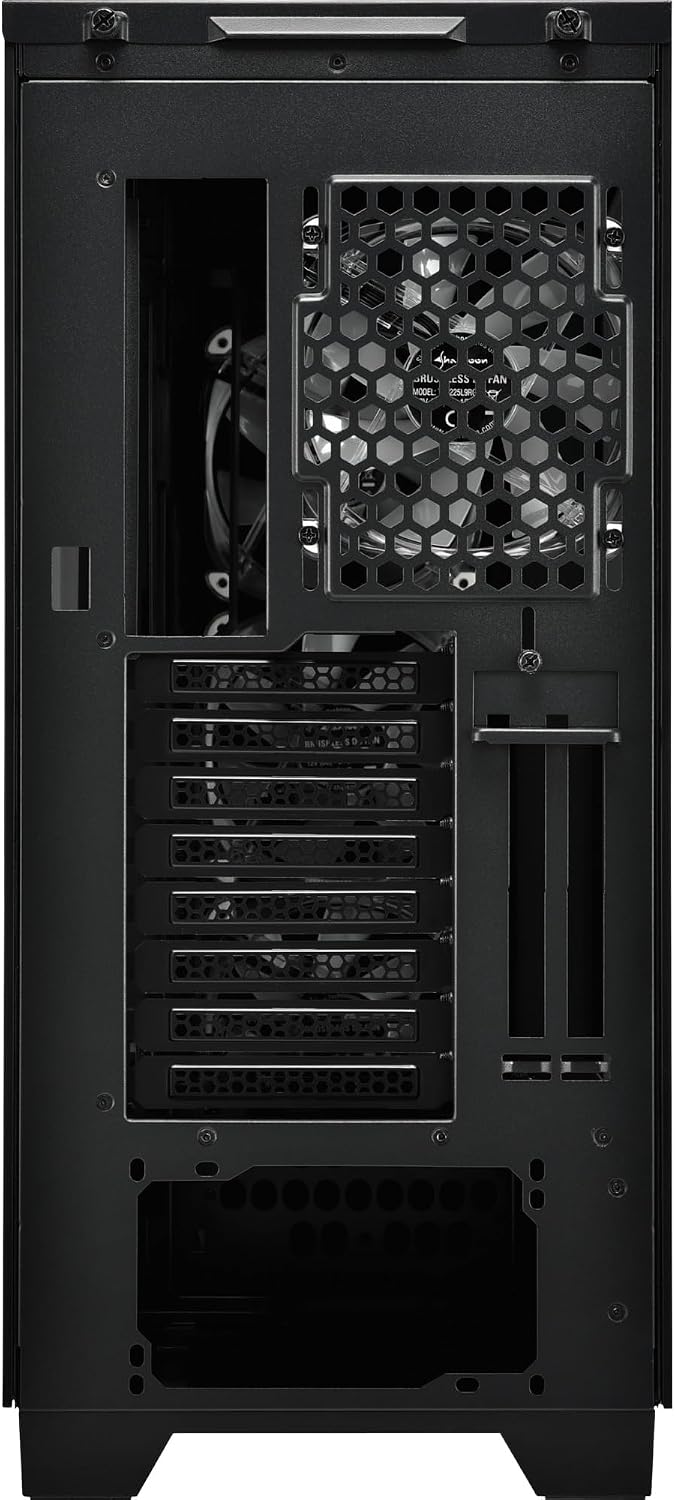
Şekil 5.3: Arka view of the Sharkoon CA300T PC case, illustrating the expansion slots, rear fan mount, and PSU opening.
5.7 Kablo Yönetimi
Utilize the cable routing channels and tie-down points behind the motherboard tray to organize cables for improved airflow and aesthetics.

Şekil 5.4: Arka iç kısım view of the Sharkoon CA300T PC case, highlighting the dedicated cable management area behind the motherboard tray.
6. Çalıştırma
6.1 Güç Açma/Kapatma
After all components are installed and cables are connected, press the power button on the front panel to turn on your system. Press it again to turn off, or use your operating system's shutdown function.
6.2 RGB Aydınlatma Kontrolü
The integrated RGB lighting can be controlled via the dedicated RGB controller (if included) or through compatible motherboard software, depending on how the RGB components are connected. Refer to your motherboard manual for software control options.
7. Bakım
7.1 Toz Filtrelerinin Temizlenmesi
The Sharkoon CA300T features a three-layer top plate with a dust filter. Regularly clean all dust filters to maintain optimal airflow and cooling performance.
- Turn off and unplug your PC.
- Carefully remove the dust filters (e.g., from the top, front, and bottom).
- Clean the filters using compressed air or by gently washing them with water. Ensure they are completely dry before reinstallation.
7.2 Genel Bakım
- Kasanın dışını yumuşak bir bezle silin.amp bez. Aşındırıcı temizleyicilerden kaçının.
- Ensure all cables are securely connected and not obstructing airflow.
8. Sorun Giderme
Bilgisayarınızın kurulumuyla ilgili sorunlarla karşılaşırsanız, aşağıdaki yaygın sorun giderme adımlarını göz önünde bulundurun:
- Güç Yok: Ensure the power supply is properly connected to the wall outlet and the motherboard. Check all power cables (24-pin, CPU, GPU).
- Fanlar Dönmüyor: Verify that all fan headers are correctly connected to the motherboard or fan controller. Check BIOS settings for fan control.
- Görüntü yok: Confirm that your monitor is connected to the graphics card (not the motherboard's integrated graphics, unless intended). Reseat the graphics card and RAM modules.
- RGB Çalışmıyor: Check RGB cable connections to the motherboard or controller. Ensure any necessary software is installed and configured.
- Aşırı Isınma: Ensure all fans are spinning correctly and dust filters are clean. Verify proper thermal paste application on the CPU cooler.
Daha karmaşık sorunlar için, ilgili bileşenlerinizin (anakart, ekran kartı, güç kaynağı) kullanım kılavuzlarına bakın veya profesyonel yardım alın.
9. Özellikler
| Özellik | Şartname |
|---|---|
| Marka | Köpekbalığı |
| Model Adı | CA300T |
| Dava Türü | Tam kule |
| Anakart Uyumluluğu | ATX |
| Önerilen Kullanım | Oyun |
| Renk | Siyah |
| Malzeme | Metal |
| Power Supply Mount Type | Alt Montaj |
| Soğutma Yöntemi | Hava |
| Fan Boyutu | 120 mm |
| Hayran Sayısı | 3 |
| Total Expansion Slots | 4 |
| Total USB 3.0 Ports | 2 |
| Toplam USB Bağlantı Noktaları | 3 |
| Özel Özellikler | RGB Lighting, Openable Cable Pocket, Three-layer Top Plate with Dust Filter |
| HDD Bay Size | 3.5 inç |
| Number of Internal Bays | 4 |
| Uyumlu Cihazlar | ATX Motherboards, 3.5-inch Hard Drives |
| Açık Renk | RGB |
| Ürün Ağırlığı | 14.7 Kilogram |
10. Garanti
The Sharkoon CA300T PC Case comes with a 2 yıllık üretici garantisi. Please retain your proof of purchase for warranty claims. The warranty covers defects in materials and workmanship under normal use. It does not cover damage caused by misuse, accidents, unauthorized modifications, or improper installation.
11. Destek
For technical support, warranty inquiries, or further assistance, please visit the official Sharkoon website or contact their customer service department. You may find contact information and FAQs on their support pages.
Resmi Webalan: www.sharkoon.com