
1. Giriş
The EPEVER Tracer-BN Series MPPT solar charge controller is designed for solar power systems, featuring advanced Maximum Power Point Tracking (MPPT) technology. This manual provides essential instructions for the Tracer3215BN model, ensuring efficient and safe operation of your solar charging system. It is suitable for 12V/24V battery systems and supports a maximum PV input voltag150V'un e'si.

Resim: Ön view of the EPEVER MPPT Charge Controller Tracer3215BN.
2. Güvenlik Talimatları
Observe the following safety guidelines during installation and operation to prevent damage to the controller or injury:
- Ensure proper wiring polarity for all connections (PV, battery, load).
- Maksimum PV giriş hacmini aşmayın.tag150VDC'nin e'si.
- Connect the battery first before connecting solar panels or loads.
- The controller features multiple electronic protections, including:
- PV kısa devre koruması
- PV aşırı voltajıtage alarm koruması
- PV current limiting protection
- PV ters polarite koruması
- Pil aşırı şarj koruması
- Pilin aşırı deşarj koruması
- Pil ters polarite koruması
- Yük aşırı yük koruması
- Yük kısa devre koruması
- Aşırı ısınma koruması
- Install the controller in a well-ventilated area to ensure adequate heat dissipation.
- Avoid exposing the controller to direct sunlight, moisture, or corrosive environments.
3. Ürün Özellikleri
The Tracer3215BN controller incorporates advanced features for optimal solar system performance:
- Gelişmiş MPPT Teknolojisi: High tracking efficiency (≥ 99.5%) and peak conversion efficiency (98%).
- Hızlı İşlem: Ultra-fast tracking speed and accurate Maximum Power Point (MPP) recognition.
- Wide MPP Operating Voltage Aralık: Adapts to various solar panel configurations.
- PV Current Limiting: Reliable automatic PV current limiting function.
- Dayanıklı Tasarım: Die-cast aluminum housing for excellent heat dissipation and extended lifespan.
- Pil Uyumluluğu: Supports Sealed, Gel, Flooded, and User-defined battery types. Includes battery temperature compensation.
- Esnek Yük Kontrolü: Multiple load working modes: Manual Control, Light ON/OFF, Light On+Timer, and Time Control.
- Veri İzleme: Real-time energy statistics and data monitoring.
- İletişim: RS485 port with industrial standard MODBUS open architecture for communication with MT50, APP, or PC software.
- Bellenim Yükseltmesi: Gelecekteki geliştirmeler için ürün yazılımı güncellemelerini destekler.

Image: Visual summary of the Tracer-BN series features.
4. Components and Ports Identification
Familiarize yourself with the controller's external components and connection ports:
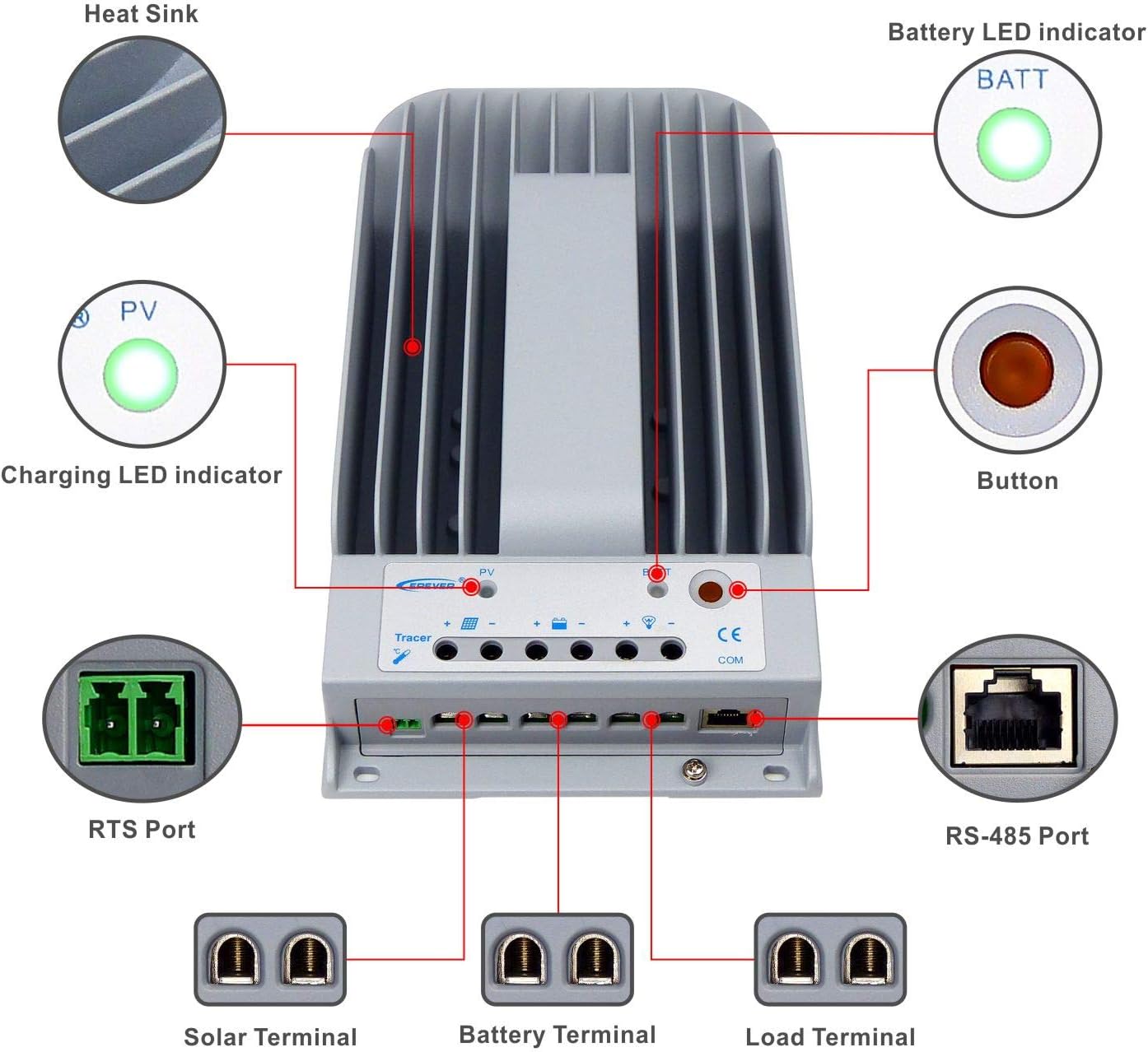
Image: Labeled diagram of the controller's external features.
| Öğe | İsim | Öğe | İsim |
|---|---|---|---|
| 1 | Soğutucu | 6 | Yük Terminali |
| 2 | Şarj LED göstergesi | 7 | RS-485 Bağlantı Noktası |
| 3 | RTS Bağlantı Noktası | 8 | Düğme |
| 4 | Güneş Terminali | 9 | Pil LED göstergesi |
| 5 | Batarya terminali |
Açıklama:
- RTS Port (3): Connection for a Remote Temperature Sensor to remotely detect battery temperature.
- RS-485 Port (7): Used to monitor the controller via PC and update controller software using an RS485 (RJ45 Interface) connection.
5. Kurulum ve Kurulum
Follow these steps for proper installation of your Tracer3215BN controller:
- Montaj: Mount the controller vertically on a flat surface in a well-ventilated indoor area, away from direct sunlight, high temperatures, and moisture. Ensure sufficient space around the heat sink for air circulation. The mounting dimensions are 130mm x 204mm with Φ4.7 mounting holes.
- Kablolama Sırası: Connect the system components in the following sequence to ensure safety and proper operation:
- Step 1: Connect the Battery: Connect the battery to the controller's battery terminals. Ensure correct polarity. The controller will detect the system voltage (12V/24V auto work).
- Step 2: Connect the Solar Panel: Connect the solar panel array to the controller's solar terminals. Ensure correct polarity.
- Step 3: Connect the Load: DC yükü kontrol cihazının yük terminallerine bağlayın. Doğru kutupluluğa dikkat edin.
- Kablo Boyutlandırma: Use appropriate cable sizes. For the Tracer3215BN, a power cable size of 6AWG (16mm²) is recommended.
- Topraklama: The controller features common negative grounding. Ensure proper grounding according to local electrical codes.
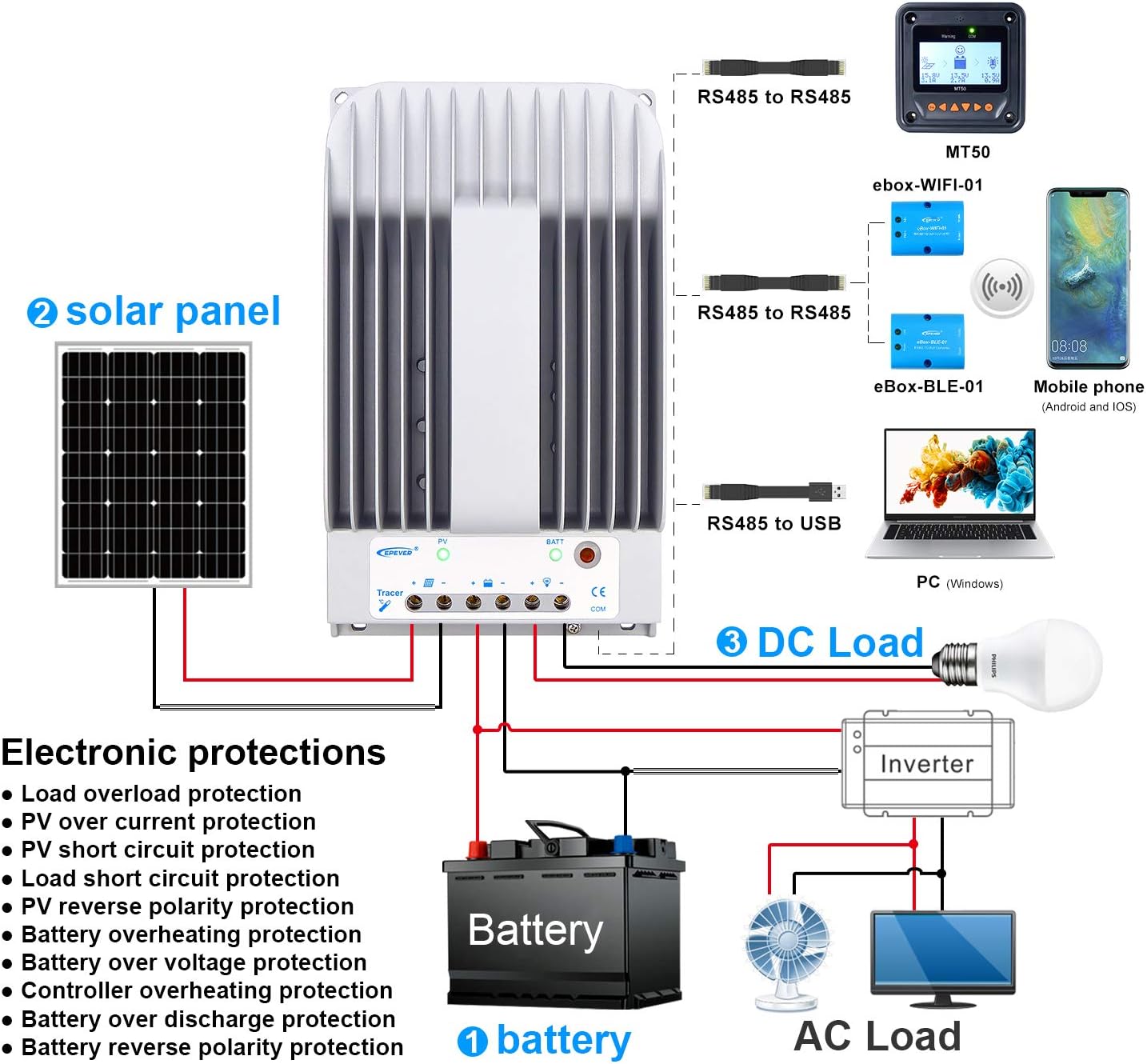
Image: Wiring diagram illustrating connections for battery, solar panel, and DC load.

Image: Controller dimensions for mounting reference.
6. Kullanım Talimatları
Once installed, the controller operates automatically. However, you can configure settings and monitor performance:
- Pil Tipi Seçimi: The controller supports Sealed, Gel, Flooded, and User-defined battery types. Select the appropriate type through the controller's interface (if available) or via external monitoring tools (MT50, APP, PC software) to ensure correct charging parameters.
- Yüklenen Çalışma Modları: Configure the DC load output behavior using the available modes:
- Manuel kontrol: Turn the load ON/OFF manually.
- Işık AÇIK/KAPALI: Yük gün batımında açılır ve gün doğumuyla kapanır.
- Işık Açık + Zamanlayıcı: Load turns ON at dusk and stays ON for a set duration.
- Zaman Kontrolü: Load operates during specified time periods.
- Monitoring and Configuration: Use the optional MT50 remote meter, mobile application, or PC software connected via the RS485 port to monitor real-time data, view energy statistics, and adjust parameters.
7. Bakım
Düzenli bakım, şarj kontrol cihazınızın uzun ömürlü olmasını ve en iyi performansı göstermesini sağlar:
- Bağlantıları Denetle: Periodically check all wiring connections (PV, battery, load) for tightness and corrosion. Loose connections can cause overheating and damage.
- Kontrol Cihazını Temizle: Keep the controller's exterior clean and free from dust and debris. Ensure the heat sink fins are clear for effective cooling.
- Havalandırma: Verify that the installation area remains well-ventilated and free from obstructions that could impede airflow around the controller.
- Performansı İzle: Regularly check the controller's display or monitoring software for any error codes or unusual readings.
- Pil Sağlığı: Ensure your battery bank is properly maintained according to the battery manufacturer's guidelines.
8. Sorun Giderme
If you encounter issues with your Tracer3215BN controller, consider the following:
- Şarj Yok:
- Check PV panel connections and ensure correct polarity.
- PV giriş hacmini doğrulayıntage is within the controller's operating range (Max 150VDC).
- Ensure sufficient sunlight on the solar panels.
- Yük Çalışmıyor:
- Yük bağlantılarını kontrol edin ve doğru kutupluluktan emin olun.
- Pil hacmini doğrulayıntage düşük ses seviyesinin üstündetage bağlantı kesme eşiği.
- Check the selected load working mode.
- Ensure the load current does not exceed the rated discharge current (30A).
- Kontrol ünitesi aşırı ısınıyor:
- Kontrol ünitesinin çevresinde yeterli havalandırma olduğundan emin olun.
- Reduce the load or PV input if consistently operating at maximum capacity in high ambient temperatures.
- Hata Kodları: Refer to the controller's display or monitoring software for specific error codes and consult the EPEVER official documentation for their meaning and resolution.
9. Teknik Özellikler
Key technical data for the Tracer3215BN MPPT Charge Controller:

Resim: Detaylı teknik özellikler tablosu.
| Parametre | Değer |
|---|---|
| Nominal Sistem Hacmitage | 12VDC / 24VDC Auto work |
| Anma Şarj Akımı | 30A |
| Nominal Deşarj Akımı | 30A |
| Maks. Solar Giriş Hacmitage | 150VDC |
| Maksimum PV Giriş Gücü (12V Akü) | 390W |
| Maksimum PV Giriş Gücü (24V Akü) | 780W |
| Self-consumption (12V) | ≤60mA |
| Self-consumption (24V) | ≤30mA |
| Montaj Boyutu | 130mm x 204mm |
| Montaj Deliği Boyutu | Φ4.7 |
| Güç kablosu | 6AWG (16mm²) |
| Boyut | 281mm x 160mm x 60mm |
| Ağırlık | 2.3 kilo |
| Çalışma Ortamı Sıcaklığı | -35℃ ~ +55℃ |
| Bağıl nem | ≤%95 (NC) |
| Muhafaza | IP30 |
| Topraklama | Ortak Negatif |
| İletişim Portu | RS485 / RJ45 Interface |
10. Garanti Bilgileri
For detailed warranty terms and conditions, please refer to the product packaging, the official EPEVER website, or contact your authorized dealer. Warranty coverage typically includes defects in materials and workmanship under normal use.
11. Destek
Should you require technical assistance, have questions regarding installation, operation, or troubleshooting, please contact:
- EPEVER Customer Service: Refer to the official EPEVER webiletişim bilgileri için site.
- Authorized Sales Agent: GolandCentury (as mentioned in product information).
When contacting support, please have your product model (Tracer3215BN) and any relevant error codes or observations ready.