
Sharp B08H3STVWG
Sharp Digital Clock with Alarm and Dual USB FastCharge Charging Ports
Model: B08H3STVWG
Marka: Sharp
1. Ürün Bittiview
The Sharp Digital Clock is designed for simplicity and convenience, featuring a clear green LED display and dual USB FastCharge ports for charging your devices. It includes an alarm function and a battery backup system to retain settings during power outagee.

Şekil 1: Ön view of the Sharp Digital Clock, highlighting the large green LED display and dual USB charging ports.
2. Kurulum Kılavuzu
2.1 Güç Bağlantısı
Connect the provided power adapter to the DC IN jack located at the back of the clock. Plug the other end into a standard electrical outlet. The display will illuminate, and the clock will be ready for time setting.
2.2 Pil Yedekleme (İsteğe Bağlı)
For battery backup functionality, which retains time and alarm settings during a power outage, install two (2) AAA batteries (not included) into the battery compartment located on the bottom of the unit. During battery backup, the display will go blank to conserve power, but settings will be preserved.
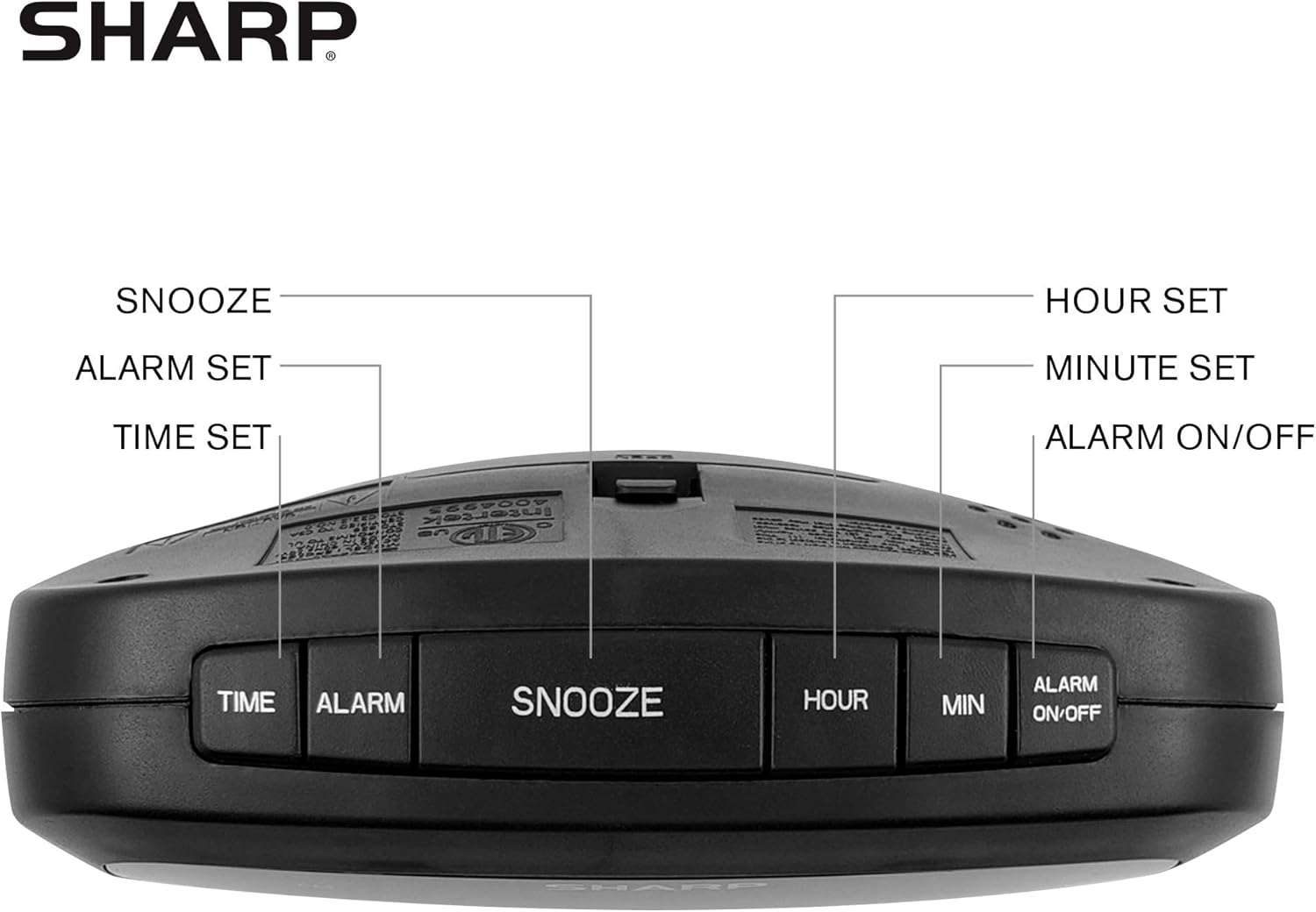
Figure 2: Underside of the clock with the battery compartment visible, requiring 2 AAA batteries for backup.
3. Kullanım Talimatları
The clock features intuitive top-mounted buttons for easy operation.

Figure 3: Top panel of the clock with clearly labeled buttons for time, alarm, snooze/dimmer, hour, minute, and alarm on/off.
3.1 Saati Ayarlama
- Basılı tutun ZAMAN Saat haneleri yanıp sönmeye başlayana kadar düğmesine basın.
- Basın SAAT button to adjust the hour. Pay attention to the PM indicator if setting a PM time.
- Basın DAKİKA Dakikayı ayarlamak için
- Basın ZAMAN Onaylamak ve süreyi kaydetmek için tekrar düğmeye basın.
3.2 Alarmı Ayarlama
- Basılı tutun ALARM Alarm saati rakamları yanıp sönmeye başlayana kadar düğmesine basın.
- Basın SAAT Alarm saatini ayarlamak için düğmesine basın.
- Basın DAKİKA Alarm dakikalarını ayarlamak için düğmeye basın.
- Basın ALARM button again to confirm and save the alarm time.
- Alarmı etkinleştirmek veya devre dışı bırakmak için tuşuna basın ALARM AÇIK / KAPALI Düğmeye basın. Alarm aktif olduğunda ekranda bir alarm gösterge ışığı yanacaktır.
3.3 Snooze and Dimmer Function
- Alarm çaldığında, büyük düğmeye basın. ERTELEME/DIMMER button to temporarily silence the alarm for a few minutes.
- To adjust the brightness of the green LED display, repeatedly press the ERTELEME/DIMMER button when the alarm is not sounding. Cycle through bright, medium, and low brightness settings.
3.4 USB Şarj Bağlantı Noktalarının Kullanımı
The clock is equipped with two 2 AMP USB charging ports on the front, allowing you to conveniently charge your smartphone or other USB-powered devices directly from the clock.

Figure 4: The clock demonstrating its dual USB charging capability with two smartphones connected.
- Simply connect your device's USB charging cable to one of the USB ports on the front of the clock.
- Ensure your device is compatible with 2 AMP charging for optimal speed.
4. Bakım
To ensure the longevity and proper functioning of your Sharp Digital Clock, follow these simple maintenance guidelines:
- Temizlik: Wipe the clock with a soft, dry cloth. Do not use abrasive cleaners, waxes, or solvents as they may damage the finish.
- Atama: Place the clock on a stable, flat surface away from direct sunlight, heat sources, and excessive moisture.
- Pil Değişimi: If using the battery backup, replace the AAA batteries annually or when the clock consistently loses time during power interruptions.
5. Sorun Giderme
| Sorun | Olası Neden | Çözüm |
|---|---|---|
| Saat göstergesi boş. | Güç yok ya da güç yoktage. | Ensure the power adapter is securely plugged into the clock and a working electrical outlet. If there was a power outage, check if backup batteries are installed and functional. |
| Alarm çalmıyor. | Alarm not set or not activated. | Verify that the alarm time is correctly set and that the alarm indicator light is visible on the display (press ALARM ON/OFF). |
| USB portları şarj cihazı değildir. | Device incompatibility or faulty cable. | Ensure your device is compatible with USB charging. Try a different USB cable. Confirm the clock is powered on. |
| Ekran çok parlak/loş. | Parlaklık ayarının ayarlanması gerekiyor. | Press the SNOOZE/DIMMER button repeatedly to cycle through brightness levels (bright, medium, low). |
6. Ürün Özellikleri
- Marka: Keskin
- Modeli: B08H3STVWG
- Görüntüleme Türü: Digital Green LED
- Güç Kaynağı: Kablolu Elektrik
- Pil Yedekleme: 2 x AAA pil (dahil değildir)
- USB Bağlantı Noktaları: 2x2 AMP USB FastCharge Ports
- Ürün Ölçüleri: 5.95"G x 2.3"Y
- Ürün Ağırlığı: 9.59 ons
- Renk: Yeşil Led
- Malzeme: Plastik
- UPC: 049353005089
7. Garanti ve Destek
This Sharp Digital Clock comes with a limited warranty. For detailed warranty information, product support, or to purchase accessories, please visit the official Sharp webweb sitesini ziyaret edebilir veya müşteri hizmetleriyle iletişime geçebilirsiniz. Ayrıca şu adresi de ziyaret edebilirsiniz: Amazon'da Sharp Mağazası.
Garanti talepleriniz için lütfen satın alma fişinizi saklayınız.
Ask a question about this manual
Ask about setup, troubleshooting, compatibility, parts, safety, or missing instructions. Manuals+ will review the question and use this page’s manual context to help answer it.