
giriiş
This manual provides comprehensive instructions for the setup, operation, and maintenance of your Rimous Replacement Remote Control for LG Smart TVs. Designed for broad compatibility, this remote offers a convenient and reliable solution for controlling your LG television.
Ürün Özellikleri
- Tam Uyumluluk: Works with LG Smart TVs from 2010-2024 models, including OLED, 4K UHD, and WebOS systems.
- Önceden Takılmış Piller: Includes premium batteries for immediate use.
- Anti-Loss Holder: Comes with a wall-mounted holder to reduce the risk of misplacing the remote.
- One-Touch Shortcut Buttons: Dedicated buttons for Netflix and Prime Video for quick access.
- Gelişmiş Performans: Equipped with a smart chip for improved functionality, longer transmission range, responsive buttons, and stable performance.
Kurmak
1. Pil Kurulumu
- Uzaktan kumandanın arkasındaki pil bölmesini bulun.
- Pil kapağını açmak için aşağı doğru kaydırın.
- Insert the two included AAA batteries, ensuring correct polarity (+ and - terminals match the markings inside the compartment).
- Pil kapağını güvenli bir şekilde yerine oturana kadar yerine kaydırın.

The image displays the Rimous replacement remote control, two AAA batteries, and a black wall-mount holder designed to keep the remote accessible.
2. Holder Installation
- Clean the desired surface (e.g., side of TV, wall, or table) where you wish to mount the holder. Ensure the surface is dry and free of dust.
- Remove the protective backing from the adhesive strip on the back of the holder.
- Press the holder firmly onto the cleaned surface for at least 30 seconds.
- Allow the adhesive to set for a few hours before placing the remote control in the holder.

A visual representation of the remote's performance, indicating a rapid 0.2-second response time and an effective transmission range exceeding 35 feet. The remote is shown being used in a living room setting.
Kullanım Talimatları
Temel Fonksiyonlar
The Rimous remote control is designed for immediate use with compatible LG TVs without requiring any programming. Simply point the remote at your TV and begin using its functions.
- Güç düğmesi (⏻): Televizyonu açar veya kapatır.
- Sayı Düğmeleri (0-9): Kanalları doğrudan seçin.
- Sesi Artır/Azalt (SES +/-): TV'nin ses düzeyini ayarlar.
- Channel Up/Down (CH PAGE): TV kanallarını değiştirir.
- Gezinti Düğmeleri (▲ ▼ ◀ ▶): Menüler ve seçenekler arasında gezinin.
- Tamam Düğmesi: Seçimleri onaylar.
- Geri Düğmesi: Önceki ekrana veya menüye döner.
- Çıkış Düğmesi: Geçerli menüyü veya uygulamayı kapatır.
Kısayol Düğmeleri
Access popular streaming services directly with dedicated buttons:
- Netflix Düğmesi: Netflix uygulamasını başlatır.
- Prime Video Düğmesi: Launches the Prime Video application.

Ayrıntılı view of the remote control, emphasizing the dedicated Netflix and Prime Video shortcut buttons for quick access to streaming services.
Uyumluluk
This remote is compatible with a wide range of LG Smart TV models, including those with:
- LED, LCD, 3D, OLED, 4K UHD displays
- Webİşletim sistemi sistemleri
- Specific original remote models such as AKB74915305, AKB75375604, AKB75095307, AKB75675304, AKB74475401, AKB74475433, AKB73975702, AKB75055701, AKB73975711, AKB73715608, AKB74915324, AKB73715601, AKB75095308, AKB74915304, AKB75095330, AGF76631064.

This image illustrates the broad compatibility of the Rimous remote control across different LG television technologies, including LED, LCD, UHD, HD, OLED, WebOS, and 4K models.
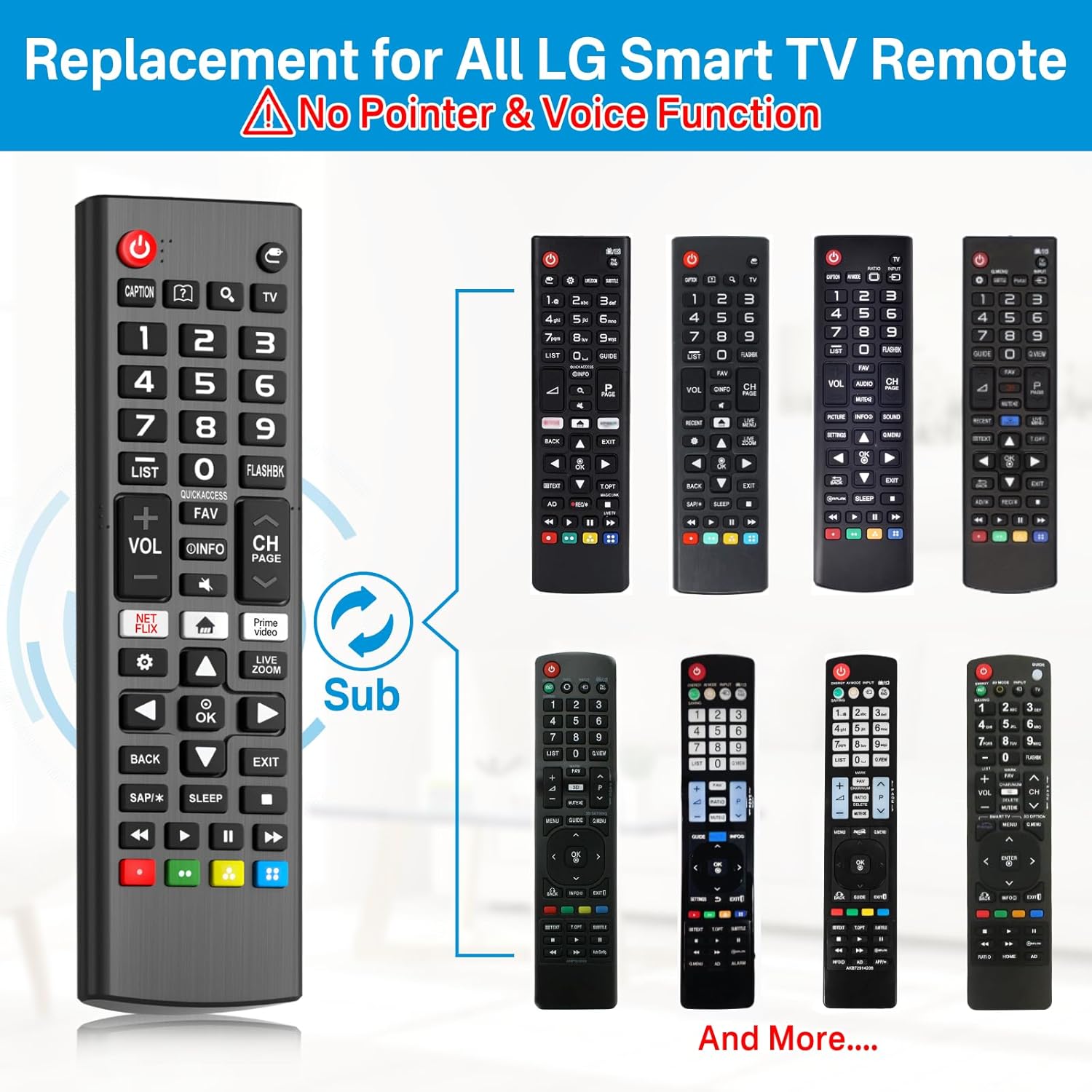
This image displays the Rimous remote alongside several original LG remote control designs, illustrating its function as a universal replacement for various models.
Bakım
- Uzaktan kumandayı yumuşak ve kuru bir bezle silerek temiz tutun.
- Avoid exposing the remote to extreme temperatures, moisture, or direct sunlight.
- Uzaktan kumandayı uzun süre kullanmayacaksanız, pil sızıntısını önlemek için pilleri çıkarın.
Sorun giderme
- Uzaktan kumanda yanıt vermiyor:
- Pillerin doğru kutuplara dikkat edilerek düzgün şekilde takıldığından emin olun.
- Piller bittiğinde yenileriyle değiştirin.
- Uzaktan kumanda ile televizyonun kızılötesi sensörü arasında herhangi bir engel olmadığından emin olun.
- Kumandanın doğrudan televizyona doğru tutulduğundan emin olun.
- Çalışmayan belirli düğmeler:
- Check for any debris or stickiness around the button. Gently clean if necessary.
- If only certain smart TV functions (like pointer or voice control) are not working, please note that this remote is a standard replacement and does not support advanced features like pointer or voice control found on some original LG Magic Remotes.
Özellikler
| Özellik | Detay |
|---|---|
| Ürün Boyutları | 6.3 x 3.54 x 0.39 inç |
| Ürün Ağırlığı | 3.84 ons |
| Marka | Çılgın |
| Üretici | Çılgın |
| Özel Özellik | Ergonomic, Lightweight, No Programming Required |
| Renk | Siyah |
| Maksimum Desteklenen Cihaz Sayısı | 1 |
| Uyumlu Cihazlar | Television (LG Smart TVs) |
Garanti ve Destek
Specific warranty information is not provided in the product details. For any support inquiries or further assistance, please refer to the seller's contact information or the platform where the product was purchased.