
giriiş
This manual provides essential information for the safe and efficient operation of your QFX SBX-213 12-inch Portable Bluetooth Speaker. Please read it thoroughly before using the product and retain it for future reference.
Güvenlik Talimatları
Güvenli çalışmayı sağlamak ve hasarı önlemek için lütfen aşağıdaki güvenlik önlemlerine uyun:
- Üniteyi yağmura, neme veya aşırı sıcaklıklara maruz bırakmayın.
- Hoparlörü açmayın.asing. Tüm servis işlemlerini yetkili personele yaptırın.
- Hoparlörü ısı kaynaklarından, doğrudan güneş ışığından ve açık alevlerden uzak tutun.
- Use only the specified power adapter and charging cable provided with the unit.
- Hoparlörün aşırı ısınmasını önlemek için çevresinde yeterli havalandırma olduğundan emin olun.
- Hoparlörün üzerine ağır nesneler koymaktan kaçının.
Paket İçeriği
Paketi açtığınızda lütfen aşağıda listelenen tüm öğelerin mevcut ve iyi durumda olduğundan emin olun:
- QFX SBX-213 Portable Bluetooth Speaker
- Güç kablosu
- Uzaktan kumanda
- Kullanım Kılavuzu (bu belge)
Ürün Bittiview
The QFX SBX-213 is a 12-inch portable speaker designed for versatile audio playback. It features Bluetooth connectivity for wireless streaming, an FM radio tuner, and a USB input for playing audio fileBir flash bellekten.
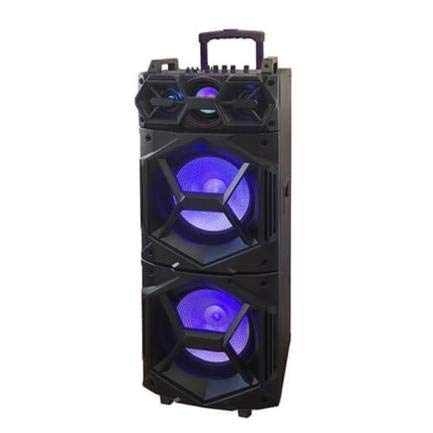
Resim: Ön view of the QFX SBX-213 Portable Bluetooth Speaker, showcasing its 12-inch driver and robust design. The speaker features a black finish and a protective grille over the main driver.
The speaker's control panel and ports typically include:
- Güç Açma/Kapama Anahtarı
- Mode Button (to switch between Bluetooth, FM, USB inputs)
- Volume Control Knobs or Buttons
- Play/Pause, Previous/Next Track Buttons
- USB Port for media playback
- Charging Port for power cable connection
- LED Indicator Lights for power, charging, and Bluetooth status
Kurmak
- Hoparlörü Şarj Etme: Before first use, connect the provided power cable to the speaker's charging port and plug it into a standard electrical outlet. Allow the speaker to fully charge. The charging indicator light will typically change color or turn off when charging is complete.
- Atama: Place the speaker on a stable, flat surface. For optimal sound dispersion, avoid placing it in enclosed spaces or directly against walls.
Kullanım Talimatları
1. Güç Açma/Kapatma
To power on the speaker, locate the power switch, usually on the back or side panel, and slide it to the "ON" position. To power off, slide the switch to the "OFF" position.
2. Bluetooth Eşleştirme
- Hoparlörü açın. Genellikle yanıp sönen bir LED ışığı ve sesli bir uyarı ile belirtildiği gibi otomatik olarak Bluetooth eşleştirme moduna girecektir.
- Mobil cihazınızda (akıllı telefon, tablet vb.) Bluetooth'u etkinleştirin.
- Arama available Bluetooth devices. You should see "QFX SBX-213" or a similar name in the list.
- Select the speaker to pair. Once connected, you will hear a confirmation sound, and the LED indicator will stop flashing.
- Artık cihazınızdaki sesleri hoparlörünüz aracılığıyla oynatabilirsiniz.
3. FM Radyonun Çalıştırılması
- Press the "MODE" button on the speaker or remote control until "FM" mode is selected.
- Press the "Play/Pause" button to initiate an automatic scan for FM stations. The speaker will save all found stations.
- Use the "Previous/Next Track" buttons to navigate between saved FM stations.
4. USB Oynatma
- MP3 ses dosyası içeren bir USB flash sürücü takın fileHoparlörün USB portuna takın.
- Press the "MODE" button until "USB" mode is selected. The speaker will automatically begin playing audio fileUSB belleğinden s.
- Use the "Play/Pause" and "Previous/Next Track" buttons to control playback.
5. Ses Kontrolü
Adjust the master volume using the dedicated volume knob or buttons on the speaker. You can also control the volume from your connected Bluetooth device or the remote control.
Bakım
- Temizlik: Use a soft, dry cloth to clean the speaker's exterior. Do not use abrasive cleaners, waxes, or solvents, as these may damage the finish.
- Depolamak: Uzun süre kullanılmayacaksa hoparlörü serin, kuru, doğrudan güneş ışığından ve aşırı sıcaklıklardan uzak bir yerde saklayın.
- Pil Bakım: To prolong battery life, avoid fully discharging the battery frequently. Charge the speaker regularly, even if not in use for long periods, to maintain battery health.
Sorun giderme
If you encounter any issues with your QFX SBX-213 speaker, please refer to the following table for common problems and solutions:
| Sorun | Olası Neden | Çözüm |
|---|---|---|
| Güç yok | Battery discharged; Power cable not connected securely | Charge the speaker fully; Ensure power cable is securely connected to both the speaker and the power outlet. |
| Bluetooth bağlantısı yok | Bluetooth not enabled on device; Speaker not in pairing mode; Device too far from speaker | Enable Bluetooth on your device; Put the speaker into Bluetooth pairing mode; Move your device closer to the speaker (within 10 meters). |
| Ses çıkışı yok | Volume too low; Incorrect mode selected; Device or speaker is muted | Increase the volume on both the speaker and your connected device; Press the MODE button to select the correct input (Bluetooth, USB, FM); Check if the speaker or device is muted. |
| FM radio static or poor reception | Weak signal; Interference | Relocate the speaker to an area with better reception; Perform an auto-scan for stations again; Avoid placing near other electronic devices that may cause interference. |
Özellikler
- Marka: QFX
- Modeli: SBX-213
- Hoparlör Boyutu: 12 inç
- Bağlantı Teknolojisi: USB, Bluetooth
- Özel Özellikler: Lightweight, Portable, FM Radio
- Montaj Tipi: Floor, Table Mount
- Denetleyici Tipi: Uzaktan kumanda
- Güç Kaynağı: Elektrik kablosu
- Boyutlar (Y x G x D): Yaklaşık 113x42x42 cm
- Ağırlık: Yaklaşık 4 kg
- UPC: 606540036341
- ASIN: B08GL3SHQP
Garanti ve Destek
QFX products are designed for reliability and performance. For detailed warranty information or technical support, please refer to the warranty card included with your purchase or visit the official QFX webSite. Satın alma belgenizi herhangi bir garanti talebi için saklayın.
For further assistance, please contact QFX customer service through their official channels.