
giriiş
This manual provides comprehensive instructions for the Lexmark MS431dw Monochrome Laser Printer. It covers setup, operation, maintenance, and troubleshooting to ensure optimal performance and longevity of your device. The Lexmark MS431dw is designed for efficient monochrome printing, offering speeds up to 40 pages per minute and automatic duplex printing.

Resim: Ön sağ view of the Lexmark MS431dw Monochrome Laser Printer.
Kurmak
1. Yazıcının Paketinden Çıkarılması
Carefully remove the printer from its packaging. Ensure all packing materials, tapes, and protective films are removed from the exterior and interior of the printer. Retain the packaging for future transport if needed.
2. Toner Kartuşunun Takılması
- Yazıcının ön kapağını açın.
- Remove the new toner cartridge from its packaging and gently shake it to distribute the toner.
- Toner kartuşunu yerine oturana kadar belirtilen yuvaya yerleştirin.
- Ön kapağı kapatın.
3. Kağıt Yükleme
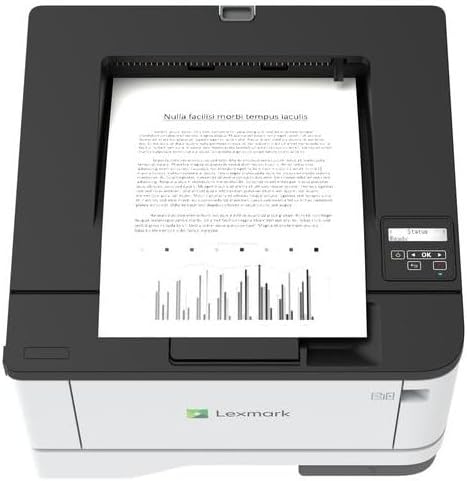
Resim: Üst view of the Lexmark MS431dw with paper loaded in the input tray.
Open the paper tray and adjust the paper guides to fit the size of your paper. Load the paper stack into the tray, ensuring it is flat and below the maximum fill line. Close the paper tray. The printer supports various media types, including card stock.
4. Gücü Bağlama
Güç kablosunu yazıcının güç girişine ve ardından topraklı bir elektrik prizine bağlayın.
5. Connecting to a Network/Computer
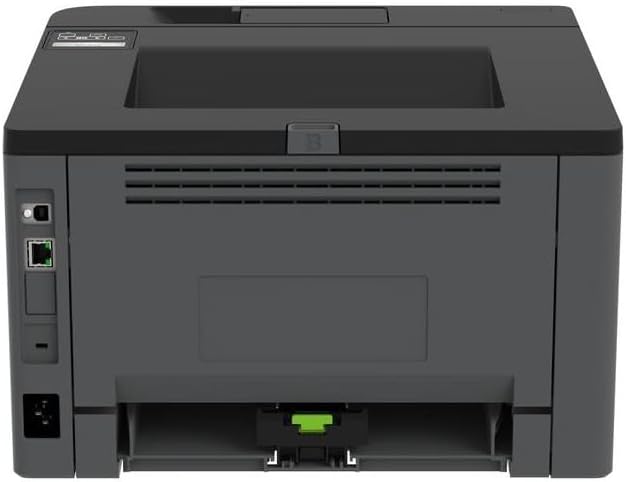
Resim: Arka view of the Lexmark MS431dw, highlighting the Ethernet and power connection ports.
The Lexmark MS431dw supports Ethernet connectivity. Connect an Ethernet cable from your network router or switch to the Ethernet port on the back of the printer. For direct connection to a computer, use a USB cable (not included) if available, or configure network printing.
6. Sürücü Kurulumu
Turn on the printer. Insert the driver CD (if provided) into your computer, or download the latest drivers from the official Lexmark support webSiteye gidin. Sürücü kurulumunu tamamlamak için ekrandaki talimatları izleyin.
Kullanım Talimatları
1. Kontrol Paneli Üzerindeview

Resim: Üst view of the Lexmark MS431dw, showing the printer's control panel with display and buttons.
The control panel features a display screen and navigation buttons (Up, Down, OK, Back) to access printer settings, status, and functions. Refer to the on-screen menus for specific options.
2. Temel Baskı
- Yazıcının açık olduğundan ve bilgisayarınıza veya ağınıza bağlı olduğundan emin olun.
- Yazdırmak istediğiniz belgeyi bilgisayarınızda açın.
- Seçme Yazdır Uygulamanın menüsünden (örneğin, File > Yazdır).
- Choose the Lexmark MS431dw from the list of available printers.
- Adjust print settings as desired (e.g., number of copies, paper size).
- Tıklamak Yazdır.
3. Automatic Duplex Printing
The MS431dw supports automatic two-sided (duplex) printing. To enable this feature:
- In the print dialog box on your computer, navigate to the printer properties or preferences.
- Look for an option related to "Two-sided printing" or "Duplex printing."
- Select the desired duplex option (e.g., long-edge binding, short-edge binding).
- Confirm your selection and proceed with printing.
Bakım
1. Replacing the Toner Cartridge
When the toner level is low, the printer's display will indicate a warning. To replace the cartridge:
- Yazıcının açık olduğundan emin olun.
- Ön kapağı açın.
- Remove the old toner cartridge by pulling it out.
- Unpack a new Lexmark-compatible toner cartridge and gently shake it.
- Insert the new cartridge until it locks into place.
- Ön kapağı kapatın.
2. Yazıcıyı Temizleme
Düzenli temizlik, baskı kalitesini korumaya ve yazıcının ömrünü uzatmaya yardımcı olur.
- Dış: Dış yüzeyleri yumuşak, dampTüy bırakmayan bir bez kullanın. Aşındırıcı temizleyiciler veya çözücüler kullanmayın.
- İç mekan: Periodically open the front cover and gently remove any dust or paper debris from accessible areas using a dry, lint-free cloth. Avoid touching the fuser unit.
Sorun giderme
This section addresses common issues you might encounter. For more detailed troubleshooting, refer to the Lexmark support webalan.
1. Kağıt Sıkışmaları
- If a paper jam occurs, the printer display will show an error message indicating the location of the jam.
- Belirtilen kapakları veya tepsileri dikkatlice açın.
- Sıkışmış kağıdı, kağıt yolunun yönüne doğru yavaşça çekin. Kağıdı yırtmamaya özen gösterin.
- Close all covers and trays. The printer should resume printing.
2. Düşük Baskı Kalitesi
- Solmuş Baskılar: The toner cartridge may be low. Replace it if necessary.
- Çizgiler veya Noktalar: Clean the printer's interior as described in the Maintenance section. Ensure the toner cartridge is properly seated.
- Boş sayfalar: Verify the toner cartridge is installed correctly and has toner. Check printer drivers and print settings.
3. Bağlantı Sorunları
- Yazıcı Bulunamadı: Ensure the Ethernet cable is securely connected to both the printer and the network. Verify network settings on the printer and computer.
- Çevrimdışı Durum: Check the printer's power and network connection. Restart both the printer and your computer.
Özellikler
| Özellik | Detay |
|---|---|
| Model Numarası | 29S0110 |
| Baskı Teknolojisi | Lazer |
| Yazıcı Çıktısı | Tek renkli |
| Maksimum Baskı Hızı (Siyah Beyaz) | Dakikada 40 sayfaya kadar |
| Bağlantı Teknolojisi | Ethernet |
| Özel Özellik | Auto-Duplex (Automatic Two-sided Printing) |
| Maksimum Giriş Sayfası Kapasitesi | 900 sayfa |
| Basılı Medya Desteği | Card stock, Plain paper |
| Ürün Ağırlığı | 9300 gram (yaklaşık 20.5 pound) |
| Netage | 570 watt |
| UPC | 734646695558 |
Not: Özellikler önceden haber verilmeksizin değiştirilebilir.
Garanti ve Destek
Garanti Bilgileri
Your Lexmark MS431dw printer is covered by a standard manufacturer's warranty. For specific terms, conditions, and duration of your warranty, please refer to the documentation included with your product or visit the official Lexmark webSite. Satın alma belgenizi garanti talepleriniz için saklayın.
Müşteri Desteği
For technical assistance, driver downloads, or further support, please visit the official Lexmark support portal.
Visit the Lexmark Store for Support