
1. Giriş
1.1 Ürün Üzeriview
The Renkforce RF-HC-100 is a compact 16-megapixel trail camera designed for outdoor monitoring. It features a time-lapse function, night vision capabilities, and a durable, camouflage brown housing. This camera is suitable for wildlife observation, property surveillance, and other outdoor recording needs.
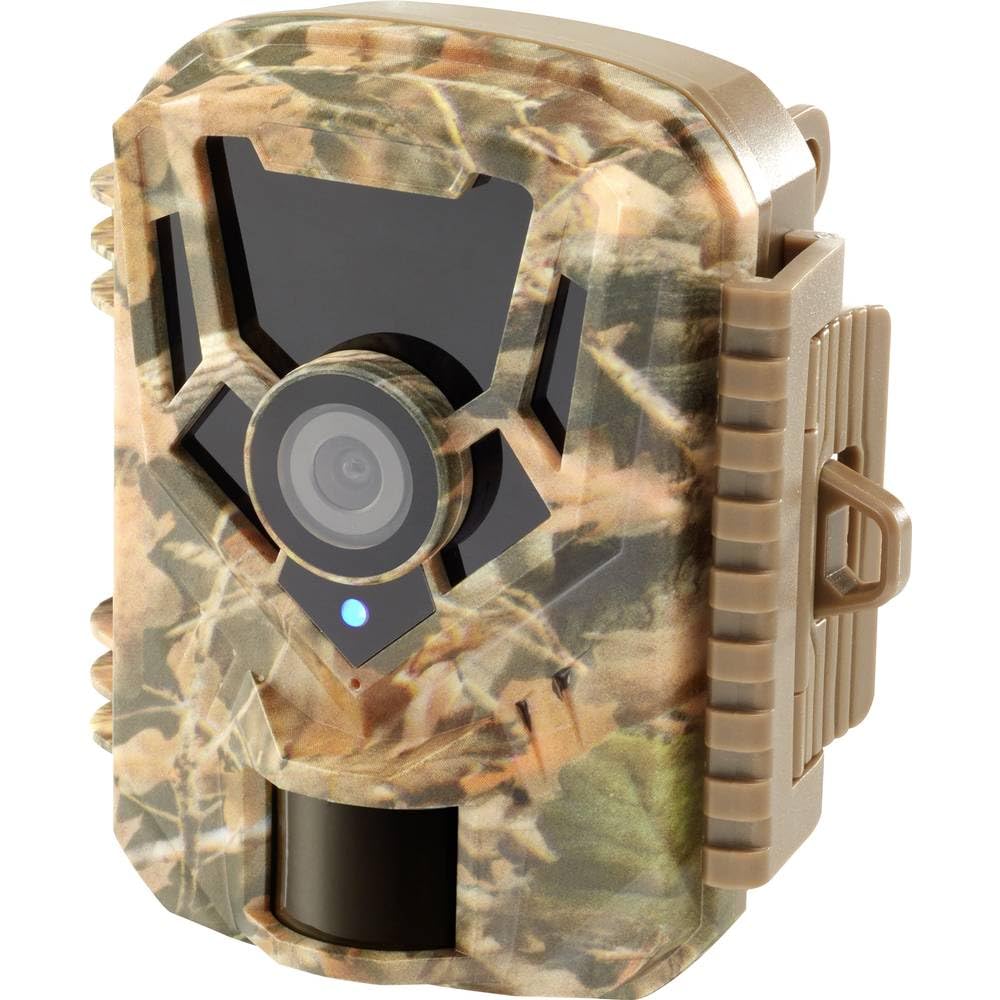
Resim: Ön taraf view of the Renkforce RF-HC-100 Trail Camera, showcasing its compact design and camouflage pattern.

Resim: Ön view of the Renkforce RF-HC-100 Trail Camera, highlighting the main lens and motion sensor.
1.2 Paket İçeriği
- 1 x Renkforce RF-HC-100 Trail Camera Unit
- Note: Additional accessories such as mounting straps, USB cables, or user manuals may be included depending on the specific package.
2. Güvenlik Bilgileri
- Cihazı çalıştırmadan önce tüm talimatları dikkatlice okuyunuz.
- Do not expose the camera to extreme temperatures, direct sunlight for prolonged periods, or corrosive liquids.
- Ensure the battery compartment is properly sealed to maintain the IP65 weather resistance.
- Pilleri yerel yönetmeliklere uygun şekilde atın. Eski ve yeni pilleri veya farklı pil türlerini karıştırmayın.
- Cihazı çocukların erişemeyeceği yerde saklayınız.
- Garanti geçersiz olacağından ve hasara yol açabileceğinden, kamerayı sökmeye veya üzerinde değişiklik yapmaya çalışmayın.
3. Ürün Özellikleri
The Renkforce RF-HC-100 Trail Camera offers the following key features:
- Yüksek Çözünürlüklü Görüntüleme: 16 Megapixel effective capture resolution for clear photos and 1080p video recording.
- Gece Görüşü: Equipped with color night vision for monitoring in low-light conditions.
- Hızlandırılmış Çekim Fonksiyonu: Uzun vadeli olayları gözlemlemek için belirli aralıklarla görüntüler yakalayın.
- SD Kart Yuvası: Supports external SD cards for ampFotoğraf ve videoların depolanması.
- Hava Koşullarına Dayanıklılık: IP65 international protection rating ensures durability in various outdoor environments.
- Kompakt Tasarım: Miniature form factor with a camouflage brown finish for discreet placement.
- Geniş Açı View: 90-degree angle of view to cover a broad area.
- Bağlantı: Features wired connectivity (USB, AV ports) and Wi-Fi protocol for data transfer and control via application.
- Montaj Seçenekleri: Includes support for wall mounting.
4. Kurulum
4.1 Pil Kurulumu
- Yan klipsleri açarak kamera muhafazasını açın.
- Pil bölmesini bulun.
- Insert the required number of AA batteries (not included) according to the polarity markings (+/-).
- Pil bölmesini sıkıca kapatın.
4.2 SD Kart Kurulumu
- Kamera gövdesi açıkken SD kart yuvasını bulun.
- Insert a compatible SD card (up to 32GB, Class 10 recommended) into the slot with the metal contacts facing down until it clicks into place.
- Çıkarmak için, SD kartı tekrar içeri doğru itin, kart dışarı fırlayana kadar.

Image: The Renkforce RF-HC-100 Trail Camera with its housing open, revealing the control panel, USB, AV, and DC ports, and the ON/SETUP/OFF switch.
4.3 Kamerayı Monte Etme
The camera can be mounted using a strap or a wall mount bracket (if included or purchased separately).
- Kayış Montajı: Thread a mounting strap through the slots on the back of the camera and secure it to a tree or pole.
- Duvara Montaj: Use the integrated mounting points or a compatible wall mount bracket to attach the camera to a flat surface. Ensure the camera is stable and pointed in the desired direction.
5. Kullanım Talimatları
5.1 Güç Açma/Kapatma ve Mod Seçimi
Locate the ON/SETUP/OFF switch inside the camera housing.
- KAPALI: Kamerayı kapatır.
- KURMAK: Enters setup mode, allowing you to configure settings via the internal display.
- AÇIK: Activates the camera for recording based on the configured settings.
5.2 Configuring Settings
In SETUP mode, use the navigation buttons (if available) to access the menu and adjust parameters such as:
- Fotoğraf/Video Çözünürlüğü
- PIR Sensör Hassasiyeti
- Algılama Gecikmesi
- Hızlandırılmış Aralık
- Tarih ve Saat
- Recording Mode (Photo, Video, Photo+Video, Time-Lapse)
5.3 Veri Alma
Kaydedilenlere erişmek için files:
- USB üzerinden: Connect the camera to a computer using a USB cable. The camera will appear as a removable disk.
- SD Kart ile: Remove the SD card from the camera and insert it into a computer's card reader.
6. Bakım
- Temizlik: Use a soft, dry cloth to clean the camera lens and housing. For stubborn dirt, a slightly damp bez kullanılabilir, ancak cihazın içine nem girmemesine dikkat edin.
- Pil Değişimi: Pil seviyesi düşük göstergesi göründüğünde veya performans düştüğünde pilleri değiştirin.
- SD Kart Yönetimi: Regularly format the SD card (after backing up important data) to maintain optimal performance and prevent errors.
- Depolamak: Uzun süre kullanılmadığı zamanlarda pilleri çıkarın ve kamerayı serin, kuru ve doğrudan güneş ışığından uzak bir yerde saklayın.
7. Sorun Giderme
| Sorun | Olası Neden | Çözüm |
|---|---|---|
| Kamera açılmıyor. | Low or dead batteries; incorrect battery installation; power switch in OFF position. | Replace batteries; ensure correct polarity; set switch to ON or SETUP. |
| Görüntü/video kalitesi zayıf. | Kirli lens; düşük ışık koşulları; yanlış çözünürlük ayarları. | Clean the lens; ensure adequate lighting or use night vision; adjust resolution settings. |
| Kamera kayıt yapmıyor. | SD card full or faulty; incorrect mode selected; PIR sensor blocked. | Format or replace SD card; select appropriate recording mode; clear sensor path. |
| Bilgisayara bağlanılamıyor. | Faulty USB cable; camera not in correct mode; driver issues. | Try a different USB cable; ensure camera is in connection mode (if applicable); try another computer or card reader. |
8. Özellikler
| Model Adı | RF-HC-100 (RF-4466574) |
| Effective Capture Resolution | 16 Megapiksel |
| Video Çözünürlüğü | 1080p |
| Boyutlar (U x G x Y) | 21 x 12 x 9 cm (8.27 x 4.72 x 3.54 inç) |
| Ağırlık | 186 Gram (0.41 lbs) |
| Bağlantı Teknolojisi | Wired (USB, AV), Wi-Fi Protocol (for control/transfer) |
| Özel Özellikler | Local Recording, Night Vision (Color Night Vision) |
| Kullanım Ortamı | Dış mekan |
| Uluslararası Koruma Derecelendirmesi | IP65 |
| Güç Kaynağı | Manual Operation (Battery-powered, batteries not included) |
| Netage | 1.5 Watt |
| View Açı | 90 Derece |
| Renk | Camouflage Brown |
| Malzeme | Metal (internal) |
| Montaj Tipi | Duvara Montaj Desteği |
9. Garanti ve Destek
Renkforce provides support for its products. Spare parts availability is indicated for 1 year from the date of purchase. For technical assistance, troubleshooting beyond this manual, or warranty claims, please refer to the contact information provided with your product packaging or visit the official Renkforce webalan.