
Brightever ST0001-WH
Brightever Touch Control Table LampKullanım Kılavuzu
Model: ST0001-WH
Ürün Bittiview
Thank you for choosing the Brightever Set of 2 Touch Control Table Lamps. These versatile lamps are designed to enhance your living space with convenient lighting and charging capabilities. Featuring a sleek metal base and a white fabric lampshade, they offer 3-way dimmable lighting, dual USB charging ports, and an AC outlet, making them ideal for bedrooms, living rooms, offices, and study areas.

Image: The Brightever Touch Control Table Lamps, highlighting their touch control feature and integrated USB charging ports.
Güvenlik Talimatları
Montaj ve kullanımdan önce lütfen tüm talimatları dikkatlice okuyun. Bu kılavuzu ileride başvurmak üzere saklayın.
- her zaman l'nin fişini çekinamp from the power outlet before cleaning, changing the light bulb, or performing any maintenance.
- Bu l'yi kullanmayınamp in wet locations or near water.
- Ses seviyesini garantileyintagGüç kaynağınızın e değeri l ile eşleşiyoramp'nin gereksinimleri (120V).
- Use only A19 LED bulbs with an E26 base. Do not exceed the maximum compatible wattage of 100 Watts (for incandescent equivalent).
- l'yi tutamp yanıcı malzemelerden uzak.
- Bu benamp sadece iç mekan kullanımı içindir.
- l'yi sökmeye veya değiştirmeye çalışmayın.ampTüm bakımları yetkili personele yaptırın.
Kurulum Kılavuzu
Follow these steps to assemble your Brightever table lamp:
- Bileşenleri Paketinden Çıkarın: Carefully remove all parts from the packaging. You should have the lamp taban, lampshade, and two A19 LED bulbs.
- L'yi takınampgölge:
- Sabitleme halkasını l'den sökünamp holder on the base.
- Kumaşı yerleştirinampl üzerine gölgeamp tutucu.
- Screw the fixing ring back onto the lamp L'yi sabitlemek için tutucuampgölge.
- Ampulü takın: Screw the provided A19 LED bulb into the E26 socket until it is snug.
- Güce Bağlanın: l'yi takınampCihazın güç kablosunu standart bir 120V AC duvar prizine takın.

Resim: Lamp dimensions and bulb type, illustrating key features for setup.
Kullanım Talimatları
Your Brightever table lamp is designed for ease of use:
Touch Control Dimmable Lighting:
Lamp features a highly sensitive touch control sensor integrated into its metal base and pole. Simply tap any metal part of the lamp to cycle through the brightness settings:
- First Tap: Low brightness setting (ideal for soft ambient light).
- Second Tap: Medium brightness setting (suitable for general illumination).
- Third Tap: High brightness setting (perfect for reading or task lighting).
- Fourth Tap: l'yi döndürüramp KAPALI.
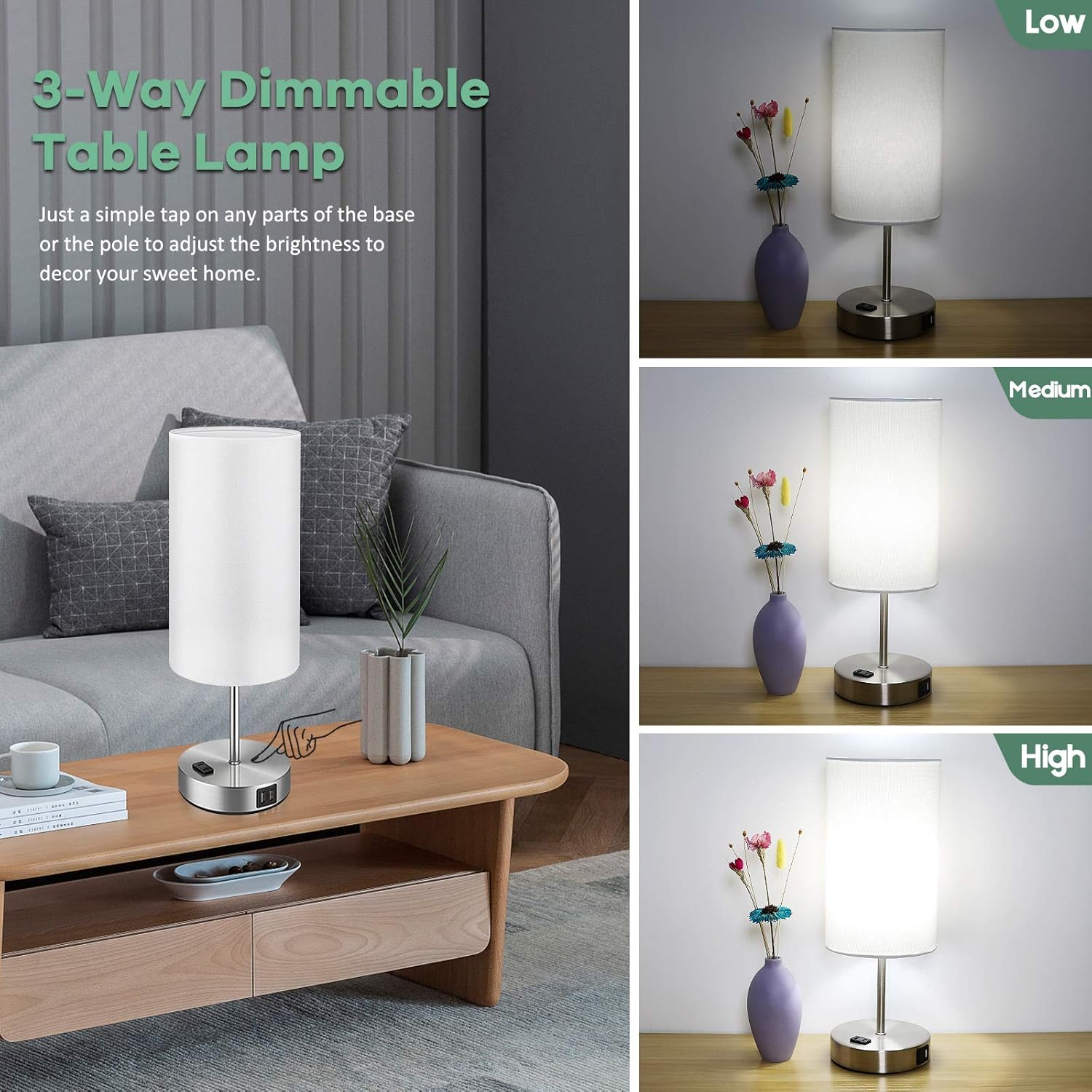
Image: Demonstration of the 3-way dimmable function, showing low, medium, and high light levels.
USB Charging Ports & AC Outlet:
Lamp is equipped with dual 5V/2.1A USB charging ports and one 2-prong AC outlet on its base. These ports are functional whether the lamp light is on or off, as long as the lamp is plugged into a wall outlet. This allows you to conveniently charge your electronic devices such as smartphones, tablets, e-readers, and more.

Resim: lamp's integrated USB charging ports and AC outlet in use, providing convenient power for devices.
Bakım
Ürününüzün uzun ömürlü olmasını ve en iyi performansı göstermesini sağlamak içinamp:
- Temizlik: her zaman l'nin fişini çekinamp before cleaning. Wipe the metal base and lampshade with a soft, dry cloth. Do not use abrasive cleaners or polishes as they may damage the finish.
- Ampul Değişimi: If the included LED bulb needs replacement, ensure the lamp is unplugged and the bulb has cooled down. Replace with an A19 LED bulb with an E26 base. The lamp is compatible with bulbs up to 100 Watts (incandescent equivalent).

Image: Key components of the lamp, useful for understanding maintenance points.
Sorun giderme
L'nizle ilgili herhangi bir sorunla karşılaşırsanızampLütfen aşağıdaki yaygın çözümlere bakın:
| Sorun | Olası Neden | Çözüm |
|---|---|---|
| Lamp açılmıyor. | Not plugged in; loose bulb; power outage. | Ensure power cord is securely plugged into a live outlet. Tighten the light bulb. Check your home's circuit breaker. |
| Touch control is unresponsive or inconsistent. | Loose connection; static electricity; incompatible bulb. | Ensure all connections are secure. Unplug and replug the lamp. Ensure you are using a dimmable LED bulb. Try touching a different part of the metal base/pole. |
| Işık titriyor. | Loose bulb; unstable power; incompatible bulb. | Tighten the bulb. Try plugging the lamp into a different outlet. Ensure the bulb is a dimmable LED. |
| USB ports or AC outlet not charging. | Lamp not plugged in; device cable issue; device not compatible. | l'yi sağlayınamp is plugged into a live wall outlet. Try a different charging cable or device. |

Image: Comparison illustrating the stable, flicker-free lighting provided by Brightever lamps, which aids in eye protection.
Özellikler
| Özellik | Detay |
|---|---|
| Marka | Daha parlak |
| Model Numarası | ST0001-WH |
| Boyutlar (D x G x Y) | 5.95" x 5.95" x 15.9" |
| Taban Malzemesi | Metal |
| Gölge Malzemesi | Çuval Bezi |
| Anahtar Türü | Dokunmatik Kontrol |
| Işık Kaynağı Türü | E26 Soketli Kısılabilir LED Ampuller |
| Dahil Ampuller | 2 x A19 LED Bulbs |
| Ampul Wattage | 7 Watt (LED) |
| Maksimum Uyumlu Watttage | 100 Watt |
| Parlaklık | 800 Lümen |
| Renk Sıcaklığı | 5000 Kelvin (Gün Işığı Beyazı) |
| Güç Kaynağı | Kablolu Elektrik |
| Bağlantı | Dual 5V/2.1A USB Charging Ports, One 2-Prong AC Outlet |
| İç/Dış Mekan Kullanımı | Sadece İç Mekan |
Garanti ve Destek
Brightever stands behind the quality of its products. For any questions, concerns, or support needs regarding your table lamps, please contact our customer service team. We are committed to ensuring your satisfaction.
Please refer to your purchase receipt or the product packaging for specific warranty details and contact information. You can also visit the official Brightever store on Amazon for more information and support resources:
Ask a question about this manual
Ask about setup, troubleshooting, compatibility, parts, safety, or missing instructions. Manuals+ will review the question and use this page’s manual context to help answer it.