
1. Giriş
This manual provides detailed instructions for the installation, operation, and maintenance of your ANRAN 1080P Security Camera System. This system includes a 13-inch LCD DVR and four 1080P indoor/outdoor surveillance cameras, designed to provide reliable home security with features like night vision, motion detection, and remote access.
2. Paket İçeriği
Kuruluma başlamadan önce lütfen aşağıda listelenen tüm bileşenlerin paketinizde mevcut olduğundan emin olun:

This image displays all components included in the ANRAN 1080P Security Camera System package. It includes the AHD DVR with a 13-inch LCD, four AHD cameras, a 1TB hard drive, screws for mounting, BNC cables, 1-to-4 power cables, a USB mouse, and power adapters.
- 1 x 13-inch LCD DVR (with pre-installed 1TB HDD)
- 4 x 1080P AHD Surveillance Cameras
- 4 x BNC Video/Power Cables
- 1 x 1-to-4 Power Splitter Cable
- 2 x Power Adapters (one for DVR, one for cameras)
- 1 x USB Fare
- Montaj Vidaları ve Dübelleri
- 1 x Kullanım Kılavuzu
3. Ürün Bittiview
3.1 Dijital Video Kaydedici (DVR)
The DVR unit features an integrated 13-inch LCD monitor for direct viewing and playback. It includes various ports for connectivity and control.
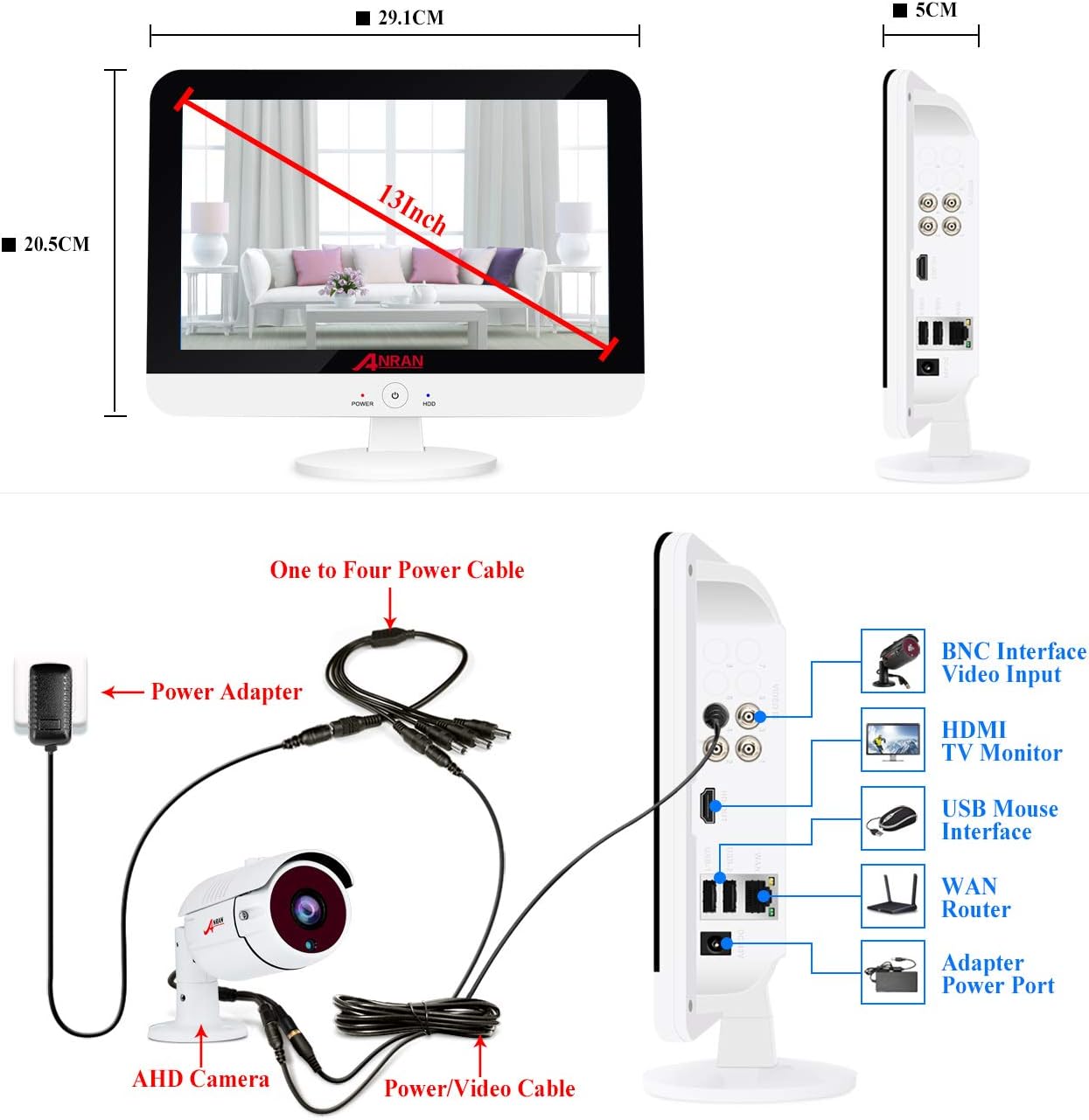
This image shows the ANRAN 13-inch LCD DVR from the front and side. The front view indicates a 13-inch screen with approximate dimensions of 29.1cm width and 20.5cm height. The side view highlights various ports: BNC Interface Video Input, HDMI TV Monitor, USB Mouse Interface, WAN Router, and Adapter Power Port.
3.2 Gözetleme Kamerası
The cameras are designed for both indoor and outdoor use, featuring robust construction and essential surveillance capabilities.

This diagram illustrates the key features of the ANRAN security camera, including 36PCS IR LEDs for night vision, an IIR-CUT Filter, a waterproof case, a mounting bracket, a power port, and an HD lens.
4. Kurulum Talimatları
4.1 Sistem Kablolaması
Follow the diagram below to connect your cameras to the DVR and power supply.

This image provides a wiring diagram for the ANRAN security camera system. It shows how the AHD camera connects to the DVR via a power/video cable, and how the DVR is powered by a power adapter and a one-to-four power cable. The DVR's side ports for BNC video input, HDMI, USB mouse, WAN router, and power adapter are also visible.
- Connect each camera to a BNC video/power cable.
- Connect the BNC end of each cable to the corresponding BNC video input port on the DVR.
- Connect the power end of the camera cables to the 1-to-4 power splitter cable.
- Plug one power adapter into the 1-to-4 power splitter cable and then into a power outlet.
- Connect the second power adapter to the DVR's power port and then into a power outlet.
- Connect the USB mouse to the DVR's USB port for navigation.
- For remote access, connect the DVR's WAN port to your router using an Ethernet cable.
4.2 Kamera Yerleşimi
Consider optimal viewing angles and security for camera installation.

This image demonstrates flexible mounting options for the ANRAN security cameras, showing one camera wall-mountable on an outdoor patio and another ceiling-mountable in an indoor living room.
- Mount cameras in locations that provide a clear view of critical areas.
- Ensure cameras are securely fastened using the provided mounting screws.
- Adjust the camera angle to cover the desired surveillance zone.
5. Kullanım Talimatları
5.1 İlk Çalıştırma ve Kurulum
Once all connections are made, power on the DVR. The system will boot up and display the live camera feeds on the integrated 13-inch LCD monitor. Follow any on-screen prompts for initial setup, including setting a password.
Bu videoview of the ANRAN wired security camera system with a 13-inch monitor DVR, demonstrating its components and basic functionality.
This video showcases the ANRAN 1080P wired home camera system, highlighting its features and the integrated 13-inch monitor.
5.2 Uzaktan Erişim
Access your camera feeds from anywhere using the mobile application.

This image illustrates the three steps for mobile access: 1. Simple Connection (DVR connected to router), 2. Download the free Danale APP, and 3. Enjoy Live View Akıllı telefonunuzda.
- Ensure your DVR is connected to your home router via an Ethernet cable.
- Download the official ANRAN mobile application (e.g., Danale App) from your smartphone's app store.
- Register an account and add your DVR device by scanning the QR code on the DVR or entering its serial number.
- Artık yapabilirsin view live feeds, playback recordings, and receive alerts on your mobile device.
5.3 Hareket Algılama
Configure motion detection settings to receive alerts and trigger recordings when activity is detected.

This image demonstrates the customizable motion detection feature, showing a person triggering a recording and an email alert being sent to a smartphone. The DVR screen also displays the detected motion.
- Navigate to the DVR's menu and select 'Motion Detection' settings.
- Kameranın görüş alanı içinde belirli alanları tanımlayın view Hareketin algılanması gereken yer.
- Set up alert preferences, such as email notifications or app push alerts.
5.4 Gece Görüşü
The cameras automatically switch to night vision mode in low-light conditions.

This image illustrates the night vision feature, showing a camera view transitioning from daytime to a clear black and white night view.
- The integrated IR LEDs provide clear black and white video footage tamamen karanlıkta.
- Kameranın görüşünü engelleyen herhangi bir şeyin olmadığından emin olun. view, especially at night, to maximize night vision effectiveness.
6. Bakım
Düzenli bakım, güvenlik sisteminizin optimum performans göstermesini ve uzun ömürlü olmasını sağlar.
This image highlights the camera's IP66 waterproof rating, indicating its ability to withstand rain, snow, and other outdoor elements within a temperature range of -10°C to +50°C.
- Lensleri Temizleyin: Kamera lenslerini düzenli olarak yumuşak bir bezle temizleyin.amp toz ve lekeleri temizlemek için bez.
- Kabloları Kontrol Edin: Inspect all cables for wear, damage, or loose connections. Secure or replace as needed.
- Yazılım Güncellemeleri: ANRAN'ı kontrol edin. website or app for any available firmware updates for your DVR to ensure the latest features and security patches.
- Sabit Disk Yönetimi: 1TB HDD şunları sağlar: ample storage. Regularly review ve önemli foo'yu yedekletage. The system typically overwrites the oldest footage disk dolduğunda.
- Çevre Koruma: While cameras are IP66 rated for outdoor use, avoid direct exposure to extreme conditions if possible to extend their lifespan.
7. Sorun Giderme
Refer to the following common issues and solutions before contacting support.
- Video Gösterimi Yok:
- Ensure all power adapters are securely plugged in and receiving power.
- Check BNC cable connections between cameras and DVR.
- Verify the DVR is powered on (check power indicator light).
- Kötü Görüntü Kalitesi:
- Kamera lenslerini temizleyin.
- Ensure cameras are within their effective range and not obstructed.
- Check cable integrity for any damage that might affect signal quality.
- Hareket Algılama Çalışmıyor:
- Review motion detection settings in the DVR menu to ensure zones are correctly configured and sensitivity is appropriate.
- Verify alert settings (email, push notifications) are correctly set up and tested.
- Uzaktan Erişim Başarısızlığı:
- Confirm the DVR is connected to the internet via an Ethernet cable to your router.
- Yönlendiricinizin internet bağlantısını kontrol edin.
- Ensure the mobile app is updated to the latest version.
- Verify device registration in the app.
8. Özellikler
| Özellik | Detay |
|---|---|
| Marka | ANRAN |
| Bağlantı Teknolojisi | Kablolu |
| Video Yakalama Çözünürlüğü | 1080p |
| Özel Özellikler | Hareket Sensörü, Gece Görüşü |
| Kanal Sayısı | 4 |
| Bellek Depolama Kapasitesi | 1TB |
| Güç Kaynağı | Kablolu Elektrik |
| Uyumlu Cihazlar | Kameralar, Kişisel Bilgisayarlar, Akıllı Telefonlar, Tabletler |
| Düşük Işık Teknolojisi | Gece rengi |
| Ürün Ağırlığı | 11.44 pound |
| İlk Mevcut Tarih | 12 Ağustos 2020 |
9. Garanti ve Destek
ANRAN products come with a standard manufacturer's warranty. Please refer to the warranty card included in your package for specific terms and conditions.
For technical support, customer service, or warranty claims, please contact ANRAN through the following channels:
- E-posta desteği
- Telefon desteği
- Live chat (available during stated business hours)
Contact details are typically provided in the user manual included with your product or on the official ANRAN webalan.