
1. Giriş
The VGEBY YCX-003 MPPT Solar Charge Controller is designed to manage power flow from your solar panels to your battery bank and connected loads. It features an industrial-grade master chip for accurate monitoring and control, ensuring efficient charging and protection for your battery system. This controller automatically adapts to 12V or 24V systems and incorporates advanced Maximum Power Point Tracking (MPPT) technology for high charging efficiency.
Temel işlevleri şunlardır:
- Maintaining optimal battery charge levels.
- Protection against over-charging and over-discharging.
- Prevention of reverse charging from battery to solar panels at night.
- Reverse polarity protection for both battery and solar panels.
- Automatic load cut-off and recovery based on battery voltage.
- Built-in thunder protection.
- Şarj hacmi için otomatik sıcaklık dengelemesitage.
2. Kurulum ve Kurulum
Güneş enerjisi şarj kontrol cihazınızın güvenli ve verimli çalışması için doğru kurulum çok önemlidir. Lütfen bu adımları dikkatlice izleyin.
2.1 Kablolama Şeması

Figure 1: Wiring connections for the solar charge controller.
2.2 Bağlantı Adımları
Connect the components in the following order to prevent damage to the controller or other system components:
- Pili bağlayın: First, connect the battery to the controller's battery terminals. Ensure correct polarity (positive to positive, negative to negative). The controller will automatically detect the system voltage (12V veya 24V).
- Güneş Panelini Bağlayın: Ardından, güneş panelini kontrol ünitesinin güneş paneli terminallerine bağlayın. Doğru kutupluluğa dikkat edin.
- Yükü bağlayın: Son olarak, DC yüklerinizi kontrol cihazının yük terminallerine bağlayın. Doğru kutupluluğa dikkat edin.
Önemli: Always connect the battery first and disconnect the load first when disassembling the system.
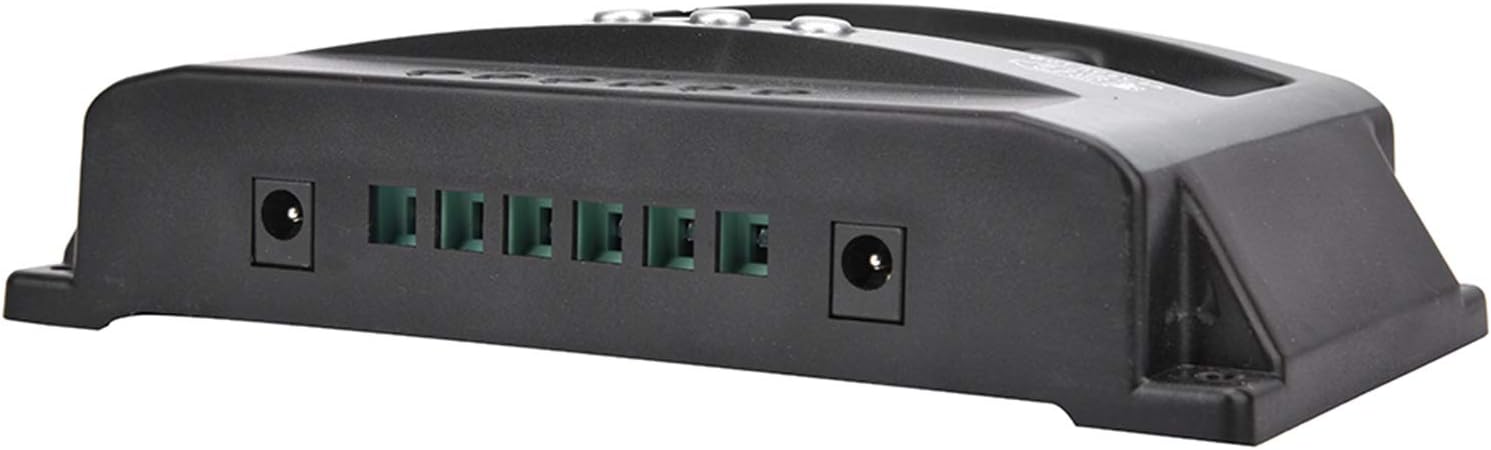
Figure 2: Connection terminals on the side of the controller.
3. Kullanım Talimatları
The VGEBY YCX-003 controller features a large LCD display and user-friendly buttons for monitoring and adjusting parameters.
3.1 LCD Ekran ve Düğmeler

Figure 3: Front panel with LCD display and control buttons.
The LCD display provides real-time information on battery voltage, charging current, discharge current, and system status. The buttons allow you to navigate through display modes and adjust certain charging and discharging parameters.
3.2 Ayarlanabilir Parametreler
The controller allows for adjustment of floating charge voltage, deşarj kesme hacmitage, and discharge recovery voltage. Refer to the on-screen menu for specific adjustment procedures. These parameters are factory-set to default values suitable for most lead-acid batteries but can be customized if needed.
3.3 USB Çıkışı
The controller includes a 5V/2A USB output for charging small electronic devices. This output is active when the battery has sufficient charge.

Figure 4: USB charging capability.
4. Bakım
To ensure the longevity and optimal performance of your VGEBY YCX-003 MPPT Solar Charge Controller, periodic maintenance is recommended.
- Temizlik: Kontrol cihazını temiz ve toz ve kalıntılardan uzak tutun. Temizlik için kuru bir bez kullanın.
- Bağlantılar: Tüm kablo bağlantılarını periyodik olarak kontrol ederek sağlam ve korozyondan arınmış olduklarından emin olun. Gevşek bağlantılar güç kaybına veya aşırı ısınmaya yol açabilir.
- Havalandırma: Ensure the controller is installed in a well-ventilated area to prevent overheating.
5. Sorun Giderme
The VGEBY YCX-003 controller is designed with several built-in protection features. If the system is not operating as expected, check the following:
- Ekran/Güç Yok: Pil bağlantılarını kontrol edin ve pilin yeterli voltaja sahip olduğundan emin olun.tage.
- Şarj Yok: Verify solar panel connections and ensure adequate sunlight. Check for reverse polarity on solar panel connections.
- Yük Çalışmıyor: Check load connections and ensure the battery voltage is above the discharge recovery voltage. The controller automatically cuts off the load if battery voltage çok düşük.
- Hata Kodları/Uyarılar: The controller has built-in protections for overheating, overcurrent, short circuit, open circuit, and reverse connection. If a fault occurs, the controller will automatically recover once the issue is resolved. Consult the display for any specific indicators.
- Ters kutup: The controller has reverse polarity protection for both the battery and solar panels. If connected incorrectly, the controller will not operate until the polarity is corrected.
6. Teknik Özellikler

Figure 5: VGEBY YCX-003 MPPT Solar Charge Controller.
| Özellik | Şartname |
|---|---|
| Örnek | YCX-003 |
| Sistem Hacmitage | 12V/24V Adaptive |
| Güneş Paneli Hacmitage | 12V, 18V, 24V, 36V |
| Yüzer Şarj Hacmitage | 13.7V (varsayılan, ayarlanabilir) |
| Deşarj Kesme Hacmitage | 10.7V (varsayılan, ayarlanabilir) |
| Deşarj Kurtarma Hacmitage | 12.6V (varsayılan, ayarlanabilir) |
| Bekleme Akımı | <10mA |
| USB Çıkışı | 5V / 2A Maks. |
| Rated Current Options | 40A, 50A, 60A, 100A |
| Maks. PV Hacmitage | 50V |
| Maksimum PV Giriş Gücü | 750W (12V) / 1500W (24V) |
| Boyutlar | Yaklaşık 170 x 92 x 45 mm (6.7 x 3.6 x 1.8 inç) |
| Malzeme | ABS + ROHS |
| Üretici | VGEBY |
7. Garanti ve Destek
For warranty information or technical support, please refer to the documentation provided at the time of purchase or contact VGEBY customer service directly. Ensure you have your product model number (YCX-003) and purchase details available when seeking support.