
giriiş
Thank you for choosing the HETP HX160S3 20W PD QC 3.0 26800mAh Fast Charging Power Bank. This portable charger is designed to provide reliable and efficient power for your mobile devices on the go. Featuring 20W Power Delivery (PD) and Quick Charge (QC) 3.0 technology, it offers rapid charging for compatible devices and can charge up to three devices simultaneously. Its high capacity ensures multiple charges for smartphones and tablets, making it an ideal companion for travel and daily use.
Güvenlik Bilgileri
Please read all safety instructions carefully before using this product. Failure to follow these instructions may result in fire, electric shock, product damage, or property damage.
- Powerbank'i aşırı sıcaklıklara (60°C/140°F'nin üzerinde veya 0°C/32°F'nin altında) maruz bırakmayın.
- Su veya diğer sıvılarla temastan kaçının.
- Cihazı sökmeyin, değiştirmeyin veya onarmaya çalışmayın.
- Keep away from direct sunlight, heat sources, and flammable materials.
- Powerbank'i düşürmeyin, delmeyin veya aşırı güç uygulamayın.
- Sadece sertifikalı şarj kabloları ve adaptörleri kullanın.
- Çocukların erişemeyeceği yerde saklayınız.
This power bank incorporates an intelligent control circuit to prevent overcharging, overvoltage, overcurrent, and short circuits, ensuring safe operation. It is CE certified.

Resim: Dahili view highlighting the intelligent control IC for enhanced safety.
Paket İçeriği
- HETP HX160S3 26800mAh Power Bank
- Mikro USB Şarj Kablosu
- Kullanım Kılavuzu (bu belge)
Ürün Bittiview
Familiarize yourself with the ports and indicators on your HETP power bank.

Resim: Ön ve yan view of the power bank, indicating port types and LED power indicator.
Limanlar:
- PD USB-C Input/Output: 5V/3A (Power Delivery for fast charging the power bank or devices).
- Mikro USB Girişi: 5V/2.1A (Standard input for charging the power bank).
- QC3.0 Çıkışı: 5V/3A (Quick Charge 3.0 for fast charging compatible devices).
- USB Çıkışı: 5V/2.1A (Standard output for charging devices).
LED Göstergesi:
Press the power button once to check the remaining battery level. The LED indicators will light up as follows:
- %10-25: One LED lit (red)
- %26-50: Two LEDs lit (green)
- %51-75: Three LEDs lit (light blue)
- %76-100: Four LEDs lit (dark blue)
Kurulum: İlk Şarj İşlemi
Before first use, fully charge your HETP power bank.
- Connect the power bank to a wall charger using either the USB-C port (for faster charging) or the Micro USB port (using the provided cable).
- The LED indicators will flash to show charging status and remain solid when fully charged.
- A full charge using a PD Type-C charger (not included) takes approximately 3.5 hours. Using a standard 2A Micro USB charger takes approximately 9 hours.

Image: Illustration of recharging the power bank, highlighting the faster Type-C PD input.
Operating: Charging Your Devices
The HETP power bank can charge up to three devices simultaneously.
- Connect your device's charging cable to one of the power bank's output ports (QC3.0, PD USB-C, or USB 2.1A).
- Kablonun diğer ucunu cihazınıza bağlayın.
- Power bank otomatik olarak şarj olmaya başlayacaktır. Başlamazsa, güç düğmesine bir kez basın.
- The LED indicators will show the remaining battery level during charging.

Image: The power bank connected and charging an iPhone and other devices, demonstrating multi-device charging capability.
Evrensel Uyumluluk:
This power bank is compatible with a wide range of USB-powered devices, including iPhones, iPads, Samsung Galaxy phones, other smartphones, tablets, smartwatches, and Bluetooth devices.

Image: A visual representation of the power bank's universal compatibility with different electronic devices.
Bakım
- Temizlik: Use a dry, soft cloth to clean the power bank. Do not use harsh chemicals or abrasive materials.
- Depolamak: Store the power bank in a cool, dry place away from direct sunlight and extreme temperatures. If storing for extended periods, charge it to about 50-75% every 3 months to maintain battery health.
- Pil Bakım: Avoid fully discharging the power bank regularly, as this can reduce its lifespan.
Sorun giderme
- Powerbank şarj olmuyor: Ensure the charging cable is securely connected to both the power bank's input port and the wall charger. Try a different cable or wall adapter.
- Cihaz powerbank'ten şarj olmuyor: Ensure the power bank has sufficient charge. Press the power button to activate charging. Try a different output port or charging cable.
- Yavaş şarj oluyor: Ensure your device and cable support fast charging (PD/QC 3.0) if you expect rapid charging speeds. Some devices may charge slower depending on their battery status or cable quality.
- Power bank automatically turns off: This may happen if the connected device is fully charged or if the current draw is too low. If it turns off unexpectedly, ensure it is sufficiently charged.
Özellikler
| Model Numarası | HX160S3 |
| Kapasite | 26800mAh |
| USB-C Giriş/Çıkış (PD) | 5V/3A |
| Mikro USB Girişi | 5V/2.1A |
| USB Çıkışı (QC3.0) | 5V/3A |
| USB Çıkışı | 5V/2.1A |
| Boyutlar | 15.08 cm x 7.49 cm x 1.83 cm |
| Ağırlık | 360 Gram |
| Uyumlu Cihazlar | Smartphones, Tablets, Bluetooth devices |
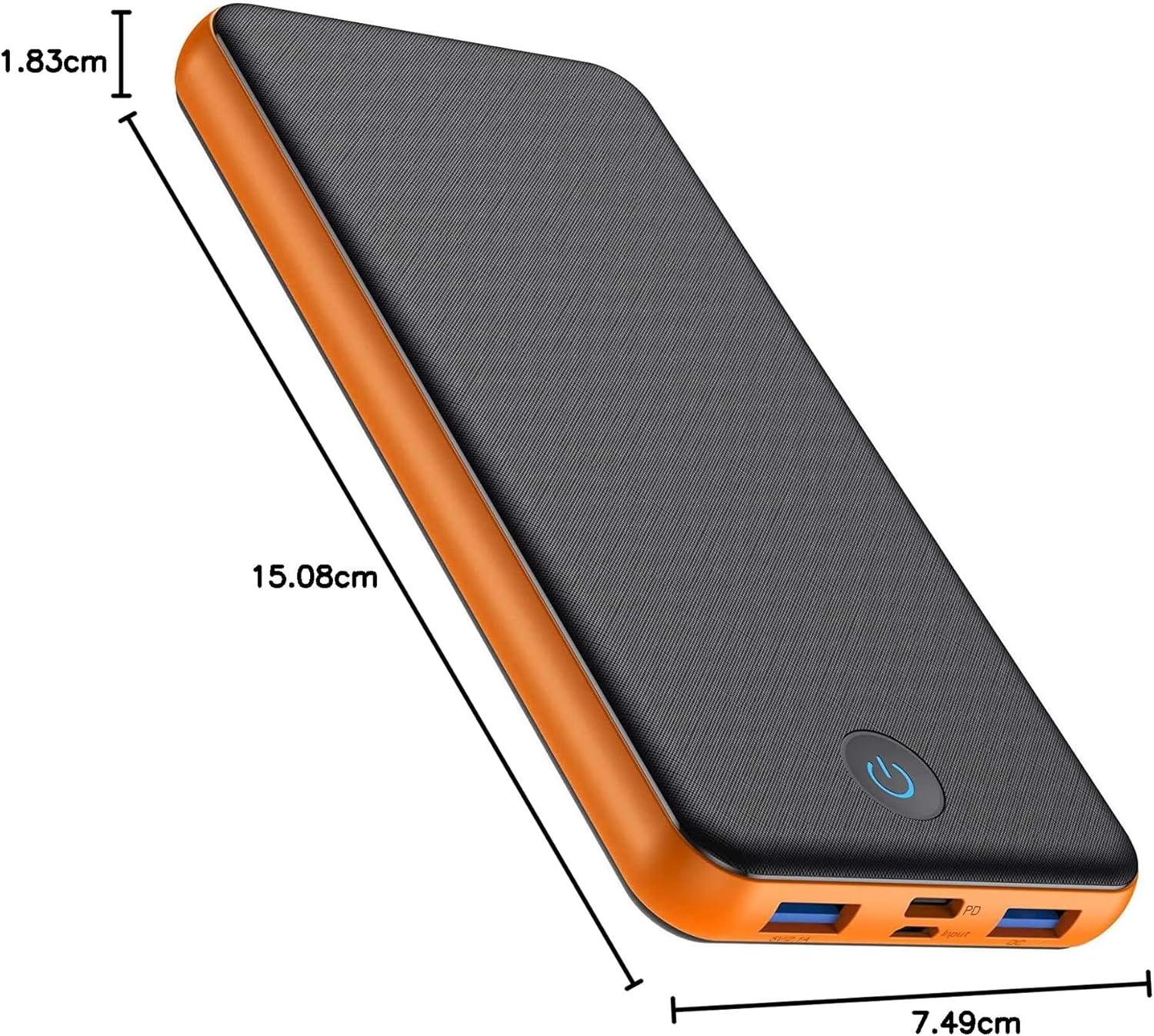
Image: The power bank displaying its physical dimensions.
Garanti ve Destek
Your HETP HX160S3 Power Bank comes with a 24-month warranty from the date of purchase. This warranty covers manufacturing defects and ensures product quality.
For any questions, technical support, or warranty claims, please contact our friendly customer service team. We are available 24 hours to assist you.
Please refer to your purchase documentation for specific contact details or visit the official HETP webalan.