
INTRATONE HTEL2-00
INTRATONE HTEL2-00 Remote Control User Manual
Model: HTEL2-00 | Brand: INTRATONE
1. Ürün Bittiview
The INTRATONE HTEL2-00 - 09-0102 remote control is a sophisticated device featuring 4 bi-technology 868 MHz channels. It integrates both Mifare and HF 868 MHz technologies, allowing for straightforward programming via the official www.intratone.info website or with a dedicated programmer (model 12-0115). A key security feature is its unique ten-digit identification number, ensuring personalized and secure operation. This remote offers an operating range of up to 10 meters and is broadly compatible with various electronic devices, including televisions, smartphones, cameras, and projectors. Measuring 6.5 x 3.8 x 1 cm and weighing only 30 grams, it is designed for portability and ease of use, providing optimal control over your compatible devices.
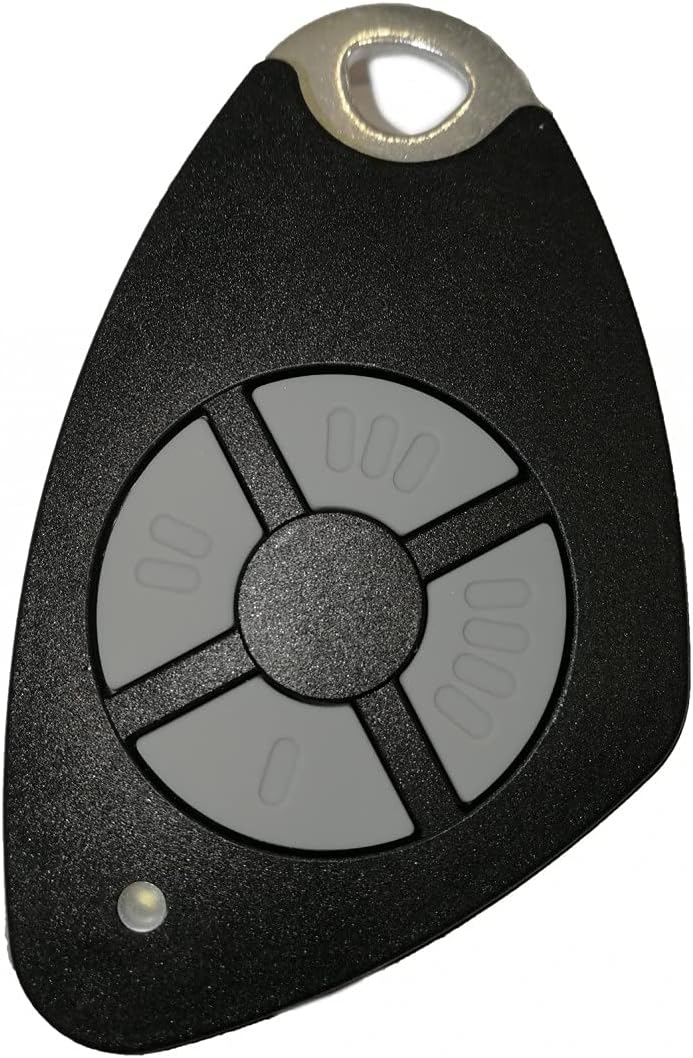
Şekil 1.1: Ön view of the INTRATONE HTEL2-00 Remote Control.
2. Ürün Özellikleri
- 4 Kanal: Provides control over up to four distinct functions or devices.
- Bi-Technology: Equipped with both Mifare and HF 868 MHz technologies for versatile use.
- Kolay Programlama: Can be programmed via the official www.intratone.info website or using a dedicated programmer (model 12-0115).
- Unique Identification: Features a unique ten-digit engraved identification number for enhanced security and personalization.
- Geniş Uyumluluk: Compatible with various devices including televisions, smartphones, cameras, and projectors.
- Kompakt Tasarım: Lightweight (30 grams) and small dimensions (6.5 x 3.8 x 1 cm) for easy portability.
3. Kurulum
3.1 Pil Kurulumu
The INTRATONE HTEL2-00 remote control uses an Alkaline battery. To install or replace the battery:
- Uzaktan kumandanın arkasındaki pil bölmesini bulun.
- Bölme kapağını dikkatlice açın.
- Insert the Alkaline battery, ensuring correct polarity (+ and -).
- Pil bölmesi kapağını sıkıca kapatın.
3.2 Uzaktan Kumandanın Programlanması
The HTEL2-00 remote control requires programming to function with your specific devices or access systems. Programming can be done via two methods:
- Online Programming: Visit the official INTRATONE programming websitede www.intratone.info. Follow the on-screen instructions to register your remote using its unique ten-digit identification number and link it to your desired system.
- Programmer Device: Use a dedicated INTRATONE programmer device (model 12-0115). Refer to the programmer's manual for specific instructions on how to transfer programming data to your HTEL2-00 remote.

Şekil 3.1: Açısal view of the remote control, showing its compact form factor.
4. Kullanım Talimatları
4.1 Using the Channels
The HTEL2-00 remote control features four distinct buttons, each corresponding to a channel (00, 000, 0000, and 0). Once programmed, each button will activate its assigned function. To operate:
- Point the remote control towards the receiver of the device you wish to control.
- Press the corresponding channel button (00, 000, 0000, or 0) for the desired action.
- The small LED indicator on the remote will illuminate briefly when a button is pressed, indicating signal transmission.
4.2 Çalışma Aralığı
The remote control has a maximum operating range of 10 meters (approximately 33 feet) under optimal conditions. Factors such as obstacles (walls, furniture), radio interference, and battery level can affect the effective range.
4.3 Uyumlu Cihazlar
This remote control is designed for compatibility with a range of devices, including but not limited to:
- Televizyonlar
- Smartphones (with compatible receivers/adapters)
- Cameras (with compatible receivers/adapters)
- Projectors (with compatible receivers/adapters)
- Access control systems (gates, garage doors, etc., if programmed accordingly)
5. Bakım
5.1 Temizlik
Uzaktan kumandayı temizlemek için yumuşak, kuru bir bez kullanın. İnatçı kirler için biraz daha sert bir bez yeterli olacaktır.amp cloth with mild soap can be used, ensuring no liquid enters the device. Do not use abrasive cleaners, solvents, or harsh chemicals.
5.2 Pil Değişimi
Replace the battery when the remote's performance degrades (e.g., reduced range, inconsistent operation) or the LED indicator does not light up. Refer to Section 3.1 for battery installation instructions. Always dispose of old batteries responsibly according to local regulations.
5.3 Depolama
Uzaktan kumandayı doğrudan güneş ışığından, aşırı sıcaklıklardan ve yüksek nemden uzak, serin ve kuru bir yerde saklayın. Uzaktan kumandayı düşürmekten veya güçlü darbelere maruz bırakmaktan kaçının.
6. Sorun Giderme
6.1 Uzaktan Yanıt Vermiyor
- Pili Kontrol Edin: Pilinin doğru takıldığından ve yeterli şarjı olduğundan emin olun. Gerekirse değiştirin.
- Verify Programming: Confirm that the remote control has been correctly programmed for the intended device or system. If unsure, attempt to reprogram it via www.intratone.info.
- Görüş Hattı: Ensure there are no obstructions between the remote control and the receiver.
- Yakınlık: Move closer to the device you are trying to control, ensuring you are within the 10-meter operating range.
6.2 Reduced Operating Range
- Düşük Pil: A weak battery can significantly reduce the remote's range. Replace the battery.
- Parazit yapmak: Other electronic devices operating on similar frequencies (868 MHz) can cause interference. Try moving away from such devices.
- obstrüksiyonlar: Thick walls, metal objects, or other physical barriers can block the signal.
6.3 LED Indicator Not Lighting Up
- Pil Sorunu: The battery may be dead or incorrectly inserted. Check and replace the battery.
- Düğme Arızası: If only one button's LED doesn't light up, that specific button might be faulty.
7. Özellikler
| Özellik | Şartname |
|---|---|
| Marka | INTRATONE |
| Model Numarası | HTEL2-00 |
| Bağlantı Teknolojisi | Radyo Frekansı (868 MHz) |
| Kanal Sayısı | 4 |
| Özel Özellikler | Digital display, Bi-technology (Mifare, HF) |
| Uyumlu Cihazlar | Television, Smartphone, Camera, Projector |
| Maksimum Menzil | 10 metre |
| Pil Türü | Alkali |
| Ürün Boyutları (U x G x Y) | 6.5x3.8x1 cm |
| Ürün Ağırlığı | 30 gram |
| Tanılama | Unique ten-digit engraved number |
8. Garanti ve Destek
Specific warranty information for the INTRATONE HTEL2-00 remote control is not provided in this manual. For details regarding warranty coverage, terms, and conditions, please refer to the product packaging or contact INTRATONE customer support directly.
For technical support, programming assistance, or any other inquiries, please visit the official INTRATONE webSitelerini ziyaret edin veya müşteri hizmetleri departmanlarıyla iletişime geçin:
- Website for Programming & Information: www.intratone.info
- Üretici iletişim: Please refer to the INTRATONE official webBölgenize özel iletişim bilgileri için siteyi ziyaret edin.
Ask a question about this manual
Ask about setup, troubleshooting, compatibility, parts, safety, or missing instructions. Manuals+ will review the question and use this page’s manual context to help answer it.