
1. Giriş
The Vimar 19593 Arké Connected IoT Actuator is an electronic control device designed for smart home environments. It features a NO 16 A relay output and supports dual IoT technology: Bluetooth 5.0 for the Vimar VIEW wireless mesh system and Zigbee 3.0 for broader compatibility. This actuator allows for both local control via a physical button and remote control through dedicated applications. It also includes instantaneous power measurement and energy consumption monitoring capabilities, along with an RGB LED for status indication and adjustable intensity.
This manual provides essential information for the safe installation, operation, and maintenance of your Vimar 19593 Arké Connected IoT Actuator.
2. Güvenlik Bilgileri
- Elektrik tesisatı: Installation must be performed by qualified personnel in compliance with local electrical codes and regulations.
- Güç Kaynağı: Ensure the power supply (100-240 V ~ 50/60 Hz) matches the device specifications before installation.
- Gücü Kesin: Herhangi bir kurulum, kablolama veya bakım işlemine başlamadan önce daima ana devre kesiciden elektriği kesin.
- Sadece İç Mekanda Kullanım: This device is intended for indoor use in dry environments. Do not expose to moisture or extreme temperatures.
- Aşırı Yüklemeden Kaçının: Do not exceed the maximum load rating of 16 A for the relay output.
- Çocuklar ve Evcil Hayvanlar: Cihazı ve parçalarını çocukların ve evcil hayvanların erişemeyeceği yerlerde saklayın.
3. Ürün Bittiview
The Vimar 19593 Arké Connected IoT Actuator is a compact module designed for integration into standard electrical systems. It features a physical button for local control and pairing, and an RGB LED indicator for status feedback.

Şekil 1: Ön view of the Vimar 19593 Arké Connected IoT Actuator. It is a dark gray rectangular module with a small indicator light and a circular button at the bottom.

Şekil 2: Close-up of the actuator showing a symbol for wireless connectivity and the control button.
Temel Bileşenler:
- Kontrol Düğmesi: Used for local ON/OFF control and initiating the pairing process.
- RGB LED Göstergesi: Provides visual feedback on device status, pairing mode, and can be adjusted for intensity.
- Röle Çıkışı: Connects to the load (e.g., lights, appliances) for switching ON/OFF.
- Kablosuz Modüller: Integrated Bluetooth 5.0 and Zigbee 3.0 for smart home connectivity.
4. Kurulum
4.1 Fiziksel Kurulum
- Gücü Kesin: İşe başlamadan önce, kurulum alanına giden ana güç kaynağının devre kesiciden kapatıldığından emin olun.
- Kablolama: Connect the actuator according to the provided wiring diagram (typically found on the device itself or in the packaging). Ensure correct connection of live, neutral, and load wires to the appropriate terminals. This device is designed for modular, flush-mounted, or wall-mounted installations.
- Güvenli Cihaz: Mount the actuator securely within the electrical box or housing.
- Gücü Geri Yükle: Kurulum tamamlandıktan ve tüm bağlantılar güvenli hale getirildikten sonra devre kesicideki gücü geri yükleyin.
4.2 Uygulama Kurulumu ve Eşleştirme
The Vimar 19593 supports two primary wireless technologies for smart home integration: Bluetooth 5.0 (via Vimar VIEW Wireless app) and Zigbee 3.0 (via compatible Zigbee hubs and apps).

Şekil 3: Vimar VIEW App icon, used for managing the actuator.
- İndir uygulaması: İndir Vimar VIEW Kablosuz app from your device's app store (for Bluetooth control) or a compatible Zigbee hub app (e.g., Amazon Alexa app for Zigbee).
- Hesap oluşturmak: Open the app and create an account if you don't already have one.
- Eşleştirme Modunu Başlatın: Press and hold the physical control button on the actuator for approximately 5 seconds. The RGB LED will begin to pulse blue, indicating it is in pairing mode.
- Uygulamaya Cihaz Ekle: Follow the on-screen instructions in your chosen app to add a new device. The app should detect the Vimar 19593 actuator.
- Select Technology: Within the Vimar VIEW Wireless app, you can switch between Bluetooth and Zigbee modes if needed. For Zigbee, ensure your Zigbee hub is also in pairing mode.
- Kurulumu Tamamla: Assign a name to your device and configure any initial settings as prompted by the app.
5. Kullanım Talimatları
5.1 Yerel Kontrol
- AÇIK/KAPALI: Briefly press the physical control button on the actuator to toggle the connected load ON or OFF.
5.2 Uygulama Üzerinden Uzaktan Kontrol
Once paired, you can control the actuator remotely using the Vimar VIEW Wireless app (for Bluetooth) or a compatible Zigbee app.
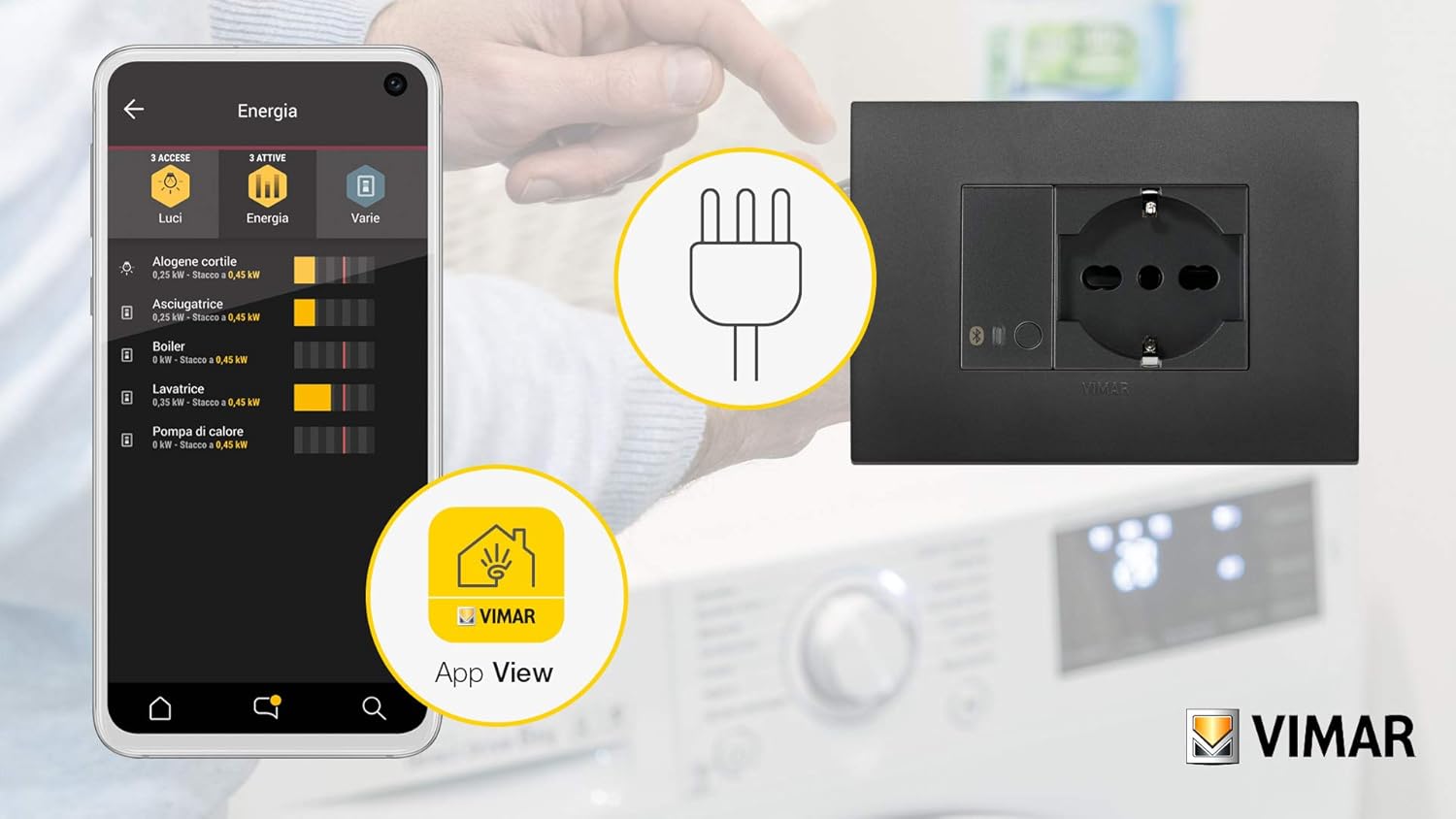
Şekil 4: Example of the Vimar app interface showing energy monitoring for connected devices.
- Toggle Load: Open the app, select your Vimar 19593 actuator, and use the virtual button to switch the connected load ON or OFF.
- Enerji İzleme: The app provides real-time instantaneous power measurement and tracks consumed energy. This feature allows you to monitor the power usage of the connected appliance.
- RGB LED Adjustment: Adjust the intensity and potentially the color (if supported by the app) of the RGB LED indicator through the app settings.
5.3 Ses Kontrol Entegrasyonu
The actuator can be integrated with voice assistants through compatible smart home hubs (e.g., Amazon Alexa for Zigbee). Refer to your voice assistant's setup guide for integration steps.

Şekil 5: Illustration of a smart plug (similar to actuator function) being controlled via voice commands and a smartphone app.
6. Bakım
- Temizlik: Disconnect power before cleaning. Use a soft, dry cloth to wipe the device. Do not use liquid cleaners or abrasive materials.
- Donanım Yazılımı Güncellemeleri: Vimar'ı periyodik olarak kontrol edin. VIEW Wireless app for available firmware updates to ensure optimal performance and security. Follow the app's instructions for any update procedures.
- Düzenli Kontroller: Occasionally inspect the device for any signs of damage or loose connections. If any issues are found, disconnect power and consult a qualified electrician.
7. Sorun Giderme
- Cihaz Yanıt Vermiyor:
- Güç kaynağının aktif olup olmadığını kontrol edin.
- Ensure the device is properly wired.
- If using a Vimar Gateway, confirm it has an active internet (CLOUD) connection, as loss of connection may prevent operation.
- Eşleştirme Sorunları:
- Ensure the actuator's LED is pulsing blue, indicating pairing mode.
- Verify your smartphone or Zigbee hub is within range.
- If re-associating, you may need to switch the device to Bluetooth mode via the Vimar Arké app, then back to Zigbee. If this fails, temporarily remove power from the actuator and restore it to attempt a reset before re-pairing.
- LED Not Functioning as Expected (Zigbee Hub):
- When associated with a generic Zigbee hub, direct control over the LED's function and color may be limited. The LED typically reflects the actuator's ON (blue) or OFF (off) state.
- Power Consumption Readings Missing (Zigbee Hub):
- Some Zigbee integrations (e.g., ZHA) might not fully support reading power consumption data from this device. Verify compatibility with your specific Zigbee coordinator and integration.
- Fabrika ayarları: To perform a factory reset, remove power from the device for a few seconds, then restore it. This may clear all pairing information.
8. Özellikler
| Üretici | Vimar |
| Model Numarası | 19593 |
| Ürün Boyutları | 4.9x2.22x5.01 cm |
| Ağırlık | 40 gram |
| Renk | Gri |
| Cilttage | 100-240 Volt AC |
| Sıklık | 50/60 Hz |
| Röle Çıkışı | NO 16 A |
| Kablosuz Teknoloji | Bluetooth 5.0, Zigbee 3.0 |
| Piller Gerekli | HAYIR |
| Menşei ülke | İtalya |
9. Garanti
For information regarding the warranty period and terms for your Vimar 19593 Arké Connected IoT Actuator, please refer to the official Vimar website or the warranty documentation included with your purchase. Warranty policies may vary by region and retailer.
10. Destek
For additional instructions, tutorials, and technical support, please visit the official Vimar support webalan:
You can also contact Vimar customer service directly for assistance with product inquiries, troubleshooting, or warranty claims.