
1. Giriş
This manual provides detailed instructions for the setup, operation, and maintenance of your BMW Multi-Function Clock, Alarm, and Weather Station. This device combines a digital clock, an alarm with a snooze function, and a weather station that displays temperature. Please read this manual carefully before use to ensure proper functionality and to maximize your experience with the product.
2. Paket İçeriği
Lütfen paketi açtıktan sonra içeriğini kontrol edin. Herhangi bir ürün eksik veya hasarlıysa, satıcınızla iletişime geçin.
- BMW Multi-Function Clock, Alarm, and Weather Station Unit
- Kullanım Kılavuzu (bu belge)
3. Kurulum
3.1. Pil Kurulumu
Cihaz gerektirir 2 adet AAA pil (dahil değildir) Çalıştırmak için. Pilleri takmak için şu adımları izleyin:
- Ünitenin arkasındaki pil bölmesi kapağını bulun.
- Bölmeyi açmak için kapağı yavaşça kaydırın veya kaldırın.
- Bölmenin içinde gösterildiği gibi kutupların (+ ve -) doğru olmasına dikkat ederek iki adet AAA pil takın.
- Pil bölmesi kapağını güvenli bir şekilde yerine takın.
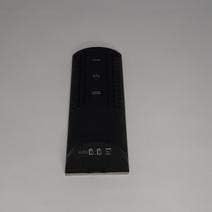
Şekil 3.1: Geri view of the device, illustrating the battery compartment and control buttons for setup.
3.2. İlk Güç Açma
After battery installation, the device display will illuminate, and it will typically show a default time or begin searching for a signal (if applicable for weather functions). Proceed to the operating instructions to set the time and other functions.
4. Kullanım Talimatları
4.1. Saat ve Tarihin Ayarlanması
Geçerli saat ve tarihi ayarlamak için:
- Basılı tutun MOD button (usually located on the back or side) for a few seconds until the time display starts flashing.
- Kullanın UP or AŞAĞI buttons (often labeled '+' or '-') to adjust the hour.
- Basmak MOD again to confirm the hour and move to the minutes.
- Dakikaları aşağıdaki yöntemi kullanarak ayarlayın. UP or AŞAĞI düğmeler.
- Basmaya devam et MOD and adjusting with YUKARI/AŞAĞI for year, month, and day settings.
- Basmak MOD Son bir kez ayar modundan çıkmak için.
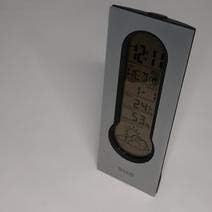
Şekil 4.1: Front display of the device, showing the digital clock, temperature, and weather forecast icons.
4.2. Alarm Ayarlama
Alarm saatini ayarlamak için:
- Normal saat görüntüleme modunda, tuşuna basın. ALARM düğme (veya MOD 'AL' veya bir alarm simgesi görünene kadar tekrarlayın).
- Basılı tutun ALARM Alarm saati yanıp sönmeye başlayana kadar düğmeye basın.
- Kullanın UP or AŞAĞI İstediğiniz alarm saatini ayarlamak için butonlara basın.
- Basmak ALARM again to confirm the hour and move to the minutes.
- Dakikaları aşağıdaki yöntemi kullanarak ayarlayın. UP or AŞAĞI düğmeler.
- Basmak ALARM one last time to save the alarm setting. An alarm icon will typically appear on the display to indicate the alarm is active.
4.3. Using Snooze Function
Alarm çaldığında, düğmesine basın. UYUKLAMA button (usually a large button on the top of the unit) to temporarily silence the alarm. The alarm will sound again after a few minutes (typically 5-10 minutes, depending on the model). To turn off the alarm completely, press any other button or let it ring until it automatically stops.

Şekil 4.2: Tepe view of the device, highlighting the prominent SNOOZE button.
4.4. Sıcaklık Göstergesi
The device continuously displays the ambient temperature. The temperature unit (Celsius or Fahrenheit) can usually be switched by pressing a dedicated button (e.g., 'C/F' or 'TEMP') or by holding down one of the adjustment buttons during time setting.
4.5. Weather Station Function
The integrated weather station provides a basic weather forecast using graphical icons (e.g., sun, clouds, rain). This forecast is based on internal barometric pressure changes and is an estimation for the local area. It is not connected to external weather services.
5. Bakım
5.1. Temizlik
To clean the device, use a soft, dry cloth. Do not use abrasive cleaners, solvents, or chemical sprays, as these can damage the surface and electronic components. Avoid getting moisture into the device.
5.2. Pil Değişimi
When the display dims or functions become erratic, it is time to replace the batteries. Follow the battery installation steps in Section 3.1. Always replace both batteries at the same time with new AAA batteries.
6. Sorun Giderme
Cihazınızla ilgili sorunlarla karşılaşırsanız, lütfen aşağıdaki yaygın sorunlar ve çözümlerine bakın:
- Ekran boş veya loş:
Check if batteries are installed correctly. Replace with fresh AAA batteries. - Saat veya tarih hatalı:
Refer to Section 4.1 to reset the time and date. Ensure you confirm each setting step. - Alarm çalmıyor:
Verify that the alarm is set and activated (look for an alarm icon on the display). Ensure the volume is not set to zero if adjustable. - Sıcaklık ölçümü doğru görünmüyor:
Ensure the device is not placed in direct sunlight, near heat sources, or in drafts, which can affect readings. Allow some time for the sensor to stabilize after placement. - Weather forecast icons are not changing:
The weather forecast is based on local barometric pressure changes and may take time to update. It provides a general trend, not a precise forecast.
7. Özellikler
| Özellik | Detay |
|---|---|
| Marka | BMW |
| Model Numarası | 06017443015007 |
| Özel Özellikler | Alarm, Snooze, Temperature Display |
| Güç Kaynağı | Pil |
| Pil Türü | 2 x AAA pil (dahil değildir) |
| ASIN | B089QGJ9VR |
8. Garanti ve Destek
This product is covered by a standard manufacturer's warranty. For specific warranty terms and conditions, please refer to the documentation provided at the time of purchase or contact your retailer. For technical support or service inquiries, please reach out to the point of purchase or the manufacturer's customer service department.