
1. Giriş
Welcome to the user manual for your Orbic Journey V Verizon Postpaid 4G LTE Flip Phone. This guide provides essential information on setting up, operating, maintaining, and troubleshooting your device. The Orbic Journey V is a compact and reliable flip phone designed for clear communication and essential smart features, running on the KaiOS operating system and supporting 4G LTE connectivity.
Please read this manual thoroughly to ensure proper use and to maximize the performance and longevity of your phone.
2. Kurulum
2.1. Kutudan Çıkarma ve Paket İçeriği
Upon opening your Orbic Journey V package, verify that all components are present:
- Orbic Yolculuk V Flip Telefon
- Şarj Edilebilir Lityum İyon Pil
- Şarj cihazı
2.2. Pil Kurulumu
- Telefonun arka tarafında bulunan pil kapağını bulun.
- Gently pry open the battery cover using the designated notch.
- Pil üzerindeki altın renkli kontakları, pil bölmesinin içindeki terminallerle hizalayın.
- Pil yerine oturana kadar sıkıca bastırın.
- Replace the battery cover, ensuring it is securely latched.
2.3. SIM Kart Kurulumu
Your Orbic Journey V requires a Nano-SIM card for cellular service. Ensure the phone is powered off before inserting or removing the SIM card.
- Remove the battery cover and the battery as described in Section 2.2.
- Locate the SIM card slot, typically near the battery compartment.
- Insert the Nano-SIM card into the slot with the gold contacts facing down and the notched corner aligned with the slot's guide.
- SIM kartı yerine oturana kadar hafifçe itin.
- Pili ve pil kapağını tekrar takın.
2.4. İlk Güç Açma ve Şarj Etme
To power on your phone for the first time, press and hold the Power/End Call button until the screen illuminates. It is recommended to fully charge the phone before first use.
- Şarj cihazını telefonun şarj portuna bağlayın.
- Şarj cihazını standart bir elektrik prizine takın.
- Ekranda şarj göstergesi belirecektir.
- Tamamen şarj olduktan sonra şarj cihazının bağlantısını kesin.
3. Telefonunuzu Kullanma
3.1. Phone Layout and Keys
Familiarize yourself with the physical components and buttons of your Orbic Journey V.
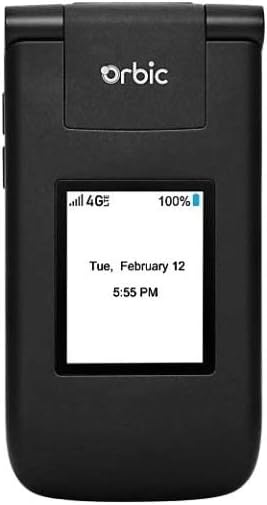
Şekil 3.1: Ön view of the Orbic Journey V, closed. The external display shows signal strength, battery level, and the current time and date.

Figure 3.2: Orbic Journey V in open position, revealing the main screen and the full alphanumeric keypad with navigation buttons.

Şekil 3.3: Arka view of the Orbic Journey V, highlighting the main camera lens and the Verizon branding.
- Harici Ekran: Shows time, date, notifications, and caller ID when the phone is closed.
- Dahili Ekran: Main screen for navigating menus, viewing content, and interacting with applications.
- Navigation Key (D-Pad): Menüler arasında gezinmek ve seçenekleri seçmek için kullanılır.
- Center Select Key: Seçimleri onaylar.
- Call/Send Key: Initiates calls and answers incoming calls.
- Çağrıyı Sonlandır/Güç Tuşu: Ends calls, returns to the home screen, and powers the phone on/off.
- Geri/Temizle Tuşu: Önceki ekrana döner veya karakterleri siler.
- Ses Tuşları: Adjusts call volume, media volume, and ringer volume.
- Kamera Tuşu: Kamera fonksiyonuna hızlı erişim.
3.2. Temel Gezinme
The Orbic Journey V operates on KaiOS. Use the Navigation Key to scroll through menu options and the Center Select Key to open applications or confirm actions.
- From the home screen, press the Navigation Key (up, down, left, right) to access shortcuts or navigate the main menu.
- Press the Center Select Key to open the main application menu.
- Press the Back/Clear key to go back to the previous screen.
3.3. Arama Yapma ve Alma
- Telefon çağrısı yapmak: Enter the phone number using the keypad and press the Call/Send key. Alternatively, navigate to Contacts, select a contact, and press the Call/Send key.
- Bir Aramayı Cevaplamak için: When the phone rings, press the Call/Send key.
- Aramayı Bitirmek İçin: Press the End Call/Power key.
3.4. Mesaj Gönderme ve Alma
- Mesaj Göndermek İçin: From the main menu, select 'Messages'. Choose 'New Message', enter the recipient's number or select from contacts, type your message using the keypad, and press 'Send'.
- Mesaj Almak İçin: New messages will typically display a notification on the screen. Navigate to the 'Messages' application to view gelen kutunuz.
3.5. Kamera Kullanımı
The Orbic Journey V is equipped with front and rear cameras. The rear camera is located on the upper-right back of the phone.
- To Open Camera: Press the dedicated Camera key or navigate to the 'Camera' application from the main menu.
- Bir fotoğraf çekmek: Frame your shot on the screen and press the Center Select key to capture the image.
- ViewFotoğraflar: Access your photos through the 'Gallery' application.
3.6. Connectivity (Bluetooth, Wi-Fi)
Your phone supports Bluetooth and Wi-Fi for wireless connectivity.
- Bluetooth: Go to 'Settings' > 'Network & Connectivity' > 'Bluetooth'. Turn Bluetooth on, and the phone will search for available devices. Select a device to pair.
- Wifi: Go to 'Settings' > 'Network & Connectivity' > 'Wi-Fi'. Turn Wi-Fi on, select an available network, and enter the password if required.
4. Bakım
4.1. Telefonunuzu Temizleme
To keep your phone in optimal condition, clean it regularly:
- Ekranı ve gövdeyi silmek için yumuşak, tiftiksiz bir bez kullanın.
- Sert kimyasallar, aşındırıcı temizleyiciler veya aerosol spreyler kullanmaktan kaçının.
- Ensure the phone is powered off and unplugged before cleaning.
4.2. Pil Bakımı
Doğru pil bakımı, pilin ömrünü uzatabilir:
- Aşırı sıcaklıklardan kaçının.
- Do not leave the phone charging for excessively long periods after it's full.
- Telefon uzun süre kullanılmayacaksa, kısmen şarj edilmiş halde (yaklaşık %50) saklayın.
4.3. Yazılım Güncellemeleri
Regular software updates provide new features, security enhancements, and bug fixes.
- Telefonunuzu Wi-Fi'ye bağlayın.
- Go to 'Settings' > 'Device' > 'Software Update'.
- Ekranda beliren yönergeleri izleyerek mevcut güncellemeleri kontrol edin ve yükleyin.
5. Sorun Giderme
This section addresses common issues you might encounter with your Orbic Journey V.
5.1. Telefon Açılmıyor
- Ensure the battery is correctly installed and charged. Connect the charger and wait a few minutes before attempting to power on.
- Try removing and reinserting the battery, then attempt to power on again.
5.2. Kötü Çağrı Kalitesi veya Sinyal Yokluğu
- Check your location for network coverage. Move to an area with better signal.
- SIM kartınızın doğru şekilde takıldığından emin olun.
- Telefonu yeniden başlatın.
- Verify that your account with Verizon is active and in good standing.
5.3. Pilin Hızlı Bitmesi
- Arka planda çalışan kullanılmayan uygulamaları kapatın.
- Ekran parlaklığını azaltın.
- Kullanmadığınız zaman Wi-Fi, Bluetooth veya GPS'i kapatın.
- Check for and install any available software updates, as these often include battery optimizations.
5.4. Software or Navigation Issues
- If the phone is unresponsive, try a soft reset by removing and reinserting the battery.
- Ensure the phone's software is up to date.
- Sorunlar devam ederse, fabrika ayarlarına sıfırlamayı düşünün (Not: Bu işlem telefondaki tüm verileri silecektir. Lütfen önce önemli bilgilerinizi yedekleyin.). Navigate to 'Settings' > 'Device' > 'Reset Phone'.
6. Özellikler
| Özellik | Detay |
|---|---|
| Model Adı | Orbik Yolculuk V |
| Marka | Orbik |
| ASIN | B08971YYM1 |
| İşletim Sistemi | KaiOS |
| Kablosuz Taşıyıcı | Verizon |
| Hücresel Teknoloji | LTE |
| Bağlantı Teknolojileri | Bluetooth, Wi-Fi |
| Form Faktörü | Çevir |
| Renk | Siyah |
| Ekran Boyutu | 5.8 inches (Standing screen display size) |
| Çözünürlük | 1520x720 |
| Kamera Özellikleri | Ön arka |
| Ses Jakı | Kulaklık girişi yok |
| Piller | 1 Lityum İyon pil (dahil) |
| Ürün Ağırlığı | 12.8 ons |
| Paket Boyutları | 5 x 3 x 3 inç |
| İlk Mevcut Tarih | 26 Mayıs 2020 |
7. Garanti ve Destek
For warranty information and technical support regarding your Orbic Journey V phone, please refer to the documentation provided with your purchase or contact Orbic directly. You can also visit the official Orbic webDestek kaynakları için site.
For service-related inquiries, please contact your wireless carrier, Verizon.
- Üretici: Orbik
- Kablosuz taşıyıcı: Verizon