
360 S9
360 S9 Robot Süpürge ve Paspas Kullanım Kılavuzu
Modeli: S9
Önemli Güvenlik Talimatları
Please read this manual carefully before using the 360 S9 Robot Vacuum and Mop and retain it for future reference. Follow all safety precautions to prevent injury or damage.
- Bu cihaz, güvenli bir şekilde cihazın kullanımı konusunda gözetim veya talimat verilmesi ve içerdiği tehlikelerin anlaşılması halinde 8 yaş ve üzeri çocuklar ve fiziksel, duyusal veya zihinsel yetenekleri azalmış veya deneyim ve bilgi eksikliği olan kişiler tarafından kullanılabilir.
- Çocukların cihazla oynamamalarını sağlamak için gözetim altında tutulmaları gerekir.
- Temizlik ve kullanıcı bakımı gözetimsiz olarak çocuklar tarafından yapılmamalıdır.
- Lütfen yalnızca üretici tarafından sağlanan orijinal güç adaptörünü kullanın.
- Robotu açık alevlerin veya kırılgan nesnelerin bulunduğu ortamlarda kullanmayın.
- Ensure the robot operates on a stable surface and avoid dropping it.
- Saçınızı, bol giysilerinizi, parmaklarınızı ve vücudunuzun tüm kısımlarını açıklıklardan ve hareketli parçalardan uzak tutun.
Ürün Bittiview
The 360 S9 Robot Vacuum and Mop is an intelligent cleaning device designed to efficiently vacuum and mop your floors. It features advanced LiDAR navigation, powerful suction, and smart app control for a customized cleaning experience.

Image: The 360 S9 Robot Vacuum and Mop, a white circular device, is shown alongside a smartphone displaying its control application. The robot features a central LiDAR sensor and two control buttons on its top surface.
Paket İçeriği
Paketin tüm bileşenlerinin mevcut olduğunu doğrulayın:
- 360 S9 Robot Süpürge ve Paspas
- Şarj İstasyonu
- Güç Adaptörü
- Ana Fırça
- Yan Fırçalar (2 çift)
- Yüksek Verimli Filtre
- Su Tankı
- Paspas Pedleri (2)
- Temizleme Aracı
- Kullanıcı Kılavuzu
Resim: Bir üstten görünüm view displaying the 360 S9 Robot Vacuum and its various accessories, including the main unit, a rectangular filter, two pairs of side brushes, a main roller brush, and the charging dock.
Kurmak
1. Paketin Açılması ve Yerleştirilmesi
- Robot ve şarj istasyonundan tüm ambalaj malzemelerini ve koruyucu filmleri çıkarın.
- Şarj istasyonunu sert ve düz bir yüzeye, duvara yaslayarak yerleştirin. İstasyonun her iki yanında en az 0.5 metre (1.6 fit) ve önünde 1.5 metre (4.9 fit) boş alan olduğundan emin olun.
- Güç adaptörünü şarj istasyonuna bağlayın ve elektrik prizine takın.
2. Robotu Şarj Etme
- Robotu şarj yuvasına yerleştirin ve şarj temas noktalarının hizalandığından emin olun. Robot şarj olduğunu bildirecektir.
- İlk kullanımda, robotu çalıştırmadan önce tamamen şarj edin (yaklaşık 4-5 saat).
3. Uygulama Kurulumu ve Bağlantısı
- Download the '360Robot' app from your mobile device's app store (Google Play Store or Apple App Store).
- Open the app and follow the on-screen instructions to create an account and add your 360 S9 robot.
- Ensure your mobile device is connected to a 2.4 GHz Wi-Fi network during the initial setup process, as the robot only supports 2.4 GHz Wi-Fi.
- Once connected, the robot will perform an initial mapping run to create a layout of your home. This map is crucial for advanced features like no-go zones and selective room cleaning.

Image: A hand holds a smartphone displaying the 360 Robot app interface, which shows a floor plan map, cleaning status, and control options for the robot vacuum. The image also highlights compatibility with Amazon Alexa and Google Assistant.
Operasyon
1. Temizleme Modları
- Otomatik Temizleme: The robot intelligently navigates and cleans your entire home based on the generated map.
- Kenar Temizleme: Robot duvar kenarlarını ve mobilya kenarlarını temizliyor.
- Nokta Temizleme: Direct the robot to clean a specific small area with concentrated effort.
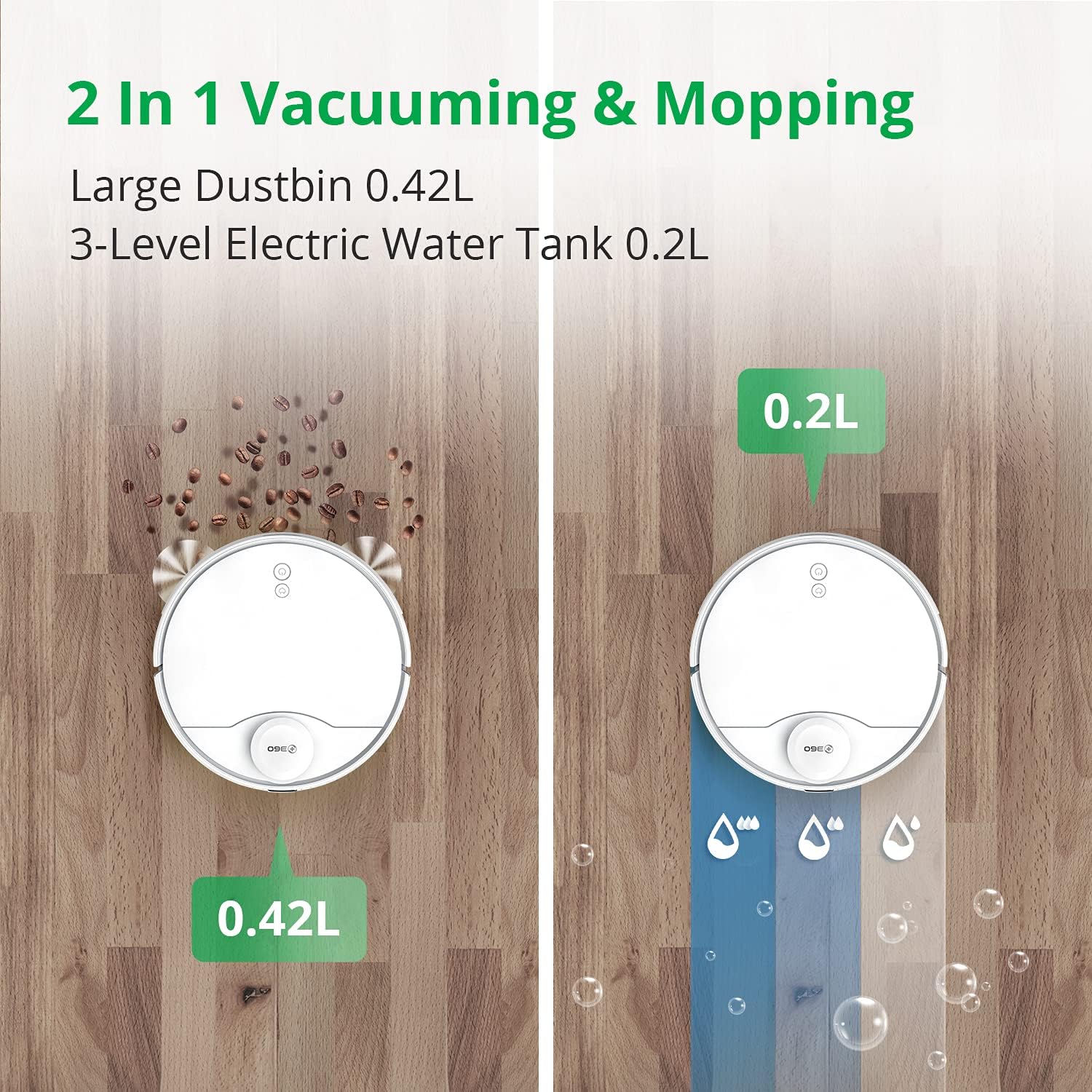
2. Vacuuming and Mopping
The 360 S9 can vacuum, mop, or perform both functions simultaneously. Attach the water tank and mopping pad for mopping operations.
- 3-Stage Water Adjustment: Control the water flow level (low, medium, high) via the app to suit different floor types and cleaning needs.
- Ensure the water tank is filled with clean water before mopping. Do not use detergents or cleaning solutions not approved by the manufacturer.

Image: A split image illustrating the 360 S9 Robot Vacuum's dual functionality. On the left, the robot vacuums debris into its 0.42L dustbin. On the right, it mops with water from its 0.2L 3-level electric water tank.
3. Akıllı Navigasyon ve Haritalama
The 360 S9 utilizes advanced LiDAR navigation to create precise maps of your home, enabling efficient and systematic cleaning.
- Gerçek Zamanlı Haritalama: View Robotun temizleme rotası ve haritası uygulama üzerinden gerçek zamanlı olarak görüntülenebilir.
- Yasak Bölgeler ve Sanal Duvarlar: Set virtual boundaries in the app to prevent the robot from entering specific areas or crossing certain lines.
- Seçici Oda Temizliği: Divide your home into rooms on the app and select specific rooms for cleaning, or schedule different rooms for different times.

Image: The 360 S9 Robot Vacuum is depicted in a modern living space, emitting green laser lines to illustrate its advanced LiDAR navigation and high-precision mapping capabilities.

Image: The 360 S9 Robot Vacuum is shown cleaning a living room floor, with a child playing nearby. The image highlights customized cleaning features such as No-go Zones, Scheduled Cleaning, and Selected Room Cleaning, indicated by icons above the scene.
4. Pil Yönetimi
- The robot has a long battery life, providing up to 180 minutes of runtime on a single charge.
- When the battery is low, the robot will automatically return to its charging dock to recharge. Once fully charged, it will resume cleaning from where it left off.

Image: The 360 S9 Robot Vacuum is shown approaching its charging dock, with icons indicating its long battery time (160-180 min runtime, 5200mAh) and self-charging capability.
5. Emme Gücü
The 360 S9 features 2650Pa powerful suction, capable of effectively cleaning various floor types. It also includes a carpet boost function.

Image: The 360 S9 Robot Vacuum is shown on a carpet, illustrating its 2650Pa powerful suction with a carpet boost feature, designed to effectively clean rugs and carpets.
6. Ses Kontrolü Entegrasyonu
The 360 S9 is compatible with smart home assistants, allowing for convenient voice control:
- Amazon Alexa: Connect your 360Robot account to Alexa for voice commands.
- Google Asistan: Integrate with Google Home for hands-free control.
Bakım
Düzenli bakım robot süpürgenizin optimum performansını sağlar ve kullanım ömrünü uzatır.
1. Çöp Kovası ve Filtre
- Çöp Kutusunu Boşaltın: Her temizleme işleminden sonra çöp kutusunu boşaltın.
- Filtreyi Temizle: Tap the filter to remove loose dirt. Rinse the filter with water if necessary, ensuring it is completely dry before reinstallation. Replace the filter every 3-6 months depending on usage.
2. Fırçalar
- Ana Fırça: Remove the main brush cover and lift out the brush. Use the provided cleaning tool to remove hair and debris tangled around the brush. Clean weekly.
- Yan Fırçalar: Check side brushes for damage or entanglement. Remove any hair or debris. Replace if worn or damaged. Clean monthly.
3. Water Tank and Mopping Pad
- Boş Su Deposu: Yerleri sildikten sonra, tankta kalan suyu boşaltın.
- Clean Mopping Pad: Her kullanımdan sonra paspas pedini çıkarıp yıkayın. Tamamen kuruması için havada bekletin.
4. Sensörler ve Şarj Kontakları
- Wipe all sensors (LiDAR, cliff, wall sensors) and charging contacts on both the robot and the charging dock with a clean, dry cloth. Clean monthly.
Sorun giderme
360 S9 cihazınızla ilgili sorunlarla karşılaşırsanız, aşağıdaki yaygın sorunlar ve çözümlerine göz atın:
- Robot şarj olmuyor: Ensure the charging dock is powered on and the robot's charging contacts are aligned with the dock's contacts. Clean contacts if dirty.
- Robot sık sık takılıyor: Clear obstacles from the cleaning path. Check for tangled wires or small objects. Ensure no-go zones are correctly set in the app for problematic areas.
- Uygulama bağlantı sorunları: Verify your Wi-Fi network is 2.4 GHz. Restart your router, robot, and smartphone. Re-pair the robot with the app if necessary.
- Zayıf temizleme performansı: Empty the dustbin and clean the filter. Check and clean the main brush and side brushes for tangled hair or debris. Ensure the water tank is filled for mopping.
- Olağandışı sesler: Check brushes for foreign objects. Ensure all components are correctly installed.
For further assistance, please contact customer support through the 360Robot App.
Özellikler
| Marka | 360 |
| Örnek | S9 |
| Özel Özellik | LiDAR Navigation, No-Go Zone, Selective Room |
| Renk | Beyaz |
| Ürün Boyutları | 13.78"U x 13.78"G x 3.94"Y |
| Ürün Ağırlığı | 14.33 pound |
| Filtre Türü | Kartuş |
| Pil Ömrü | 180 dakikadır. |
| Cilttage | 127 Volt |
| Çöp Kovası Kapasitesi | 0.42 Liters (from image) |
| Su Tankı Kapasitesi | 0.2 Litre |
| Güç Kaynağı | Pil ile çalışır |
| Kontrol Yöntemi | Remote, Voice (App, Amazon Echo, Google Home) |
Garanti ve Destek
The 360 S9 Robot Vacuum and Mop comes with a 12 ay garanti satın alma tarihinden itibaren.
For technical support, warranty claims, or any product-related inquiries, please contact 360 Smart Life customer support:
- Via 360Robot App: Access the support section within the application for direct assistance.
- Çevrimiçi destek: Visit the official 360 Smart Life webSSS ve iletişim seçenekleri için site.
- Yanıt Süresi: Customer support aims to respond within 24 hours.
- A local after-service center is available in California, US.
Ask a question about this manual
Ask about setup, troubleshooting, compatibility, parts, safety, or missing instructions. Manuals+ will review the question and use this page’s manual context to help answer it.