
1. Giriş
This manual provides essential instructions for the safe and efficient operation of your Multilaser MINI TORRE 900W SP380 audio system. Please read this manual thoroughly before using the product and retain it for future reference. Proper use will ensure optimal performance and extend the lifespan of your device.
2. Güvenlik Talimatları
- Güç Kaynağı: Güç kaynağının ses seviyesiyle eşleştiğinden emin oluntagÜrün etiketinde belirtilen gereksinimler.
- Havalandırma: Havalandırma açıklıklarını kapatmayın. Uygun hava akışı için ünitenin etrafında yeterli boşluk bırakın.
- Su ve Nem: Keep the device away from water, rain, and excessive humidity. Do not operate with wet hands.
- Isı Kaynakları: Cihazı radyatör, soba veya diğer ısı üreten cihazlar gibi ısı kaynaklarının yakınına yerleştirmekten kaçının.
- Temizlik: Temizlemeden önce elektriği kesin. Kuru ve yumuşak bir bez kullanın. Sıvı temizleyiciler veya aerosol spreyler kullanmayın.
- Servis: Cihazı kendiniz tamir etmeye çalışmayın. Tüm servis işlemlerini yetkili servis personeline yaptırın.
- Çocuklar: Cihazı ve aksesuarlarını çocukların erişemeyeceği bir yerde saklayın.
- Atama: Cihazın düşmesini önlemek için onu sağlam, düz bir yüzeye yerleştirin.
3. Ürün Bittiview
The Multilaser MINI TORRE 900W SP380 is a powerful audio system designed for versatile sound reproduction. It features dual speakers, LED lighting, and multiple connectivity options.
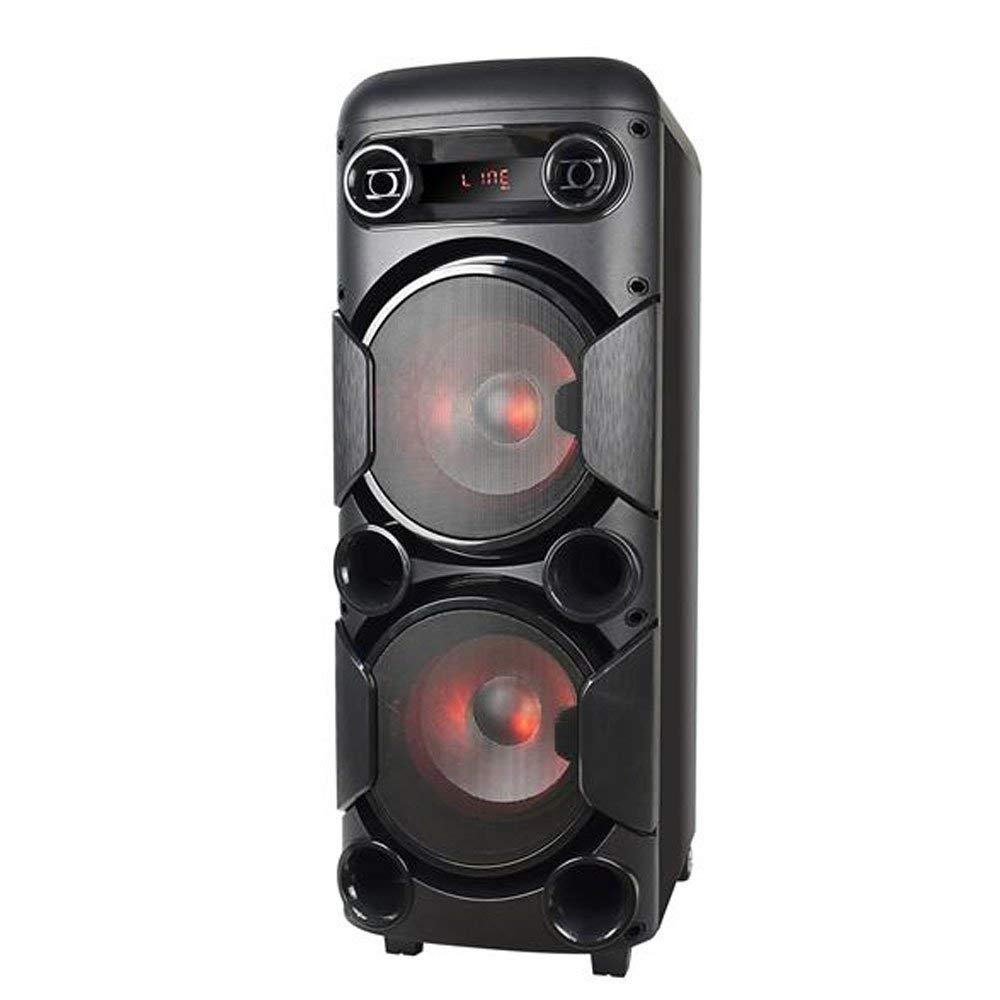
Şekil 3.1: Ön view of the Multilaser MINI TORRE 900W SP380, showcasing its dual speaker design and illuminated LED woofers.
The control panel, located on the top of the unit, provides access to all functions and inputs.

Şekil 3.2: Ayrıntılı view of the control panel, including volume knob, equalizer sliders, input ports (USB, TF/Memory Card, Line, Mic 1, Mic 2), and control buttons for mode, light, and playback.
4. Kurulum
- Paketin açılması: Carefully remove the MINI TORRE from its packaging. Retain the packaging for future transport or storage.
- Atama: Position the speaker on a flat, stable surface. Ensure there is adequate space around the unit for ventilation. The integrated wheels facilitate easy transport.
- Güç Bağlantısı: Connect the power cable to the AC input on the unit and then to a suitable power outlet. The device supports bivolt automatic voltage.
- İlk Güç Açma: Flip the power switch (usually located on the control panel) to the "ON" position. The display will illuminate.
5. Kullanım Talimatları
5.1. Güç Açma/Kapatma
To power on the device, locate the power switch on the control panel and set it to the "ON" position. To power off, set the switch to "OFF".
5.2. Ses Kontrolü
Adjust the main volume using the large central HACİM knob on the control panel. Turn clockwise to increase volume and counter-clockwise to decrease.
5.3. Mod Seçimi
Basın MOD button repeatedly to cycle through available input modes: Bluetooth (BT), FM Radio, USB, Memory Card (TF), and Auxiliary (LINE).
5.4. LED Aydınlatma
Basın IŞIK button to toggle the LED lighting effects on the speakers. Multiple light modes may be available.
5.5. Mikrofon Girişi
Connect a microphone to either the MİKROFON 1 or MİKROFON 2 Giriş. Mikrofon ses seviyesini aşağıdaki komutu kullanarak ayarlayın. MİKROFON SESİ slider and add echo effect with the YANKI kaydırıcı.
5.6. Sound Equalization
Kullanın TİZ Ve BAS sliders to adjust the high and low frequencies of the audio output, respectively, to suit your preference.
6. Bağlantı
6.1. Bluetooth Eşleştirme
- Turn on the MINI TORRE and select Bluetooth (BT) modu kullanarak MOD button. The display will show "BT" and a pairing indicator.
- Akıllı telefonunuzda, tabletinizde veya diğer uyumlu cihazınızda Bluetooth'u etkinleştirin.
- Arama available devices and select "MULTILASER SP380" (or similar name) from the list.
- Once paired, the device will confirm the connection, and you can begin playing audio wirelessly.
6.2. USB / Memory Card Playback
USB flash sürücüyü sürücüye takın USB port or a TF (MicroSD) card into the TF / USB slot. The unit will automatically switch to USB or TF mode and begin playing compatible audio files. Use the playback control buttons (OYNAT/DURDUR, ÖNCESİ, SONRAKİ) to manage your music.
6.3. Auxiliary Input (LINE IN)
Harici bir ses cihazını (örneğin, MP3 çalar, dizüstü bilgisayar) şuraya bağlayın: ASTAR input using a 3.5mm audio cable. Select ASTAR modu ile MOD button. Audio will play from the connected device.
6.4. FM Radyo
Geçiş yapmak FM modu kullanarak MOD buton. basın ve basılı tutun OYNAT/DURDUR button to initiate an automatic scan for FM stations. The unit will save detected stations. Use the ÖNCESİ Ve SONRAKİ Kayıtlı istasyonlar arasında gezinmek için düğmeler.
7. Bakım
- Temizlik: Before cleaning, ensure the device is powered off and unplugged. Use a soft, dry, lint-free cloth to wipe the exterior surfaces. Do not use abrasive cleaners, waxes, or solvents.
- Depolamak: Cihazı uzun süre saklayacaksanız, elektrik prizinden çıkarın ve doğrudan güneş ışığından ve aşırı sıcaklıklardan uzak, serin ve kuru bir yerde saklayın.
- Engellerden Kaçının: Regularly check that the speaker grilles and ventilation openings are free from dust and debris.
8. Sorun Giderme
| Sorun | Olası Neden | Çözüm |
|---|---|---|
| Güç yok | Power cable not connected; Power outlet not working; Power switch off. | Ensure power cable is securely connected. Test the outlet with another device. Turn the power switch to "ON". |
| Ses yok | Ses seviyesi çok düşük; Yanlış giriş modu seçildi; Harici cihaz çalışmıyor. | Sesi artırın. Basın. MOD to select the correct input. Ensure the external device is playing and its volume is up. |
| Bluetooth eşleştirmiyor | Device too far; Bluetooth not enabled on external device; Incorrect mode. | Move devices closer. Ensure Bluetooth is enabled on your external device. Select BT mode on the speaker. |
| USB/TF kartı çalışmıyor | Card/drive not inserted correctly; Incompatible file format; Incorrect mode. | Reinsert the USB drive or TF card. Ensure audio files are in a compatible format (e.g., MP3). Select USB or TF mod. |
| FM radyo statik | Zayıf sinyal; Anten bağlı değil (varsa). | Reposition the unit or extend the antenna (if present). Perform an auto-scan for stations again. |
9. Özellikler
Below are the technical specifications for the Multilaser MINI TORRE 900W SP380:

Şekil 9.1: Packaging of the Multilaser MINI TORRE 900W SP380, highlighting its main features and technical specifications.
| Özellik | Detay |
|---|---|
| Marka | Çoklu lazer |
| Örnek | SP380 |
| Maksimum Hoparlör Çıkış Gücü | 900 Watt RMS |
| Bağlantı Teknolojisi | Yardımcı giriş, Bluetooth 5.0 |
| Hoparlör Tipi | Tower (2x 8" drivers) |
| Özel Özellikler | USB Port, LED Lighting, Microphone Input, Memory Card Slot, FM Radio, Bass Boost, Transport Wheels |
| Ürün Boyutları (D x G x Y) | 33 cm x 37 cm x 82 cm |
| Ürün Ağırlığı | 11.95 Kilogram |
| Uyumlu Cihazlar | Dizüstü bilgisayar, Akıllı telefon, Tablet |
| Güç Kaynağı | Bivolt automatic (AC) |
| Frekans Tepkisi | 60Hz-20KHz |
| Hassasiyet | 89 dB |
| Empedans | 4 Ohm |
| Bileşenler Dahil | 1x Mini Torre 900W SP380, 1x Cable Set, 1x User Manual |
10. Garanti ve Destek
The Multilaser MINI TORRE 900W SP380 comes with a 1 yıllık garanti Satın alma tarihinden itibaren geçerlidir. Bu garanti, normal kullanım koşulları altında üretim hatalarını kapsar.
For warranty claims, technical support, or service inquiries, please contact Multilaser customer support through their official channels. Please have your proof of purchase and product model number (SP380) ready when contacting support.
Not: Bu garanti, yanlış kullanım, kazalar, yetkisiz değişiklikler veya bu kılavuzdaki talimatlara uyulmaması sonucu oluşan hasarları kapsamaz.