
giriiş
Satın aldığınız için teşekkür ederizasing the Boytone BT-424FN 2.1 Multimedia Bluetooth Speaker System. This powerful shelf stereo system is designed to deliver high-quality audio with versatile connectivity options, including Bluetooth, FM radio, USB, SD card, and auxiliary input. This manual provides detailed instructions for setting up, operating, and maintaining your speaker system to ensure optimal performance and longevity.
Paket İçeriği
Lütfen tüm öğelerin mevcut ve iyi durumda olduğundan emin olmak için paketi dikkatlice kontrol edin:
- Boytone BT-424FN Main Unit (Subwoofer with built-in ampkaldırıcı)
- Two Satellite Speakers (3" x 2" Full range)
- Kablosuz Uzaktan Kumanda
- AUX Kablosu
- USB kablosu
- SD Card (if included with specific models)
- 2 AAA Pil (uzaktan kumanda için)

Image: The Boytone BT-424FN 2.1 Multimedia Bluetooth Speaker System, showcasing the main subwoofer unit, two satellite speakers, and the included remote control.
Güvenlik Bilgileri
To prevent fire or shock hazards, do not expose this appliance to rain or moisture. Do not open the cabinet. Refer servicing to qualified personnel only.
- Güç Kaynağı: Ensure the power source matches the requirements (AC 110/220V).
- Havalandırma: Havalandırma açıklıklarını hiçbir şekilde kapatmayın. Uygun hava akışı için ünitenin etrafında yeterli boşluk olduğundan emin olun.
- Su ve Nem: Do not expose the unit to dripping or splashing. Do not place objects filled with liquids, such as vases, on the apparatus.
- Sıcaklık: Üniteyi radyatörler, kalorifer ızgaraları, sobalar veya diğer cihazlar (dahil) gibi ısı kaynaklarından uzak tutun. amp(ısı üreten)
- Temizlik: Temizlemeden önce cihazı prizden çıkarın. Temizlik için kuru bir bez kullanın.
- Atama: Cihazın düşmesini önlemek için onu sağlam, düz bir yüzeye yerleştirin.
Ürün Bittiview ve Özellikler
The Boytone BT-424FN is a versatile 2.1 multimedia speaker system designed for a rich audio experience. It combines powerful sound output with multiple connectivity options and user-friendly controls.
Temel Özellikler:
- Güçlü Ses Çıkışı: 40 Watts (20W subwoofer + 2x10W satellite speakers) for a wide audio spectrum.
- Bluetooth Bağlantısı: Easy wireless connection with a range of up to 33 feet, compatible with all Bluetooth-enabled devices.
- Çoklu Oynatma Seçenekleri: USB port and SD card slot for MP3 file playback, FM tuner for radio, and a 3.5mm auxiliary jack for non-Bluetooth devices.
- Dijital Ekran ve Kontroller: Digital LED display for mode and track information, with digital bass control.
- RGB Işık: Integrated RGB lighting for enhanced visual appeal.
- Uzaktan kumanda: Full-function wireless remote for convenient operation.
- Kompakt Tasarım: Tabletop mount design with a black wood finish.

Image: Diagram highlighting key features of the Boytone BT-424FN, including USB/SD port for MP3, wireless sound capability, all-in-one stereo system, and 40 Watts with RGB light.
Bileşen Tanımlaması:
Familiarize yourself with the various ports and controls on your speaker system.

Resim: Arka ve yan view of the Boytone BT-424FN main unit, showing the USB port, SD slot, auxiliary jack, and DVD jack for various input connections.

Image: Close-up of the Boytone BT-424FN's front panel, displaying the LED screen, volume knob, and control buttons for source selection, tone, and tuning.
Kurmak
Follow these steps to set up your Boytone BT-424FN speaker system.
1. Hoparlör Bağlantısı:
- Connect the two satellite speakers to the corresponding audio output jacks on the rear of the main subwoofer unit. Ensure a secure connection.
2. Güç Bağlantısı:
- Plug the AC power cord from the main unit into a standard AC 110/220V wall outlet.
3. Uzaktan Kumanda Kurulumu:
- Insert the two AAA batteries into the remote control, observing the correct polarity (+/-).
4. İlk Çalıştırma:
- Press the power button on the main unit or the remote control to turn on the system. The LED display will light up.
Kullanım Talimatları
Learn how to use the various functions of your Boytone BT-424FN speaker system.
1. Temel İşlem:
- Güç Açma/Kapatma: Press the 'ST-BY/M' button on the main unit or the power button on the remote.
- Ses Kontrolü: Rotate the 'VOLUME' knob on the front panel or use the 'VOL+' and 'VOL-' buttons on the remote control.
- Kaynak Seçimi: Press the 'SOURCE' button on the main unit or the remote to cycle through input modes: Bluetooth, FM, USB, SD, AUX.
- Ton Kontrolü: Use the 'TONE' button on the main unit or remote to adjust bass and treble settings (if available).
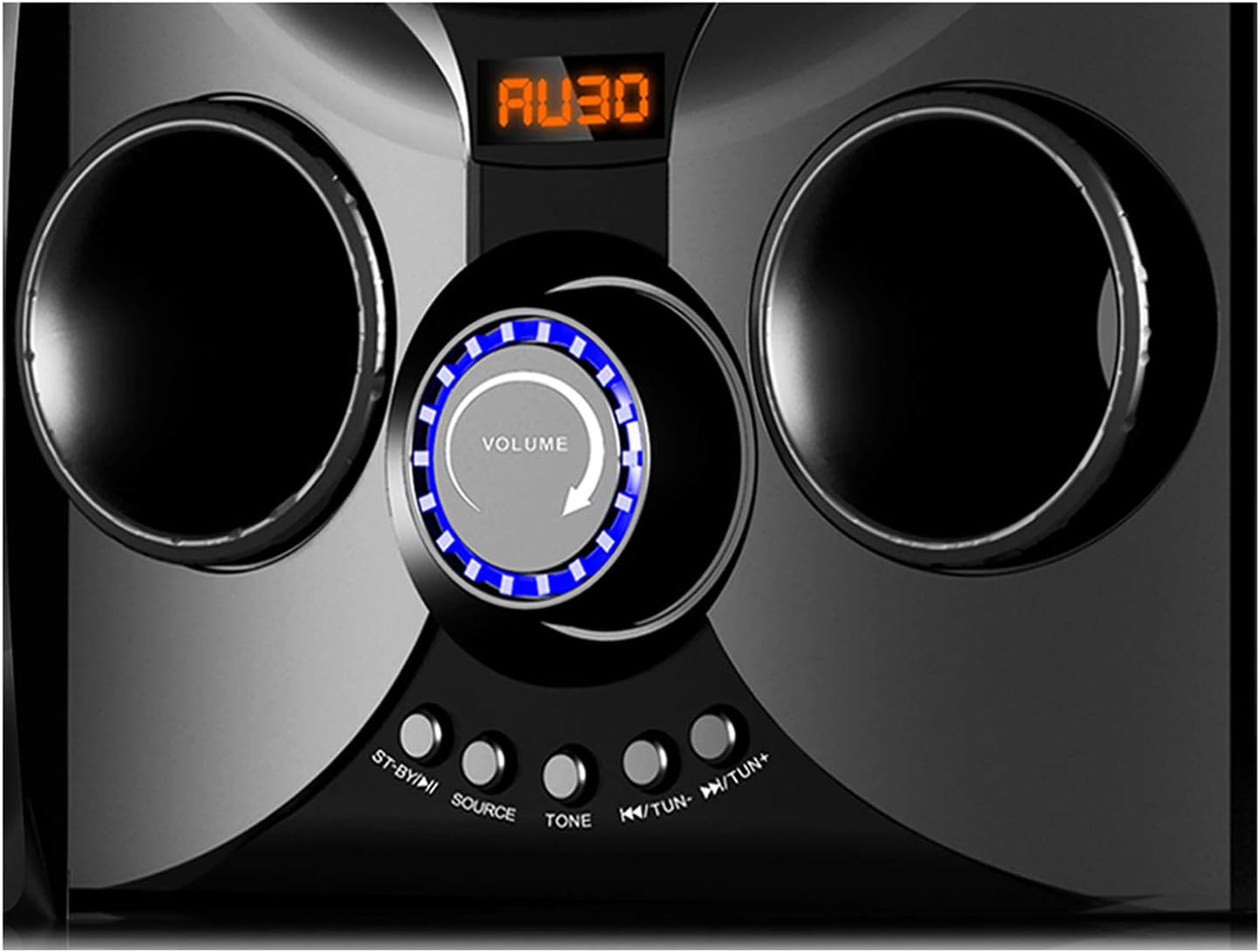
Image: Close-up of the Boytone BT-424FN's central control area, highlighting the illuminated volume knob and the function buttons below it.
2. Bluetooth Modu:
- Select 'Bluetooth' mode using the 'SOURCE' button. The LED display will show 'BT' or a similar indicator.
- Bluetooth özellikli cihazınızda (akıllı telefon, tablet vb.) Bluetooth'u etkinleştirin ve kullanılabilir cihazları arayın.
- Select 'BT-424FN' or 'Boytone' from the list of devices.
- Once paired, you can play audio from your device through the speaker system.
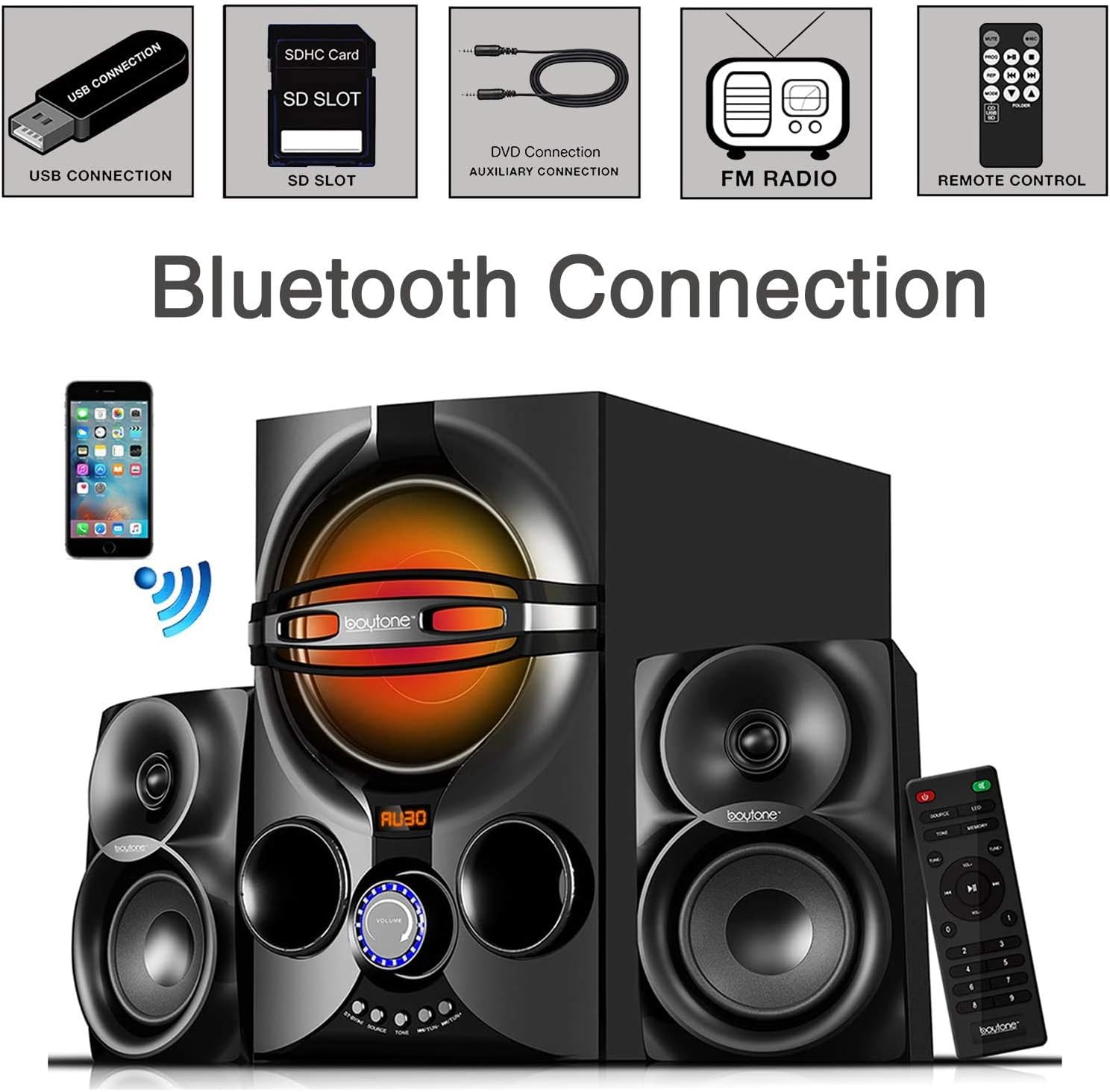
Image: A diagram illustrating the process of connecting a smartphone to the Boytone BT-424FN via Bluetooth, alongside icons representing other connectivity options like USB, SD, AUX, FM radio, and remote control.
3. FM Radyo Modu:
- Select 'FM' mode using the 'SOURCE' button.
- Use the 'TUN+/-' buttons on the main unit or the remote to manually tune to a desired radio station.
- To auto-scan and save stations, press and hold the 'PLAY/PAUSE' button (often doubles as auto-scan in FM mode) on the remote or main unit.
4. USB/SD Card Mode:
- MP3 ses dosyaları içeren bir USB flash sürücü veya SD kart takın. fileilgili limana.
- Select 'USB' or 'SD' mode using the 'SOURCE' button. The system will automatically begin playing the first compatible audio file.
- Use the 'PREV/NEXT' buttons on the main unit or remote to skip tracks. Use 'PLAY/PAUSE' to control playback.
5. AUX Modu:
- Connect your external audio device (e.g., MP3 player, TV, computer) to the 'AUX' input jack on the main unit using the provided 3.5mm audio cable.
- Select 'AUX' mode using the 'SOURCE' button.
- Oynatma ve ses seviyesini doğrudan bağlı harici cihazınızdan kontrol edin.
Bakım
Proper care and maintenance will ensure the longevity of your speaker system.
- Temizlik: Use a soft, dry cloth to clean the exterior surfaces of the unit. Do not use abrasive cleaners, waxes, or solvents.
- Toz: Regularly dust the speaker grilles and vents to prevent accumulation that could affect sound quality and ventilation.
- Depolamak: Cihazı uzun süre saklayacaksanız, elektrik prizinden çıkarın ve serin, kuru bir yerde saklayın.
- Sıvılardan Kaçının: Keep liquids away from the unit to prevent damage to internal components.
Sorun giderme
If you encounter any issues with your Boytone BT-424FN, refer to the following common problems and solutions.
| Sorun | Olası Neden | Çözüm |
|---|---|---|
| Güç yok | Güç kablosu bağlı değil; Elektrik prizi aktif değil. | Ensure power cord is securely plugged in; Try a different power outlet |
| Ses yok | Ses seviyesi çok düşük; Yanlış kaynak seçildi; Hoparlörler bağlı değil. | Increase volume; Press 'SOURCE' to select correct input; Check speaker connections |
| Bluetooth eşleştirme başarısız oldu | Device too far; Bluetooth not enabled on device; Speaker not in pairing mode | Move device closer; Enable Bluetooth on your device; Ensure speaker is in Bluetooth mode and discoverable |
| FM radyo statik | Weak signal; Antenna not extended | Adjust antenna position; Try auto-scanning for stronger stations |
| USB/SD oynatılamıyor | Desteklenmiyor file biçim; Bozuk files; Incorrect mode selected | Emin olmak files are MP3 format; Try a different USB/SD card; Select 'USB' or 'SD' mode |
| Uzaktan kumanda çalışmıyor | Batteries drained or incorrectly inserted; Obstruction between remote and unit | Replace batteries and check polarity; Remove any obstructions; Point remote directly at the unit's sensor |
Özellikler
Detailed technical specifications for the Boytone BT-424FN speaker system.
| Özellik | Şartname |
|---|---|
| Model Adı | BT-424FN |
| Hoparlör Tipi | 2.1 Channel Subwoofer System |
| Hoparlör Maksimum Çıkış Gücü | 40 Watts (20W Subwoofer + 2x10W Satellites) |
| Subwoofer Çapı | 5 inç |
| Uydu Hoparlör Boyutu | 3" x 2" Full Range |
| Bağlantı Teknolojisi | Bluetooth, USB, SD, AUX, FM Radyo |
| Kablosuz İletişim Teknolojisi | Bluetooth |
| Bluetooth Menzili | 33 feet'e kadar |
| Güç Kaynağı | Corded Electric (AC 110/220V) |
| Kontrol Yöntemi | Uzaktan Kumanda, Cihaz Üzerindeki Düğmeler |
| Malzeme | Odun |
| Renk | Siyah |
| Ürün Ölçüleri (Ana Ünite) | 8.5"D x 16.5"G x 13"Y |
| Ürün Ağırlığı | 9.5 Pound |
| Dahil Bileşenler | AUX cable, USB cable, SD card, Remote control |
| Uzaktan Kumanda Pilleri | 2 adet AAA pil (dahil) |
| İç/Dış Mekan Kullanımı | Kapalı |
| UPC | 643307992373 |

Resim: Arka view of the Boytone BT-424FN main unit and one satellite speaker, with dimensions indicated: 10.50 inches (height), 15 inches (depth), and 11 inches (width).
Garanti ve Destek
The Boytone BT-424FN Multimedia Bluetooth Speaker System comes with a Limited Warranty. Please refer to the warranty card included in your package for specific terms and conditions, including coverage duration and claim procedures.
For technical support or service inquiries, please contact Boytone customer service through their official website or the contact information provided with your product documentation. Ensure you have your model number (BT-424FN) and proof of purchase ready when contacting support.