
1. Ürün Bittiview
The Alecto WS-1560 is a wireless weather station designed to provide accurate indoor and outdoor environmental data. Featuring a clear color display and a remote outdoor sensor, it offers comprehensive weather information and additional useful functions for your home.
Temel Özellikler:
- Measures indoor and outdoor temperature and humidity.
- Long-range wireless outdoor sensor (up to 100 meters).
- 5.7-inch well-lit color display with animated weather forecast icons.
- Temperature and ice alarm functions.
- Erteleme fonksiyonlu çalar saat.
- Memory function for latest and highest readings.
- Moon phase indicator, date, day, and time display.
- Battery-operated main unit and outdoor sensor with backup batteries.

Figure 1.1: Alecto WS-1560 Main Unit and Wireless Outdoor Sensor.
2. Paket İçeriği
Ambalajı açtığınızda tüm bileşenlerin mevcut ve iyi durumda olduğundan emin olun:
- Alecto WS-1560 Main Unit (Indoor Display)
- Kablosuz açık sensörü
- Kullanıcı Kılavuzu
- (Power adapter and batteries may be included depending on package)
Video 2.1: Illustrative video showing typical weather station components and basic setup. (Note: This video is for a related product and may not show the exact Alecto WS-1560 model.)
3. Kurulum ve Kurulum
3.1. Pil Kurulumu
Both the main unit and the outdoor sensor require batteries for operation. Ensure you use the correct type and polarity.
- Dış Mekan Sensörü:
- Open the battery compartment on the back of the wireless outdoor sensor.
- Insert 2x AA batteries (not included) according to the polarity markings (+/-).
- Pil bölmesini sıkıca kapatın.
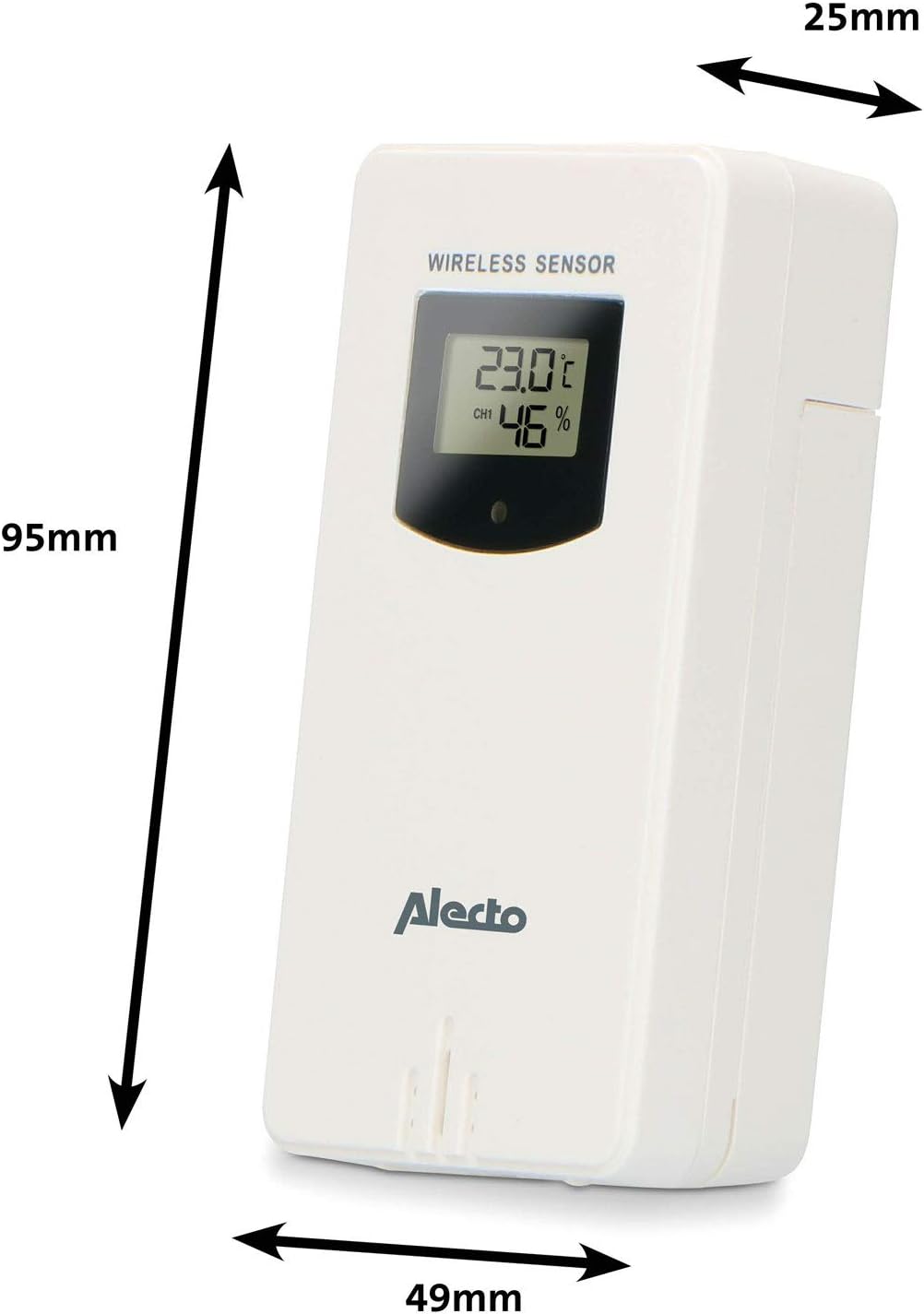
Figure 3.1: Wireless Outdoor Sensor dimensions and battery compartment location.
- Ana Ünite:
- Open the battery compartment on the back of the main unit.
- Insert 2x AA batteries (not included) according to the polarity markings (+/-). These serve as backup batteries.
- Pil bölmesini sıkıca kapatın.
- Connect the main unit to a power outlet using the provided power adapter (if included).

Figure 3.2: Main Unit dimensions and power input.
3.2. Sensör Yerleşimi
For accurate outdoor readings, proper placement of the wireless sensor is crucial:
- Place the sensor in a shaded area, away from direct sunlight, to prevent inaccurate temperature readings.
- Ensure good air circulation around the sensor.
- Mount the sensor vertically, approximately 1.5 to 2.5 meters (5 to 8 feet) above the ground.
- Avoid placing the sensor near heat sources (e.g., vents, windows) or moisture sources.
- The maximum transmission range is 100 meters (328 feet) in open air. Walls and other obstacles will reduce this range.

Şekil 3.3: Ör.ample of outdoor sensor placement on a wall.
3.3. Pairing the Sensor with the Main Unit
The main unit and sensor should automatically pair once both are powered on. If pairing does not occur:
- Ensure both units have fresh batteries and are within range.
- Dış mekan sensörünün pil bölmesindeki "TX" düğmesine basarak manuel olarak sinyal gönderebilirsiniz.
- On the main unit, you may need to initiate a search for the outdoor sensor (refer to the "Operation" section for specific button functions).
4. Operasyon
4.1. Ekran Düzeni
The 5.7-inch color display provides a clear overview of all measured data. Key areas include:
- Dış Ortam Sıcaklığı ve Nem Oranı: Displays current outdoor conditions.
- İç Mekan Sıcaklığı ve Nem Oranı: Displays current indoor conditions.
- Animated Weather Forecast: Icons predict upcoming weather (sunny, partly cloudy, cloudy, rainy, snowy).
- Saat ve Tarih: Current time, day, and date.
- Barometrik basınç: Mevcut atmosfer basıncı.
- Ay evreleri: Ayın mevcut evresinin grafiksel gösterimi.
- Temperature/Ice Alarm Indicators: Alerts for specific temperature thresholds or potential ice conditions.

Şekil 4.1: Ayrıntılı view of the main unit's color display.
4.2. Düğme Fonksiyonları
The main unit features several buttons for setting and adjusting functions. Common buttons include:
- AYARLAMAK: Enters setup mode for time, date, and other settings.
- TARİFİ: Switches between display modes or confirms settings.
- YUKARI/AŞAĞI (veya +/-): Adjusts values during setup or cycles through channels.
- ALARM: Alarm fonksiyonunu ayarlar veya etkinleştirir.
- - Displays maximum/minimum temperature and humidity records. Long press to clear records.
- ERTELEME/IŞIK: Activates snooze during an alarm or adjusts backlight brightness.
Video 4.2: Illustrative video demonstrating various features and settings of a weather station. (Note: This video is for a related product and may not show the exact Alecto WS-1560 model.)
4.3. Saat ve Tarihin Ayarlanması
- Press and hold the "SET" button until the time display starts flashing.
- Use the "UP" or "DOWN" buttons to adjust the hour, then press "SET" to confirm and move to minutes.
- Aynı işlemi dakika, yıl, ay ve gün için de tekrarlayın.
- Press "SET" again to exit the setting mode.
4.4. Alarm Ayarları
- Press the "ALARM" button once to view alarm zamanı.
- Press and hold the "ALARM" button until the alarm time starts flashing.
- Use the "UP" or "DOWN" buttons to set the desired alarm hour and minute.
- Onaylamak için "ALARM" düğmesine basın.
- To activate/deactivate the alarm, press the "ALARM" button briefly when the alarm time is displayed. An alarm icon will appear/disappear.
4.5. Maksimum/Minimum Kayıtlar
The weather station automatically records the maximum and minimum temperature and humidity values over a 24-hour period.
- Press the "MEM" button briefly to view the maximum recorded values.
- Press "MEM" again to view the minimum recorded values.
- Press "MEM" a third time to return to current readings.
- To clear the records, press and hold the "MEM" button for a few seconds.
5. Bakım
- Temizlik: Ekranı ve cihaz yüzeylerini yumuşak bir bezle silin.amp bezle silin. Aşındırıcı temizleyiciler veya çözücüler kullanmayın.
- Pil Değişimi: Replace batteries in both the main unit and the outdoor sensor when the low battery indicator appears on the display. Always replace all batteries at the same time with new ones of the same type.
- Sensör Bakımı: Periodically check the outdoor sensor for debris or obstructions that might affect its readings. Ensure it remains in a shaded, well-ventilated area.
6. Sorun Giderme
| Sorun | Olası Neden | Çözüm |
|---|---|---|
| No outdoor temperature/humidity reading (or "---" displayed) |
|
|
| Yanlış sıcaklık/nem ölçümleri |
|
|
| Ekran soluk veya boş |
|
|
7. Özellikler
| Model Numarası | WS-1560 |
| Marka | Alecto |
| Güç Kaynağı (Ana Ünite) | Power Adapter (if included) + 2x AA batteries (backup) |
| Güç Kaynağı (Dış Mekan Sensörü) | 2x AA pil |
| Ürün Ölçüleri (Ana Ünite) | 5.1x16.5x12.3 cm |
| Ürün Ağırlığı | 440 gr |
| Wireless Sensor Range | 100 metreye kadar (açık hava) |
| Ekran Boyutu | 5.7 inç / 14.5 cm |
| Kökeni | Çin |
8. Garanti ve Destek
For warranty information, technical support, or service inquiries, please refer to the warranty card included with your product or visit the official Alecto webSite. Satın alma belgeniz olarak satın alma fişinizi saklayın.
Alecto Webalan: www.alecto.nl (General Alecto website, specific support page may vary)