
1. Ürün Bittiview
The ProCase Wireless Keyboard (Model PC-08362168) is a compact and portable Bluetooth keyboard designed for multi-device compatibility. It offers a comfortable typing experience with low-profile, quiet keys and an ergonomic design, suitable for use with iOS, Android, and Windows operating systems.

Image: The ProCase Wireless Keyboard, a slim black keyboard with a standard QWERTY layout, designed for portability and multi-device use.
2. Paket İçeriği
- ProCase Wireless Keyboard (Model PC-08362168)
- Kullanım Kılavuzu (bu belge)
Not: Cihazın çalışması için 2 adet AAA pil gereklidir ve piller pakete dahil değildir.
3. Kurulum Kılavuzu
3.1. Pil Kurulumu
- Locate the battery compartment on the back of the keyboard.
- Pil bölmesinin kapağını açın.
- İki (2) adet AAA pili, doğru kutuplara (+/-) dikkat ederek takın.
- Pil bölmesi kapağını sıkıca kapatın.

Image: Underside of the keyboard showing the ON/OFF switch, Connect button, and the battery compartment for two AAA batteries.
3.2. Açma/Kapama
Slide the ON/OFF switch, located on the back of the keyboard, to the "ON" position to power on the device. Slide it to "OFF" when not in use to conserve battery life.
3.3. Bluetooth Eşleştirme
- Klavyenin açık olduğundan emin olun.
- Press the "Connect" button on the back of the keyboard. The Bluetooth indicator light (usually blue) on the keyboard will start blinking, indicating it is in pairing mode.
- Cihazınızda (tablet, akıllı telefon, bilgisayar) Bluetooth ayarlarına gidin.
- Bluetooth'u etkinleştirin ve mevcut cihazları arayın.
- Select "ProCase Keyboard" (or similar name) from the list of found devices.
- Follow any on-screen prompts to complete the pairing process. A successful connection will be indicated by the Bluetooth light on the keyboard turning solid or turning off, depending on the model.

Image: Diagram illustrating wide compatibility with Android, Windows, and iOS devices, including iPads, Android tablets, Microsoft Surface, and smartphones. It also notes that a USB drive is not included and only Bluetooth connection is supported.
4. Kullanım Talimatları
4.1. Temel Klavye Kullanımı
The keyboard features a standard QWERTY layout. Simply begin typing after successful pairing with your device.
4.2. Function Keys (F1-F12) and Hot Keys
The top row of keys serves dual functions: standard F-keys (F1-F12) and special hot keys for media control, volume, and other system functions. To use the F-keys (F1, F2, etc.), you must hold down the Fn key simultaneously with the desired F-key. Pressing the key without holding Fn will activate its associated hot key function.
- Fn + F1: Ev
- Fn + F2: Aramak
- Fn + F3: Select All
- Fn + F4: Kopyala
- Fn + F5: Yapıştır
- Fn + F6: Cut
- Fn + F7: Önceki parça
- Fn + F8: Oynat/Duraklat
- Fn + F9: Sonraki parça
- Fn + F10: Sesini kapatmak
- Fn + F11: Sesi kıs
- Fn + F12: Sesi aç

Resim: Yakın çekim view of a keyboard key, illustrating the scissor-cross mechanism for comfortable and responsive keystrokes.

Image: A person typing on the ProCase Wireless Keyboard, positioned next to a tablet, highlighting the comfortable and quiet typing experience.
5. Bakım
5.1. Temizlik
To clean the keyboard, gently wipe the surface with a soft, dry, lint-free cloth. For stubborn dirt, slightly dampen the cloth with water or a mild cleaning solution. Avoid excessive moisture and do not spray cleaners directly onto the keyboard.
5.2. Depolama
When not in use for extended periods, power off the keyboard to conserve battery life. Store it in a cool, dry place away from direct sunlight and extreme temperatures.
6. Sorun Giderme
- Klavye bağlanmıyor:
- Klavyenin açık olduğundan ve pillerinin yeni olduğundan emin olun.
- Press the "Connect" button on the back of the keyboard to enter pairing mode.
- Verify Bluetooth is enabled on your device and try re-pairing.
- Klavyeyi cihazınıza yaklaştırın.
- Hem klavyeyi (gücü kapatıp açarak) hem de cihazınızı yeniden başlatın.
- Tuşlar yanıt vermiyor:
- Pil seviyesini kontrol edin ve gerekiyorsa değiştirin.
- Klavyenin Bluetooth üzerinden doğru şekilde bağlandığından emin olun.
- Tuşların etrafındaki kalıntıları temizleyin.
- Function (F) keys not working as expected:
- Remember that to activate F1-F12 functions, you must hold down the Fn key simultaneously. Without holding Fn, the keys will activate their assigned hot key functions (e.g., media control). This behavior cannot be changed.
- Kısa pil ömrü:
- Ensure the keyboard is powered off when not in use.
- The keyboard features a sleep mode to conserve power during inactivity.
- Yüksek kaliteli AAA piller kullanın.
7. Özellikler
| Özellik | Detay |
|---|---|
| Model Numarası | PC-08362168 |
| Boyutlar (U x G x Y) | 11.5 x 4.7 x 0.29 inç (29.2 x 11.9 x 0.74 cm) |
| Ağırlık | 10 ons (283.5 gram) |
| Bağlantı | Bluetooth Kablosuz |
| Güç Kaynağı | 2 x AAA Piller (dahil değildir) |
| Malzeme | Akrilonitril Bütadien Stiren (ABS) |
| Renk | Siyah |
| Uyumlu İşletim Sistemleri | iOS, Android, Windows (Note: Does not support Windows 8 Mobile) |
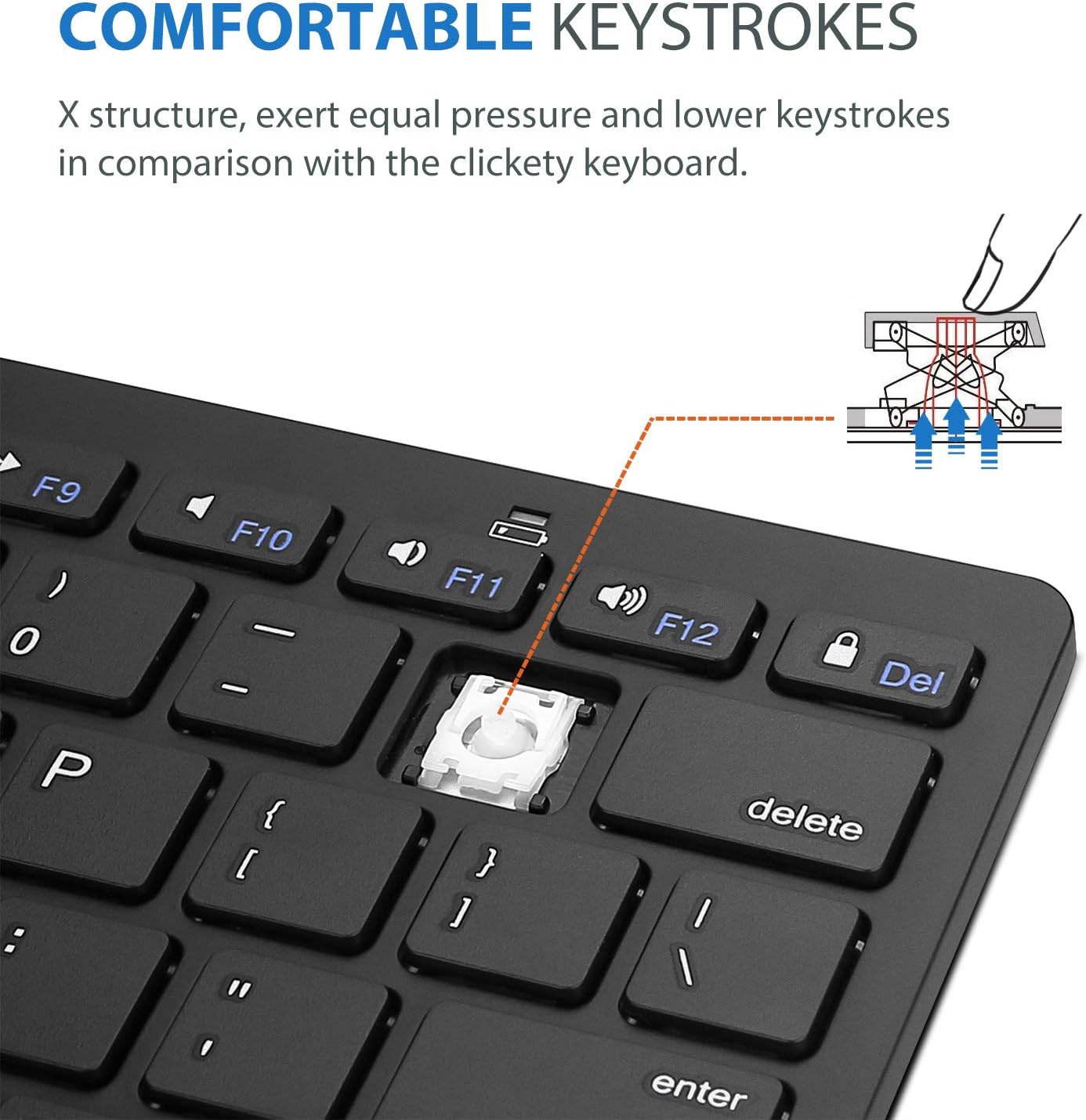
Image: Diagram showing the ultra-slim design and dimensions of the ProCase Wireless Keyboard, measuring 11.2 inches in length, 4.7 inches in width, and 0.19 inches in thickness.
8. Garanti ve Destek
8.1. Garanti Bilgileri
ProCase products are designed for reliability and performance. For specific warranty details regarding your ProCase Wireless Keyboard, please refer to the warranty card included with your purchase or visit the official ProCase webSite. Satın alma belgenizi garanti talepleriniz için saklayın.
8.2. Müşteri Desteği
If you encounter any issues or have questions not covered in this manual, please contact ProCase customer support. You can find contact information on the official ProCase websiteniz veya satın alma platformunuz aracılığıyla.
Daha fazla bilgi için şu adresi ziyaret edin: ProCase Store on Amazon.