
giriiş
Welcome to the user manual for your SNDWAY SW-T60 Digital Laser Rangefinder. This device is designed for precise and efficient measurement of distances, areas, and volumes. Please read this manual carefully before using the device to ensure safe and optimal operation and to understand all features.
Güvenlik Bilgileri
Lazer Güvenliği
The SNDWAY SW-T60 emits a Class II laser. Observe the following precautions:
- Lazer ışınına doğrudan bakmayın.
- Lazer ışınını insanlara veya hayvanlara doğrultmayın.
- Doğrudan göz temasından kaçının.
- Cihazı sökmeyin veya üzerinde değişiklik yapmayın.
Genel Güvenlik
- Cihazı çocukların erişemeyeceği yerde saklayınız.
- Cihazı patlayıcı ortamlarda kullanmayınız.
- Cihazı nemden ve doğrudan güneş ışığından koruyun.
- Use only specified batteries (2 x 1.5V AAA).
Ürün Bittiview
Cihaz Bileşenleri
The following image illustrates the main components of the SNDWAY SW-T60.

Bir ön view of the SNDWAY SW-T60 Digital Laser Rangefinder, showing the display screen, "READ" button, and other function buttons. A bubble level is visible on the right side.

Yakın çekim view highlighting the integrated bubble level on the side of the SNDWAY SW-T60, used for ensuring horizontal alignment during measurements.
Ekran Düzeni
The LCD provides various measurement readings and status indicators. Key elements include:
- Güç Kaynağı Göstergesi: Pil seviyesini gösterir.
- Record/Memory Indicator: Indicates data storage status.
- Laser On Indicator: Confirms laser is active.
- Maksimum/Minimum Değer Gösterimi: Shows highest and lowest values in continuous measurement.
- Length Measurement Display: For single distance measurements.
- Area, Volume, and Pythagorean Measurement Indicators: Icons for selected measurement modes.
- Continuous Measuring Indicator: Active during tracking mode.
- Major Display: The primary measurement result.
- Auxiliary Display: Secondary measurement results or previous values.
Klavye İşlevleri
The device features several buttons for different operations:
- OKUMAK: Activates the laser, initiates a measurement, or confirms a selection.
- +: Used for adding measurements.
- -: Used for subtracting measurements.
- Alan/Hacim/Pisagor teoremi: Cycles through Area, Volume, and various Pythagorean measurement modes.
- Save/Memory: Saves current measurement data or recalls stored data.
- Reference Point/Unit Switch: Toggles the measurement reference point (front/rear edge) or switches between measurement units (m/in/ft).
- KAPALI/TEMİZ: Turns off the device or clears the current measurement/selection.
Kurmak
Pil Kurulumu
The SNDWAY SW-T60 requires two 1.5V AAA batteries for operation.
- Cihazın arkasındaki pil bölmesi kapağını bulun.
- Slide or open the cover to access the battery slots.
- Insert two AAA batteries, ensuring that the positive (+) and negative (-) terminals match the indicators inside the compartment.
- Pil bölmesi kapağını sıkıca kapatın.
Kullanım Talimatları
Açma/Kapatma
- Cihazı açmak için tuşuna basın. OKUMAK düğme.
- Kapatmak için basılı tutun. KAPALI/TEMİZ button. The device will automatically shut off after 150 seconds of inactivity to conserve battery.
Temel Mesafe Ölçümü
- Basın OKUMAK Lazeri etkinleştirmek için düğmeye bir kez basın.
- Lazer noktasını hedef noktaya doğrultun.
- Basın OKUMAK button again to take a measurement. The result will be displayed on the main screen.

The SNDWAY SW-T60 shown alongside a reflective plate. A reflective plate can be used to improve measurement accuracy and range, especially in bright conditions or on non-reflective surfaces.
Birim Değiştirme
To switch between measurement units (meters, inches, feet), press the Reference Point/Unit Switch düğmesine kısaca basın.
Reference Point Setting
The device can measure from the front or rear edge. Press and hold the Reference Point/Unit Switch button to toggle the reference point. An icon on the display will indicate the current reference point (e.g., an arrow pointing from the top or bottom of the device icon).
Sürekli Ölçüm (Takip)
This mode allows for dynamic measurement, displaying minimum and maximum distances as you move the device.
- From standby, press and hold the OKUMAK düğme.
- The device will continuously measure and display the current, minimum, and maximum distances.
- Basmak OKUMAK Sürekli ölçümü tekrar durdurmak için.
Alan Ölçümü
To measure the area of a rectangular space:

A close-up of the device's display showing the icon for area measurement, which is a square.
- Basın Alan/Hacim/Pisagor button once until the area icon (square) appears on the display.
- Measure the first side (length) by pressing OKUMAK.
- Measure the second side (width) by pressing OKUMAK.
- Cihaz alanı otomatik olarak hesaplayıp gösterecektir.
Hacim Ölçümü
Bir mekanın hacmini ölçmek için:

A close-up of the device's display showing the icon for volume measurement, which is a cube.
- Basın Alan/Hacim/Pisagor button twice until the volume icon (cube) appears.
- Uzunluğu ölçmek için üzerine basın. OKUMAK.
- Genişliği bastırarak ölçün. OKUMAK.
- Basınca basarak yüksekliği ölçün OKUMAK.
- Cihaz otomatik olarak hacmi hesaplayıp gösterecektir.
Pisagor Ölçümü
The device supports various Pythagorean modes for indirect measurements, useful for calculating heights or distances that cannot be measured directly.
A close-up of the device's display showing the icon for Pythagorean measurement, which is a triangle.
- Basın Alan/Hacim/Pisagor button repeatedly until the desired Pythagorean mode icon appears (e.g., single Pythagorean for height, double Pythagorean for partial height).
- Follow the on-screen prompts to measure the required sides (e.g., hypotenuse, base).
- Cihaz bilinmeyen tarafı hesaplayıp ekrana yansıtacaktır.
Toplama ve Çıkarma
Ölçüleri toplamak veya çıkarmak için:
- İlk ölçümü alın.
- Basın + button for addition or the - button for subtraction.
- İkinci ölçümü yapın.
- The result will be displayed. You can continue adding or subtracting further measurements.
Veri Depolama ve Geri Çağırma
Cihaz, 30 adede kadar ölçüm verisi setini saklayabilir.
- Ölçümden sonra, tuşuna basın Save/Memory button to save the result.
- Kaydedilmiş verileri geri çağırmak için basılı tutun. Save/Memory düğmesini kullanın. + Ve - buttons to navigate through stored records.
Bakım
- Cihazı yumuşak bir bezle temizleyin.amp bezle silin. Aşındırıcı temizleyiciler veya çözücüler kullanmayın.
- Ensure the laser lens is clean for accurate measurements.
- Cihazınızı uzun süre kullanmayacaksanız pillerini çıkarın.
- Store the device in a dry, dust-free environment.
- Cihazın bir IP54 rating, meaning it is protected against dust and splashing water, but it is not waterproof.
Sorun giderme
| Sorun | Olası Neden | Çözüm |
|---|---|---|
| Cihaz açılmıyor | Low or dead batteries, incorrect battery polarity | Pilleri değiştirin, kutuplarını kontrol edin |
| Yanlış ölçümler | Dirty laser lens, unstable measuring surface, target too reflective/dark | Clean lens, ensure stable position, use a reflective plate for difficult targets |
| Lazer görünmüyor | Parlak ortam ışığı | Use in lower light conditions, use a target plate |
| Ekranda hata mesajı | Measurement out of range, internal error | Re-measure within range, restart device |
Sorun devam ederse lütfen daha fazla yardım için müşteri desteğiyle iletişime geçin.
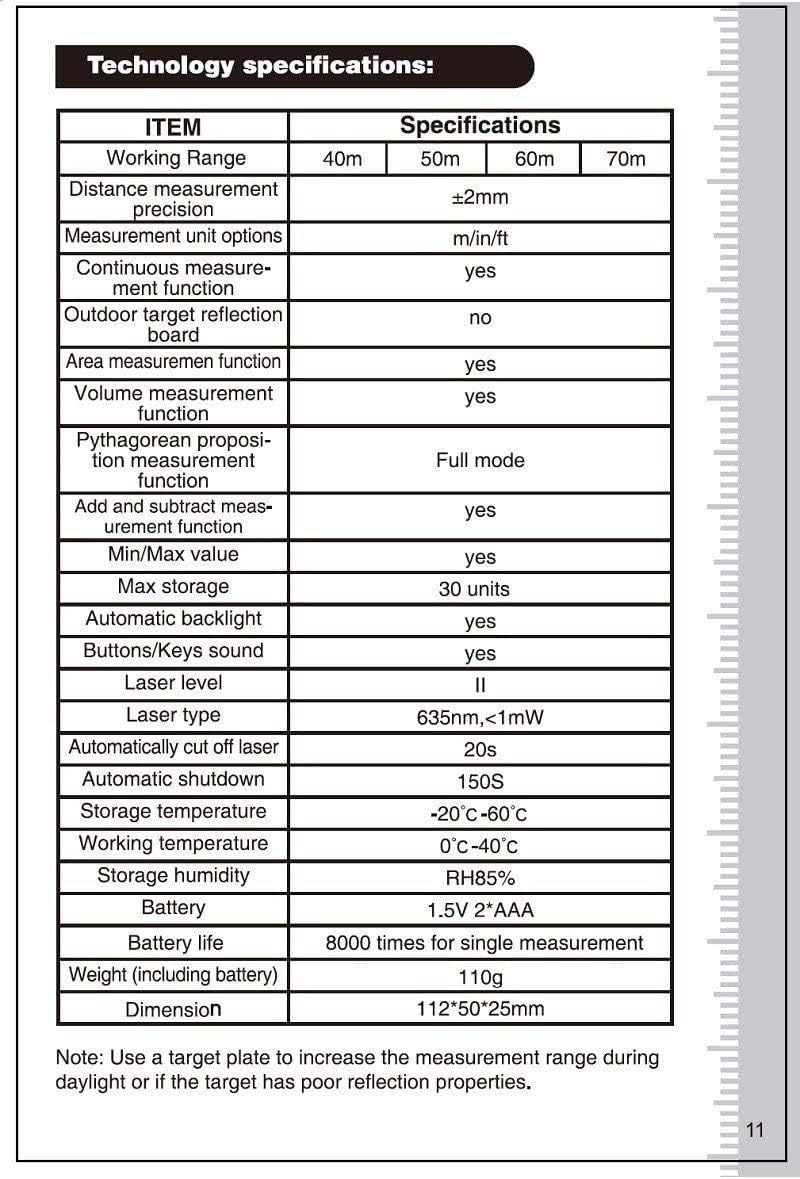
Özellikler
| Öğe | Şartname |
|---|---|
| Çalışma Aralığı | 0.05 - 60m |
| Mesafe Ölçüm Hassasiyeti | ±2mm |
| Measurement Unit Options | m/inç/ft |
| Continuous Measurement Function | Evet |
| Outdoor Target Reflection Board | No (recommended for daylight/poor targets) |
| Area Measurement Function | Evet |
| Volume Measurement Function | Evet |
| Pythagorean Measurement Function | Tam mod |
| Add and Subtract Measurement Function | Evet |
| Min/Maks Değer | Evet |
| Maksimum Depolama | 30 birim |
| Otomatik Arka Işık | Evet |
| Buttons/Keys Sound | Evet |
| Lazer Seviyesi | II |
| Lazer Tipi | 635nm, <1mW |
| Automatically Cut Off Laser | 20 saniye |
| Otomatik Kapanma | 150 saniye |
| Depolama Sıcaklığı | -20°C - 60°C |
| Çalışma Sıcaklığı | 0°C - 40°C |
| Depolama Nemi | bağıl nem %85 |
| Pil | 1.5V * 2 AAA |
| Pil Ömrü | Tek ölçüm için 8000 kez |
| Ağırlık (pil dahil) | 110 gr |
| Boyut | 112 x 50 x 25 mm |
| Uluslararası Koruma Derecelendirmesi | IP54 |
Note: A target plate is recommended to increase the measurement range during daylight or if the target has poor reflection properties.
Garanti ve Destek
For warranty information and technical support, please refer to the documentation provided with your purchase or contact SNDWAY customer service. Keep your purchase receipt as proof of purchase for any warranty claims.


