
giriiş
This manual provides essential instructions for the safe and efficient operation, maintenance, and troubleshooting of your Xiaomi Mijia Robot 2-in-1 Sweeping and Wet Mopping Robot Vacuum Cleaner. Please read this manual thoroughly before using the product and retain it for future reference.
Önemli Güvenlik Bilgileri
Yaralanma veya hasar riskini azaltmak için tüm güvenlik önlemlerini okuyun ve uygulayın. Bu cihaz yalnızca ev kullanımı içindir.
- Çocukların cihazla oynamasına izin vermeyin.
- Şarj istasyonunun düz bir yüzeye, duvara yaslanarak yerleştirildiğinden emin olun.
- Saçınızı, bol giysilerinizi, parmaklarınızı ve vücudunuzun tüm kısımlarını açıklıklardan ve hareketli parçalardan uzak tutun.
- Robotu açık alev veya patlayıcı madde bulunan alanlarda çalıştırmayın.
- Robotu büyük parçaları, sıvıları veya yanan nesneleri toplamak için kullanmayın.
- Always remove the water tank and dustbin before moving or cleaning the robot.
- Yalnızca üretici tarafından sağlanan orijinal güç adaptörünü ve şarj yuvasını kullanın.
Paket İçeriği
Paketin içinde tüm öğelerin mevcut olduğundan emin olun:
- 1 x Xiaomi Mijia Sweeping Mopping Robot
- 1 x 2-in-1 Water Tank
- 2 x Yan Fırça
- 1 x Şarj Standı
- 1 x Güç Adaptörü
- 1 x Mop Bracket
- 2 x Wiper (Mopping Pad)
Ürün Bittiview
Robot elektrikli süpürgenizin ana bileşenlerini yakından tanıyın.

Resim Açıklaması: Tepe view of the Xiaomi Mijia Robot Vacuum Cleaner, showing the main body, the LDS laser navigation system dome, and the power/home buttons.
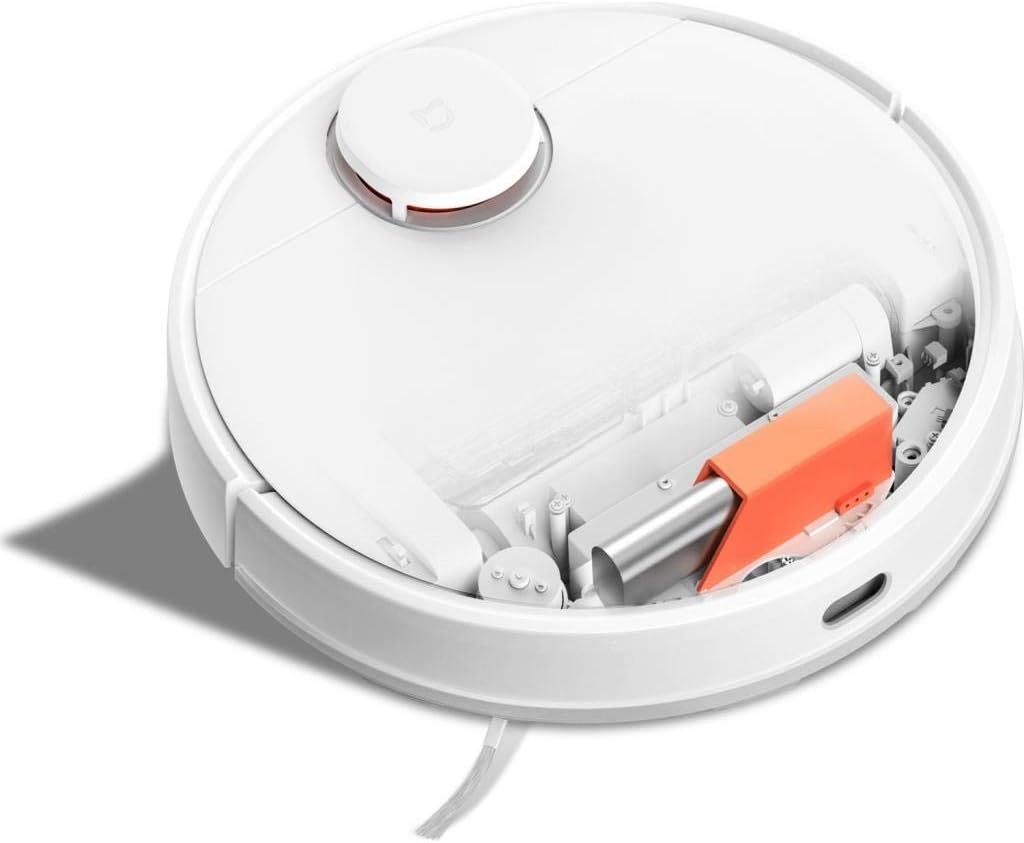
Resim Açıklaması: Tepe view of the Xiaomi Mijia Robot Vacuum Cleaner with its top lid open, revealing the dustbin compartment and internal mechanisms, including an orange component.
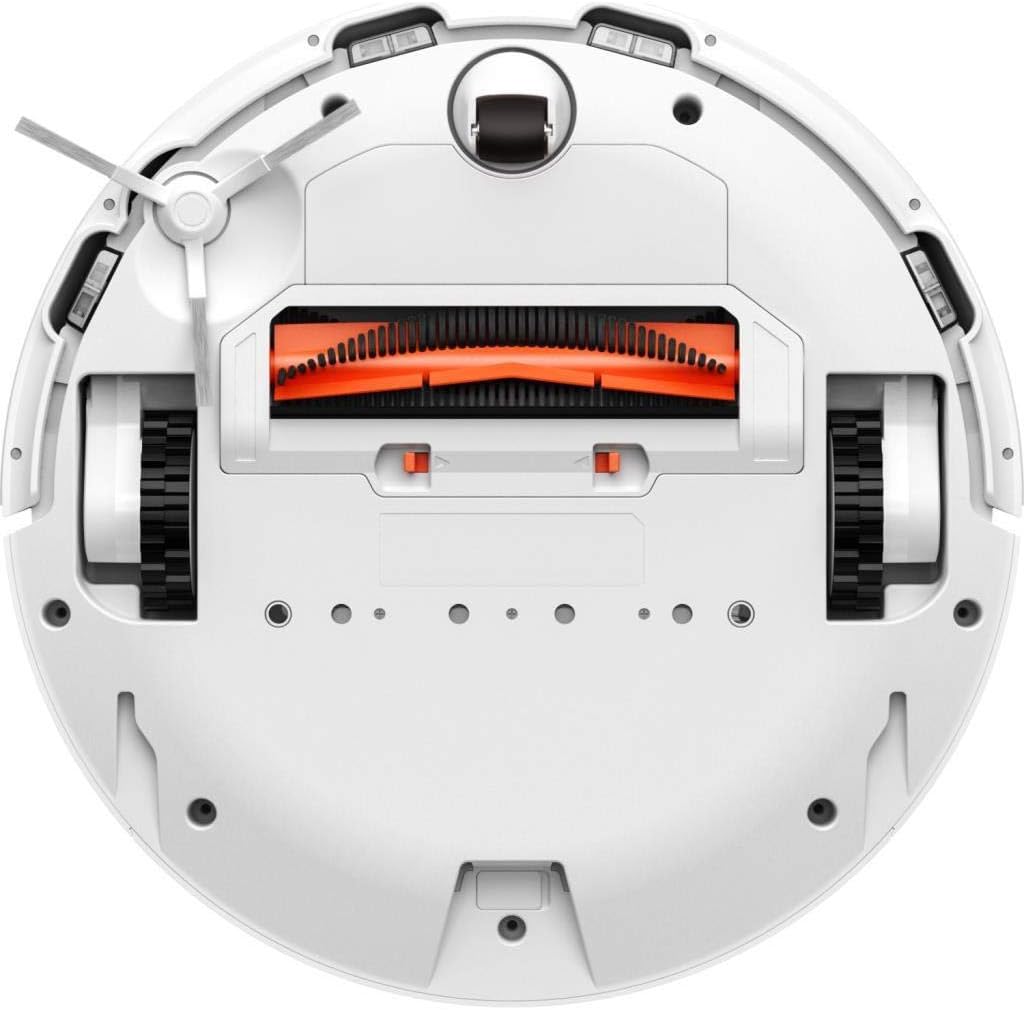
Resim Açıklaması: Alt view of the Xiaomi Mijia Robot Vacuum Cleaner, displaying the main roller brush (orange), side brushes, charging contacts, and various sensors.
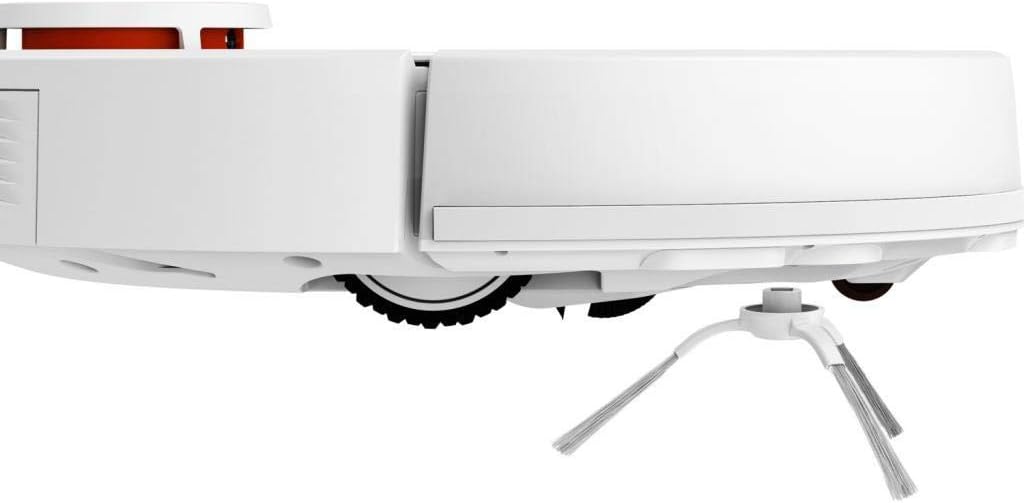
Resim Açıklaması: Yan profesyonelfile of the Xiaomi Mijia Robot Vacuum Cleaner, highlighting one of the side brushes and a main wheel.
Kurmak
1. Şarj İstasyonunun Yerleştirilmesi
Place the charging dock against a wall on a hard, level surface. Ensure there are no obstacles within 0.5 meters (1.6 feet) to either side and 1.5 meters (4.9 feet) in front of the dock. Connect the power adapter to the charging dock and plug it into a power outlet.

Resim Açıklaması: The Xiaomi Mijia Robot Vacuum Cleaner positioned next to its compact white charging dock, ready for charging.
2. İlk Şarj
Place the robot onto the charging dock. The robot will automatically align itself and begin charging. For first-time use, ensure the robot is fully charged before operation. A full charge typically takes several hours.
3. Uygulama Kurulumu ve Bağlantısı
Download the "Mi Home" app from your smartphone's app store. Follow the in-app instructions to add your Xiaomi Mijia Robot Vacuum Cleaner. This process involves connecting the robot to your home's 2.4 GHz Wi-Fi network. The app allows for remote control, scheduling, and map management.
Kullanım Talimatları
1. Temizleme Modları
The robot supports three cleaning modes:
- Sweeping and Mopping: The robot simultaneously vacuums and mops the floor. Ensure the 2-in-1 water tank with a mop pad is installed.
- Süpürme: The robot only vacuums. Use the dustbin for this mode.
- Paspaslama: The robot only mops. Ensure the 2-in-1 water tank with a mop pad is installed and the HEPA filter is removed from the water tank if only mopping is desired.
2. Temizleme Döngüsünü Başlatma
Press the power button on the robot or use the Mi Home app to start a cleaning cycle. The robot will automatically map its environment using its LDS laser navigation system and begin cleaning.

Resim Açıklaması: The Xiaomi Mijia Robot Vacuum Cleaner actively cleaning a modern room with light-colored flooring, demonstrating its compact size and ability to navigate open spaces.
3. Pausing and Stopping
Press the power button once to pause cleaning. Press it again to resume. To stop cleaning and send the robot back to its charging dock, press and hold the power button, or use the app.
4. Planlı Temizlik
Use the Mi Home app to set up cleaning schedules. You can specify times and days for the robot to automatically start cleaning.
5. Zone Cleaning and Virtual Walls
Through the Mi Home app, you can define specific areas for cleaning (zone cleaning) or set up virtual walls and forbidden sweep areas to restrict the robot's access to certain zones.
6. Ses Kontrolü
The robot supports voice interaction via the Mi Home app and is compatible with Amazon Echo (Alexa). Follow the instructions in the Mi Home app to link your robot with your voice assistant for hands-free control.
Bakım
Düzenli bakım robot süpürgenizin optimum performans göstermesini sağlar ve ömrünü uzatır.
1. Çöp Kutusu ve Su Deposu Temizliği
Empty the dustbin after each cleaning cycle. Remove the 2-in-1 water tank, empty any remaining water, and clean the mop pad. The mop pad can be washed and reused.
2. Ana Fırça ve Yan Fırçaların Temizlenmesi
Periodically remove the main brush and side brushes to clear any tangled hair or debris. Use the cleaning tool provided (if any) or scissors to cut tangled hair.
3. Sensör Temizliği
Wipe the cliff sensors, wall sensors, and charging contacts with a soft, dry cloth to ensure they remain free of dust and debris. Clean the LDS laser navigation system dome as well.
4. Filtre Değiştirme
The HEPA filter in the dustbin should be cleaned regularly and replaced every 3-6 months, depending on usage. Refer to the Mi Home app for filter status and replacement reminders.
Sorun giderme
Robotunuzla ilgili sorunlarla karşılaşırsanız, aşağıdaki yaygın çözümlere başvurabilirsiniz:
| Sorun | Olası Neden | Çözüm |
|---|---|---|
| Robot başlamıyor veya yanıt vermiyor. | Pil seviyesi düşük; güç düğmesine doğru basılmamış. | Ensure robot is fully charged. Press and hold the power button for a few seconds. |
| Robot Wi-Fi'ye bağlanamıyor. | Yanlış Wi-Fi şifresi; 5GHz ağı kullanılıyor; robot yönlendiriciden çok uzakta. | Ensure correct 2.4GHz Wi-Fi network and password. Move robot closer to router. Reset Wi-Fi on robot if necessary. |
| Zayıf temizleme performansı. | Full dustbin; clogged brushes; dirty filter. | Toz haznesini boşaltın. Ana fırçayı ve yan fırçaları temizleyin. Filtreyi temizleyin veya değiştirin. |
| Robot sık sık takılıyor. | Obstacles on the floor; high thresholds; dark surfaces (cliff sensors). | Clear floor of cables and small objects. Use virtual walls for problematic areas. Ensure sufficient lighting for dark floors. |
| Paspas fonksiyonu çalışmıyor. | Su deposu boş; paspas pedi takılı değil; su çıkış borusu tıkalı. | Fill water tank. Attach mop pad correctly. Clean water tank outlets. |
Özellikler
| Özellik | Detay |
|---|---|
| Marka | XIAOMI |
| Model Adı | 26200 |
| Özel Özellik | High Precision Sensors, LDS Laser Navigation |
| Renk | Beyaz |
| Dahil Bileşenler | Sweeping Mopping Robot, 2-in-1 Water Tank, Side Brushes, Charging Stand, Power Adapter, Mop Bracket, Wipers |
| Filtre Türü | Kumaş (HEPA) |
| Pil Ömrü | Up to 130 minutes (Sweeping), 60 minutes (Mopping) |
| Cilttage | 240 Volts (Input) |
| Çöp Kovası Kapasitesi | 0.3 Litre |
| Güç Kaynağı | Pil ile çalışır |
| Kontrol Yöntemi | App (Mi Home) |
| Uyumlu Cihazlar | Amazon Echo (Alexa) |
| Form Faktörü | Robotik |
| Ürün Boyutları | 13.58 x 13.58 x 3.78 inç (34.5 x 34.5 x 9.6 cm) |
| Ürün Ağırlığı | 4.4 pound (2 kg) |
| Pil Türü | Lithium-ion (3200mAh capacity) |
| Climb Capability | 2 cm |
Garanti ve Destek
Garanti bilgileri ve teknik destek için lütfen resmi XIAOMI mağazasına başvurun. webSite üzerinden satın alabilir veya müşteri hizmetleriyle iletişime geçebilirsiniz. Satın alma belgenizi saklayın.