
1. Giriş
Satın aldığınız için teşekkür ederizasing the Media Tech MT-3333 3-in-1 Home Theater System. This manual provides essential information for the safe and efficient operation of your new audio system. Please read it thoroughly before use and retain it for future reference.
Paket İçeriği:
- 1 x Media Tech MT-3333 Subwoofer Unit
- 3 adet Uydu Hoparlör
- 1 x Uzaktan Kumanda
- 1 x Audio/Video Cable
- 1 x Kullanım Kılavuzu
- 1 x Optik Kablo

Şekil 1.1: Ön view of the Media Tech MT-3333 Home Theater System, showing the central subwoofer unit and two tall satellite speakers, along with a smaller center speaker.
2. Güvenlik Talimatları
Güvenli çalışmayı sağlamak ve hasarı önlemek için lütfen aşağıdaki güvenlik önlemlerine uyun:
- Güç Kaynağı: Connect the system only to a power outlet with the specified voltage (AC220-240V 50Hz).
- Havalandırma: Ensure adequate ventilation around the subwoofer and speakers. Do not block any ventilation openings.
- Su ve Nem: Do not expose the system to rain, moisture, or dripping/splashing liquids. Do not place objects filled with liquids, such as vases, on the apparatus.
- Isı Kaynakları: Keep the system away from heat sources such as radiators, heat registers, stoves, or other apparatus (including amp(ısı üreten)
- Atama: Place the system on a stable, flat surface. Avoid placing it in direct sunlight or in areas with excessive dust or vibrations.
- Temizlik: Unplug the system from the power outlet before cleaning. Use a dry cloth only.
- Servis: Bu ürüne kendiniz servis vermeye çalışmayın. Tüm servis işlemleri için kalifiye servis personeline başvurun.
- Çocuklar: Keep packaging materials and small parts out of reach of children.
3. Kurulum
Follow these steps to set up your home theater system:
3.1 Paketin açılması
- Tüm bileşenleri dikkatlice ambalajından çıkarın.
- Check that all items listed in the "Package Contents" section are present.
- İlerideki taşıma veya saklama işlemleri için ambalajı saklayın.
3.2 Hoparlör Bağlantıları
Connect the satellite speakers to the corresponding output ports on the rear of the subwoofer unit. Ensure correct polarity (positive to positive, negative to negative) for optimal sound quality.
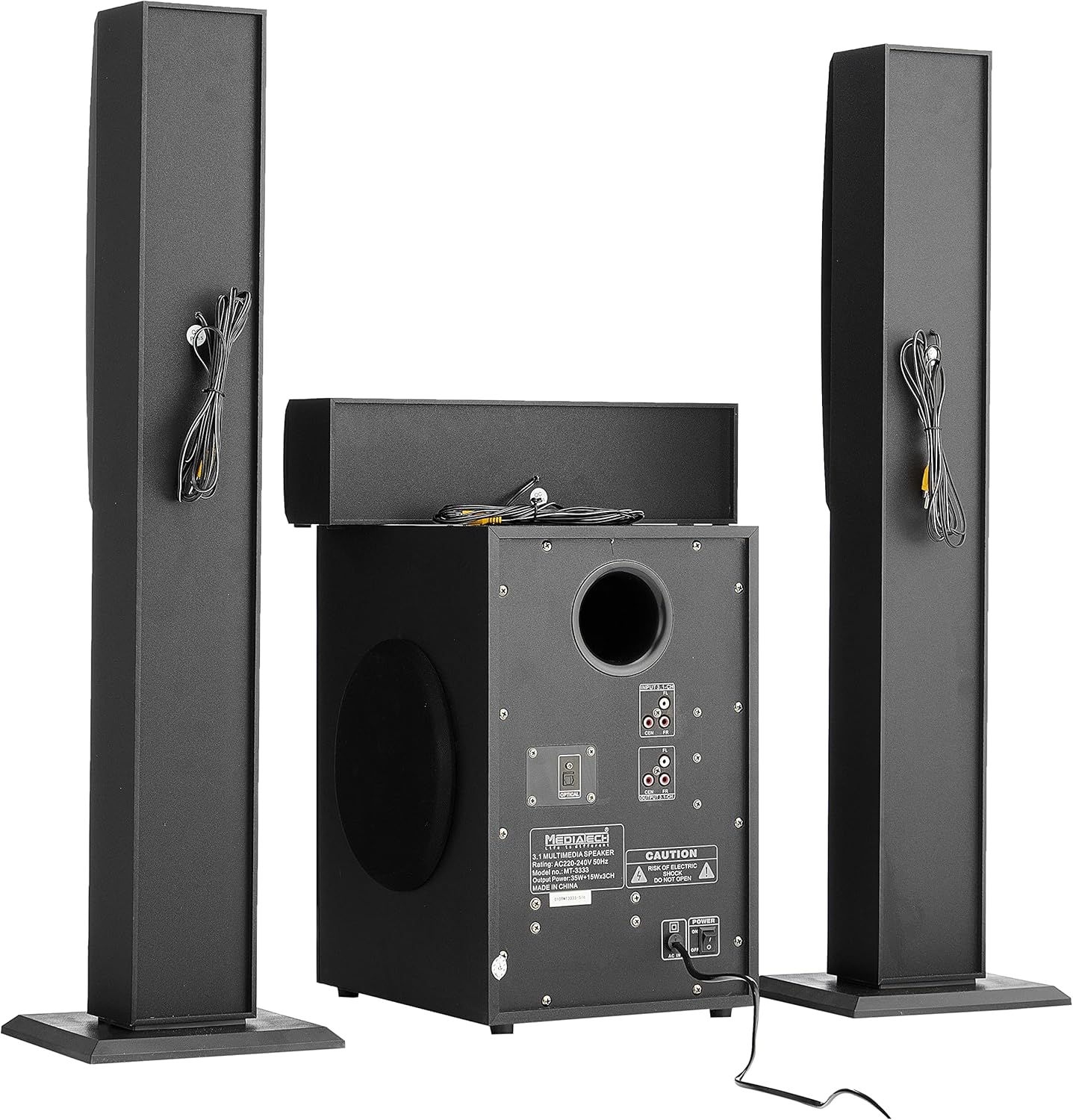
Şekil 3.1: Arka view of the system, illustrating the subwoofer and satellite speakers connected via cables.
3.3 Ses Kaynağı Bağlantıları
The MT-3333 offers multiple input options. Choose the appropriate connection for your audio source:
- Optik Giriş: For high-quality digital audio from TVs, game consoles, or Blu-ray players. Connect an optical cable from your source to the OPTICAL port on the subwoofer.
- AUX (MP3) Input: For connecting devices with a 3.5mm audio output (e.g., smartphones, tablets, laptops). Use the provided audio cable to connect to the MP3/AUX port.
- USB Girişi: Ses içeren bir USB flash sürücü takın fileUSB bağlantı noktasına takın.
- SD Kart Girişi: Insert an SD memory card containing audio fileSD kart yuvasına takın.
- Bluetooth: For wireless audio streaming from Bluetooth-enabled devices. (Refer to Section 4.3 for pairing instructions).

Şekil 3.2: Ayrıntılı view of the subwoofer's rear panel, highlighting the various input and output connections, including the Optical port and 3.1-channel audio inputs/outputs.
3.4 Güç Bağlantısı
- Tüm ses bağlantılarının güvenli olduğundan emin olun.
- Connect the power cord to the AC IN port on the rear of the subwoofer.
- Plug the two-pin power plug into a suitable wall outlet.
4. Kullanım Talimatları
4.1 Açma/Kapatma
Locate the power switch on the rear panel of the subwoofer. Flip it to the "ON" position to power on the system. Flip it to "OFF" to power off. You can also use the power button on the remote control or the front panel of the subwoofer.
4.2 Giriş Seçimi
Press the "MODE" button on the remote control or the front panel to cycle through available input sources: Bluetooth, USB, SD, AUX, and Optical.
4.3 Bluetooth Eşleştirme
- Switch the system to Bluetooth mode using the "MODE" button. The display will indicate "BT".
- Mobil cihazınızda veya bilgisayarınızda Bluetooth'u etkinleştirin.
- Arama available devices and select "MT-3333" from the list.
- Eşleştirme işlemi tamamlandıktan sonra, sisteme kablosuz olarak ses aktarımı yapabilirsiniz.
4.4 Volume, Bass, and Treble Control
- Hacim: Use the "VOL+" and "VOL-" buttons on the remote or the main volume knob on the subwoofer to adjust the overall volume.
- Bas: Use the "BASS+" and "BASS-" buttons on the remote to adjust the bass level.
- tiz: Use the "TRE+" and "TRE-" buttons on the remote to adjust the treble level.
4.5 Uzaktan Kumanda İşlevleri
The remote control provides full functionality for your MT-3333 system:

Figure 4.1: The remote control for the Media Tech MT-3333, showing buttons for power, input selection (USB, SD, BT, AUX, OPTICAL), volume, bass, treble, equalizer presets (EQ1-EQ4), and media playback controls.
- Güç Düğmesi (Kırmızı): Sistemi açar veya kapatır.
- Input Selection (USB, SD, BT, AUX, DIS, LED): Selects the desired audio source. 'DIS' might refer to display or another input. 'LED' controls lighting.
- Ses Seviyesi Kontrolü (VOL+, VOL-): Ana ses seviyesini ayarlar.
- Bass Control (BASS+, BASS-): Adjusts the bass output.
- Treble Control (TRE+, TRE-): Adjusts the treble output.
- EQ (EQ1-EQ4): Selects preset equalizer modes.
- Media Playback Controls (Play/Pause, Next, Previous, Repeat): For USB/SD card playback.
- Sesini kapatmak: Ses çıkışını susturur.
- Sayısal Tuş Takımı (0-9): For direct track selection on USB/SD.
- Lighting Control (LED): Activates or adjusts any integrated lighting features.
5. Bakım
Proper maintenance ensures the longevity and optimal performance of your home theater system.
5.1 Temizlik
- Temizliğe başlamadan önce cihazı daima elektrik prizinden çıkarın.
- Use a soft, dry cloth to wipe the surfaces of the subwoofer and speakers.
- Yüzey kaplamasına veya iç bileşenlere zarar verebileceğinden, sıvı temizleyiciler, aerosoller veya aşındırıcı temizlik maddeleri kullanmayın.
- Use a soft brush or compressed air to gently clean dust from speaker grilles and ventilation openings.
5.2 Depolama
If you plan to store the system for an extended period:
- Tüm kabloları ve güç bağlantılarını çıkarın.
- Sistemi serin, kuru bir yerde, doğrudan güneş ışığından ve aşırı sıcaklıklardan uzakta saklayın.
- If possible, use the original packaging to protect the components from dust and physical damage.
6. Sorun Giderme
If you encounter any issues with your Media Tech MT-3333, refer to the following table for common problems and solutions.
| Sorun | Olası Neden | Çözüm |
|---|---|---|
| Güç yok | Power cord not connected; Power switch off; Wall outlet faulty | Ensure power cord is securely plugged in; Turn power switch ON; Test wall outlet with another device. |
| Ses yok | Incorrect input selected; Volume too low; Speaker cables loose; Mute function active | Press MODE to select correct input; Increase volume; Check speaker connections; Press MUTE on remote. |
| Kötü ses kalitesi | Loose connections; Source audio quality low; Incorrect EQ setting | Check all cable connections; Try a different audio source; Adjust BASS/TREBLE or EQ settings. |
| Uzaktan kumanda çalışmıyor | Batteries depleted; Obstruction between remote and system; Remote not pointed correctly | Replace remote control batteries; Remove any obstructions; Point remote directly at the subwoofer's sensor. |
| Bluetooth eşleştirme hatası | System not in BT mode; Device too far; Interference | Ensure system is in BT mode; Move device closer; Turn off other Bluetooth devices nearby. |
Bu çözümleri denedikten sonra sorun devam ederse lütfen müşteri desteğiyle iletişime geçin.
7. Özellikler
| Özellik | Şartname |
|---|---|
| Model Numarası | MT-3333 |
| Çıkış Gücü | Subwoofer: 35W, Satellite Speakers: 3 x 15W (Total 80W) |
| Hoparlör Ünitesi Boyutu | Subwoofer: 6.5 inches, Satellite Speakers: 3 x 3 inches |
| Malzeme | Wood and ABS Plastic |
| Girişler | USB, AUX (MP3), SD Card, Bluetooth, Optical |
| Güç Kaynağı | AC220-240V 50Hz |
| Approx. Shipping Dimensions | 76x26x21 cm |
| Yaklaşık Nakliye Ağırlığı | 3.1 kilo |
8. Garanti ve Destek
Media Tech products are designed for reliability and performance. This product comes with a standard manufacturer's warranty against defects in materials and workmanship under normal use.
For warranty claims, technical support, or service inquiries, please refer to the contact information provided on your purchase receipt or visit the official Media Tech webalan.
Lütfen aklınızda bulundurun: The warranty may not cover damage caused by improper installation, accident, misuse, abuse, negligence, or unauthorized modification.