

giriiş
Thank you for choosing the XO B24 Foldable Bluetooth Headphones. This manual provides essential information for the safe and efficient use of your device. Please read it carefully before use and retain it for future reference.
The XO B24 headphones are designed for comfort and portability, featuring high-quality materials and a secure fit for an optimal audio experience.
Ürün Bittiview
The XO B24 headphones offer both wired and wireless connectivity, a built-in microphone for calls, and a foldable design for easy storage and transport.
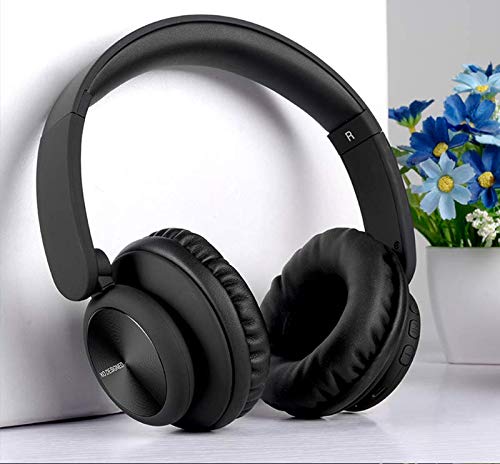
Image: XO B24 Foldable Bluetooth Headphones, showcasing their over-ear design and black color.
Özellikler
| Özellik | Tanım |
|---|---|
| Marka Adı | XO |
| Model Adı | B24 |
| Model Numarası | XO-B24 |
| Renk | Siyah |
| Kulaklık Form Faktörü | Kulak üstü |
| Bağlantı Teknolojisi | Kablolu, Kablosuz (Bluetooth) |
| Kulaklık girişi | 3.5 mm Jak |
| Kablosuz İletişim Teknolojisi | Bluetooth |
| Özel Özellikler | Includes Microphone, Foldable Design |
| Mikrofon | Evet |
| Gürültü Önleme | HAYIR |
| Kontrol Türü | Ses Seviyesi Kontrolü, Dokunmatik Kontrol |
| Uyumlu Cihazlar | Çoklu cihaz |
| Pil gerekli | Evet |
Kurmak
1. Kulaklıkları Şarj Etme
- Kutuda bulunan USB şarj kablosunu kulaklıktaki şarj portuna bağlayın.
- USB kablosunun diğer ucunu uyumlu bir USB güç kaynağına (örneğin, bilgisayar, duvar adaptörü) takın.
- The LED indicator will illuminate during charging and turn off or change color once fully charged.
2. Bluetooth Eşleştirme
- Kulaklığın tam şarjlı olduğundan emin olun.
- Press and hold the Power button on the headphones until the LED indicator flashes rapidly, indicating pairing mode.
- Cihazınızda (akıllı telefon, tablet, bilgisayar) Bluetooth'u etkinleştirin ve kullanılabilir cihazları arayın.
- Select "XO B24" from the list of found devices.
- Once paired, the LED indicator will stop flashing and may show a solid light or flash slowly.
3. Kablolu Bağlantı (İsteğe Bağlı)
- Insert one end of the 3.5mm audio cable into the headphone jack on the XO B24.
- Plug the other end of the 3.5mm audio cable into the audio output jack of your device.
- The headphones will operate in wired mode, conserving battery life.
Kullanım Talimatları
Güç Açık/Kapalı
- Güç Açık: LED göstergesi yanana kadar Güç düğmesini yaklaşık 3 saniye basılı tutun.
- Kapat: LED göstergesi sönene kadar Güç düğmesini yaklaşık 3-5 saniye basılı tutun.
Müzik Çalma
- Oynat/Duraklat: Çok fonksiyonlu düğmeye (genellikle Güç düğmesine) bir kez basın.
- Sonraki Parça: Ses açma düğmesine veya özel 'Sonraki' düğmesine basılı tutun.
- Önceki parça: Ses kısma düğmesine veya özel 'Önceki' düğmesine basılı tutun.
Ses Kontrolü
- Sesi arttır: Sesi Açma tuşuna basın.
- Sesi Azalt: Sesi Azalt tuşuna basın.
Yönetim Çağrı
- Çağrıyı Cevapla/Sonlandır: Çok işlevli düğmeye bir kez basın.
- Çağrıyı Reddet: Çok fonksiyonlu düğmeye yaklaşık 2 saniye basılı tutun.
Katlama Mekanizması
- To fold the headphones for storage, gently rotate the earcups inwards towards the headband until they are compact.
- To unfold, reverse the process, ensuring the earcups click securely into place.
Bakım
- Temizlik: Kulaklığınızı temizlemek için yumuşak ve kuru bir bez kullanın. Aşındırıcı temizleyiciler veya çözücüler kullanmayın.
- Depolamak: Kullanılmadığı zamanlarda kulaklıkları serin, kuru bir yerde, doğrudan güneş ışığından ve aşırı sıcaklıklardan uzakta saklayın. Katlanabilir tasarımı sayesinde kompakt bir şekilde saklayabilirsiniz.
- Pil Bakım: Pil ömrünü uzatmak için kulaklıkların pilini sık sık tamamen boşaltmaktan kaçının. Sürekli kullanılmasa bile düzenli olarak şarj edin.
- Nemden Kaçının: Kulaklıkları sudan ve aşırı nemden uzak tutun.
Sorun giderme
| Sorun | Çözüm |
|---|---|
| Kulaklık açılmıyor. | Kulaklıkların tamamen şarj olduğundan emin olun. Bir güç kaynağına bağlayın ve tekrar deneyin. |
| Bluetooth üzerinden eşleştirme yapılamıyor. | Make sure the headphones are in pairing mode (LED flashing rapidly). Disable and re-enable Bluetooth on your device. Move closer to the headphones. |
| Ses yok veya ses seviyesi düşük. | Kulaklıkların ve bağlı cihazınızın ses seviyelerini kontrol edin. Kulaklıkların doğru şekilde eşleştirildiğinden veya 3.5 mm kablonun güvenli bir şekilde bağlı olduğundan emin olun. |
| Ses kalitesi kötü. | Ensure there are no obstructions between the headphones and your device. Try moving closer to your device. Disconnect and reconnect the Bluetooth connection. |
| Mikrofon çalışmıyor. | Kulaklıkların doğru şekilde bağlı olduğundan ve sisteminizde ses giriş aygıtı olarak seçildiğinden emin olun. Cihazınızda mikrofonun sessize alınmış olup olmadığını kontrol edin. |
Garanti ve Destek
The XO B24 Foldable Bluetooth Headphones come with a standard manufacturer's warranty. Please refer to the warranty card included in your product packaging for specific terms and conditions.
For technical support, troubleshooting assistance, or warranty claims, please contact your retailer or the official XO customer service. Contact information can typically be found on the product packaging or the manufacturer's webalan.