
1. Giriş
The Aerocool LUXPRO550 is a 550W power supply unit designed for desktop computers, offering reliable and efficient power delivery. This unit is 80 Plus 230V EU Bronze certified, ensuring over 88% efficiency. It features high-quality 105°C Japanese capacitors and a 14cm FDB fan for enhanced durability and optimized thermal performance. This manual provides essential information for the safe and correct installation, operation, and maintenance of your LUXPRO550 power supply.

Image 1.1: The Aerocool LUXPRO550 Power Supply Unit, highlighting its high efficiency and 80 Plus Bronze certification.
2. Güvenlik Önlemleri
- Güç kaynağını takmadan veya çıkarmadan önce daima güç kablosunu duvar prizinden çıkarın.
- Güç kaynağını açmayınasing. Yüksek hacimtagİçerisinde elektrik çarpmasına neden olabilecek parçacıklar bulunmaktadır.
- Elektrik tehlikelerini önlemek için uygun topraklamayı sağlayın.
- Güç kaynağını iyi havalandırılan, ısı ve nem kaynaklarından uzak bir yere kurun.
- Yalnızca güç kaynağıyla birlikte verilen kabloları kullanın.
- Bu ürün yalnızca bilgisayar sistemlerinde kullanılmak üzere tasarlanmıştır. Başka bir amaçla kullanmayın.
3. Kurulum Kılavuzu
The LUXPRO550 power supply supports all Intel ATX12V formats and features flat, black cables for optimized internal airflow and ease of installation.
3.1. Kuruluma Hazırlık
- Turn off your computer and disconnect the power cord from the wall outlet.
- Bilgisayar kasasını açın. Ayrıntılı talimatlar için bilgisayar kasanızın kullanım kılavuzuna bakın.
- Mevcut bir güç kaynağını değiştiriyorsanız, eski güç kaynağının tüm kablolarını çıkarın ve kasadan çıkarın.
3.2. Güç Kaynağının Kurulumu
- Carefully place the LUXPRO550 into the power supply bay of your computer case.
- Verilen vidaları kullanarak güç kaynağını kasaya sabitleyin.
- Connect the 20+4 pin ATX motherboard power connector to your motherboard.
- Connect the 4+4 pin CPU power connector to your motherboard.
- SATA güç konektörlerini depolama sürücülerinize (HDD'ler, SSD'ler) ve optik sürücülerinize bağlayın.
- Connect PCIe 6+2 pin connectors to your graphics card(s) if required.
- Connect any other peripheral connectors (e.g., Molex) as needed for case fans or other components.
- Ensure all connections are secure. Use cable ties to manage cables for better airflow.
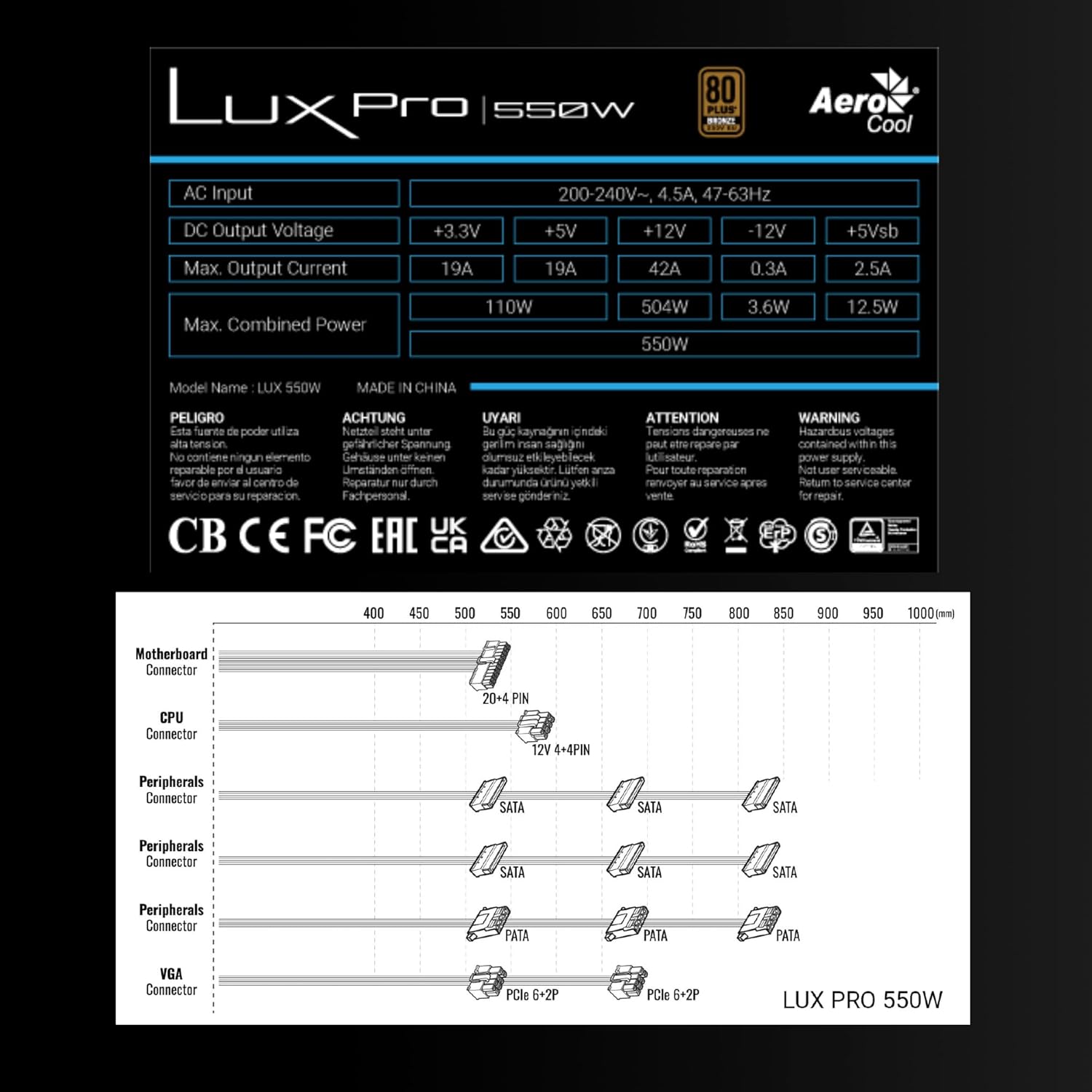
Image 3.1: Connector types and lengths for the LUXPRO550 power supply. This diagram illustrates the available connectors including Motherboard (20+4 PIN), CPU (12V 4+4 PIN), Peripherals (SATA, PATA), and VGA (PCIe 6+2 PIN).
3.3. Son Adımlar
- Bilgisayar kasanızı kapatın.
- AC güç kablosunu güç kaynağına ve ardından duvar prizine bağlayın.
- PSU'nun arkasındaki güç anahtarını 'AÇIK' konumuna getirin.
- Bilgisayarınızı açın.
4. Kullanım Talimatları
The Aerocool LUXPRO550 is designed for continuous and stable operation once correctly installed. Its 80 Plus Bronze certification ensures high energy efficiency, reducing power consumption and heat generation.
4.1. Active PFC Technology
The integrated Active Power Factor Correction (APFC) technology ensures efficient and reliable power distribution, contributing to overall system stability and energy savings.
4.2. Fan Çalıştırma
The 14cm FDB (Fluid Dynamic Bearing) fan features optimized thermal speed control. It operates silently, starting at less than 700 RPM, and only increases speed as the load approaches 40% at ambient temperatures of 25°C, ensuring quiet operation under typical loads.

Image 4.1: The 14cm FDB fan of the LUXPRO550, illustrating its optimized thermal speed control for efficient cooling.
5. Bakım
The LUXPRO550 is built with high-quality components, including 105°C Japanese capacitors, designed for maximum reliability and a long operational lifespan with minimal maintenance.

Image 5.1: High-quality 105°C Japanese capacitors, contributing to the power supply's reliability and extended lifespan.
5.1. Genel Bakım
- Keep the power supply and computer case free from dust. Dust accumulation can hinder cooling and reduce efficiency.
- Use compressed air to gently clean the fan and ventilation grilles periodically. Ensure the computer is powered off and unplugged before cleaning.
- Do not obstruct the airflow around the power supply.
İçerisinde kullanıcı tarafından onarılabilecek hiçbir parça bulunmamaktadır. Cihazı kendiniz açmaya veya onarmaya çalışmayın.
6. Sorun Giderme
If you encounter issues with your LUXPRO550 power supply, please follow these basic troubleshooting steps:
- Güç Yok:
- AC güç kablosunun hem güç kaynağına hem de duvar prizine güvenli bir şekilde bağlı olduğundan emin olun.
- Güç kaynağının arkasındaki güç anahtarının 'AÇIK' konumda olduğundan emin olun.
- Duvar prizinin çalışır durumda olduğunu başka bir cihaz takarak doğrulayın.
- Sistem Başlatılmıyor:
- Double-check all power connections to the motherboard, CPU, graphics card, and storage devices.
- Ensure all components are properly seated in their slots.
- If possible, test the power supply with another known working system or test another power supply with your system to isolate the issue.
- Alışılmadık Sesler:
- A slight hum is normal. If you hear grinding or loud fan noises, ensure the fan is not obstructed by cables or dust.
- Gürültü devam ederse müşteri desteğiyle iletişime geçin.
If these steps do not resolve the issue, please contact Aerocool customer support or your retailer for further assistance. Do not attempt to repair the unit yourself.
7. Özellikler
| Özellik | Şartname |
|---|---|
| Model Adı | LUXPRO550 |
| Marka | Hava Soğutmalı |
| Netage | 550 Watt |
| Verimlilik Sertifikası | 80 Plus Bronze 230V EU (over 88% efficiency) |
| Form Faktörü | ATX |
| Kapasitörler | Japanese 105°C |
| Fan Tipi | 14cm FDB (Fluid Dynamic Bearing) with thermal speed control |
| Öncü | Aktif PFC |
| Boyutlar (UxGxY) | 16x15x8.5 cm |
| Ağırlık | 1.4 kilo |
| Uyumlu Cihazlar | PC |
7.1. DC Çıkış Hacmitage Tablosu
The following table details the DC output voltages and maximum currents for the LUXPRO550:
| DC Çıkış Hacmitage | +3.3V | +5V | +12V | -12V | +5Vsb |
|---|---|---|---|---|---|
| Maks. Çıkış akımı | 19A | 19A | 42A | 0.3A | 2.5A |
| Maks. Birleşik Güç | 110W | 504W | 3.6W | 12.5W | |
| Total Combined Power | 550W | ||||
8. Garanti ve Destek
8.1. Garanti Bilgileri
The Aerocool LUXPRO550 power supply comes with an extended 5 yıllık garanti, reflecting its high reliability and the quality of its components, such as the 105°C Japanese capacitors.
Garanti talepleri için lütfen satın alma belgenizi saklayın.
8.2. Müşteri Desteği
For technical assistance, warranty claims, or any questions regarding your Aerocool LUXPRO550 power supply, please contact Aerocool customer support through their official webweb sitesinden veya yerel satıcınızdan.
Do not attempt to open or repair the power supply unit, as this will void the warranty.