
1. Giriş
Welcome to the user manual for your Energizer E241S+ 4G Feature Phone. This guide provides essential information on how to set up, operate, and maintain your device. The E241S+ combines the simplicity of a classic feature phone with the capabilities of a smartphone, powered by the KaiOS operating system. Enjoy 4G connectivity, Wi-Fi, and access to various applications.
2. Paket İçeriği
Lütfen aşağıdaki öğelerin kutucuğunu işaretleyin:
- Energizer E241S+ Feature Phone
- Battery (1900 mAh)
- Mobil Şarj Aleti
- Kulaklıklar
- Kullanım Kılavuzu (bu belge)
3. Cihaz Bittiview
Familiarize yourself with the physical components of your Energizer E241S+ phone.

Resim 3.1: Ön ve arka view of the Energizer E241S+ phone. The front features the display and keypad, while the back shows the rear camera and speaker grille.
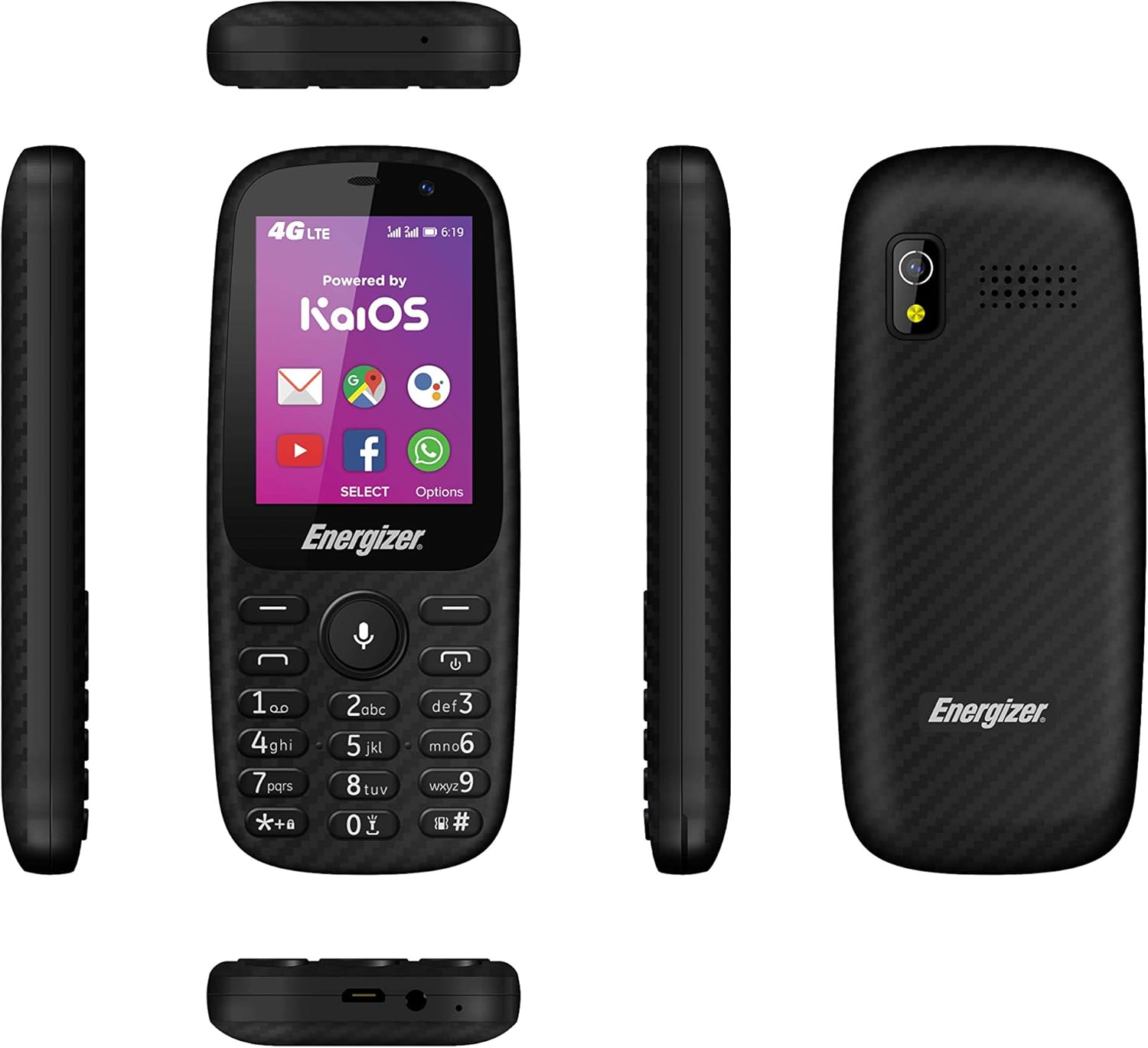
Resim 3.2: Various side views of the Energizer E241S+ phone, illustrating the slim profile, top-mounted ports, and bottom-mounted ports.
4. Kurulum
4.1. Installing the SIM Card(s) and MicroSD Card
- Telefonun arka kapağını dikkatlice çıkarın.
- Insert your Mini SIM card(s) into the designated SIM slots. The E241S+ supports dual SIM functionality.
- If desired, insert a MicroSD card (up to 128GB) into the memory card slot for expanded storage.
- Ensure all cards are seated correctly.
4.2. Pilin Takılması
- Align the battery contacts with the terminals inside the phone's battery compartment.
- Pili yavaşça yerine bastırın.
- Arka kapağı yerine takın ve iyice yerine oturduğundan emin olun.
4.3. Telefonu Şarj Etme
- Connect the Micro USB end of the charger cable to the phone's charging port.
- Şarj cihazının diğer ucunu bir elektrik prizine takın.
- Allow the phone to charge fully before initial use. The battery indicator on the screen will show charging status.
5. Kullanım Talimatları
5.1. Güç Açma/Kapatma
- Açmak için: Ekran ışığı yanana kadar Güç düğmesini basılı tutun.
- To power off: Press and hold the Power button, then select 'Power Off' from the options on the screen.
5.2. Arama Yapma
- Ana ekrandan, tuş takımını kullanarak istediğiniz telefon numarasını çevirin.
- Aramayı başlatmak için Arama düğmesine (genellikle yeşil) basın.
- Aramayı sonlandırmak için, Aramayı Sonlandır düğmesine (genellikle kırmızı) basın.
5.3. Mesaj Gönderme
- Ana menüden 'Mesajlar' uygulamasına gidin.
- Select 'New Message' or 'Create Message'.
- Alıcının telefon numarasını girin veya rehberinizden seçin.
- Tuş takımını kullanarak mesajınızı yazın.
- 'Gönder'e basın.
5.4. Internet and Applications (KaiOS)
Your E241S+ runs on KaiOS, providing access to essential smartphone features:
- 4G Bağlantısı: Access high-speed internet for browsing and app usage.
- Wifi: İnternet erişimi için mevcut Wi-Fi ağlarına bağlanın.
- KaiStore: Download and install various applications, including popular social media and communication tools.
- KÜRESEL KONUMLAMA SİSTEMİ: Utilize the built-in GPS for navigation and location services.
5.5. Kamera Fonksiyonları
The phone is equipped with both front and rear cameras, each with a flash, allowing you to capture photos and videos.
- 'Kamera' uygulamasına gidin.
- Use the navigation keys to switch between front and rear cameras.
- Press the center key to capture a photo or start/stop video recording.
6. Bakım
- Cihazınızı kuru tutun. Nem, elektronik devrelere zarar verebilir.
- Aşırı sıcaklıklardan kaçının. Yüksek sıcaklıklar elektronik cihazların ömrünü kısaltabilir ve bazı plastiklerin deforme olmasına veya erimesine neden olabilir.
- Telefonu temizlemek için sert kimyasallar, temizleme çözücüleri veya güçlü deterjanlar kullanmayın. Yumuşak, kuru bir bezle silin.
- Handle the phone with care. Dropping, knocking, or shaking the device can damage internal circuit boards.
- The phone is water-resistant; however, avoid prolonged submersion or exposure to high-pressure water.
7. Sorun Giderme
| Sorun | Olası Çözüm |
|---|---|
| Telefon açılmıyor | Pilinin doğru takıldığından ve şarj edildiğinden emin olun. Şarj cihazını bağlayın ve tekrar deneyin. |
| Arama yapılamıyor veya alınamıyor. | Check if the SIM card is properly inserted and activated. Verify network signal strength. |
| Zayıf pil ömrü | Reduce screen brightness, close unused applications, or disable Wi-Fi/Bluetooth when not in use. |
| Telefon donuyor veya yanıt vermiyor. | Remove and reinsert the battery to perform a soft reset. If the issue persists, consider a factory reset (backup data first). |
| internete bağlanılamıyor | Check 4G/Wi-Fi settings. Ensure data plan is active or Wi-Fi password is correct. |
8. Özellikler
| Özellik | Detay |
|---|---|
| Marka | Enerji verici |
| Model Adı | E241S |
| İşletim Sistemi | KaiOS |
| Veri deposu | 512 MB |
| Dahili Depolama | 1 GB |
| Genişletilebilir Depolama | 128 GB'a kadar (MicroSD) |
| Ekran Boyutu | 2.4 inç |
| Ekran Çözünürlüğü | 320 x 240 (LCD) |
| Hücresel Teknoloji | 4G LTE |
| Bağlantı | USB, Bluetooth, Wi-Fi |
| SIM Kart Yuvaları | Dual SIM (Mini SIM) |
| Pil Kapasitesi | 1900 mAh (Lityum İyon) |
| Konuşma Zamanı | 28 saate kadar |
| Kulaklık girişi | 3.5 mm |
| Kameralar | Front and Rear with Flash |
| Küresel Konumlama Sistemi | Evet |
| Suya Dayanıklılık | Evet |
| Boyutlar | 14x50x116 mm |
9. Garanti ve Destek
For warranty information, customer service, and additional resources, please visit the official Energizer websitesine bakın veya satıcınızla iletişime geçin.
You can also find information regarding free applications and services at: energizeyourdevice.com/customer-services/free-apps/